
Milimomusic
A powerful music generation application powered by HeartMuLa foundation models.
Install / Use
/learn @mainza-ai/MilimomusicREADME
Milimo Music
A music generation application powered by HeartMuLa models.
[!NOTE] Cross-Platform Support: Optimized for both macOS (Apple Silicon/MPS) and Windows (CUDA).

🎵 Listen to a Sample Track generated with Milimo Music
Features & Architecture Deep Dive
Core Technology
Milimo Music integrates state-of-the-art AI models to provide a seamless music creation experience.
- HeartMuLa-3B Model: The heart of the audio generation engine. HeartMuLa (Hear the Music Language) is a 3B parameter transformer model capable of generating high-fidelity music conditioned on lyrics and stylistic tags.
- Multilingual Support: Capable of generating music with lyrics in multiple languages, including but not limited to English, Chinese, Japanese, Korean, and Spanish.
- Audio Codec: Uses
HeartCodec(12.5 Hz) for efficient and high-quality audio reconstruction. - Ollama Integration: Leverages local LLMs (like Llama 3) for:
- Lyrics Generation: Automatically writes structured lyrics (Verse, Chorus, Bridge) based on a topic.
- Prompt Enhancement: Expands simple concepts into detailed musical descriptors.
- Auto-Titling: Generates creative titles based on the song content.
- Inspiration Mode: Brainstorms unique song concepts and style combinations for you.
Key Capabilities
- Text-to-Music Generation: Create full 48kHz stereo tracks by simply describing a mood and style.
Note: Music style integration is currently in beta. To get the best results, use only the following supported tags (HeartMuLa-3B):
Warm, Reflection, Pop, Cafe, R&B, Keyboard, Regret, Drum machine, Electric guitar, Synthesizer, Soft, Energetic, Electronic, Self-discovery, Sad, Ballad, Longing, Meditation, Faith, Acoustic, Peaceful, Wedding, Piano, Strings, Acoustic guitar, Romantic, Drums, Emotional, Walking, Hope, Hopeful, Powerful, Epic, Driving, Rock. - Lyrics-Conditioned Synthesis: The model aligns generated audio with provided lyrics, respecting prosody and structure.
- Track Extension: Continue generating from where a previous track left off, allowing for the creation of longer compositions segment by segment.
<br>
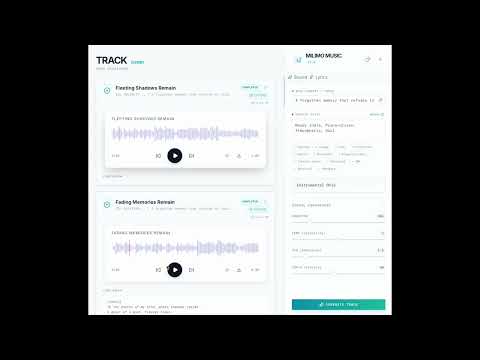
- Repair Segment (Beta): Fix specific parts of your generated track without regenerating the entire song. Select a time range and let the AI rewrite just that segment while preserving the surrounding context.
- Training Studio (Beta): Fine-tune the HeartMuLa model on your own audio datasets directly within the app.
- Custom Styles: Train the model to understand specific genres or artist styles (e.g., 'Afrobeat', 'MyVoice').
- LoRA Training: Efficient low-rank adaptation training that runs locally.
- Global Monitoring: Track training progress from anywhere in the app with the floating status widget.
- Real-Time Progress: Server-Sent Events (SSE) provide live feedback on the generation steps, from token inference to decoding.
- Smart History: Automatically saves all generated tracks, lyrics, and metadata (seed, cfg, temperature) for easy retrieval and playback.
- AI Co-Writer (Multi-Agent System):
<br>

- Agentic Workflow: The Co-Writer is not a simple chatbot. It uses a graph of specialized Pydantic Agents working in tandem:
- Coordinator Agent: Analyzes your request and routes it to the correct workflow (Creation vs. Editing).
- Lyricist Agent: The creative engine that drafts content and executes complex editing operations (Update, Insert, Append).
- StructureGuard Agent: A dedicated QA agent that validates every output against strict schemas. If the Lyricist makes a mistake, the Guard catches it and forces a retry automatically.
- Pydantic-Native: By treating lyrics as code artifacts (Schemas), we eliminate hallucinated formatting and ensure the lyrics always fit the music generation engine perfectly.
- Agentic Workflow: The Co-Writer is not a simple chatbot. It uses a graph of specialized Pydantic Agents working in tandem:
Prerequisites
- Conda (Anaconda or Miniconda)
- Python 3.10+
- Node.js 18+
- npm or yarn
- Ollama (Required for lyrics generation)
Setup Instructions
1. Environment Setup
It is highly recommended to use a Conda environment to manage dependencies.
conda create -n milimo python=3.12
conda activate milimo
2. Ollama Setup
- Download and install Ollama for your operating system.
- Pull a compatible model (e.g., Llama 3.2):
ollama pull llama3.2:3b-instruct-fp16 - Ensure Ollama is running in the background:
ollama serve
3. LLM Configuration & Providers
Milimo Music supports multiple LLM providers for lyrics generation and creative prompting.
Supported Providers:
- Ollama (Local, Default): Uses your local models via
ollama serve. - OpenAI: Connects to proper GPT models (requires API Key).
- Google Gemini: Uses Gemini models (requires API Key).
- OpenRouter: Access various models like Claude, Mistral, Llama via a unified API (requires API Key).
- DeepSeek: Direct integration with DeepSeek API.
- LM Studio: Connects to other local inference servers compatible with OpenAI API.
Configuration:
- Click the Settings (Gear) icon in the sidebar.
- Select your desired provider tab.
- Enter your API Key or Base URL.
- Click "Save & Set Active". The app will automatically fetch available models for you.
4. HeartLib & Model Weights
Crucial Step: You must download the large model weights manually as they are excluded from the repository.
-
Download Pretrained Models: You need to download the checkpoints into the
heartlib/ckptdirectory. You can use Hugging Face or ModelScope.Using Hugging Face CLI:
# Install hf-hub if not present: pip install huggingface_hub[cli]

hf download --local-dir './ckpt' 'HeartMuLa/HeartMuLaGen'
hf download --local-dir './ckpt/HeartMuLa-oss-3B' 'HeartMuLa/HeartMuLa-oss-3B'
hf download --local-dir './ckpt/HeartCodec-oss' 'HeartMuLa/HeartCodec-oss'
Directory Structure Verification: After downloading, ensure your
heartlib/ckptfolder looks like this:heartlib/ckpt/ ├── HeartCodec-oss/ ├── HeartMuLa-oss-3B/ ├── gen_config.json └── tokenizer.json
5. Backend
-
Navigate to the
backenddirectory:cd ../backend -
Install dependencies (this will automatically install
heartlib):pip install -r requirements.txt -
Run the server:
python -m app.mainThe backend will start at
http://localhost:8000.
6. Frontend
-
Navigate to the
frontenddirectory:cd ../frontend -
Install dependencies:
npm install -
Start the development server:
npm run devThe frontend will be available at
http://localhost:5173.
Author
Mainza Kangombe
LinkedIn Profile
