
Maildev
:mailbox: SMTP Server + Web Interface for viewing and testing emails during development.
Install / Use
/learn @maildev/MaildevREADME
MailDev





MailDev is sponsored by ⭐️ inngest/inngest.
Inngest is the developer platform for easily building reliable workflows with zero infrastructure. Check it out and give it a star! ⭐️
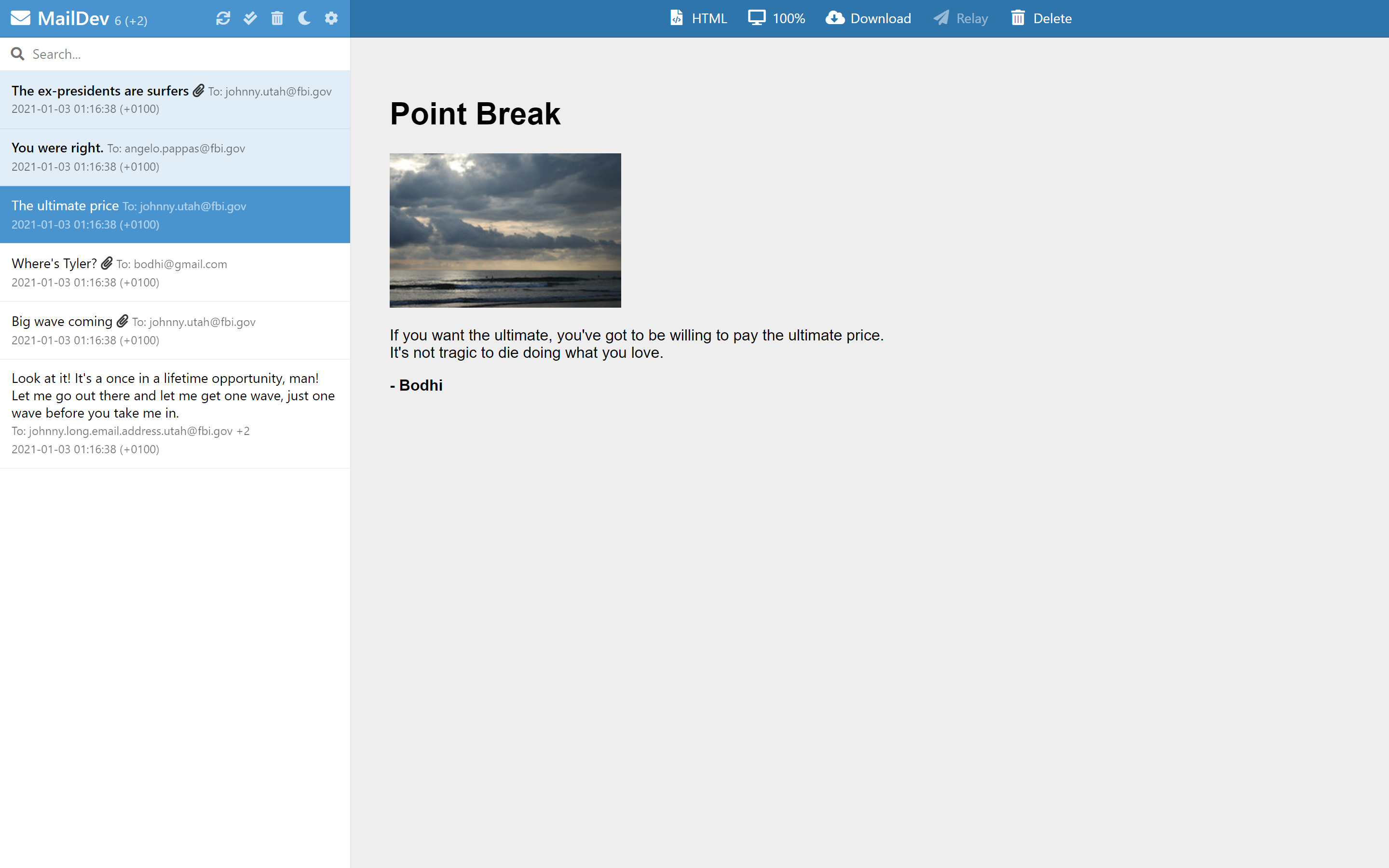
MailDev is a simple way to test your project's generated email during development, with an easy to use web interface that runs on your machine built on top of Node.js.
Docker Run
If you want to use MailDev with Docker, you can use the maildev/maildev image on Docker Hub. For a guide for usage with Docker, checkout the docs.
$ docker run -p 1080:1080 -p 1025:1025 maildev/maildev
Usage
Usage: maildev [options]
| Options | Environment variable | Description |
| -------------------------------- | -------------------------- | ----------------------------------------------------------------------------------------- |
| -s, --smtp <port> | MAILDEV_SMTP_PORT | SMTP port to catch mail |
| -w, --web <port> | MAILDEV_WEB_PORT | Port to run the Web GUI |
| --mail-directory <path> | MAILDEV_MAIL_DIRECTORY | Directory for persisting mail |
| --https | MAILDEV_HTTPS | Switch from http to https protocol |
| --https-key <file> | MAILDEV_HTTPS_KEY | The file path to the ssl private key |
| --https-cert <file> | MAILDEV_HTTPS_CERT | The file path to the ssl cert file |
| --ip <ip address> | MAILDEV_IP | IP Address to bind SMTP service to, defaults to :: (any IPv4/v6) |
| --outgoing-host <host> | MAILDEV_OUTGOING_HOST | SMTP host for outgoing mail |
| --outgoing-port <port> | MAILDEV_OUTGOING_PORT | SMTP port for outgoing mail |
| --outgoing-user <user> | MAILDEV_OUTGOING_USER | SMTP user for outgoing mail |
| --outgoing-pass <password> | MAILDEV_OUTGOING_PASS | SMTP password for outgoing mail |
| --outgoing-secure | MAILDEV_OUTGOING_SECURE | Use SMTP SSL for outgoing mail |
| --auto-relay [email] | MAILDEV_AUTO_RELAY | Use auto-relay mode. Optional relay email address |
| --auto-relay-rules <file> | MAILDEV_AUTO_RELAY_RULES | Filter rules for auto relay mode |
| --incoming-user <user> | MAILDEV_INCOMING_USER | SMTP user for incoming mail |
| --incoming-pass <pass> | MAILDEV_INCOMING_PASS | SMTP password for incoming mail |
| --incoming-secure | MAILDEV_INCOMING_SECURE | Use SMTP SSL for incoming emails |
| --incoming-cert <path> | MAILDEV_INCOMING_CERT | Cert file location for incoming SSL |
| --incoming-key <path> | MAILDEV_INCOMING_KEY | Key file location for incoming SSL |
| --web-ip <ip address> | MAILDEV_WEB_IP | IP Address to bind HTTP service to, defaults to --ip |
| --web-user <user> | MAILDEV_WEB_USER | HTTP user for GUI |
| --web-pass <password> | MAILDEV_WEB_PASS | HTTP password for GUI |
| --base-pathname <path> | MAILDEV_BASE_PATHNAME | Base path for URLs |
| --disable-web | MAILDEV_DISABLE_WEB | Disable the use of the web interface. Useful for unit testing |
| --hide-extensions <extensions> | MAILDEV_HIDE_EXTENSIONS | Comma separated list of SMTP extensions to NOT advertise (SMTPUTF8, PIPELINING, 8BITMIME) |
| -o, --open | | Open the Web GUI after startup |
| -v, --verbose | | |
| --silent | | |
| --log-mail-contents | | Log a JSON representation of each incoming mail |
API
MailDev can be used in your Node.js application. For more info view the API docs.
const MailDev = require("maildev");

const maildev = new MailDev();

maildev.listen();

maildev.on("new", function (email) {
  // We got a new email!
});
MailDev also has a REST API. For more info view the docs.
Outgoing email
Maildev optionally supports selectively relaying emails to an outgoing SMTP server. If you configure outgoing email with the --outgoing-* options you can click "Relay" on an individual email to relay through MailDev out to a real SMTP service that will *actually* send the email to the recipient.
Example:
$ maildev --outgoing-host smtp.gmail.com \
          --outgoing-secure \
          --outgoing-user 'you@gmail.com' \
          --outgoing-pass '<pass>'
Auto relay mode
Enabling the auto relay mode will automatically send each email to it's recipient without the need to click the "Relay" button mentioned above. The outgoing email options are required to enable this feature.
Optionally, you can specify a single email address to which Maildev will forward
all emails instead of the original recipient. For example, using
--auto-relay you@example.com will forward all emails to that address
automatically.
Additionally, you can pass a valid json file with additional configuration for
which email addresses you would like to allow or deny. The last matching
rule in the array will be the rule MailDev will follow.
Example:
$ maildev --outgoing-host smtp.gmail.com \
          --outgoing-secure \
          --outgoing-user 'you@gmail.com' \
          --outgoing-pass '<pass>' \
          --auto-relay \
          --auto-relay-rules file.json
Rules example file:
[
  { "allow": "*" },
  { "deny": "*@test.com" },
  { "allow": "ok@test.com" },
  { "deny": "*@utah.com" },
  { "allow": "johnny@utah.com" }
]
This would allow angelo@fbi.gov, ok@test.com, johnny@utah.com, but deny
bodhi@test.com.
Configure your project
Configure your application to send emails via port 1025 and open localhost:1080 in your browser.
Nodemailer (v1.0+)
// We add this setting to tell nodemailer the host isn't secure during dev
process.env.NODE_TLS_REJECT_UNAUTHORIZED = "0";

const transport = nodemailer.createTransport({
  port: 1025,
  // other settings...
});
Django -- Add EMAIL_PORT = 1025 in your settings file [source]
Rails -- config settings:
config.action_mailer.delivery_method = :smtp
    config.action_mailer.smtp_settings = {
        address: "localhost",
        port: 1025,
        enable_starttls_auto: false
    }
Drupal -- Install and configure SMTP module or use a library like SwiftMailer.
Spring Boot -- configuration: <br/> in application.properties file:
spring.mail.host=localhost #where the smtp server is running
spring.mail.port=1025
spring.mail.username=no-reply@gmail.com
spring.mail.properties.mail.smtp.starttls.enable=true
spring.mail.properties.mail.smtp.starttls.required=true
spring.mail.properties.mail.smtp.auth=true
spring.mail.properties.mail.smtp.connectiontimeout=5000
spring.mail.properties.mail.smtp.timeout=5000
spring.mail.properties.mail.smtp.writetimeout=5000
Or in application.yml file:<br/>
sprin
