
MZFormSheetPresentationController
MZFormSheetPresentationController provides an alternative to the native iOS UIModalPresentationFormSheet, adding support for iPhone and additional opportunities to setup UIPresentationController size and feel form sheet.
Install / Use
/learn @m1entus/MZFormSheetPresentationControllerREADME

MZFormSheetPresentationController
MZFormSheetPresentationController provides an alternative to the native iOS UIModalPresentationFormSheet, adding support for iPhone and additional opportunities to setup controller size and feel form sheet.
MZFormSheetPresentationController also has a number of predefined transitions so you can customize whether the modal form slides in, fades in, bounces in or you can create your own custom transition. There are also a number of properties for customizing the exact look and position of the form. It support also pan gesture dismissing.
This project is continuation of MZFormSheetController which allow you to make form sheet when deployment target is set to >iOS5 but use some tricky UIWindow hacks.
Here are a couple of images showing MZFormSheetPresentationController in action:


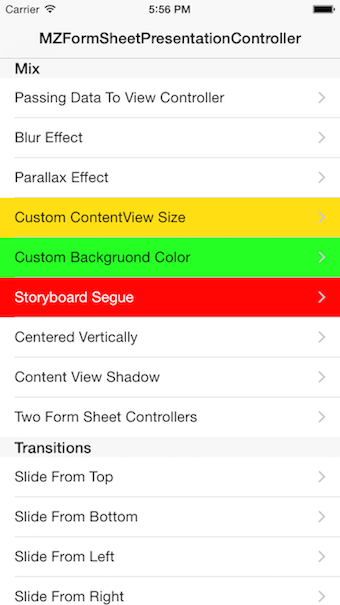

2.x Change Log:
- Fully tested and certified for iOS 9
- Support for tvOS
- Fixed issue with text size based on size class
- Fixed autolayout issues
- Added dissmisal pan gesture on each direction
- Rewritten
MZFormSheetPresentationControllerto useUIPresentationController - Support for adding shadow to content view
- Added frame configuration handler which allow you to change frame during rotation and animations
- Added
shouldCenterHorizontallyproperty - Allowed make your custom animator to support native transitions
- Allow to make dynamic contentViewSize depents on displayed UIViewController
Upgrade from 1.x
As a major version change, the API introduced in 2.0 is not backward compatible with 1.x integrations. Upgrading is straightforward.
-
Use
MZFormSheetPresentationViewControllerinstead ofMZFormSheetPresentationController -
MZFormSheetPresentationControllernow inherits fromUIPresentationControllerand manage presentation of popup -
MZFormSheetPresentationViewControllerhave propertypresentationControllerwhich allows you customization presented content view -
MZFormSheetPresentationController registerTransitionClassis nowMZTransition registerTransitionClass -
func entryFormSheetControllerTransition(formSheetController: MZFormSheetPresentationController, completionHandler: MZTransitionCompletionHandler)changed tofunc entryFormSheetControllerTransition(formSheetController: UIViewController, completionHandler: MZTransitionCompletionHandler)which formSheetController frame is equal to contentViewSize with view origin.
Requirements
MZFormSheetPresentationController requires either iOS 8.x and above.
Installation
###Carthage
Add the following line to your Cartfile.
github "m1entus/MZFormSheetPresentationController" "master"
Then run carthage update --no-use-binaries or just carthage update.
After building the framework you will need to add it to your project and import it using the Framework header:
#import <MZFormSheetPresentationController/MZFormSheetPresentationControllerFramework.h>
For further details on the installation and usage of Carthage, visit it's project page.
###CocoaPods
Add the following line to your Podfile.
# Uncomment this line to define a global platform for your project
platform :ios, '8.0'
# Uncomment this line if you're using Swift
use_frameworks!

target 'ProjectName' do
    pod 'MZFormSheetPresentationController'
end
Then run pod install --verbose or just pod install. For details of the installation and usage of CocoaPods, visit it's project page.
How To Use
There are two example projects, one is for Objective-C second is for Swift.
Let's start with a simple example
Objective-C
UINavigationController *navigationController = [self.storyboard instantiateViewControllerWithIdentifier:@"formSheetController"];
MZFormSheetPresentationViewController *formSheetController = [[MZFormSheetPresentationViewController alloc] initWithContentViewController:navigationController];
formSheetController.presentationController.contentViewSize = CGSizeMake(250, 250); // or pass in UILayoutFittingCompressedSize to size automatically with auto-layout

[self presentViewController:formSheetController animated:YES completion:nil];
Swift
let navigationController = self.storyboard!.instantiateViewController(withIdentifier: "formSheetController") as! UINavigationController
let formSheetController = MZFormSheetPresentationViewController(contentViewController: navigationController)
formSheetController.presentationController?.contentViewSize = CGSize(width: 250, height: 250)  // or pass in UILayoutFittingCompressedSize to size automatically with auto-layout

self.present(formSheetController, animated: true, completion: nil)
This will display view controller inside form sheet container.
If you want to dismiss form sheet controller, use default dismissing view controller action.
Objective-C
[self dismissViewControllerAnimated:YES completion:nil];
Swift
self.dismiss(animated: true, completion: nil)
Easy right ?!
Passing data
If you want to pass data to presenting view controller, you are doing it like normal. Just remember that IBOutlets are initialized after viewDidLoad, if you don't want to create additional properies, you can always use completion handler willPresentContentViewControllerHandler to pass data directly to outlets. It is called after viewWillAppear and before MZFormSheetPresentationViewController animation.
Objective-C
MZFormSheetPresentationViewController *formSheetController = [[MZFormSheetPresentationViewController alloc] initWithContentViewController:navigationController];

PresentedTableViewController *presentedViewController = [navigationController.viewControllers firstObject];
presentedViewController.textFieldBecomeFirstResponder = YES;
presentedViewController.passingString = @"PASSSED DATA!!";

formSheetController.willPresentContentViewControllerHandler = ^(UIViewController *vc) {
    UINavigationController *navigationController = (id)vc;
    PresentedTableViewController *presentedViewController = [navigationController.viewControllers firstObject];
    [presentedViewController.view layoutIfNeeded];
    presentedViewController.textField.text = @"PASS DATA DIRECTLY TO OUTLET!!";
};

[self presentViewController:formSheetController animated:YES completion:nil];
Swift
let formSheetController = MZFormSheetPresentationViewController(contentViewController: navigationController)

let presentedViewController = navigationController.viewControllers.first as! PresentedTableViewController
presentedViewController.textFieldBecomeFirstResponder = true
presentedViewController.passingString = "PASSED DATA"

formSheetController.willPresentContentViewControllerHandler = { vc in
    let navigationController = vc as! UINavigationController
    let presentedViewController = navigationController.viewControllers.first as! PresentedTableViewController
    presentedViewController.view?.layoutIfNeeded()
    presentedViewController.textField?.text = "PASS DATA DIRECTLY TO OUTLET!!"
}

self.present(formSheetController, animated: true, completion: nil)
Using pan gesture to dismiss
typedef NS_OPTIONS(NSUInteger, MZFormSheetPanGestureDismissDirection) {
    MZFormSheetPanGestureDismissDirectionNone = 0,
    MZFormSheetPanGestureDismissDirectionUp = 1 << 0,
    MZFormSheetPanGestureDismissDirectionDown = 1 << 1,
    MZFormSheetPanGestureDismissDirectionLeft = 1 << 2,
    MZFormSheetPanGestureDismissDirectionRight = 1 << 3,
    MZFormSheetPanGestureDismissDirectionAll = MZFormSheetPanGestureDismissDirectionUp | MZFormSheetPanGestureDismissDirectionDown | MZFormSheetPanGestureDismissDirectionLeft | MZFormSheetPanGestureDismissDirectionRight
};
UINavigationController *navigationController = [self formSheetControllerWithNavigationController];
MZFormSheetPresentationViewController *formSheetController = [[MZFormSheetPresentationViewController alloc] initWithContentViewController:navigationController];

formSheetController.interactivePanGestureDissmisalDirection = MZFormSheetPanGestureDismissDirectionAll;

[self presentViewController:formSheetController animated:YES completion:nil];
Blur background effect
It is possible to display blurry background, you can set MZFormSheetPresentationController default appearance or directly to MZFormSheetPresentationController
Objective-C
// Blur will be applied to all MZFormSheetPresentationControllers by default
[[MZFormSheetPresentationController appearance] setShouldApplyBackgroundBlurEffect:YES];

or

// This will set to only one instance
formSheetController.shouldApplyBackgroundBlurEffect = YES;
Swift
// Blur will be applied to all MZFormSheetPresentationControllers by default
MZFormSheetPresentationController.appearance().shouldApplyBackgroundBlurEffect = true

or

// This will set to only one instance
formSheetController.shouldAp
Related Skills
openhue
343.1kControl Philips Hue lights and scenes via the OpenHue CLI.
sag
343.1kElevenLabs text-to-speech with mac-style say UX.
weather
343.1kGet current weather and forecasts via wttr.in or Open-Meteo
tweakcc
1.5kCustomize Claude Code's system prompts, create custom toolsets, input pattern highlighters, themes/thinking verbs/spinners, customize input box & user message styling, support AGENTS.md, unlock private/unreleased features, and much more. Supports both native/npm installs on all platforms.
