
UnityUIComponents
🕹 [C#/Mono/Unity3D] Custom UI components for Unity3D game engine.
Install / Use
npx skills add m-wilczynski/UnityUIComponentsInstalls into whichever agent you are using.
README
UnityUIComponents
Custom UI components for Unity3D game engine. Intended to fill the gap of some missing, yet useful UI components.
Getting started
You have two options to use UnityUIComponents in your project:
- download repository, launch /src/Localwire.UnityUIComponents.sln and build project in Release mode, then copy
Localwire.UnityUIComponents.dllover to your project's Assets folder - download repository, navigate to examples in /examples/Localwire.UnityUIComponents.Examples/Assets/DLLs/ and copy over
Localwire.UnityUIComponents.dllto your project's Assets folder
Available components
Autocomplete Textbox
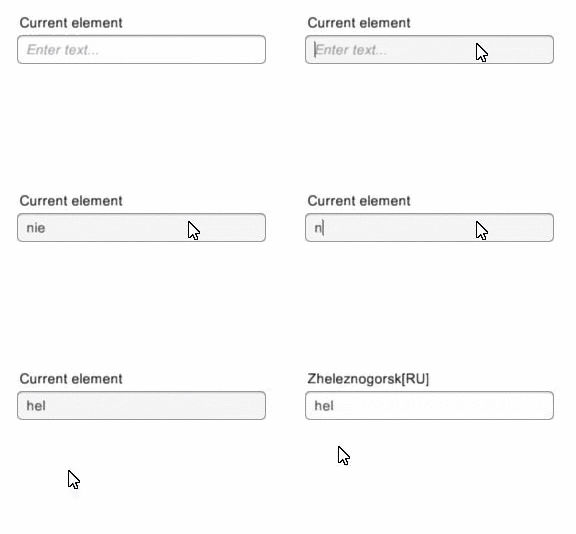
Similiar to its web equivalents, Autocomplete Textbox listens to user input in InputField and after short delay (defined by user), queries provided source of IAutocompleteSource<T> with input as criteria and prints results out to UI as AutocompleteResultListElement.
Unlike most of built-in Unity3D components, selected item will not only be shown as string in Text component but also provided as actual, strongly-typed item of type T through AutocompleteTextboxView.SelectedItem property.
Example:
 <br/>
<br/>
Related Skills
node-connect
385.5kDiagnose OpenClaw Android, iOS, or macOS node pairing, QR/setup code, route, auth, and connection failures.
blender-python-addon
40.5kBlender Python add-on rules for operators, panels, properties, registration, testing, and API-safe scripting
flutter-development-guidelines-cursorrules-prompt-file
40.5kCursor rules for Flutter development with MVVM architecture, Riverpod state management, Material widgets, and Dart style guidelines.
commit-push-pr
140.6kCommit, push, and open a PR
