
GamesHub
No description available
Install / Use
/learn @lupohan44/GamesHubREADME
GamesHub






This project is inspired by SteamDB-FreeGames
Telegram discussion group: https://t.me/GamesHubDiscussion
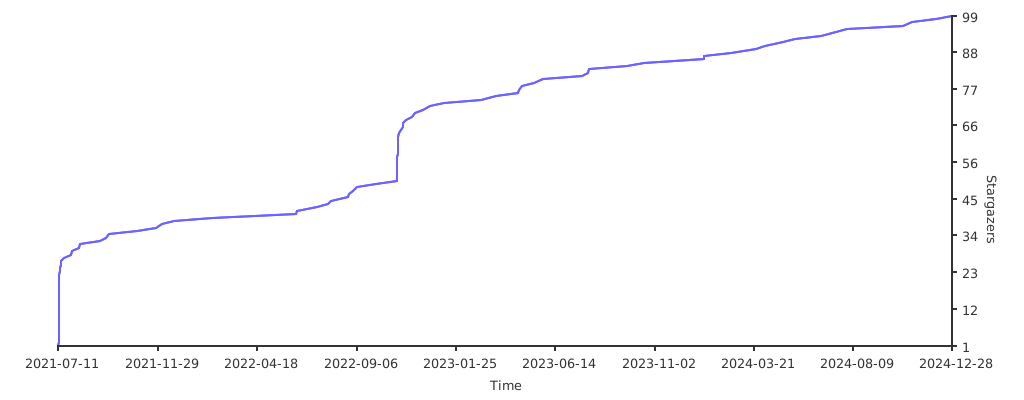
Star History
Features
Provide a framework to develop plugins to scrap games from different websites and send notifications to other plugins
Official Plugins (Maintained by project)
:white_check_mark: Gather Steam free games from SteamDB. (Not recommended)
:white_check_mark: Gather free games from Keylol. (recommended)
:white_check_mark: Gather free games from Reddit.
:white_check_mark: Use Apprise to send free games information. (Telegram demo channel)
:white_check_mark: Use ASF to redeem games
:white_check_mark: Use Steam to redeem games
Requirements
- python3
Usage
Direct run
- Clone repository
git clone https://github.com/lupohan44/GamesHub.git - Go into GamesHub directory
cd GamesHub - Install requirements
or install minimum requirementspip3 install -r requirements.txt playwright install webkit chromium firefox || python3 -m playwright install webkit chromium firefox # Depends on the browser(s) you want to use
and install requirements for each plugin you want to enablepip install -r requirements-no_plugin.txt - Copy config.example.json5 to
config.json5, change settings in it according to the comment. - Run
Each enabled official plugin should create a folder inpython3 app.py{WORKING_DIR}/plugins/{PLUGIN_PACKAGE_NAME}to store runtime files and configs - Change plugins' config files from step 5
- Rerun step 5
Docker (For Linux only)
-
Create a folder for record and config, let's say folder name is /var/GamesHub
Please note that this folder name must be absolute path.
export GAMES_HUB_FOLDER_NAME=/var/GamesHub mkdir -p "$GAMES_HUB_FOLDER_NAME" -
Download config.example.json5 and rename to
config.json5into the folder created in step 1, change settings in it according to the comment.wget -c "https://raw.githubusercontent.com/lupohan44/GamesHub/main/config.example.json5" -O "$STEAM_DB_FOLDER_NAME/config.json5" || curl -o "$STEAM_DB_FOLDER_NAME/config.json5" "https://raw.githubusercontent.com/lupohan44/GamesHub/main/config.example.json5" -
Run with docker
docker pull lupohan44/games_hub:latest && docker run -v $GAMES_HUB_FOLDER_NAME:/home/wd --rm lupohan44/games_hub:latestAll changes by script inside docker will be permanently save to this folder.
Each enabled official plugin should create a folder in{WORKING_DIR}/plugins/{PLUGIN_PACKAGE_NAME}to store runtime files and configs -
Change plugins' config files from step 3
-
Rerun step 3
Plugins structure example
/var/GamesHub (working directory)
├── config.json5
└── plugins
    ├── gameshub.official.notification.apprise
    │   └── config.json5
    ├── gameshub.official.scraper.steamdb
    │   └── config.json5
    ├── gameshub.official.scraper.keylol
    │   ├── config.json5
    │   └── cookies.txt
    └── gameshub.official.redeemer.asf
        └── config.json5
Known issue
- Playwright does not support CentOS. (issue)
- Use docker
Develop plugins
- Think a package name for your plugin, format should be like gameshub.unofficial.{plugin_purpose}.{plugin_description}[.{your_name}]
- Copy one of the official plugin in plugins folder and rename it to your package name
- Follow the official plugin's structure and modify it to your needs
Changelog
Special Thanks
- The logo is designed by 限免喜加一

Support me

- Star this repository
- Contribute to this project by pull request
Each of them is appreciated. Thank you.
Related Skills
node-connect
337.4kDiagnose OpenClaw node connection and pairing failures for Android, iOS, and macOS companion apps
frontend-design
83.2kCreate distinctive, production-grade frontend interfaces with high design quality. Use this skill when the user asks to build web components, pages, or applications. Generates creative, polished code that avoids generic AI aesthetics.
openai-whisper-api
337.4kTranscribe audio via OpenAI Audio Transcriptions API (Whisper).
commit-push-pr
83.2kCommit, push, and open a PR
