
Cakechat
CakeChat: Emotional Generative Dialog System
Install / Use
/learn @lukalabs/CakechatREADME
Note on the top: the project is unmaintained.
Transformer-based dialog models work better and we recommend using them instead of RNN-based CakeChat. See, for example https://github.com/microsoft/DialoGPT
CakeChat: Emotional Generative Dialog System
CakeChat is a backend for chatbots that are able to express emotions via conversations.
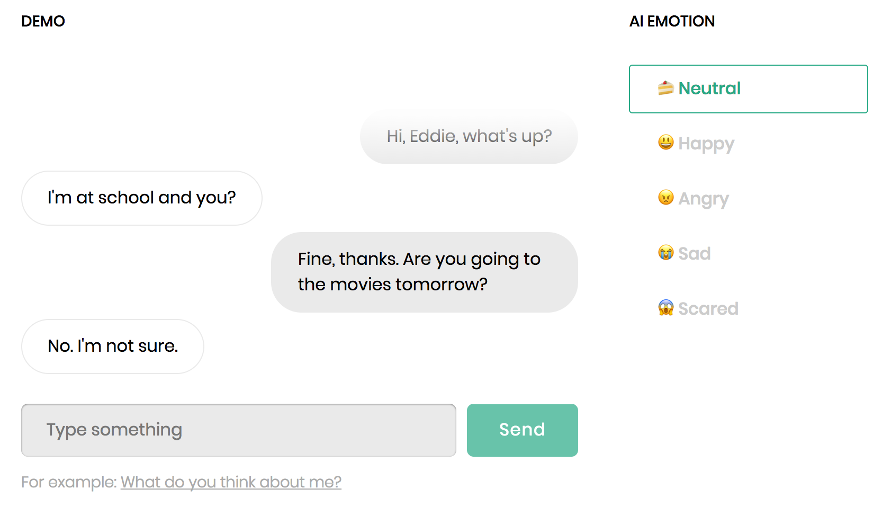
CakeChat is built on Keras and Tensorflow.
The code is flexible and allows to condition model's responses by an arbitrary categorical variable. For example, you can train your own persona-based neural conversational model<sup>[1]</sup> or create an emotional chatting machine<sup>[2]</sup>.
Main requirements
- python 3.5.2
- tensorflow 1.12.2
- keras 2.2.4
Table of contents
- Network architecture and features
- Quick start
- Setup for training and testing
- Getting the pre-trained model
- Training data
- Training the model
- Running CakeChat server
- Repository overview
- Example use cases
- References
- Credits & Support
- License
Network architecture and features

Model:
- Hierarchical Recurrent Encoder-Decoder (HRED) architecture for handling deep dialog context<sup>[3]</sup>.
- Multilayer RNN with GRU cells. The first layer of the utterance-level encoder is always bidirectional. By default, CuDNNGRU implementation is used for ~25% acceleration during inference.
- Thought vector is fed into decoder on each decoding step.
- Decoder can be conditioned on any categorical label, for example, emotion label or persona id.
Word embedding layer:
- May be initialized using w2v model trained on your corpus.
- Embedding layer may be either fixed or fine-tuned along with other weights of the network.
Decoding
- 4 different response generation algorithms: "sampling", "beamsearch", "sampling-reranking" and "beamsearch-reranking". Reranking of the generated candidates is performed according to the log-likelihood or MMI-criteria<sup>[4]</sup>. See configuration settings description for details.
Metrics:
- Perplexity
- n-gram distinct metrics adjusted to the samples size<sup>[4]</sup>.
- Lexical similarity between samples of the model and some fixed dataset. Lexical similarity is a cosine distance between TF-IDF vector of responses generated by the model and tokens in the dataset.
- Ranking metrics: mean average precision and mean recall@k.<sup>[5]</sup>
Quick start
In case you are familiar with Docker here is the easiest way to run a pre-trained CakeChat
model as a server. You may need to run the following commands with sudo.
CPU version:
docker pull lukalabs/cakechat:latest && \

docker run --name cakechat-server -p 127.0.0.1:8080:8080 -it lukalabs/cakechat:latest bash -c "python bin/cakechat_server.py"
GPU version:
docker pull lukalabs/cakechat-gpu:latest && \

nvidia-docker run --name cakechat-gpu-server -p 127.0.0.1:8080:8080 -it lukalabs/cakechat-gpu:latest bash -c "CUDA_VISIBLE_DEVICES=0 python bin/cakechat_server.py"
That's it! Now test your CakeChat server by running the following command on your host machine:
python tools/test_api.py -f localhost -p 8080 -c "hi!" -c "hi, how are you?" -c "good!" -e "joy"
The response dict may look like this:
{'response': "I'm fine!"}
Setup for training and testing
Docker
Docker is the easiest way to set up the environment and install all the dependencies for training and testing.
CPU-only setup
Note: We strongly recommend using GPU-enabled environment for training CakeChat model. Inference can be made both on GPUs and CPUs.
-
Install Docker.
-
Pull a CPU-only docker image from dockerhub:
docker pull lukalabs/cakechat:latest
- Run a docker container in the CPU-only environment:
docker run --name <YOUR_CONTAINER_NAME> -it lukalabs/cakechat:latest
GPU-enabled setup
-
Install nvidia-docker for the GPU support.
-
Pull GPU-enabled docker image from dockerhub:
docker pull lukalabs/cakechat-gpu:latest
- Run a docker container in the GPU-enabled environment:
nvidia-docker run --name <YOUR_CONTAINER_NAME> -it cakechat-gpu:latest
That's it! Now you can train your model and chat with it. See the corresponding section below for further instructions.
Manual setup
If you don't want to deal with docker, you can install all the requirements manually:
pip install -r requirements.txt -r requirements-local.txt
NB:
We recommend installing the requirements inside a virtualenv to prevent messing with your system packages.
Getting the pre-trained model
You can download our pre-trained model weights by running python tools/fetch.py.
The params of the pre-trained model are the following:
- context size 3 (<speaker_1_utterance>, <speaker_2_utterance>, <speaker_1_utterance>)
- each encoded utterance contains up to 30 tokens
- the decoded utterance contains up to 32 tokens
- both encoder and decoder have 2 GRU layers with 768 hidden units each
- first layer of the encoder is bidirectional
Training data
The model was trained on a preprocessed Twitter corpus with ~50 million dialogs (11Gb of text data). To clean up the corpus, we removed
- URLs, retweets and citations;
- mentions and hashtags that are not preceded by regular words or punctuation marks;
- messages that contain more than 30 tokens.
We used our emotions classifier to label each utterance with one of the following 5 emotions: "neutral", "joy", "anger", "sadness", "fear", and used these labels during training.
To mark-up your own corpus with emotions you can use, for example, DeepMoji tool.
Unfortunately, due to Twitter's privacy policy, we are not allowed to provide our dataset. You can train a dialog model on any text conversational dataset available to you, a great overview of existing conversational datasets can be found here: https://breakend.github.io/DialogDatasets/
The training data should be a txt file, where each line is a valid json object, representing a list of dialog utterances. Refer to our dummy train dataset to see the necessary file structure. Replace this dummy corpus with your data before training.
Training the model
There are two options:
- training from scratch
- fine-tuning the provided trained model
The first approach is less restrictive: you can use any training data you want and set any config params of the model. However, you should be aware that you'll need enough train data (~50Mb at least), one or more GPUs and enough patience (days) to get good model's responses.
The second approach is limited by the choice of config params of the pre-trained model – see cakechat/config.py for
the complete list. If the default params are suitable for your task, fine-tuning should be a good option.
Fine-tuning the pre-trained model on your data
-
Fetch the pre-trained model from Amazon S3 by running
python tools/fetch.py. -
Put your training text corpus to
data/corpora_processed/train_processed_dialogs.txt. Make sure that your dataset is large enough, otherwise your model risks to overfit the data and the results will be poor. -
Run
python tools/train.py.- The script will look for the pre-trained model weights in
results/nn_models, the full path is inferred from the set of config params. - If you want to initialize the model weights from a custom file, you can specify the path to the file via
-iargument, for example,python tools/train.py -i results/nn_models/my_saved_weights/model.current. - Don't forget to set
CUDA_VISIBLE_DEVICES=<GPU_ID>environment variable (with <GPU_ID> as in output of nvidia-smi command) if you want to use GPU. For example,CUDA_VISIBLE_DEVICES=0 python tools/train.pywill run the train process on the 0-th GPU. - Use parameter
-sto train the model on a subset of the first N samples of your training data to speed up preprocessing for debugging. For example, runpython tools/train.py -s 1000to train on the first 1
- The script will look for the pre-trained model weights in
