
Alfred
alfred-py: A deep learning utility library for **human**, more detail about the usage of lib to: https://zhuanlan.zhihu.com/p/341446046
Install / Use
/learn @lucasjinreal/AlfredREADME








alfred-py can be called from terminal via alfred as a tool for deep-learning usage. It also provides massive utilities to boost your daily efficiency APIs, for instance, if you want draw a box with score and label, if you want logging in your python applications, if you want convert your model to TRT engine, just import alfred, you can get whatever you want. More usage you can read instructions below.
Functions Summary
Since many new users of alfred maybe not very familiar with it, conclude functions here briefly, more details see my updates:
- Visualization, draw boxes, masks, keypoints is very simple, even 3D boxes on point cloud supported;
- Command line tools, such as view your annotation data in any format (yolo, voc, coco any one);
- Deploy, you can using alfred deploy your tensorrt models;
- DL common utils, such as torch.device() etc;
- Renders, render your 3D models.
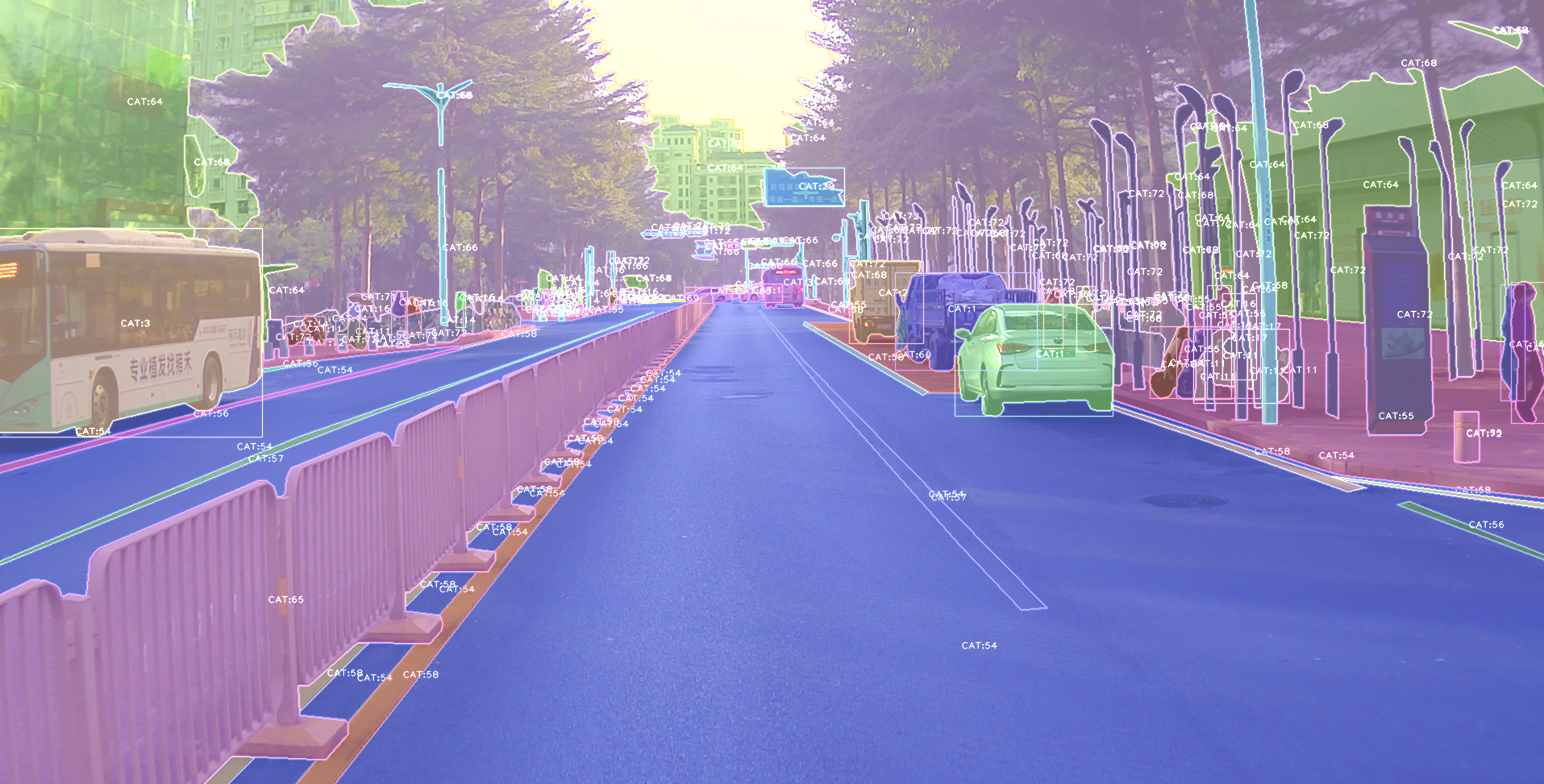
A pic visualized from alfred:
Install
To install alfred, it is very simple:
requirements:
lxml [optional]
pycocotools [optional]
opencv-python [optional]
then:
sudo pip3 install alfred-py
alfred is both a lib and a tool, you can import it's APIs, or you can directly call it inside your terminal.
A glance of alfred, after you installed above package, you will have alfred:
-
datamodule:# show VOC annotations alfred data vocview -i JPEGImages/ -l Annotations/ # show coco anntations alfred data cocoview -j annotations/instance_2017.json -i images/ # show yolo annotations alfred data yoloview -i images -l labels # show detection label with txt format alfred data txtview -i images/ -l txts/ # show more of data alfred data -h # eval tools alfred data evalvoc -h -
cabmodule:# count files number of a type alfred cab count -d ./images -t jpg # split a txt file into train and test alfred cab split -f all.txt -r 0.9,0.1 -n train,val -
visionmodule;# extract video to images alfred vision extract -v video.mp4 # combine images to video alfred vision 2video -d images/ -
-hto see more:usage: alfred [-h] [--version] {vision,text,scrap,cab,data} ... positional arguments: {vision,text,scrap,cab,data} vision vision related commands. text text related commands. scrap scrap related commands. cab cabinet related commands. data data related commands. optional arguments: -h, --help show this help message and exit --version, -v show version info.inside every child module, you can call it's
-has well:alfred text -h.
if you are on windows, you can install pycocotools via:
pip install "git+https://github.com/philferriere/cocoapi.git#egg=pycocotools&subdirectory=PythonAPI", we have made pycocotools as an dependencies since we need pycoco API.
Updates
alfred-py has been updating for 3 years, and it will keep going!
-
2050-xxx: to be continue;
-
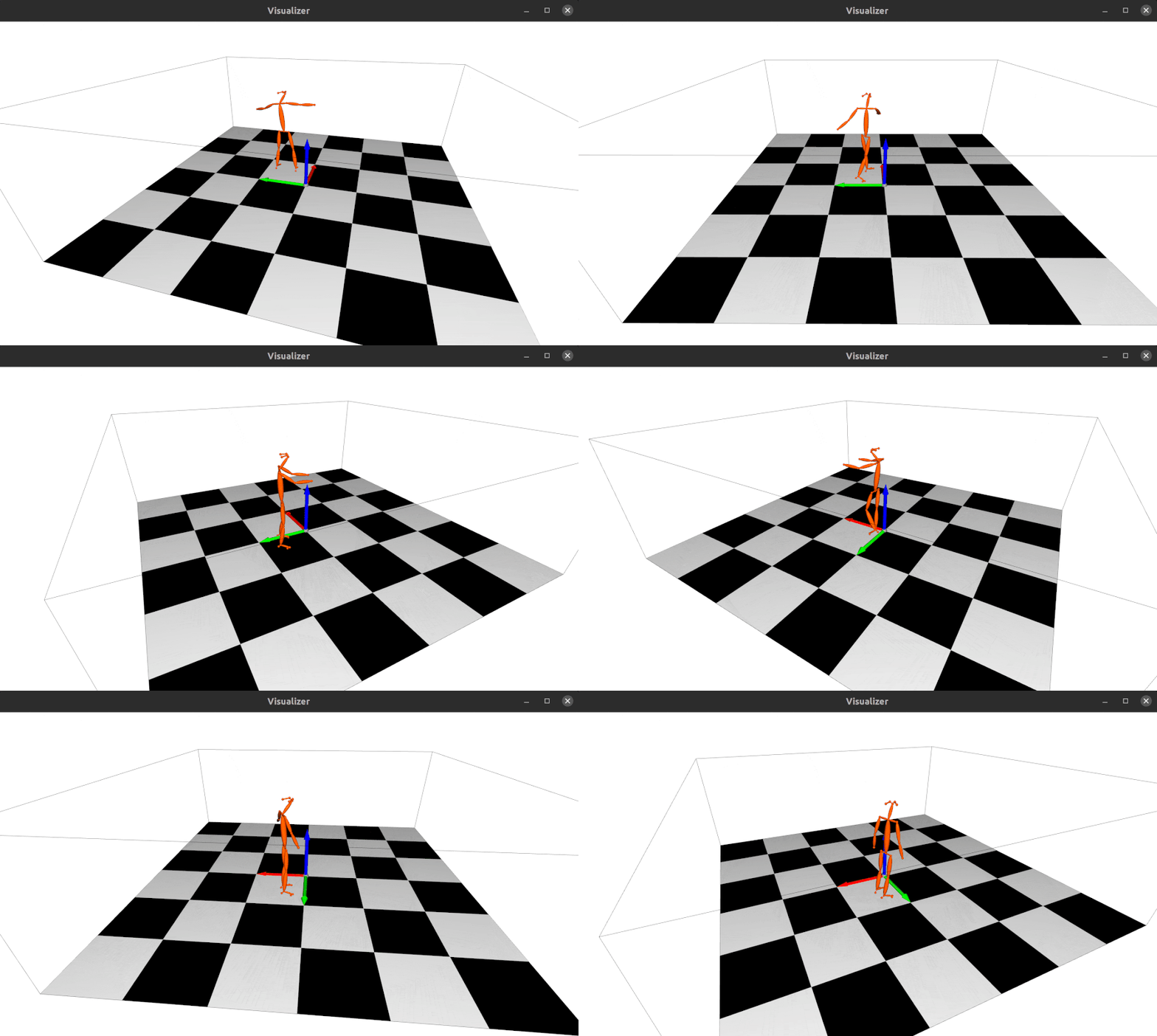
2023.04.28: Update the 3d keypoints visualizer, now you can visualize Human3DM kpts in realtime:
 For detailes reference to
 examples/demo_o3d_server.py. The result is generated from MotionBert. -
2022.01.18: Now alfred support a Mesh3D visualizer server based on Open3D:
from alfred.vis.mesh3d.o3dsocket import VisOpen3DSocket

def main():
    server = VisOpen3DSocket()
    while True:
        server.update()


if __name__ == "__main__":
    main()
Then, you just need setup a client, send keypoints3d to server, and it will automatically visualized out. Here is what it looks like:
-
2021.12.22: Now alfred supported keypoints visualization, almost all datasets supported in mmpose were also supported by alfred:
from alfred.vis.image.pose import vis_pose_result # preds are poses, which is (Bs, 17, 3) for coco body vis_pose_result(ori_image, preds, radius=5, thickness=2, show=True) -
2021.12.05: You can using
alfred.deploy.tensorrtfor tensorrt inference now:from alfred.deploy.tensorrt.common import do_inference_v2, allocate_buffers_v2, build_engine_onnx_v3 def engine_infer(engine, context, inputs, outputs, bindings, stream, test_image): # image_input, img_raw, _ = preprocess_np(test_image) image_input, img_raw, _ = preprocess_img((test_image)) print('input shape: ', image_input.shape) inputs[0].host = image_input.astype(np.float32).ravel() start = time.time() dets, labels, masks = do_inference_v2(context, bindings=bindings, inputs=inputs, outputs=outputs, stream=stream, input_tensor=image_input) img_f = 'demo/demo.jpg' with build_engine_onnx_v3(onnx_file_path=onnx_f) as engine: inputs, outputs, bindings, stream = allocate_buffers_v2(engine) # Contexts are used to perform inference. with engine.create_execution_context() as context: print(engine.get_binding_shape(0)) print(engine.get_binding_shape(1)) print(engine.get_binding_shape(2)) INPUT_SHAPE = engine.get_binding_shape(0)[-2:] print(context.get_binding_shape(0)) print(context.get_binding_shape(1)) dets, labels, masks, img_raw = engine_infer( engine, context, inputs, outputs, bindings, stream, img_f) -
2021.11.13: Now I add Siren SDK support!
from functools import wraps
from alfred.siren.handler import SirenClient
from alfred.siren.models import ChatMessage, InvitationMessage

siren = SirenClient('daybreak_account', 'password')


@siren.on_received_invitation
def on_received_invitation(msg: InvitationMessage):
    print('received invitation: ', msg.invitation)
    # directly agree this invitation for robots


@siren.on_received_chat_message
def on_received_chat_msg(msg: ChatMessage):
    print('got new msg: ', msg.text)
    siren.publish_txt_msg('I got your message O(∩_∩)O哈哈~', msg.roomId)


if __name__ == '__main__':
    siren.loop()
Using this, you can easily setup a Chatbot. By using Siren client.
-
2021.06.24: Add a useful commandline tool, change your pypi source easily!!:
alfred cab changesourceAnd then your pypi will using aliyun by default!
-
2021.05.07: Upgrade Open3D instructions: Open3D>0.9.0 no longer compatible with previous alfred-py. Please upgrade Open3D, you can build Open3D from source:
  git clone --recursive https://github.com/intel-isl/Open3D.git
  cd Open3D && mkdir build && cd build
  sudo apt install libc++abi-8-dev
  sudo apt install libc++-8-dev
  cmake .. -DPYTHON_EXECUTABLE=/usr/bin/python3
Ubuntu 16.04 blow I tried all faild to build from source. So, please using open3d==0.9.0 for alfred-py.
-
2021.04.01: A unified evaluator had added. As all we know, for many users, writting Evaluation might coupled deeply with your project. But with Alfred's help, you can do evaluation in any project by simply writting 8 lines of codes, for example, if your dataset format is Yolo, then do this:
  def infer_func(img_f):
  image = cv2.imread(img_f)
  results = config_dict['model'].predict_for_single_image(
      image, aug_pipeline=simple_widerface_val_pipeline, classification_threshold=0.89, nms_threshold=0.6, class_agnostic=True)
  if len(results) > 0:
      results = np.array(results)[:, [2, 3, 4, 5, 0, 1]]
      # xywh to xyxy
      results[:, 2] += results[:, 0]
      results[:, 3] += results[:, 1]
  return results

  if __name__ == '__main__':
      conf_thr = 0.4
      iou_thr = 0.5

      imgs_root = 'data/hand/images'
      labels_root = 'data/hand/labels'

      yolo
