
Shinestacker
Focus stacking software with an interactive GUI and Python API for advanced image processing workflows
Install / Use
/learn @lucalista/ShinestackerREADME
Shine Stacker
ShineStacker is a focus stacking tool with an interactive GUI and a Python API, designed for advanced image processing workflows in macro photography and microscopy.






Key Features
- 🪟 Cross-Platform GUI: Native app built with Qt6, available for Windows, macOS, and Linux.
- 🚀 Batch Processing: Automatically align, balance, and stack hundreds of images — perfect for macro or microscopy datasets.
- 🧩 Modular Architecture: Combine configurable modules for alignment, normalization, and blending to build custom workflows.
- 🖌️ Retouch Editor: Interactively refine your stacked image by painting in details from individual frames.
- 📊 Jupyter & Python Integration: Use Shine Stacker as a library inside your Python or Jupyter workflows.
- 🎞️ Supported formats: TIFF 8-16 bits, PNG 8-16 bits, JPEG, most RAW formats via
rawpy.
<img src='https://raw.githubusercontent.com/lucalista/shinestacker/main/img/flies.gif' width="400" referrerpolicy="no-referrer"> <img src='https://raw.githubusercontent.com/lucalista/shinestacker/main/img/flies_stack.jpg' width="400" referrerpolicy="no-referrer">
Interactive GUI
The graphical interface makes complex stacking tasks simple:
- Project View – Configure, preview, and run stacking workflows with optional intermediate results.
- Retouch View – Manually refine the final image by blending details from selected frames and applying filters.
Ideal for users who want the power of scripting and the comfort of a modern UI.
<img src='https://raw.githubusercontent.com/lucalista/shinestacker/main/img/coffee.gif' width="400" referrerpolicy="no-referrer"> <img src='https://raw.githubusercontent.com/lucalista/shinestacker/main/img/coffee_stack.jpg' width="400" referrerpolicy="no-referrer">
Get Started
Demo video
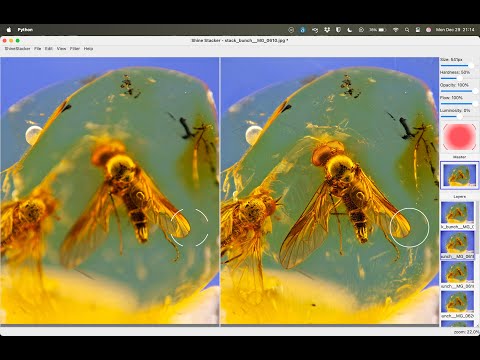
Short demo of the new user interface introduced in Shine Stacker, release 1.13.0.
Resources
🌍 Website on WordPress • 📖 Main documentation • 📝 Changelog
Installation
See the main documentation for detailed installation instructions.
Platform notes:
- Windows: If you download the installer or ZIP archive, you may need to whitelist the app in your antivirus software.
- macOS: See the installation note for macOS users.
Acknowledgements & References
The first version of the core focus stack algorithm was inspired by the Laplacian pyramids method implementation by Sami Jawhar, used under permission. The implementation in the latest releases was rewritten from the original code.
Key references:
- Pyramid Methods in Image Processing, E. H. Adelson, C. H. Anderson, J. R. Bergen, P. J. Burt, J. M. Ogden, RCA Engineer, 29-6, Nov/Dec 1984 Pyramid methods in image processing
- A Multi-focus Image Fusion Method Based on Laplacian Pyramid, Wencheng Wang, Faliang Chang, Journal of Computers 6 (12), 2559, December 2011
License
<img src="https://www.gnu.org/graphics/lgplv3-147x51.png" alt="LGPL 3 logo">-
Code: The software is provided as is under the GNU Lesser General Public License v3.0. See LICENSE for details.
-
Logo: The Shine Stacker logo was designed by Alessandro Lista. Copyright © Alessandro Lista. All rights reserved. The logo is not covered by the LGPL-3.0 license of this project.
Attribution request
📸 If you publish images created with Shine Stacker, please consider adding a note such as:
Created with Shine Stacker – https://github.com/lucalista/shinestacker
This is not mandatory, but highly appreciated.
Developed and maintained by Luca Lista. 💡 Contributions, feedback, and feature suggestions are warmly welcome. If you enjoy Shine Stacker, consider giving it a ⭐️ on GitHub — it really helps visibility!
Related Skills
node-connect
336.5kDiagnose OpenClaw node connection and pairing failures for Android, iOS, and macOS companion apps
claude-opus-4-5-migration
82.9kMigrate prompts and code from Claude Sonnet 4.0, Sonnet 4.5, or Opus 4.1 to Opus 4.5
frontend-design
82.9kCreate distinctive, production-grade frontend interfaces with high design quality. Use this skill when the user asks to build web components, pages, or applications. Generates creative, polished code that avoids generic AI aesthetics.
model-usage
336.5kUse CodexBar CLI local cost usage to summarize per-model usage for Codex or Claude, including the current (most recent) model or a full model breakdown. Trigger when asked for model-level usage/cost data from codexbar, or when you need a scriptable per-model summary from codexbar cost JSON.
