
Lsd
The next gen ls command
Install / Use
/learn @lsd-rs/LsdREADME
Pochi is an AI agent designed for software development.
</div>[!IMPORTANT] This is the documentation for the development version of lsd. Please consult the documentation on the Tags page if you are looking for the documentation of individual releases.
The current newest release is: v1.2.0
LSD (LSDeluxe)





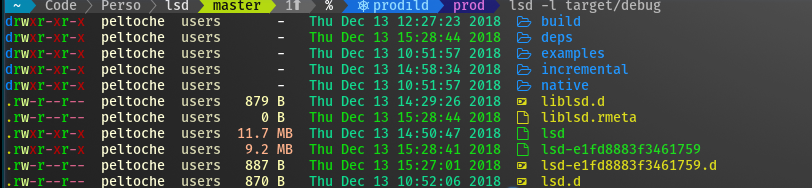
This project is a rewrite of GNU ls with lots of added features like colors, icons, tree-view, more formatting options etc.
The project is heavily inspired by the super colorls project.
Installation
Prerequisites
[!TIP] Have a look at the Nerd Font README for help with installing Nerd Fonts
- In order for icons to work you need to have a patched font like nerd-font or font-awesome installed on your machine and your terminal needs to be configured to use the patched font of your choosing.
- If you intend to install
lsdfrom source you need to have a working Rust toolchain (obviously) on your machine.
Installing with a package manager
<details> <summary>Packaging status</summary> <a href="https://repology.org/project/lsd/versions"> <img src="https://repology.org/badge/vertical-allrepos/lsd.svg?columns=3" alt="Packaging status"> </a> </details>Please consult the table below for the installation command associated with your package manager.
| OS/Distro | Command |
| ------------------------------- | ---------------------------------------------------------------------------------------------------------------------|
| Archlinux | pacman -S lsd |
| Fedora | dnf install lsd |
| Gentoo | sudo emerge sys-apps/lsd |
| macOS | brew install lsd or sudo port install lsd |
| Nix (non NixOS) | nix-env -iA nixpkgs.lsd |
| NixOS | Add environment.systemPackages = [ pkgs.lsd ]; to your system config |
| FreeBSD | pkg install lsd |
| NetBSD or any pkgsrc platform | pkgin install lsd or cd /usr/pkgsrc/sysutils/lsd && make install |
| OpenBSD | pkg_add lsd |
| Windows | scoop install lsd or winget install --id lsd-rs.lsd or choco install lsd |
| Android (via Termux) | pkg install lsd |
| Debian sid and bookworm | apt install lsd |
| Ubuntu 23.04 (Lunar Lobster) | apt install lsd |
| Earlier Ubuntu/Debian versions | snap discontinued, use the method described here instead |
| Solus | eopkg it lsd |
| Void Linux | sudo xbps-install lsd |
| openSUSE | sudo zypper install lsd |
Installing from source
With Rust's package manager cargo, you can install lsd via:
cargo install lsd
And if you want to install the latest main branch commit you can do so via:
cargo install --git https://github.com/lsd-rs/lsd.git --branch main
Installing binaries directly
The release page includes precompiled binaries for Linux, macOS, and Windows for every release. You can also get the latest binary of the main branch from the GitHub action build artifacts (choose the top action and then scroll down to the artifacts section).
Configuring your shell to use lsd instead of ls (optional)
In order to use lsd instead of entering the ls command, you need to create an alias for ls in to your shell configuration file (~/.bashrc, ~/.zshrc, etc...). The simplest variant of such an alias is:
alias ls='lsd'
The alias above will replace a stock ls command with an lsd command without additional parameters.
Some examples of other useful aliases are:
alias l='lsd -l'
alias la='lsd -a'
alias lla='lsd -la'
alias lt='lsd --tree'
Customizing lsd (configuration and theming)
[!TIP] In order to make the customization process easier for you we’ve supplied sample files. These files contain the entries for all the defaults that
lsdcomes with after installation. You can find the sample files in the documentation folder.We've also supplied a color reference where we’ve documented the default colors
lsduses in its output. You can also preview there.
In order to tailor lsd to your specific needs you can create any of the following three files and make adjustments as you see fit.
config.yaml→ config sample file herecolors.yaml→ colors sample file hereicons.yaml→ icons sample file here
Note that it is not required to have all three of the files present in order for your configuration to be applied. For example, if you only want to customize the icons then only icons.yaml needs to be present in the configuration directory; config.yaml, and colors.yaml do not have to be present in order for your icon modifications to be applied.
Config file locations
[!TIP] You can also instruct
lsdto look for configuration files in a custom location of your choosing by using the following command:lsd --config-file [YOUR_CUSTOM_PATH]. This is particularly useful when testing a configuration changes before committing to them.
Unix (Linux, Mac, etc...)
On non-Windows systems lsd follows the XDG Base Directory Specification, thus lsd will look for configuration files any of the following locations:
$HOME/.config/lsd$XDG_CONFIG_HOME/lsd
On most systems these variables are mapped to the same location, which is usually ~/.config/lsd/. If lsd does not detect the location, or if the location exists but does not contain any of the three configuration files, the default configuration will be used instead.
Windows
On Windows systems lsd will look for configuration files in the following locations, in order:
%USERPROFILE%\.config\lsd%APPDATA%\lsd
These locations are usually something like C:\Users\username\AppData\Roaming\lsd\, and C:\Users\username\.config\lsd\ respectively.
Quick customization example
For this example let's assume you're already content lsd, but there are a few of the default icons that really bug you and you want to change them to something that suits your needs better. All you have to do is create an icons.yaml file in the configuration directory and configure your custom icon there. Here’s how.
There are 3 kinds of icon overrides available in lsd:
namefiletypeextension
Both nerd font glyphs and Unicode emojis can be used for icons. The final set of icons
Related Skills
himalaya
340.5kCLI to manage emails via IMAP/SMTP. Use `himalaya` to list, read, write, reply, forward, search, and organize emails from the terminal. Supports multiple accounts and message composition with MML (MIME Meta Language).
node-connect
340.5kDiagnose OpenClaw node connection and pairing failures for Android, iOS, and macOS companion apps
frontend-design
84.2kCreate distinctive, production-grade frontend interfaces with high design quality. Use this skill when the user asks to build web components, pages, or applications. Generates creative, polished code that avoids generic AI aesthetics.
coding-agent
340.5kDelegate coding tasks to Codex, Claude Code, or Pi agents via background process
