
TimelineView
A customizable and easy-to-use Timeline View library for Android. Works as a RecyclerView decorator (ItemDecoration)
Install / Use
/learn @lriccardo/TimelineViewREADME
TimelineView



A customizable and easy-to-use Timeline View library for Android
Can be used as a standalone view or as a RecyclerView decorator
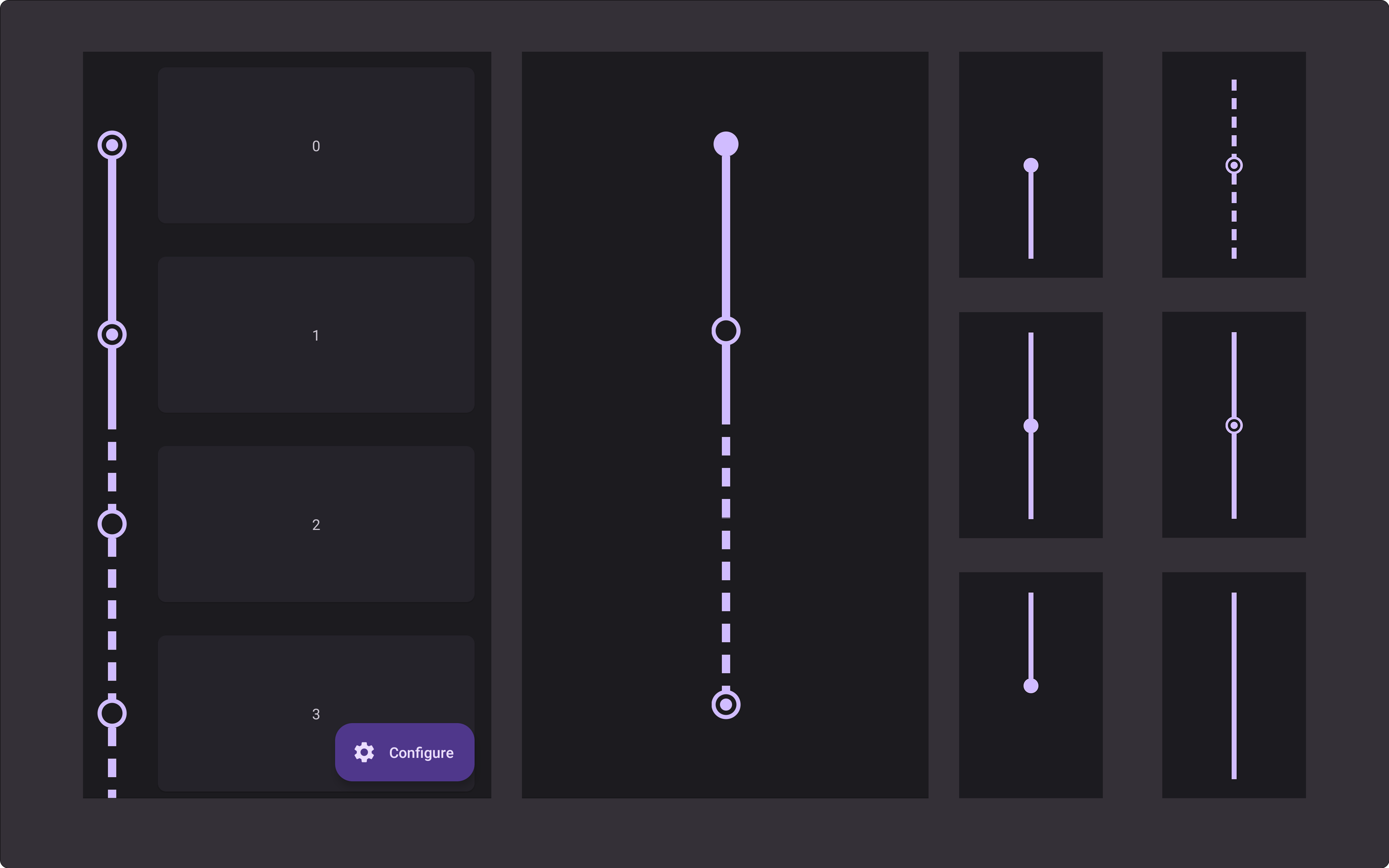
Previews
<table> <th>Automatically adapts to the item height and supports expand animations</th> <th>View type</th> <th>Preview</th> <th>View type</th> <th>Preview</th> <th>View type</th> <th>Preview</th> <tr> <td align="center" rowspan="2"><img src="https://github.com/lriccardo/TimelineView/raw/main/screens/demo.gif" alt="demo" width="250"/></td> <td>first</td> <td><img src="https://github.com/lriccardo/TimelineView/raw/main/screens/first.jpg" alt="first" width="200"/></td> <td>middle</td> <td><img src="https://github.com/lriccardo/TimelineView/raw/main/screens/middle.jpg" alt="middle" width="200"/></td> <td>checked</td> <td><img src="https://github.com/lriccardo/TimelineView/raw/main/screens/middle_checked.jpg" alt="checked" width="200"/></td> </tr> <tr> <td>last</td> <td><img src="https://github.com/lriccardo/TimelineView/raw/main/screens/last.jpg" alt="last" width="200"/></td> <td>spacer</td> <td><img src="https://github.com/lriccardo/TimelineView/raw/main/screens/spacer.jpg" alt="spacer" width="200"/></td> <td>dashed</td> <td><img src="https://github.com/lriccardo/TimelineView/raw/main/screens/middle_dashed.jpg" alt="dashed" width="200"/></td> </tr> </table>Setup
1. Add Jitpack to your root build.gradle
allprojects {
    repositories {
        maven { url "https://jitpack.io" }
    }
}
2. Add the dependency
dependencies {
    implementation 'com.github.lriccardo:TimelineView:1.1.2'
}
Usage
RecyclerView Decorator
recyclerView.addItemDecoration(
    TimelineDecorator(
        indicatorSize = 24f,
        lineWidth = 15f,
        padding = 48f,
        position = TimelineDecorator.Position.Left,
        indicatorColor = Color.RED,
        lineColor = Color.RED
    )
)
-
Customization
You can provide a custom drawable for the indicators using
indicatorDrawableorindicatorDrawableRes(indicatorDrawableoverridesindicatorDrawableRes), if both arenulla circle will be drawn (using the other customization parameters).If you pass a drawable reference (
<table> <th>Field</th> <th>Accepted values</th> <th>Default</th> <tr> <td>indicatorStyle</td> <td>IndicatorStyle (Filled | Empty | Checked)</td> <td>Filled</td> </tr> <tr> <td>indicatorDrawable</td> <td>Drawable</td> <td>null</td> </tr> <tr> <td>indicatorDrawableRes</td> <td>@DrawableRes Int</td> <td>null</td> </tr> <tr> <td>indicatorSize</td> <td>Float</td> <td>24f</td> </tr> <tr> <td>indicatorYPosition</td> <td>Percentage (0.0f - 1.0f)</td> <td>0.5f</td> </tr> <tr> <td>checkedIndicatorSize</td> <td>Float</td> <td>TimelineView default value</td> </tr> <tr> <td>checkedIndicatorStrokeWidth</td> <td>Float</td> <td>4dp</td> </tr> <tr> <td>lineStyle</td> <td>Normal (Normal | Dashed)</td> <td>TimelineView default value</td> </tr> <tr> <td>linePadding</td> <td>Float</td> <td>TimelineView default value</td> </tr> <tr> <td>lineDashLength</td> <td>Float</td> <td>TimelineView default value</td> </tr> <tr> <td>lineDashGap</td> <td>Float</td> <td>TimelineView default value</td> </tr> <tr> <td>lineWidth</td> <td>Float</td> <td>TimelineView default value</td> </tr> <tr> <td>padding</td> <td>Float</td> <td>16dp</td> </tr> <tr> <td>position</td> <td>Position (Left | Right)</td> <td>Left</td> </tr> <tr> <td>indicatorColor</td> <td>@ColorInt</td> <td>TimelineView default value</td> </tr> </tr> <tr> <td>lineColor</td> <td>@ColorInt</td> <td>TimelineView default value</td> </tr> </table>indicatorDrawableRes),ContextCompat.getDrawable()will be used internally. -
Advanced customization
If your
RecyclerView.AdapterimplementsTimelineAdapteryou can customize how each item of your list is drawn. Implementing one or more of these methods, allows you to use thepositionargument to return a different customization for some of your items.interface TimelineAdapter { fun getTimelineViewType(position: Int): TimelineView.ViewType? fun getIndicatorDrawable(position: Int): Drawable? @DrawableRes fun getIndicatorDrawableRes(position: Int): Int? fun getIndicatorStyle(position: Int): TimelineView.IndicatorStyle? fun getIndicatorColor(position: Int): Int? fun getLineColor(position: Int): Int? fun getLineStyle(position: Int): TimelineView.LineStyle? fun getLinePadding(position: Int): Float? }
Standalone view
<com.lriccardo.timelineview.TimelineView
    android:layout_width="wrap_content"
    android:layout_height="match_parent"
    app:timeline_item_type="first"
    app:indicator_size="12dp"
    app:line_width="8dp"
    app:indicator_color="@color/teal_700"
    app:line_color="@color/teal_700" />
-
Customization
<table> <th>Attribute</th> <th>Accepted values</th> <th>Default</th> <tr> <td>app:timeline_item_type</td> <td>first | middle | last | spacer</td> <td>first</td> </tr> <tr> <td>app:indicator_style</td> <td>filled | empty | checked</td> <td>filled</td> </tr> <tr> <td>app:indicator_drawable</td> <td>Drawable</td> <td>null</td> </tr> <tr> <td>app:indicator_size</td> <td>Dimension</td> <td>12dp</td> </tr> </tr> <tr> <td>app:indicator_color</td> <td>Color</td> <td>Color.RED</td> </tr> <tr> <td>app:indicator_y_position</td> <td>Percentage (0.0 - 1.0)</td> <td>0.5f</td> </tr> <tr> <td>app:checked_indicator_size</td> <td>Dimension</td> <td>6dp</td> </tr> <tr> <td>app:checked_indicator_stroke_width</td> <td>Dimension</td> <td>4dp</td> </tr> <tr> <td>app:line_style</td> <td>normal | dashed</td> <td>normal</td> </tr> <tr> <td>app:line_width</td> <td>Dimension</td> <td>8dp</td> </tr> </tr> <tr> <td>app:line_color</td> <td>Color</td> <td>Color.RED</td> </tr> <tr> <td>app:line_dash_length</td> <td>Dimension</td> <td>18</td> </tr> <tr> <td>app:line_dash_gap</td> <td>Dimension</td> <td>12</td> </tr> </table>
License
Copyright 2022 Riccardo Lattarulo

Licensed under the Apache License, Version 2.0 (the "License");
you may not use this file except in compliance with the License.
You may obtain a copy of the License at

   http://www.apache.org/licenses/LICENSE-2.0

Unless required by applicable law or agreed to in writing, software
distributed under the License is distributed on an "AS IS" BASIS,
WITHOUT WARRANTIES OR CONDITIONS OF ANY KIND, either express or implied.
See the License for the specific language governing permissions and
limitations under the License.
