
Crashreporter
Store and send crash reports directly to the devlopers
Install / Use
/learn @lobocv/CrashreporterREADME
CrashReporter
CrashReporter creates reports from the traceback if your python code crashes. The reports can be uploaded directly to the developers via email or web server. If no internet connection is available, crash reporter stores offline reports and later sends them when possible.
Features
Features of crashreporter include:
- Uploading of crash reports via email or to a web server (HQ).
- Offline crash reporting that stores crash reports until they are uploaded.
- Traceback and variable inspection output
Installation
To install:
pip install crashreporter
Usage
Implementing the crash reporter is easy. Just create a CrashReporter object. Configure the SMTP or HQ accounts for uploading of reports (optional) and you are good to go!
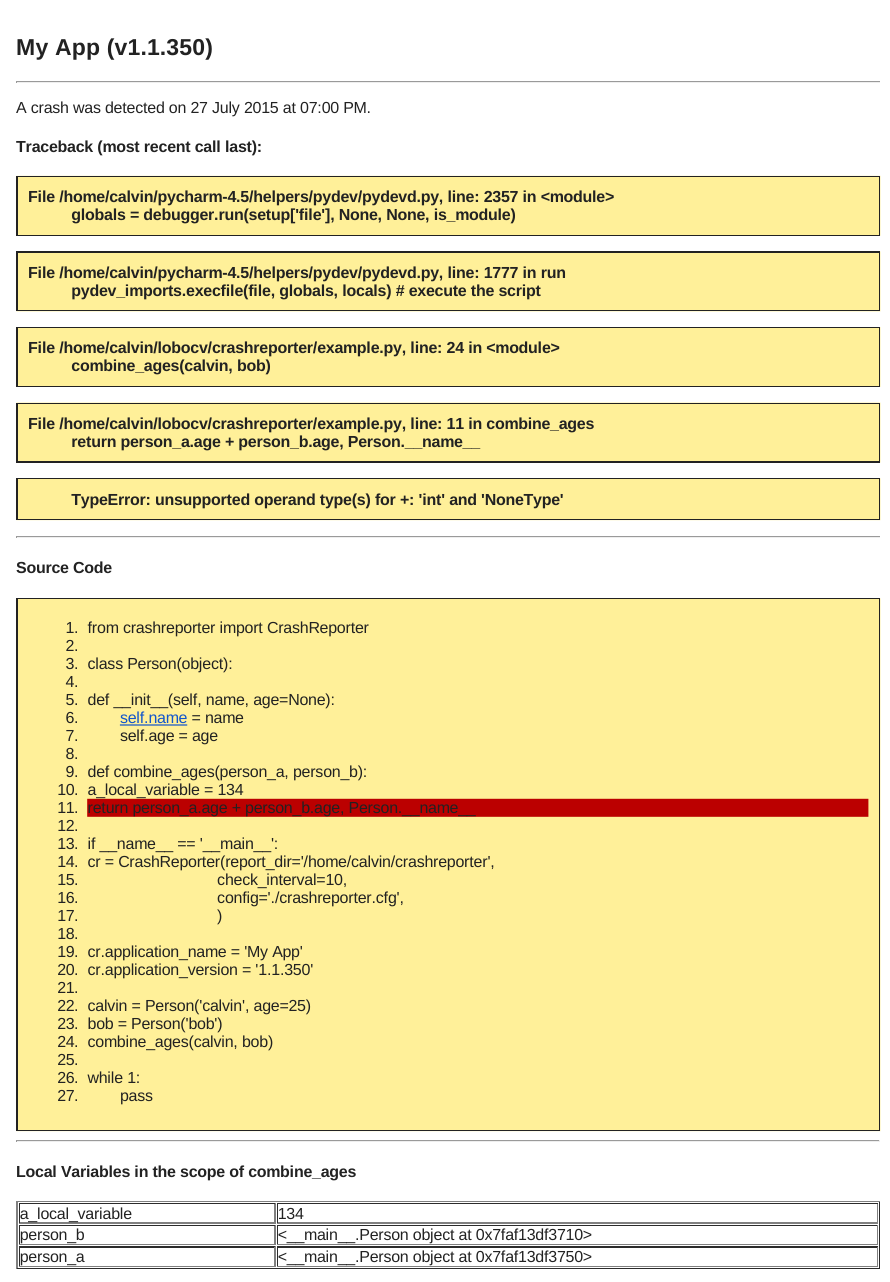
In the following example, we wil create a Person class that has an optional age attribute. We will then create two Person objects, one with an age and one without. When we attempt to combine their ages we get the following error:
TypeError: unsupported operand type(s) for +: 'int' and 'NoneType'
example.py
    from crashreporter import CrashReporter

    class Person(object):

        def __init__(self, name, age=None):
            self.name = name
            self.age = age

    def combine_ages(person_a, person_b):
        a_local_variable = 134
        return person_a.age + person_b.age, Person.__name__

    if __name__ == '__main__':
        # Note I have used a configuration file for setting up SMTP and HQ accounts but you can also call functions
        # cr.setup_smtp() and cr.setup_hq() with your credentials to configure SMTP/HQ respectively.
        cr = CrashReporter(report_dir='/home/calvin/crashreporter',
                           check_interval=10,
                           config='./crashreporter.cfg')

        cr.application_name = 'My App'
        cr.application_version = '1.1.350'

        calvin = Person('calvin', age=25)
        bob = Person('bob')
        combine_ages(calvin, bob)

        while 1:
            pass
When the crash occurs, the crash reporter will attempt to send it by email or upload it to the HQ server, if both methods
fail, the crash is written to file in report_dir. The next time the script is run, the crash reporter will look for
any offline reports and attempt to send them every check_interval seconds. After a sucessful upload, the stored reports
are deleted.
Configuration File
If you don't want to keep your SMTP and HQ credentials in your scripts you can alternatively use a configuration file.
Simple pass the path to the configuration file as the config argument in CrashReporter or call the load_configuration(path)
method with the path. The format of the configuration file should have two sections, SMTP and HQ. Under each section are parameters
that are passed to the setup_smtp and setup_ftp functions:
Example:
[SMTP]
user = mycrashreporter@gmail.com
passwd = mypasswordissupersecret
recipients = developer1@gmail.com, developer2@gmail.com
host = smtp.gmail.com
port = 587

[HQ]
api_key = ar923086wkjsldl235dfgdf32
server = http://www.crashreporter-hq.com
Attributes
The CrashReporter has several attributes that can be changed:
offline_report_limit:
        The maximum number of offline reports to save before overwriting
        the oldest report.

application_version:
        Application version as a string to be included in the report.

application_name:
        Application name as a string to be included in the report.

source_code_line_limit:
        The number of source code lines to include before and after the error
        as a tuple (before, after)
Example Report
Related Skills
node-connect
342.0kDiagnose OpenClaw node connection and pairing failures for Android, iOS, and macOS companion apps
claude-opus-4-5-migration
84.7kMigrate prompts and code from Claude Sonnet 4.0, Sonnet 4.5, or Opus 4.1 to Opus 4.5
frontend-design
84.7kCreate distinctive, production-grade frontend interfaces with high design quality. Use this skill when the user asks to build web components, pages, or applications. Generates creative, polished code that avoids generic AI aesthetics.
model-usage
342.0kUse CodexBar CLI local cost usage to summarize per-model usage for Codex or Claude, including the current (most recent) model or a full model breakdown. Trigger when asked for model-level usage/cost data from codexbar, or when you need a scriptable per-model summary from codexbar cost JSON.
