DirectTDoA
a Python 2/3 GUI for automated TDoA recording & processing
Install / Use
/learn @llinkz/DirectTDoAREADME
directTDoA v7.20
03 Jan 2024 - KiwiSDR software version > v1.647 broke directTDoA (no GNSS/GPS detected because of IQ wav incompatibility)
12 Jan 2024 - Good news! Christoph, our TDoA master fixed the issue (was a bug in kiwirecorder.py)
FIX : https://github.com/jks-prv/kiwiclient/commit/bc189087cf503820d56ddcc0f8781d7eed1b6337
The fix is simple and can be done by hand, just edit your kiwiclient/kiwirecorder.py file if you want a quick one !
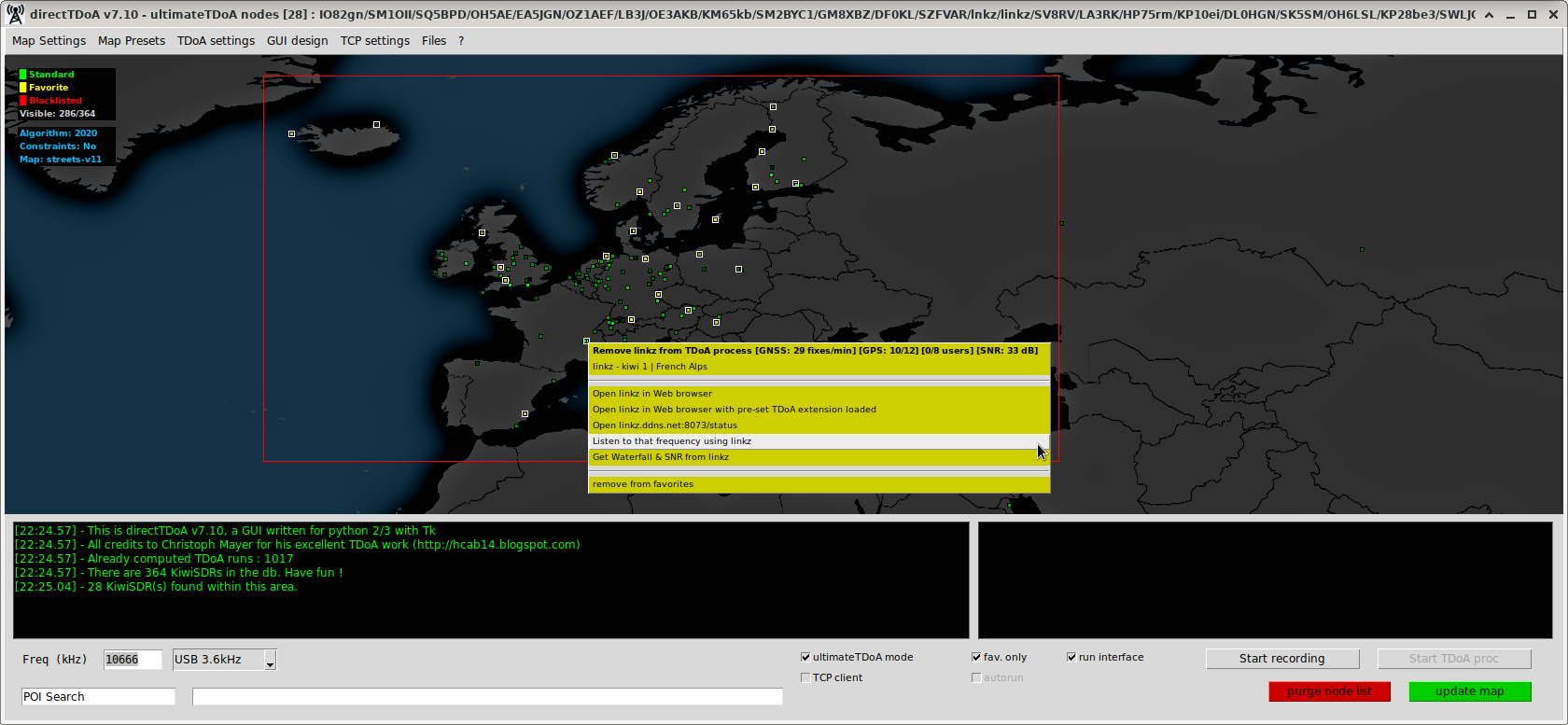
This software is JUST a python 2/3 GUI designed to compute TDoA runs on shortwave radio transmissions using remote (GPS enabled) KiwiSDR receivers around the World.
TDoA = Time Difference of Arrival .. (in this case: the Arrival of shortwave radio transmissions)
Linux users : GNU Octave version < 8 only !
else, read_kiwi_iq_wav.cc will not compile - fix in progress...
KNOWN ISSUES:
1/ If you plan to use the software on a machine without a sound card then you must comment out lines 15 & 16 in /directTDoA/kiwiclient/kiwirecorder.py
#stream = sounddevice.OutputStream(48000, 2048, channels=1, dtype='int16')
#stream.start()
2/ On recent versions of Octave the handling of the font size has been changed (pixels Vs points) and you may find that they are too large in the final file, you can reduce the fontsize values on lines 41, 42 & 154 in /directTDoA/TDoA/m/tdoa_plot_map.m
WINDOWS
The decision was made not to support installation from the repository.
1/ Download the latest directTDoA-windows.zip, unzip and extract it
2/ Create your own Mapbox.com account, go to account and get/create a default public token then edit getmap.py and modify MAP_TOK variable with your default public token
NOTE: directTDoA use Static Images API and you'll get 50000 free monthly requests
3/ double-click on directTDoA.bat
IMPORTANT: You must use only this method to launch the program to avoid file path issues.
This .zip archive contains all the necessary files already patched and compiled and also includes light versions of GNU Octave and python, so no need to install the full versions of the last two on your machine. The unzipped archive is 272 MB, compared to ~2 GB in the other installer way.
LINUX
1/ Install python 3 and python3-pip using your package manager
2/ Install GNU octave (important: only versions < 8)
3/ Install git, patch, gcc, base-devel, ttf-dejavu, gcc-fortran, tk, portaudio, xdg-utils, epdfview, fltk, liboctave-dev
4/ git clone --recursive https://github.com/llinkz/directTDoA && cd directTDoA
5/ ./setup.sh
####This setup script will install python modules, compile the necessary .oct file and apply some files patchs ####IMPORTANT: The octave files compilation process takes a lot of time, be patient, ignore warnings and don't stop the script
6/ Create your own Mapbox.com account, go to account and get/create a default public token then edit file named getmap.py and modify MAP_TOK variable with your default public token (directTDoA use Static Images API and you'll get 50000 free monthly requests)
7/ ./directTDoA.py
MAC OS X
- REQUIREMENT Xcode + Homebrew (https://brew.sh/index_fr)
1/ Install Homebrew, in terminal : /usr/bin/ruby -e "$(curl -fsSL https://raw.githubusercontent.com/Homebrew/install/master/install)"
2/ Install Python, in terminal : brew install python@2 or brew install python@3
3/ Install GNU Octave in Terminal : brew install octave
4/ git clone --recursive https://github.com/llinkz/directTDoA && cd directTDoA
5/ ./setup.sh
####This setup script will install python modules, compile the necessary .oct file and apply some files patchs ####IMPORTANT: The octave files compilation process takes a lot of time, be patient, ignore warnings and don't stop the script
6/ Create your own Mapbox.com account, go to account and get/create a default public token then edit file named getmap.py and modify MAP_TOK variable with your default public token (directTDoA use Static Images API and you'll get 50000 free monthly requests)
7/ ./directTDoA.py
LICENSE
- This python GUI code has been written and released under the "do what the f$ck you want with it" license
CHANGE LOG
- v1.00-1.50 : first working version, basic, static map, manual host adding, hardcoded coordinates, manual octave code run etc...
- v2.00 : current work, update & dynamic maps full of GPS enabled nodes, auto octave code run, easier to use
- v2.10beta : adding differents maps that can be choosed by the user, early work on SNR and tiny waterfall for nodes
- v2.20: adding favorite/blacklist node management, popup menu when clicking a node gives: add for TDoA proc + Open KiwiSDR in browser
- v2.21: reducing the map boundaries red rectangle 'sensivity' when mouse is near main window borders
- v2.30: adding node color change possible + code clean-up + adding a popup window telling you forgot to choose your map boundaries before starting the IQ recording + Popup menus are now disabled (Add/Open) if the node has no slot available + Added a gray scale map more brighter
- v2.31: bugfix on checkfilesize process
- v2.32: adding a restart GUI button
- v2.33: adding MacOS X compatibility, thx Nicolas M.
- v2.40: known points (world capitals) listing is now a file, format is 'name,lat,lon' - easier for you to add yours :-)
- v2.41: update process modified due to missing tags for some nodes in kiwisdr.com/public page
- v2.42: forgot some conditions for MacOS compatibility oops thanks Nicolas M. again :-)
- v2.43: auto create the directTDoA_server_list.db file at 1st start, file does not need to be in the repo anymore
- v2.44: MacOS tested OK, code cleanup + warning about missing GPS timestamps in IQ recordings -uglymaps +kickass NASA maps
- v2.50: some TODO list items coded or fixed
- v2.60: map update now based on John's json listing + GPS fix/min map filter + nodes are identified by IDs, no hosts anymore + no .png file creation (patch) + no more gnss_pos.txt backup and no more TDoA/gnss_pos/ purge
- v2.70: Octave subprocess management modified (no more octave defunct remaining in "ps aux" now) + stdout & stderr saved in the same "TDoA/iq/<backup>/TDoA_<freq>.txt" file
- v2.71: each node color brightness is now based on its latest GPS fix/min value, it will become darker when fix/min will go towards "0" + my own kiwiSDR coordinates more accurate
- v2.72: Adding the SNR values of each node from linkfanel's (JSON) database + Color points (nodes) change in brightness according to the SNR, minimum=0 <darker - brighter> maximum=35? (version not released)
- v2.80: Listing update is now made from both linkfanel's (JSON) databases only (GPS enabled nodes list + SNR values) + adding regexp to create TDoA_id (parsing callsigns), IPs and node various coordinates format (version not released)
- v2.90: Code clean-up + SNR values are now only from IS0KYB (JSON) database + count TDoA runs at start + adding a ./recompute.sh script to backup dir + directTDoA node db now in JSON format + add map legend + popup menu font color managed for more readibility + new maps
- v3.00: More code clean-up and as the GUI has changed a lot recently, it's now entering the v.3xx version range
- v3.10: Removed "20 kHz wide audio bandwidth mode" set KiwiSDRs from the node list, incompatible with TDoA at this time (2jan19) + reachability & GPS_good, fixes_min, user, users_max values are now dynamic when node is clicked on map (timeout/host not found/obsolete proxy data)
- v3.20: Better management of clicked nodes (checking offline=yes/no + TDoA_ch>=1 + fixes_min>0) + default IQ rec BW in config file added + possibility to restart the IQ rec process + Marco/Pierre websites checked before update process start + current release version check menu added
- v3.21: the popup when map boundaries are set has been removed - adding mode informations in the TDoA map result title - minor bug fixes with the bandwidth default/current setting
- v3.22: map boundaries informations back, as label..
- v3.23: bug fixes with add/remove fav/black process..
- v3.24: allowing the possibility to "Open" a node in browser even if 0 GPS fixes were reported at instant T + minor date modification on TDoA output file title + minor text corrections
- v4.00: no more GUI restart after TDoA runs (node list is kept intact) + Listen/Demod mode added, requires python modules pygame (for all) + scipy (for MacOS X), new file KiwiSDRclient.py also required + possibility to remove a single node from the list + purge button added + check version runned on software start + minor fixes on many routines
- v4.10: "Restart Rec" is now "Stop Rec" instead (it saves IQ files and generate .m file only) + added "Abort TDoA" routine so you can stop a previewed bad result octave process w/o having to restart full GUI + minor mods on checkversion(), float(frequency) and restart/close GUI + 200Hz high pass filter block commented out and empty known point block added in proc.m files
- v4.18: early ultimateTDoA mode dev, adding a necessary patch for TDoA/kiwiclient/kiwiworker.py to bypass returned errors causing full IQ recording process freezes (KiwiBadPasswordError & KiwiDownError) to apply run: patch -i kiwiworker_patch.diff ./TDoA/kiwiclient/kiwiworker.py
- v4.19: adding another patch for TDoA/m/tdoa_plot_map.m to display the 'most likely position' string