
Rearview
Timeseries data monitoring framework
Install / Use
/learn @livingsocial/RearviewREADME

Overview
Rearview is a real-time monitoring framework that sits on top of <a href="https://github.com/graphite-project" target="_blank">Graphite</a>'s time series data. This allows users to create monitors that both visualize and alert on data as it streams from Graphite. The monitors themselves are simple Ruby scripts which run in a sandbox to provide additional security. Monitors are also configured with a crontab compatible time specification used by the scheduler. Alerts can be sent via email, pagerduty, or campfire.
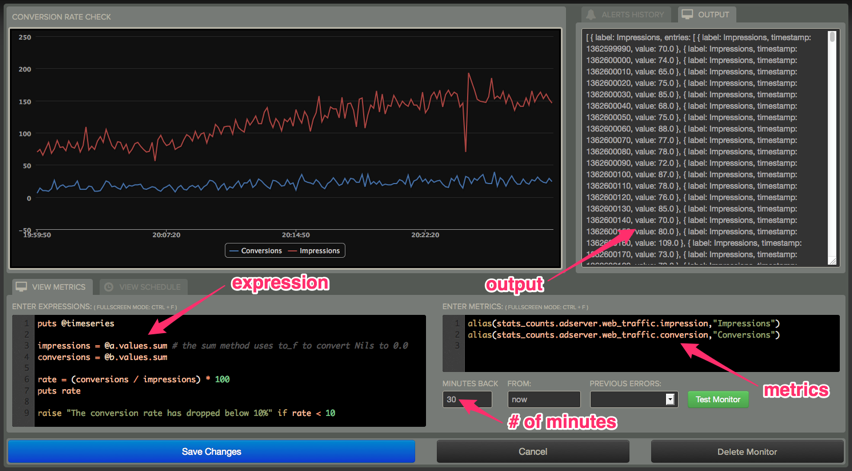
This is a port of the original scala version re-written in Ruby on Rails. Rearview has been running in production for over a year at LivingSocial.
Go here for a more detailed overview of rearview
Requirements
- jvm 1.6+
- jruby 1.7.5+
- ruby manager (rvm or rbenv)
- graphite
- mysql/postgresql (or other supported database)
Getting Started
Get it
Download the latest release.
Database Support
Rearview comes with drivers for both mysql and postgresql. If you wish to use a differenct database select a supported jdbc driver and add it to the Gemfile and bundle install. See activerecord-jdbc-adapter site for more details.
Edit config/database.yml
Configure per your selected database driver and database connection settings. See Configuring Rails for more details. The installation defaults to common settings for mysql.
Sample configurations for both mysql (config/database.jdbcmysql.yml) and postgresql (config/database.jdbcpostgresql.yml) are available.
Run the setup script
$ bin/setup
If the setup script fails due to java.lang.ClassNotFoundException: javax/crypto/JceSecurity, please see issue #17 for a resolution to this problem.
Configuration
Before running rearview you must specify a few settings. The configuration file location is:
config/initializers/rearview.rb
You must set config.graphite_url and config.sandbox_exec for rearview to run properly. Most of the other settings you should be able to leave as is.
Verify configuration
$ rake RAILS_ENV=production rearview:config:verify
Running
$ foreman start
This will start rearview on port 3000 (http://localhost:3000).
Sign-in with the default user admin@localhost and password admin
Contributing
We encourage you to contribute to Rearview. Please check out the rearview-engine repository for more details.
