
ZYThumbnailTableView
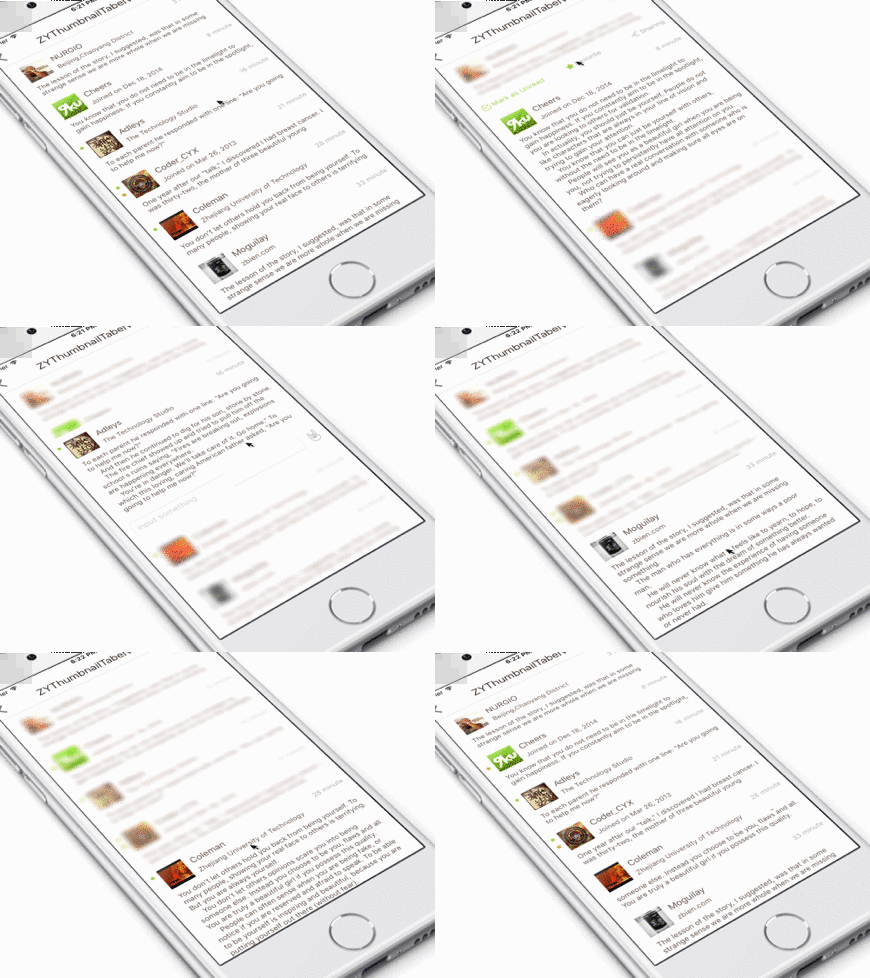
a TableView have thumbnail cell only, and you can use gesture let it expands other expansionView, all diy
Install / Use
/learn @liuzhiyi1992/ZYThumbnailTableViewREADME
ZYThumbnailTableView
#####可展开型预览TableView,开放接口,完全自由定制
#####An expandable preview TableView, custom-made all the modules completely with open API you can.
######Design by Sergii Ganushchak





<br>

a TableView have thumbnail cell only, and you can use gesture let it expands other expansionView, all DIY
高度自由定制可扩展TableView, 其中tableViewCell,topExpansionView,bottomExpansionView均提供接口自由定制,功能堪比小型阅读app
<br>
#####If you have updated Xcode 7.3 yet, please use the branch named 'Xcode7.3-Handle'.
#####如果已更新Xcode7.3,请下载分支Xcode7.3-Handle使用即可。
#英文文档
##Summary
With TableView skin, the powerful heart similar to a small app, decoupling arms and legs and support highly customized there are. Every cell as a whole with the vocational work. you can expand more extension views through slide up&down with your finger, and that the cell and extension views you can custom-made completely with open API, which carry the param can meet your needs to make interaction.
- Working characteristics: TableViewCell act as a container with thumbnail content, the contents of the initial display be limited to 'cellHeight',it will recalculate the complete height when you click it, and you can slide to expand the extension views after that.
- Custom-made: tableViewCell, topExtensionView, bottomExtensionView all you can provide to thumbnailTableView.
- Simple to use: alloc a ZYThumbnailTableViewController object, assign your tableViewCell, ExtensionView(top or bottom), and your can uses the indexPath that the param with the assign Block to come true your demand.
##CocoaPods
pod 'ZYThumbnailTableView', '~> 1.0.5'
Setting up with Carthage
Carthage is a decentralized dependency manager that automates the process of adding frameworks to your Cocoa application.
You can install Carthage with Homebrew using the following command:
$ brew update
$ brew install carthage
To integrate ZYThumbnailTableView into your Xcode project using Carthage, specify it in your Cartfile:
github "Dershowitz011/ZYYT"
##Usage
You can consult the Demo to complete your own thumbnailTableView. Have fun.
create a ZYThumbnailTableView object:
zyThumbnailTableVC = ZYThumbnailTableViewController()
configure the necessary param of tableViewCell, cellHeight, reused identification, dataSource...
zyThumbnailTableVC.tableViewCellReuseId = "DIYTableViewCell"
zyThumbnailTableVC.tableViewCellHeight = 100.0
zyThumbnailTableVC.tableViewDataList = dataList
//you can modify the cellHeight & dataList all the place dynamically
//you must ensure the dataSource newest, dont forget to update it in network callback .
zyThumbnailTableVC.tableViewBackgroudColor = UIColor.whiteColor()
//default backgroundColor is white.
and then configure your tableViewCell
//--------insert your custom tableview cell
zyThumbnailTableVC.configureTableViewCellBlock = {
    return DIYTableViewCell.createCell()
}
configure the update cell function
zyThumbnailTableVC.updateTableViewCellBlock =  { [weak self](cell: UITableViewCell, indexPath: NSIndexPath) -> Void in
    let myCell = cell as? DIYTableViewCell
    //Post is my datasource model
    guard let dataSource = self?.zyThumbnailTableVC.tableViewDataList[indexPath.row] as? Post else {
        print("ERROR: illegal tableview dataSource")
        return
    }
    myCell?.updateCell(dataSource)
}
//--------insert your diy TopView
zyThumbnailTableVC.createTopExpansionViewBlock = { [weak self](indexPath: NSIndexPath) -> UIView in
    //Post是我的数据model
    let post = self?.zyThumbnailTableVC.tableViewDataList[indexPath.row] as! Post
    let topView = TopView.createView(indexPath, post: post)!
    topView.delegate = self;
    return topView
}

let diyBottomView = BottomView.createView()!
//--------let your inputView component not cover by keyboard automatically (animated) (ZYKeyboardUtil)
zyThumbnailTableVC.keyboardAdaptiveView = diyBottomView.inputTextField;
//--------insert your diy BottomView
zyThumbnailTableVC.createBottomExpansionViewBlock = { _ in
    return diyBottomView
}
The effects working with ZYKeyboardUtil

In general, your own thumbnailtableView is completed, you can produce the Interaction in your custom view file, and use 'indexPath' to connected them.
how i used 'indexPath' in my Interaction
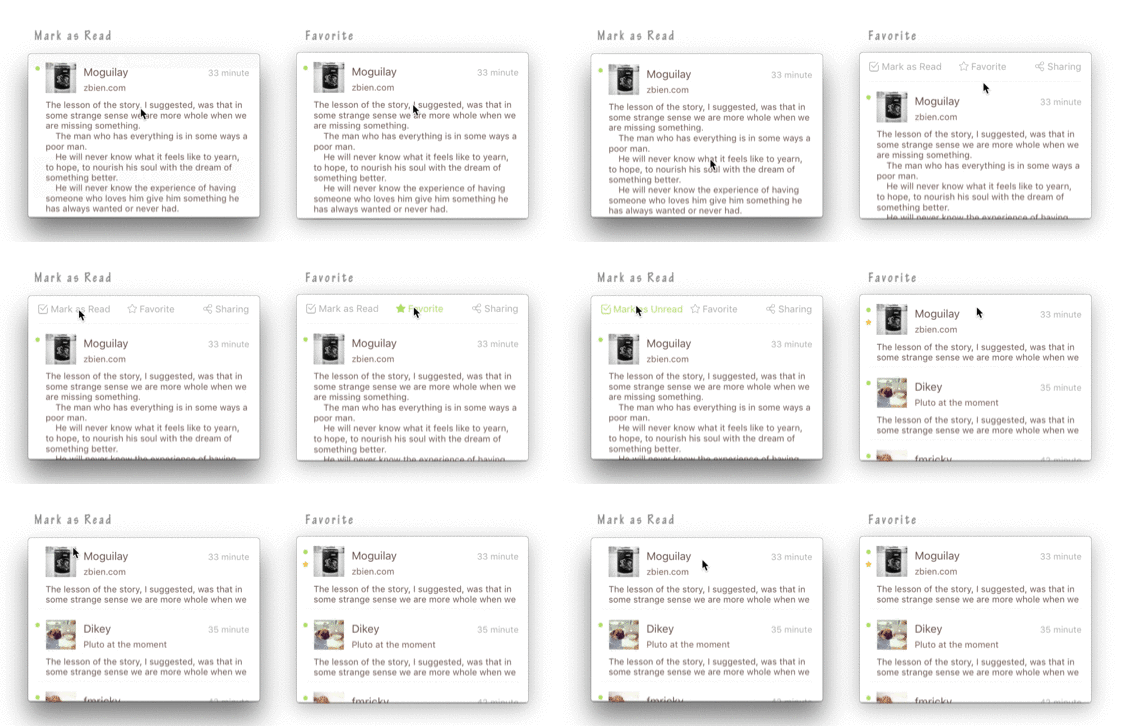
- mark as read, the green dot disappear.
- mark as favorite, show a star on the edge of the cell.
I save the param 'indexpath' in my topView object while createView, if the favorite button be clicked, i modify the dataSource according to ‘indexPath' with delegate, and zyThumbnailTableVC.reloadMainTableView().
//TopView---------------------------------------------
class func createView(indexPath: NSIndexPath, post: Post) -> TopView? {
    //--------do something
    view.indexPath = indexPath
    return view
}

//touch up inside---------------------------------------------
@IBAction func clickFavoriteButton(sender: UIButton) {
    //--------do something
    delegate.topViewDidClickFavoriteBtn?(self)
}

//delegate func    in   ViewController---------------------------
func topViewDidClickFavoriteBtn(topView: TopView) {
    let indexPath = topView.indexPath
    //Post is my dataSource model
    let post = zyThumbnailTableVC.tableViewDataList[indexPath.row] as! Post
    post.favorite = !post.favorite
    zyThumbnailTableVC.reloadMainTableView()
}
For NavigationBar, i deal with navigationItem of zyThumbnailTableView object in ViewController in Demo, eh, maybe you can let ZYThumbnailTabelViewController inherit your communal Controller in the my Source Code.
//------------ViewController------------
func configureZYTableViewNav() {
        let titleView = UILabel(frame: CGRectMake(0, 0, 200, 44))
        titleView.text = "ZYThumbnailTabelView"
        titleView.textAlignment = .Center
        titleView.font = UIFont.systemFontOfSize(20.0);
        //503f39
        titleView.textColor = UIColor(red: 63/255.0, green: 47/255.0, blue: 41/255.0, alpha: 1.0)
        zyThumbnailTableVC.navigationItem.titleView = titleView
    }
#For Chinese
##Summary:
tableView的皮肤,类似一个小型app的强大交互心脏,四肢高度解耦高度自由定制,每个cell其实都是一个业务的缩略view,原谅我语文不太好不懂表达,这样的缩略view下文就叫做thumbnailView,可以根据上下手势展开更多的功能视图块,这些视图块已经开放了接口,支持使用者自己diy提供创建,同时接口中带的参数基本满足使用者需要的交互,当然tableviewCell也是完全自由diy的
-
工作特点:tableViewCell充当一个缩略内容的容器,初始内容展示局限于cellHeight,当cell被点击后,根据缩略view内容重新计算出完整的高度,装入另外一个容器中完整展示出来,并且可以上下拖拽扩展出上下功能视图。
-
自由定制:看见的除了功能以外,全部视图都开放接口灵活Diy,tableViewCell,头部扩展视图(topView),底部扩展视图(bottomView)都是自己提供。
-
使用简单:只需要把自己的tableViewCell,topView,bottomView配置给ZYThumbnailTableViewController对象。
##CocoaPods:
未来会更新oc版
pod 'ZYThumbnailTableView', '~> 1.0.5'
##Usage:
------结合Demo介绍使用方法,手把手定制自己的ThumbnailTableView:
创建ZYThumbnailTableViewController对象:
zyThumbnailTableVC = ZYThumbnailTableViewController()
配置tableViewCell必须的参数:cell高,cell的重用标志符,tableView的数据源等
zyThumbnailTableVC.tableViewCellReuseId = "DIYTableViewCell"
zyThumbnailTableVC.tableViewCellHeight = 100.0
//当然cell高可以在任何时候动态配置
zyThumbnailTableVC.tableViewDataList = dataList
zyThumbnailTableVC.tableViewBackgroudColor = UIColor.whiteColor()
//背景颜色可不设置,默认为白色
配置cell的update方法,tableView配置每个cell必经之处,除了updateCell可以添加额外的操作。这里要注意updateCell的时候建议尽量使用zyThumbnailTableVC对象里的数据源datalist,同时要注意时刻保证VC对象里的数据源为最新,接口回调更改数据源时不要忘了对zyThumbnailTableVC.tableViewDataList的更新。
zyThumbnailTableVC.updateTableViewCellBlock =  { [weak self](cell: UITableViewCell, indexPath: NSIndexPath) -> Void in
    let myCell = cell as? DIYTableViewCell
    //Post是我的数据model
    guard let dataSource = self?.zyThumbnailTableVC.tableViewDataList[indexPath.row] as? Post else {
        print("ERROR: illegal tableview dataSource")
        return
    }
    myCell?
