
Heads
A minimal Linux that runs as a coreboot or LinuxBoot ROM payload to provide a secure, flexible boot environment for laptops, workstations and servers.
Install / Use
/learn @linuxboot/HeadsREADME

Heads: the other side of TAILS
Heads is a configuration for laptops and servers that tries to bring more security to commodity hardware. Among its goals are:
- Use free software on the boot path
- Move the root of trust into hardware (or at least the ROM bootblock)
- Measure and attest to the state of the firmware
- Measure and verify all filesystems
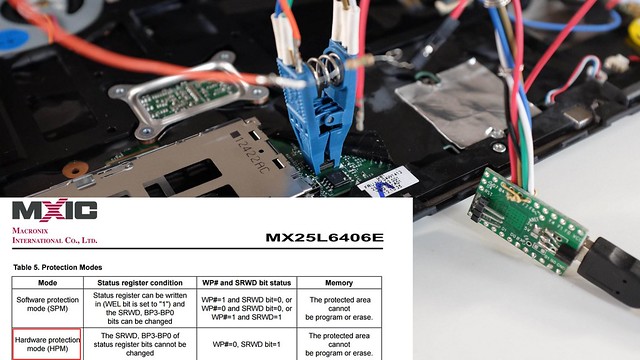
NOTE: It is a work in progress and not yet ready for non-technical users. If you're interested in contributing, please get in touch. Installation requires disassembly of your laptop or server, external SPI flash programmers, possible risk of destruction and significant frustration.
More information is available in the 33C3 presentation of building "Slightly more secure systems".
Documentation
Please refer to Heads-wiki for your Heads' documentation needs.
Contributing
We welcome contributions to the Heads project! Before contributing, please read our Contributing Guidelines for information on how to get started, submit issues, and propose changes.
Building heads with prebuilt and versioned docker images
Heads now builds with Nix built docker images since https://github.com/linuxboot/heads/pull/1661.
The short path to build Heads is to do what CircleCI would do (./docker_repro.sh under heads git cloned directory):
- Install Docker (docker-ce) for your OS by following Docker's official installation instructions: https://docs.docker.com/engine/install/
- run
./docker_repro.sh make BOARD=XYZ
Note: ./docker_repro.sh is the canonical, reproducible way to build and test Heads. The docker_local_dev.sh helper is intended for developers who need to modify the local image built from flake.nix/flake.lock and is not recommended for general testing.
Important: the supported and tested workflow uses the provided Docker
wrappers (./docker_repro.sh, ./docker_local_dev.sh, or
./docker_latest.sh). Host-side installation of QEMU, swtpm, or other
QEMU-related tooling is unnecessary for the standard workflow and is not
part of the tested configuration. Only advanced or edge-case workflows
may require installing those tools on the host (see targets/qemu.md
for guidance).
The Docker images produced by our Nix build include QEMU
(qemu-system-x86_64), swtpm / libtpms, canokey-qemu (a virtual
OpenPGP smartcard), and other userspace tooling required to build and
test QEMU boards. If you use ./docker_repro.sh you only need Docker on
the host (for example, docker-ce). For KVM acceleration the host
must expose /dev/kvm (load kvm_intel / kvm_amd as appropriate);
our wrapper scripts mount /dev/kvm automatically when it exists.
If you plan to manage disk images or use qemu-img snapshots on the
host (outside containers), install the qemu-utils package locally
(which provides qemu-img).
Inspecting and cleaning local Docker images
# List local images
docker images

# Inspect a specific image (IDs, digests, repo tags)
docker image inspect <image>

# Remove a specific image
docker rmi <image>

# Remove all local images (destructive)
docker rmi -f $(docker images -aq)

# Remove unused images/containers/networks/build cache (destructive)
docker system prune -a --volumes
Note: you may need to prefix commands with sudo depending on your Docker setup.
QEMU disk snapshots with qemu-img
If you manage qcow2 disk images on the host, qemu-img can create, list,
restore, and delete snapshots. These examples assume a qcow2 disk image:
# Create a snapshot
qemu-img snapshot -c clean root.qcow2

# List snapshots
qemu-img snapshot -l root.qcow2

# Restore (apply) a snapshot
qemu-img snapshot -a clean root.qcow2

# Delete a snapshot
qemu-img snapshot -d clean root.qcow2

# Optional: create an overlay backed by a base image
qemu-img create -f qcow2 -b base.qcow2 overlay.qcow2
If you prefer to run these inside the container, prefix with
./docker_repro.sh (for example, ./docker_repro.sh qemu-img snapshot -l root.qcow2).
If you do not specify USB_TOKEN when running QEMU targets, the container will use the included canokey-qemu virtual token by default; set USB_TOKEN (or use hostbus/hostport/vendorid,productid) to forward a hardware token instead.
Docker wrapper helper reference
Each wrapper now shows its own focused help (only the variables it actually uses). For the complete environment reference, run docker/common.sh directly:
# Wrapper-specific help
./docker_repro.sh --help
./docker_latest.sh --help
./docker_local_dev.sh --help

# Full environment variable reference (shared helper)
./docker/common.sh
The shared helper documents all supported environment variables (opt-ins and opt-outs) and defaults. Wrapper help is intentionally narrower so it only lists variables relevant to that wrapper.
Wrapper options & environment variables
All wrapper scripts (./docker_repro.sh, ./docker_latest.sh, ./docker_local_dev.sh):
-
HEADS_MAINTAINER_DOCKER_IMAGE— override the canonical maintainer's Docker image repository (default:tlaurion/heads-dev-env). Use this for local testing or if you maintain a fork. Example:export HEADS_MAINTAINER_DOCKER_IMAGE="myuser/heads-dev-env". This affects reproducibility checks and default image references across all Docker wrapper scripts. -
HEADS_CHECK_REPRODUCIBILITY_REMOTE— specify which remote image to compare against when verifying reproducibility (default:${HEADS_MAINTAINER_DOCKER_IMAGE}:latest). Use this to test against a specific tagged version instead of:latest.# Compare against a specific version export HEADS_CHECK_REPRODUCIBILITY_REMOTE="tlaurion/heads-dev-env:v0.2.7" HEADS_CHECK_REPRODUCIBILITY=1 ./docker_local_dev.sh -
HEADS_DISABLE_USB=1— disable automatic USB passthrough and the automatic USB cleanup (default:0). -
HEADS_X11_XAUTH=1— force mounting your${HOME}/.Xauthorityinto the container for X11 authentication. When set the helper will bypass programmatic Xauthority generation and mount your${HOME}/.Xauthority(if present); if the file is missing the helper will warn and will not attempt automatic cookie creation (GUI may fail).
./docker_local_dev.sh:
-
HEADS_SKIP_DOCKER_REBUILD=1— skip automatically rebuilding the local image whenflake.nix/flake.lockare dirty -
HEADS_CHECK_REPRODUCIBILITY=1— recommended for verifying reproducible builds. After building/loading the local image, automatically compares its digest with the published maintainer image to verify reproducibility. Requires network access. By default compares against${HEADS_MAINTAINER_DOCKER_IMAGE}:latest. UseHEADS_CHECK_REPRODUCIBILITY_REMOTEto specify a different tag (e.g.,v0.2.7). See the "Verifying reproducibility" section below for detailed examples and expected outputs. -
HEADS_AUTO_INSTALL_NIX=1— automatically attempt to download the Nix single-user installer whennixis missing (interactive prompt suppressed). For supply-chain safety the helper will download the installer to a temporary file and print its SHA256; it will NOT execute the installer automatically unless the downloaded installer matches a pinned hash. The helper will also attempt to detect the installer version heuristically (when possible) and suggest the canonical releases URL (for examplehttps://releases.nixos.org/nix/nix-2.33.2/install.sha256) so you can fetch the published sha and compare. To verify:-
Preferred: pin a release version (recommended): set
HEADS_NIX_INSTALLER_VERSIONto a release (for examplenix-2.33.2). The helper will fetchhttps://releases.nixos.org/nix/${HEADS_NIX_INSTALLER_VERSION}/installandinstall.sha256and show both checksums for you to compare. To auto-run in trusted automation, setHEADS_NIX_INSTALLER_SHA256to the expected sha256 as well. -
Or compute-and-pin locally: run
./docker/fetch_nix_installer.sh --version nix-2.33.2(or--url) to download the installer and print its sha256, then setHEADS_NIX_INSTALLER_SHA256to that value for automation.
Otherwise verify the downloaded installer manually and run it yourself:
sh /path/to/installer --no-daemon. -
-
HEADS_AUTO_ENABLE_FLAKES=1— automatically enable flakes by writingexperimental-features = nix-command flakesto$HOME/.config/nix/nix.conf(interactive prompt suppressed) -
HEADS_MIN_DISK_GB— minimum free disk space in GB required on/nix(or/if/nixmissing) for building (default:50) -
HEADS_SKIP_DISK_CHECK=1— skip the preflight disk-space check -
HEADS_ALLOW_UNPINNED_LATEST=1— when set, bypass the interactive warning that using:latestin./docker_latest.shis a supply-chain risk (otherwise:latestrequires confirmation unlessDOCKER_LATEST_DIGESTis set or the wrapper can fall back toDOCKER_REPRO_DIGESTfor the maintainer image) -
DOCKER_REPRO_DIGEST— pin the image used by./docker_repro.shto an immutable digest:tlaurion/heads-dev-env@<digest>(recommended for reproducible and secure builds). Note:DOCKER_REPRO_DIGESTis consumed by./docker_repro.sh(viaresolve_docker_imageindocker/common.sh) and is the canonical way to pin the repro image for reproducible builds.
For details about selecting or forwarding a physical USB token to QEMU
(handled by the USB_TOKEN make variable), see targets/qemu.md.
Note: when USB passthrough is active the wrappers will detect processes that may be holding a USB token (for example scdaemon or pcscd). The wrapper will warn and, on interactive shells, give a 3s abort window before attempting to kill those processes to free the token. Set HEADS_DISABLE_USB=1 to opt out of thi
Related Skills
node-connect
344.1kDiagnose OpenClaw node connection and pairing failures for Android, iOS, and macOS companion apps
frontend-design
96.8kCreate distinctive, production-grade frontend interfaces with high design quality. Use this skill when the user asks to build web components, pages, or applications. Generates creative, polished code that avoids generic AI aesthetics.
openai-whisper-api
344.1kTranscribe audio via OpenAI Audio Transcriptions API (Whisper).
qqbot-media
344.1kQQBot 富媒体收发能力。使用 <qqmedia> 标签,系统根据文件扩展名自动识别类型(图片/语音/视频/文件)。
