
HERO
Research code for EMNLP 2020 paper "HERO: Hierarchical Encoder for Video+Language Omni-representation Pre-training"
Install / Use
/learn @linjieli222/HEROREADME
HERO: Hierarchical Encoder for Video+Language Omni-representation Pre-training
This is the official repository of HERO (EMNLP 2020). This repository currently supports finetuning HERO on TVR, TVQA, TVC, VIOLIN, DiDeMo, and MSR-VTT Retrieval. The best pre-trained checkpoint (on both HowTo100M and TV Dataset) are released. Code for HERO pre-training on TV Dataset is also available.
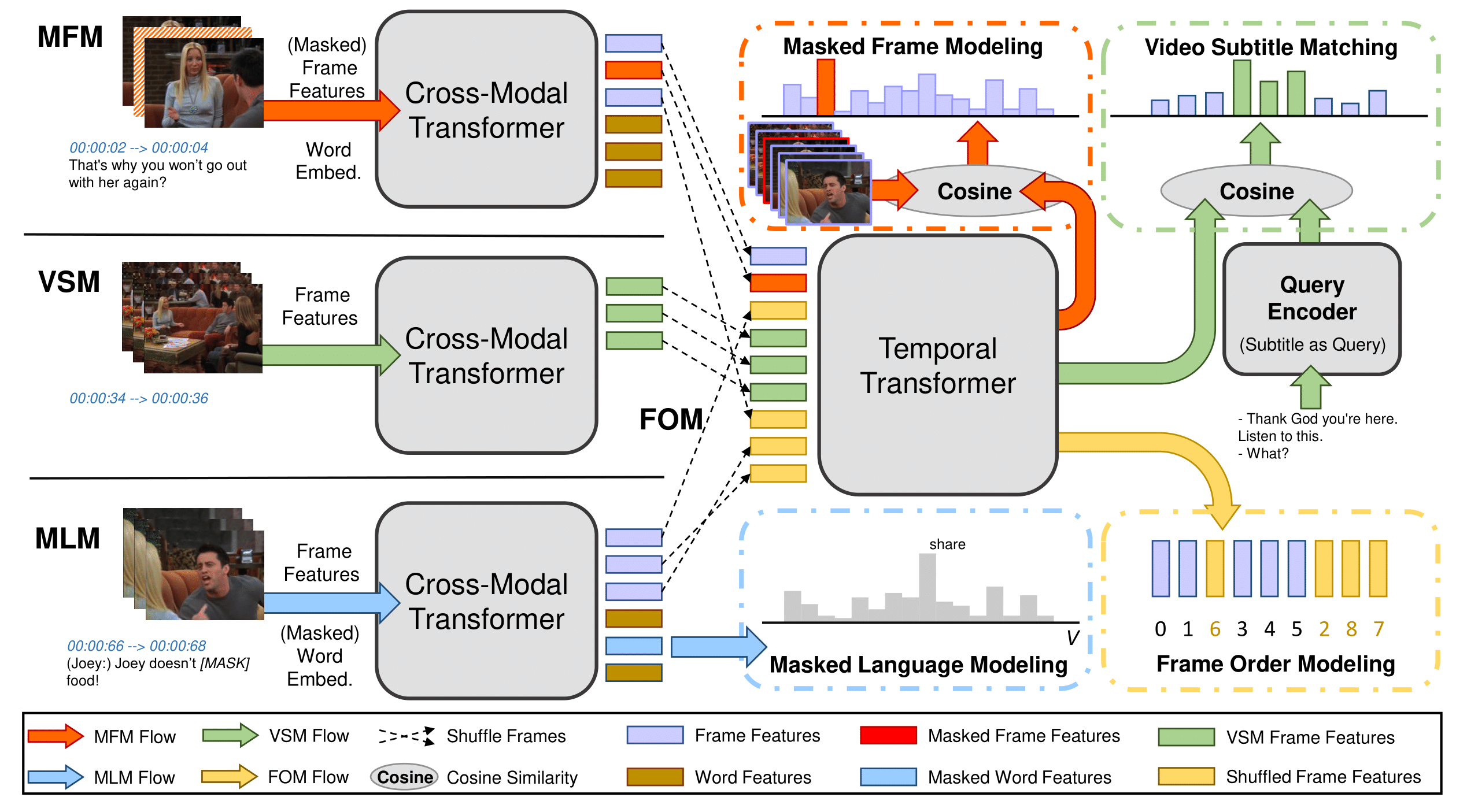
Some code in this repo are copied/modified from opensource implementations made available by PyTorch, HuggingFace, OpenNMT, Nvidia, TVRetrieval, TVCaption, and UNITER. The visual frame features are extracted using SlowFast and ResNet-152. Feature extraction code is available at HERO_Video_Feature_Extractor
Requirements
We provide Docker image for easier reproduction. Please install the following:
- nvidia driver (418+),
- Docker (19.03+),
- nvidia-container-toolkit.
Our scripts require the user to have the docker group membership so that docker commands can be run without sudo. We only support Linux with NVIDIA GPUs. We test on Ubuntu 18.04 and V100 cards. We use mixed-precision training hence GPUs with Tensor Cores are recommended.
Quick Start
NOTE: Please run bash scripts/download_pretrained.sh $PATH_TO_STORAGE to get our latest pretrained
checkpoints.
We use TVR as an end-to-end example for using this code base.
-
Download processed data and pretrained models with the following command.
bash scripts/download_tvr.sh $PATH_TO_STORAGEAfter downloading you should see the following folder structure:
├── finetune │ ├── tvr_default ├── video_db │ ├── tv ├── pretrained │ └── hero-tv-ht100.pt └── txt_db ├── tv_subtitles.db ├── tvr_train.db ├── tvr_val.db └── tvr_test_public.db -
Launch the Docker container for running the experiments.
# docker image should be automatically pulled
source launch_container.sh $PATH_TO_STORAGE/txt_db $PATH_TO_STORAGE/video_db \
    $PATH_TO_STORAGE/finetune $PATH_TO_STORAGE/pretrained
The launch script respects $CUDA_VISIBLE_DEVICES environment variable. Note that the source code is mounted into the container under
/srcinstead of built into the image so that user modification will be reflected without re-building the image. (Data folders are mounted into the container separately for flexibility on folder structures.) -
Run finetuning for the TVR task.
# inside the container horovodrun -np 8 python train_vcmr.py --config config/train-tvr-8gpu.json # for single gpu python train_vcmr.py --config $YOUR_CONFIG_JSON -
Run inference for the TVR task.
# inference, inside the container
horovodrun -np 8 python eval_vcmr.py --query_txt_db /txt/tvr_val.db/ --split val \
    --vfeat_db /video/tv/ --sub_txt_db /txt/tv_subtitles.db/ \
    --output_dir /storage/tvr_default/ --checkpoint 4800 --fp16 --pin_mem
The result file will be written at
/storage/tvr_default/results_val/results_4800_all.json. Change to--query_txt_db /txt/tvr_test_public.db/ --split test_publicfor inference on test_public split. Please format the result file as requested by the evaluation server for submission, our code does not include formatting.The above command runs inference on the model we trained. Feel free to replace
--output_dirand--checkpointwith your own model trained in step 3. Single GPU inference is also supported. -
Misc. In case you would like to reproduce the whole preprocessing pipeline.
-
Text annotation and subtitle preprocessing
# outside of the container bash scripts/create_txtdb.sh $PATH_TO_STORAGE/txt_db $PATH_TO_STORAGE/ann -
Video feature extraction
We provide feature extraction code at HERO_Video_Feature_Extractor. Please follow the link for instructions to extract both 2D ResNet features and 3D SlowFast features. These features are saved as separate .npz files per video.
-
Video feature preprocessing and saved to lmdb
# inside of the container # Gather slowfast/resnet feature paths python scripts/collect_video_feature_paths.py --feature_dir $PATH_TO_STORAGE/feature_output_dir\ --output $PATH_TO_STORAGE/video_db --dataset $DATASET_NAME # Convert to lmdb python scripts/convert_videodb.py --vfeat_info_file $PATH_TO_STORAGE/video_db/$DATASET_NAME/video_feat_info.pkl \ --output $PATH_TO_STORAGE/video_db --dataset $DATASET_NAME --frame_length 1.5--frame_length: 1 feature per "frame_length" seconds, we use 1.5/2 in our implementation. set it to be consistent with the one used in feature extraction.--compress: enable compression of lmdb
Downstream Tasks Finetuning
TVQA
NOTE: train and inference should be ran inside the docker container
- download data
# outside of the container bash scripts/download_tvqa.sh $PATH_TO_STORAGE - train
# inside the container horovodrun -np 8 python train_videoQA.py --config config/train-tvqa-8gpu.json \ --output_dir $TVQA_EXP - inference
The result file will be written at# inside the container horovodrun -np 8 python eval_videoQA.py --query_txt_db /txt/tvqa_test_public.db/ --split test_public \ --vfeat_db /video/tv/ --sub_txt_db /txt/tv_subtitles.db/ \ --output_dir $TVQA_EXP --checkpoint $ckpt --pin_mem --fp16$TVQA_EXP/results_test_public/results_$ckpt_all.json, which can be submitted to the evaluation server. Please format the result file as requested by the evaluation server for submission, our code does not include formatting.
TVC
- download data
# outside of the container bash scripts/download_tvc.sh $PATH_TO_STORAGE - train
# inside the container horovodrun -np 8 python train_tvc.py --config config/train-tvc-8gpu.json \ --output_dir $TVC_EXP - inference
# inside the container python inf_tvc.py --model_dir $TVC_EXP --ckpt_step 7000 \ --target_clip /txt/tvc_val_release.jsonl --output tvc_val_output.jsonltvc_val_output.jsonlwill be in the official TVC submission format.- change to
--target_clip /txt/tvc_test_public_release.jsonlfor test results.
NOTE: see scripts/prepro_tvc.sh for LMDB preprocessing.
VIOLIN
- download data
# outside of the container bash scripts/download_violin.sh $PATH_TO_STORAGE - train
# inside the container
horovodrun -np 8 python train_violin.py --config config/train-violin-8gpu.json \
    --output_dir $VIOLIN_EXP
DiDeMo
- download data
# outside of the container bash scripts/download_didemo.sh $PATH_TO_STORAGE - train
Switch to# inside the container horovodrun -np 4 python train_vcmr.py --config config/train-didemo_video_only-4gpu.json \ --output_dir $DIDEMO_EXPconfig/train-didemo_video_sub-8gpu.jsonfor ASR augmented DiDeMo results. You can also download the original ASR here.
MSR-VTT Retrieval
- download data
# outside of the container bash scripts/download_msrvtt.sh $PATH_TO_STORAGE - train
Switch to# inside the container horovodrun -np 4 python train_vr.py --config config/train-msrvtt_video_only-4gpu.json \ --output_dir $MSRVTT_EXPconfig/train-msrvtt_video_sub-4gpu.jsonfor ASR augmented MSR-VTT results. You can also download the original ASR here.
How2R and How2QA
For raw annotation, please refer to How2R and How2QA. Features and code will be available soon ....
Pre-training
- download data
# outside of the container bash scripts/download_tv_pretrain.sh $PATH_TO_STORAGE - pre-train
Unfortunately, we cannot host HowTo100M features due to its large size. Users can either process them on their own or send your inquiry to my email address (which you can find on our paper).# inside of the container horovodrun -np 16 python pretrain.py --config config/pretrain-tv-16gpu.json \ --output_dir $PRETRAIN_EXP
Citation
If you find this code useful for your research, please consider citing:
@inproceedings{li2020hero,
  title={HERO: Hierarchical Encoder for Video+ Language Omni-representation Pre-training},
  a
Related Skills
docs-writer
99.3k`docs-writer` skill instructions As an expert technical writer and editor for the Gemini CLI project, you produce accurate, clear, and consistent documentation. When asked to write, edit, or revie
model-usage
339.3kUse CodexBar CLI local cost usage to summarize per-model usage for Codex or Claude, including the current (most recent) model or a full model breakdown. Trigger when asked for model-level usage/cost data from codexbar, or when you need a scriptable per-model summary from codexbar cost JSON.
Design
Campus Second-Hand Trading Platform \- General Design Document (v5.0 \- React Architecture \- Complete Final Version)1\. System Overall Design 1.1. Project Overview This project aims t
ddd
Guía de Principios DDD para el Proyecto > 📚 Documento Complementario : Este documento define los principios y reglas de DDD. Para ver templates de código, ejemplos detallados y guías paso
