
Chatglm.cpp
C++ implementation of ChatGLM-6B & ChatGLM2-6B & ChatGLM3 & GLM4(V)
Install / Use
/learn @li-plus/Chatglm.cppREADME
ChatGLM.cpp





C++ implementation of ChatGLM-6B, ChatGLM2-6B, ChatGLM3 and GLM-4(V) for real-time chatting on your MacBook.

Features
Highlights:
- Pure C++ implementation based on ggml, working in the same way as llama.cpp.
- Accelerated memory-efficient CPU inference with int4/int8 quantization, optimized KV cache and parallel computing.
- P-Tuning v2 and LoRA finetuned models support.
- Streaming generation with typewriter effect.
- Python binding, web demo, api servers and more possibilities.
Support Matrix:
- Hardwares: x86/arm CPU, NVIDIA GPU, Apple Silicon GPU
- Platforms: Linux, MacOS, Windows
- Models: ChatGLM-6B, ChatGLM2-6B, ChatGLM3, GLM-4(V), CodeGeeX2
Getting Started
Preparation
Clone the ChatGLM.cpp repository into your local machine:
git clone --recursive https://github.com/li-plus/chatglm.cpp.git && cd chatglm.cpp
If you forgot the --recursive flag when cloning the repository, run the following command in the chatglm.cpp folder:
git submodule update --init --recursive
Quantize Model
Install necessary packages for loading and quantizing Hugging Face models:
python3 -m pip install -U pip
python3 -m pip install torch tabulate tqdm transformers accelerate sentencepiece
Use convert.py to transform ChatGLM-6B into quantized GGML format. For example, to convert the fp16 original model to q4_0 (quantized int4) GGML model, run:
python3 chatglm_cpp/convert.py -i THUDM/chatglm-6b -t q4_0 -o models/chatglm-ggml.bin
The original model (-i <model_name_or_path>) can be a Hugging Face model name or a local path to your pre-downloaded model. Currently supported models are:
- ChatGLM-6B:
THUDM/chatglm-6b,THUDM/chatglm-6b-int8,THUDM/chatglm-6b-int4 - ChatGLM2-6B:
THUDM/chatglm2-6b,THUDM/chatglm2-6b-int4,THUDM/chatglm2-6b-32k,THUDM/chatglm2-6b-32k-int4 - ChatGLM3-6B:
THUDM/chatglm3-6b,THUDM/chatglm3-6b-32k,THUDM/chatglm3-6b-128k,THUDM/chatglm3-6b-base - ChatGLM4(V)-9B:
THUDM/glm-4-9b-chat,THUDM/glm-4-9b-chat-1m,THUDM/glm-4-9b,THUDM/glm-4v-9b - CodeGeeX2:
THUDM/codegeex2-6b,THUDM/codegeex2-6b-int4
You are free to try any of the below quantization types by specifying -t <type>:
| type | precision | symmetric |
| ------ | --------- | --------- |
| q4_0 | int4 | true |
| q4_1 | int4 | false |
| q5_0 | int5 | true |
| q5_1 | int5 | false |
| q8_0 | int8 | true |
| f16 | half | |
| f32 | float | |
For LoRA models, add -l <lora_model_name_or_path> flag to merge your LoRA weights into the base model. For example, run python3 chatglm_cpp/convert.py -i THUDM/chatglm3-6b -t q4_0 -o models/chatglm3-ggml-lora.bin -l shibing624/chatglm3-6b-csc-chinese-lora to merge public LoRA weights from Hugging Face.
For P-Tuning v2 models using the official finetuning script, additional weights are automatically detected by convert.py. If past_key_values is on the output weight list, the P-Tuning checkpoint is successfully converted.
Build & Run
Compile the project using CMake:
cmake -B build
cmake --build build -j --config Release
Now you may chat with the quantized ChatGLM-6B model by running:
./build/bin/main -m models/chatglm-ggml.bin -p 你好
# 你好👋!我是人工智能助手 ChatGLM-6B,很高兴见到你,欢迎问我任何问题。
To run the model in interactive mode, add the -i flag. For example:
./build/bin/main -m models/chatglm-ggml.bin -i
In interactive mode, your chat history will serve as the context for the next-round conversation.
Run ./build/bin/main -h to explore more options!
Try Other Models
<details open> <summary>ChatGLM2-6B</summary>python3 chatglm_cpp/convert.py -i THUDM/chatglm2-6b -t q4_0 -o models/chatglm2-ggml.bin
./build/bin/main -m models/chatglm2-ggml.bin -p 你好 --top_p 0.8 --temp 0.8
# 你好👋!我是人工智能助手 ChatGLM2-6B,很高兴见到你,欢迎问我任何问题。
ChatGLM3-6B further supports function call and code interpreter in addition to chat mode.
Chat mode:
python3 chatglm_cpp/convert.py -i THUDM/chatglm3-6b -t q4_0 -o models/chatglm3-ggml.bin
./build/bin/main -m models/chatglm3-ggml.bin -p 你好 --top_p 0.8 --temp 0.8
# 你好👋!我是人工智能助手 ChatGLM3-6B,很高兴见到你,欢迎问我任何问题。
Setting system prompt:
./build/bin/main -m models/chatglm3-ggml.bin -p 你好 -s "You are ChatGLM3, a large language model trained by Zhipu.AI. Follow the user's instructions carefully. Respond using markdown."
# 你好👋!我是 ChatGLM3,有什么问题可以帮您解答吗?
Function call:
$ ./build/bin/main -m models/chatglm3-ggml.bin --top_p 0.8 --temp 0.8 --sp examples/system/function_call.txt -i
System   > Answer the following questions as best as you can. You have access to the following tools: ...
Prompt   > 生成一个随机数
ChatGLM3 > random_number_generator
```python
tool_call(seed=42, range=(0, 100))
```
Tool Call   > Please manually call function `random_number_generator` with args `tool_call(seed=42, range=(0, 100))` and provide the results below.
Observation > 23
ChatGLM3 > 根据您的要求,我使用随机数生成器API生成了一个随机数。根据API返回结果,生成的随机数为23。
Code interpreter:
$ ./build/bin/main -m models/chatglm3-ggml.bin --top_p 0.8 --temp 0.8 --sp examples/system/code_interpreter.txt -i
System   > 你是一位智能AI助手,你叫ChatGLM,你连接着一台电脑,但请注意不能联网。在使用Python解决任务时,你可以运行代码并得到结果,如果运行结果有错误,你需要尽可能对代码进行改进。你可以处理用户上传到电脑上的文件,文件默认存储路径是/mnt/data/。
Prompt   > 列出100以内的所有质数
ChatGLM3 > 好的,我会为您列出100以内的所有质数。
```python
def is_prime(n):
   """Check if a number is prime."""
   if n <= 1:
       return False
   if n <= 3:
       return True
   if n % 2 == 0 or n % 3 == 0:
       return False
   i = 5
   while i * i <= n:
       if n % i == 0 or n % (i + 2) == 0:
           return False
       i += 6
   return True

primes_upto_100 = [i for i in range(2, 101) if is_prime(i)]
primes_upto_100
```

Code Interpreter > Please manually run the code and provide the results below.
Observation      > [2, 3, 5, 7, 11, 13, 17, 19, 23, 29, 31, 37, 41, 43, 47, 53, 59, 61, 67, 71, 73, 79, 83, 89, 97]
ChatGLM3 > 100以内的所有质数为:

$$
2, 3, 5, 7, 11, 13, 17, 19, 23, 29, 31, 37, 41, 43, 47, 53, 59, 61, 67, 71, 73, 79, 83, 89, 97
$$
Chat mode:
python3 chatglm_cpp/convert.py -i THUDM/glm-4-9b-chat -t q4_0 -o models/chatglm4-ggml.bin
./build/bin/main -m models/chatglm4-ggml.bin -p 你好 --top_p 0.8 --temp 0.8
# 你好👋!有什么可以帮助你的吗?
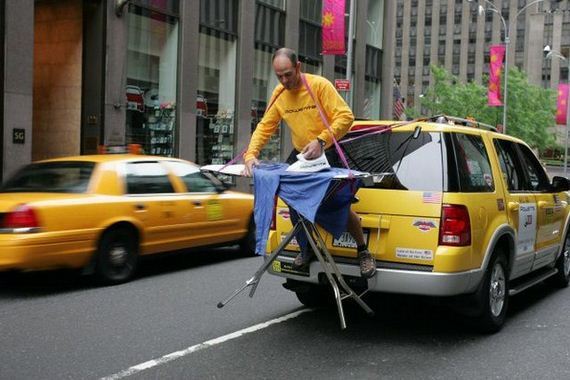
You may use -vt <vision_type> to set quantization type for the vision encoder. It is recommended to run GLM4V on GPU since vision encoding runs too slow on CPU even with 4-bit quantization.
python3 chatglm_cpp/convert.py -i THUDM/glm-4v-9b -t q4_0 -vt q4_0 -o models/chatglm4v-ggml.bin
./build/bin/main -m models/chatglm4v-ggml.bin --image examples/03-Confusing-Pictures.jpg -p "这张图片有什么不寻常的地方" --temp 0
# 这张图片中不寻常的地方在于,男子正在一辆黄色出租车后面熨衣服。通常情况下,熨衣是在家中或洗衣店进行的,而不是在车辆上。此外,出租车在行驶中,男子却能够稳定地熨衣,这增加了场景的荒诞感。
$ python3 chatglm_cpp/convert.py -i THUDM/codegeex2-6b -t q4_0 -o models/codegeex2-ggml.bin
$ ./build/bin/main -m models/codegeex2-ggml.bin --temp 0 --mode generate -p "\
# language: Python
# write a bubble sort function
"


def bubble_sort(lst):
    for i in range(len(lst) - 1):
        for j in range(len(lst) - 1 - i):
            if lst[j] > lst[j + 1]:
                lst[j], lst[j + 1] = lst[j + 1], lst[j]
    return lst


print(bubble_sort([5, 4, 3, 2, 1]))
Using BLAS
BLAS library can be integrated to further accelerate matrix multiplication. However, in some cases, using BLAS may cause performance degradation. Whether to turn on BLAS should depend on the benchmarking result.
Accelerate Framework
Accelerate Framework is automatically enabled on macOS. To disable it, add the CMake flag -DGGML_NO_ACCELERATE=ON.
OpenBLAS
OpenBLAS provides acceleration on CPU. Add the CMake flag -DGGML_OPENBLAS=ON to enable it.
cmake -B build -DGGML_OPENBLAS=ON && cmake --build build -j
CUDA
CUDA accelerates model inference on NVIDIA GPU. Add the CMake flag -DGGML_CUDA=ON to enable it.
cmake -B build -DGGML_CUDA=ON && cmake --build build -j
By default, all kernels will be compiled for all possible CUDA architectures and it takes some time. To run on a specific type of device, you may specify CMAKE_CUDA_ARCHITECTURES to speed up the nvcc compilation. For example:
cmake -B build -DGGML_CUDA=ON -DCMAKE_CUDA_ARCHITECTURES="80"       # for A100
cmake -B build -DGGML_CUDA=ON -DCMAKE_CUDA_ARCHITECTURES="70;75"    # compatible with both V100 and T4
To find out the CUDA architecture of your GPU device, see [Your GPU Compute Ca
