
RobustPalmRoi
A robust algorithm for extracting ROI from palm image taken by mobile phone.
Install / Use
/learn @leosocy/RobustPalmRoiREADME
A robust algorithm for extracting ROI from palm image taken by mobile phone





The palm image taken by the mobile phone has differences in angle, illumination, etc. The RobustPalmRoi algorithm reduces these differences through a series of handlers, thus extracting a stable ROI.
The following palms are taken by iPhoneX and have different angles. The corresponding ROI is below it.
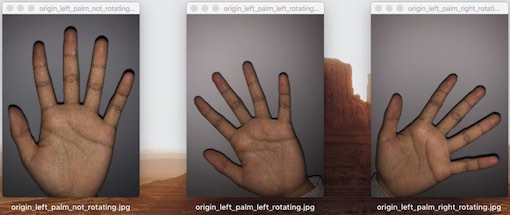
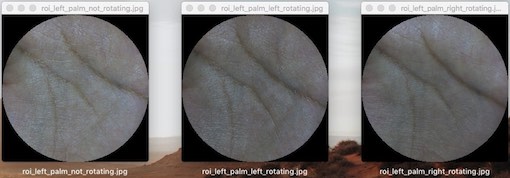
Advantages of RobustPalmRoi algorithm:
- Lower extraction requirements, just use your mobile phone.
- Faster extraction speed, just tens of milliseconds.
- Higher extraction stability, eliminate the differences such as angle, illumination, etc.
Some tips for capturing palms on mobile phones:
- Five fingers open.
- Take the whole palm.
- Low illumination on the background.
Installation
Install library
There are some requirements if you want to install RobustPalmRoi library:
- OS Linux/Unix like.
OpenCVinstalled.yaml-cppinstalled. You should install it as a shared library. Stepgit clone https://github.com/jbeder/yaml-cpp.gitcd yaml-cpp && mkdir -p build && cd buildcmake -DBUILD_SHARED_LIBS=ON -DYAML_CPP_BUILD_TESTS=OFF -DYAML_CPP_BUILD_TOOLS=OFF -DYAML_CPP_BUILD_CONTRIB=OFF ..sudo make install
Steps:
git clone https://github.com/Leosocy/RobustPalmRoi.gitcd RobustPalmRoi && mkdir -p build && cd buildcmake .. && sudo make install
Install Python module
Please make sure the C++ library is installed successfully.
Python3.x required.
Steps:
cd pypackagepython setup.py install
Usage
C++
In your CMakeLists.txt, add these lines:
add_definitions(-std=c++11)
find_package(robust-palm-roi REQUIRED)
include_directories(${ROBUST_PALM_ROI_INCLUDE_DIR})
...
add_dependencies(${YOUR_PROJECT} ${ROBUST_PALM_ROI_LIBRARIES})
target_link_libraries(${YOUR_PROJECT} ${ROBUST_PALM_ROI_LIBRARIES})
Then you can use it in your source code like this:
#include <opencv2/highgui.hpp>
#include <robust-palm-roi/chain.h>

int main() {
  rpr::ChainBuilder builder;
  builder.SetConfigYaml(config_file_name);
  auto chain = builder.BuildAndInitChain();

  cv::Mat img = cv::imread(palm_image_file_name);
  cv::Mat roi;
  auto status = chain->Process(img, &roi);
  if (status.IsOk()) {
    cv::imshow("roi", roi);
  }

  return 0;
}
You can find the detail under samples/cpp_sample directory.
Python
from rpr import HandlerChain

chain = HandlerChain('your_config.yaml')

# Process image, and get bytes of roi, and save roi as image.
import io
with open('your_palm_image.png', 'rb') as palm:
    roi_bytes = chain.process_image(palm)
    roi = io.BytesIO(roi_bytes)
    with open('your_roi_image.png', 'wb') as roi_image:
        roi_image.write(roi.read())
You can find the detail under samples/py_sample directory.
Run samples
Make sure you have installed library and rpr.py before running examples.
Before you run cpp or python sample, please prepare some date follow this:
cd samples/palm_data./download.sh
Run cpp sample
cd cpp_samplemkdir build; cd build; cmake ..; make -j./run_cpp_sample
Run python sample
cd py_samplepython run_sample.py
Contributing
Please see CONTRIBUTING.md
