
AdaptiveClient
Library and pattern for creating a scalable, loosely coupled service layer. Build interdependent services that are granular and testable. Inject a single client that allows the application to access the entire service layer. Provision services across multiple providers and transports with almost zero application infrastructure.
Install / Use
/learn @leaderanalytics/AdaptiveClientREADME
AdaptiveClient
-
Create a scalable, loosely coupled service layer
-
Build interdependent services that are granular and testable
-
Organize services into APIs and work with them as a single unit
-
Inject a single client that allows the application to access all services in an API
-
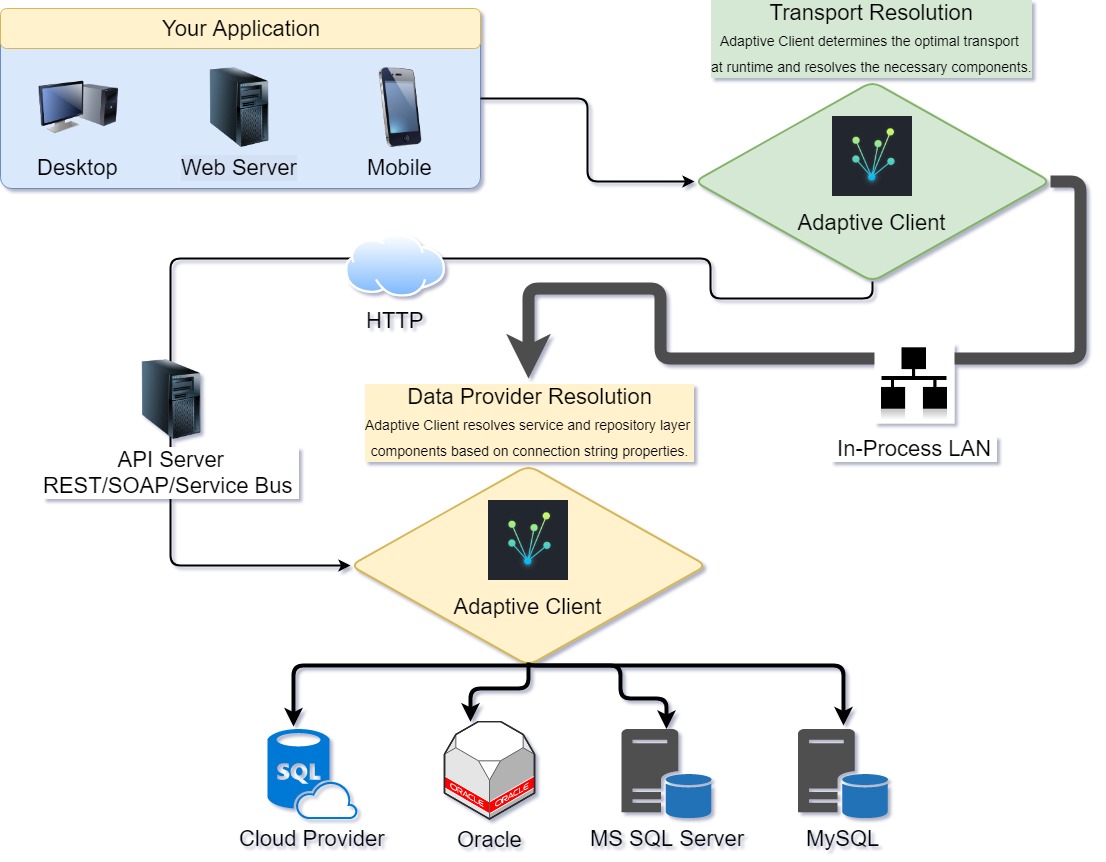
Provision services across multiple providers and transports with almost zero application infrastructure
public partial class MainWindow : Window
{
    private IAdaptiveClient<IUsersService> client;

    public MainWindow(IAdaptiveClient<IUsersService> client)
    {
        this.client = client;
    }

    public async Task<User> Login(string userName, string password)
    {
        // AdaptiveClient will attempt to use the server you define as most preferred.
        // Server may be SQL, MySQL, WCF, REST, etc. - AdaptiveClient will resolve the correct
        // client and all dependencies.
        // If the request fails AdaptiveClient will begin an orderly fall back to any other
        // server that can handle the request:

        User user = await client.TryAsync(x => x.GetUser(userName, password));
        return user;
    }
}
Get the Zamagon demo
Get the simple console app demo
Get the nuget package
What AdaptiveClient does
Dynamically route API calls over the fastest transport available
Easily allow internal desktop apps to access APIs using fast, in-process calls over the local area network. The same applications can make HTTP calls and access the same APIs when off-site. AdaptiveClient resolves the correct implementation of your API client based on the connection available at runtime.
Target multiple data providers in your service and repository layers
If you maintain a shrink wrap app or you are migrating and you want to target multiple database providers you can make the process simple and transparent to the end user of your application. AdaptiveClient resolves the correct implementation of your service and repository based on properties of the connection string.
Fall back to secondary servers if the primary fails
All you need to do is define multiple connection strings for the API you want to use. Give each connection string a preference and AdaptiveClient will attempt to use them in the order you define. Connection strings can be for any transport or data provider.
How you will benefit from using AdaptiveClient
AdaptiveClient allows you to continue to write strongly typed n-tier applications using SOLID and DRY principals you have already embraced. If you are careful to encapsulate your business logic in your service layer you are well on your way to writing a truly scalable application. You don't have to buy into any new architecture, you don't need to write any tooling, there are no black boxes.
How it works
AdaptiveClient is a design pattern that leverages n-tier architecture and a dependency injection container (Autofac). The classes included in this download assist you in implementing the pattern. In a nutshell, AdaptiveClient works by associating three keys with each connection string in your application. These three keys are API_Name, EndPointType, and ProviderName. You define the values for each of these keys. You register each of your connection strings (or API URLs) with AdaptiveClient using these keys. You also use the same keys to register implementations of your services. When you make an API call AdaptiveClient use the keys associated with the connection string (or URL) to resolve the specific dependencies required to communicate with the server.
Its all about Connection Strings
The functionality provided by AdaptiveClient comes primarily from a class called EndPointConfiguration which is a class that contains a connection string and a few extra properties. When you implement AdaptiveClient you move your connection strings and API URLs to a section within your appsettings.json file. The values you see for API_Name, EndPointType, and ProviderName are also defined as constants in your application. You register implementations of your services using these same values as keys. Doing so allows AdaptiveClient to match a service implementation to a connection string:
{
    "EndPoints": [
    {
        "Name": "StoreFront_SQLServer",
        "IsActive": "true",
        "API_Name": "StoreFront",
        "Preference": "10",
        "EndPointType": "InProcess",
        "ProviderName": "MSSQL",
        "ConnectionString": "Data Source=.\\SQLSERVER;Initial Catalog=AdaptiveClientEF_StoreFront;"
    },

    {
        "Name": "BackOffice_SQLServer",
        "IsActive": "true",
        "API_Name": "BackOffice",
        "Preference": "10",
        "EndPointType": "InProcess",
        "ProviderName": "MSSQL",
        "ConnectionString": "Data Source=.\\SQLSERVER;Initial Catalog=AdaptiveClientEF_BackOffice;"
    },

    {
        "Name": "StoreFront_MySQL",
        "IsActive": "true",
        "API_Name": "StoreFront",
        "Preference": "20",
        "EndPointType": "InProcess",
        "ProviderName": "MySQL",
        "ConnectionString": "Server=localhost;Database=AdaptiveClientEF_StoreFront;Uid=x;Pwd=x;SslMode=none;"
    },

    {
        "Name": "BackOffice_MySQL",
        "IsActive": "true",
        "API_Name": "BackOffice",
        "Preference": "20",
        "EndPointType": "InProcess",
        "ProviderName": "MySQL",
        "ConnectionString": "Server=localhost;Database=AdaptiveClientEF_BackOffice;Uid=x;Pwd=x;SslMode=none"
    },

    {
      "Name": "StoreFront_WebAPI",
      "IsActive": "true",
      "API_Name": "StoreFront",
      "Preference": "30",
      "EndPointType": "HTTP",
      "ProviderName": "WebAPI",
      "ConnectionString": "http://localhost:59260/api/StoreFront/"
    }
  ]
}
AdaptiveClient includes a utility for loading EndPoints from your appsettings.json file. By default only EndPoints where IsActive is true are loaded.
How AdaptiveClient resolves a client from start to finish
In most cases you will use a single connection string for each API your application uses (which may be a url). However, as mentioned above, AdaptiveClient will fall back if necessary and attempt to contact multiple servers using different connection strings. Here is how that process works:
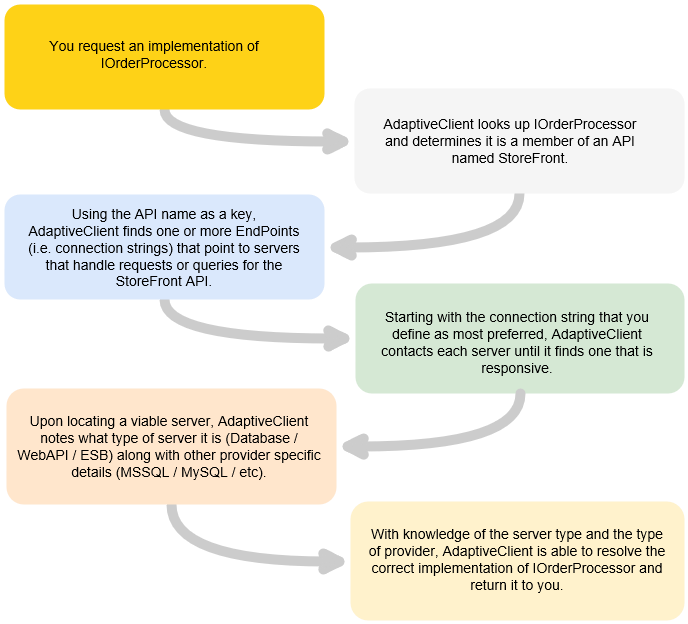
AdaptiveClient components
EndPointConfiguration
public class EndPointConfiguration : IEndPointConfiguration
{
    public string Name { get; set; }
    public string API_Name { get; set; }
    public int Preference { get; set; }
    public String EndPointType { get; set; }
    public string ConnectionString { get; set; }
    public string ProviderName { get; set; }
    public Dictionary<string, string> Parameters { get; set; }
    public bool IsActive { get; set; }
}
- Name: Name of the EndPoint: DevServer01, QASloth02, etc.
- API_Name: Name of the application or API exposed by the EndPoint: OurCompanyApp, xyz.com, etc.
- Preference: Number that allows AdaptiveClient to rank this EndPoint. Lower numbers are more preferred.
- EndPointType: User defined string that describes what kind of transport is used to access the EndPoint - Examples might be DBMS, HTTP, TCP.
- ProviderName: A string that further describes the connection string data provider or protocol. Examples might be MSSQL, MySQL, WCF, REST.
- ConnectionString: Valid connection string OR URL if pointing to a HTTP server.
- Parameters: Not used at this time.
- IsActive: Set this value to false to prevent AdaptiveClient fro using this
EndPointConfiguration.
RegistrationHelper
RegistrationHelper hides the complexity of registering EndPointConfiguration objects and services with the DI container. The following is an example of registering three implementations of IOrdersService. The first implementation contains code specific to Microsoft SQL Server. The second is specific to MySQL. The third makes API calls over HTTP. Note how values supplied as parameters to the RegisterService method match values provided in the appsettings.json file shown above.
registrationHelper.RegisterService<MSSQL_OrdersService, IOrdersService>(EndPointType.DBMS, API_Name.StoreFront, ProviderName.MSSQL);
registrationHelper.RegisterService<MySQL_OrdersService, IOrdersService>(EndPointType.DBMS, API_Name.StoreFront, ProviderName.MySQL);
registrationHelper.RegisterService<WebAPI_OrdersService, IOrdersService>(EndPointType.HTTP, API_Name.StoreFront, ProviderName.WebAPI);
Additional usage is discussed in the Getting Started section.
AdaptiveClient
AdaptiveClient implements two methods you can use to call your services: Try and Call. These methods differ in how and when they identify a server as being available if they are called without a specific EndPointConfiguration name.
- Call and CallAsync
string endPointName = "Production_Server";
var orders = await serviceClient.CallAsync(x => x.OrdersService.GetOrders(), endPointName);
In the example above we are calling a service and passing the name of a specific EndPointConfiguration to use. AdaptiveClient will resolve components based on the properties of that specific EndPointConfiguration in order to call the service.
var orders = await serviceClient.CallAsync(x => x.OrdersSe
Related Skills
tmux
349.2kRemote-control tmux sessions for interactive CLIs by sending keystrokes and scraping pane output.
diffs
349.2kUse the diffs tool to produce real, shareable diffs (viewer URL, file artifact, or both) instead of manual edit summaries.
blogwatcher
349.2kMonitor blogs and RSS/Atom feeds for updates using the blogwatcher CLI.
Unla
2.1k🧩 MCP Gateway - A lightweight gateway service that instantly transforms existing MCP Servers and APIs into MCP servers with zero code changes. Features Docker deployment and management UI, requiring no infrastructure modifications.
