
Lazeemenu
Multi-level sidebar menu - JQuery plugin
Install / Use
/learn @lazee/LazeemenuREADME
LazeeMenu
NOTE: This project was mostly about having a package up in NPM from a devops perspective, but it actually got some users around the world. But now its time to archive it for good.
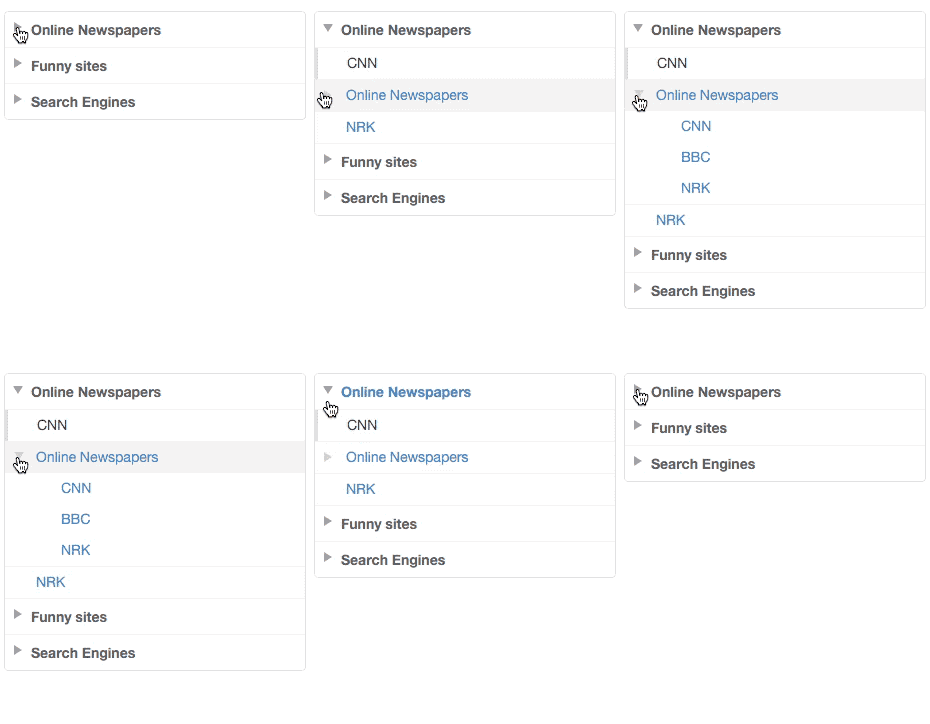
LazeeMenu is a JQuery plugin that turns a nested unordered list of links into a vertical multi-level navigation menu. It is visually inspired by the menu on Github's reference pages, but with support for an additional level. It support both links and standard text in the expandable menu items.
Homepage - Demo | Download ZIP
Install with NPM
npm install lazeemenu
Getting started
Download the plugin, unzip it and copy the files to your project folder. Then include the css and js inside your HTML.
<head>
    <!-- Load LazeeMenu CSS -->
    <script type="text/javascript" src="/lazeemenu/lazeemenu.css"></script>
</head>
<body>
    <!-- Add this at the bottom of the body tag -->
    <!-- Load JQuery -->
    <script type="text/javascript" src="http://code.jquery.com/jquery-latest.min.js"></script>
    <!-- Load LazeeMenu -->
    <script type="text/javascript" src="/lazeemenu/lazeemenu-jquery.js"></script>
</body>
Sample menu and how to activate:
<ul id="menu-1">
    <li>
        <h3><span>Tennis</span></h3>
        <ul>
            <li><a href="/">Serves</a></li>
            <li class="active"><a href="/">Player results</a></li>
            <li><a href="/">Leagues</a></li>
            <li><a href="/">Tournaments</a></li>
        </ul>
    </li>
    <li>
        <h3><span>Ballet</span></h3>
        <ul>
            <li><a href="/">Dancers</a></li>
            <li><a href="/">Famous acts</a></li>
        </ul>
    </li>
</ul>
<script type="text/javascript">
    $(document).ready(function() {
        $('#menu-1').lazeemenu();
    });
</script>
There are also a few options that can be extended:
<script type="text/javascript">
    $(document).ready(function() {
        $('.menu-1').lazeemenu({
            activeClass: 'active',
            initialState: 'default'
        });
    });
</script>
Options
These are the options you can set during activation of a menu.
activeClass
- Type:
string - Default:
active
The name of the class name used in li elements to indicate what link that should be marked as active.
initialState
- Type:
string - Default:
default
You can set this value to expanded if you initially want the entire menu expanded. Setting it to collapsed will collapse the menu. Finally default (Which is the default ;)) will make sure that the active link is expanded. Everything else will be collapsed.
Public methods
expandAll
Expand all menu items
$(selector).lazeemenu('expandAll');
expandAll
Collapse all menu items
$(selector).lazeemenu('collapseAll');
Related Skills
node-connect
347.0kDiagnose OpenClaw node connection and pairing failures for Android, iOS, and macOS companion apps
frontend-design
107.8kCreate distinctive, production-grade frontend interfaces with high design quality. Use this skill when the user asks to build web components, pages, or applications. Generates creative, polished code that avoids generic AI aesthetics.
openai-whisper-api
347.0kTranscribe audio via OpenAI Audio Transcriptions API (Whisper).
qqbot-media
347.0kQQBot 富媒体收发能力。使用 <qqmedia> 标签,系统根据文件扩展名自动识别类型(图片/语音/视频/文件)。
