
Pockaw
Pockaw is a free and simple budgeting app designed to help you manage your finances with ease. Track expenses, monitor income, set budget goals, and visualize spending trends—all in one place.
Install / Use
/learn @layground/PockawREADME
Welcome to Pockaw
<img src="https://pockaw.com/assets/images/pockaw-cover-github_readme.webp" alt="Pockaw Cover">
-purple)
-purple)
-purple)
-purple)
-purple)





Download Pockaw
| PlayStore | AppStore* | Microsoft Store* | Browser* |
| :--------: | :--------: | :--------------: | :------: |
|  |
|  |
|  |
|  |
|
* Coming Soon
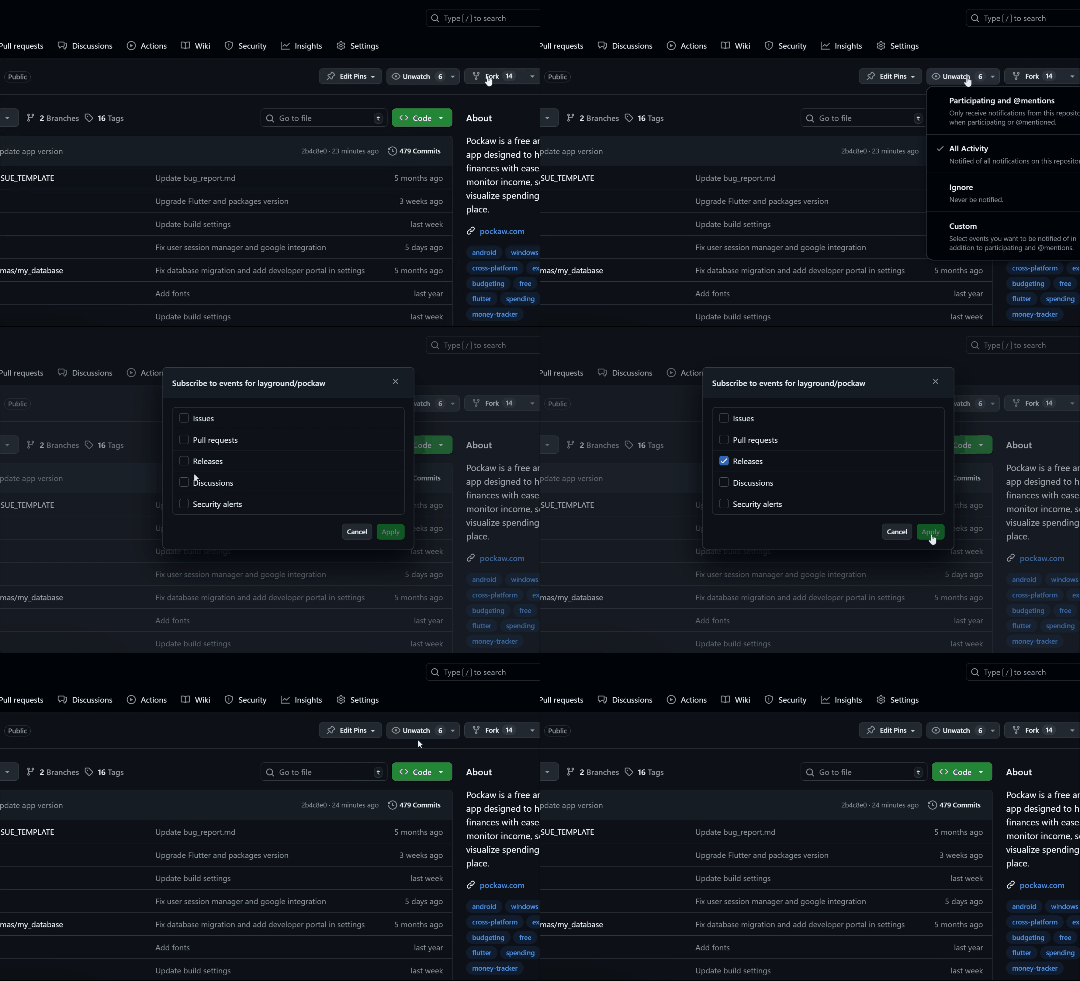
Subscribe to Release Notification
Don't forget to watch or subscribe to receive release notifications.
📝 Overview
Hello, Pockies! say goodbye to spreadsheet-based expense and budget tracking! Pockaw is your new intuitive, user-friendly app for seamless pocket and wallet-sized finance buddy, tailored for both personal use and small businesses. Pockaw offers powerful features to simplify cash flow management:
- Expense Tracking: Easily log daily expenses and categorize them (e.g., groceries, entertainment), so you know exactly where your money goes.
- Income Management: Track multiple income sources, from salaries to side hustles, in one convenient place.
- Budget Goals: Set and monitor monthly or weekly spending goals to stay within budget and work towards your financial objectives.
- Expense Analytics: Gain insights through visual breakdowns of spending, trends over time, and custom filters for a personalized view.
- Reminders & Notifications: Get timely alerts for upcoming bill due dates and monthly goals, keeping you on track.
- Multi-Currency Support: Perfect for a global audience, Pockaw makes it easy to manage finances across different currencies.
🌟 What Will You Get
- 100% Free & Open Source: Completely free, no hidden costs, with open access to the source code — FOREVER!
- Cross-Platform: Seamless use across Android, iOS*, macOS*, Windows, Linux*, and even the browser. Take your budget management anywhere!
- No Registration Needed: Jump right in without the hassle of creating an account or request any access like spreadsheet-based does.
- No Ads, Always: Say goodbye to annoying ads; Pockaw is focused solely on helping you manage your finances.
- Offline-first: Your data is always accessible, even offline. Connect only when you want to sync across devices.
- Security focused: For offline use, you are in charge of your own data.
Signature Feature Advanced Goal Planning: Set up multiple checklist goals for any occasion, from a wedding gifts, new house furniture, to wishlist shopping.
* Coming soon
🎯 User Target
Designed For
- Individuals (Ages 20-35)
- Students who want to easily track their daily spending's and build financial awareness.
- Employees interested in managing their monthly income, expenses, and budgeting for future goals.
- Families needing a simple, effective way to monitor and optimize their household cash flow.
- Goal-Driven Savers looking to turn financial goals and wishlists into reality, keeping an eye on every penny along the way!
- Micro to Small Businesses
- Size: Perfect for teams of 1-5 people, ideal for small operations needing basic cash flow insights.
- Income: Suited for businesses with a yearly income of approximately $3,800 - $4,000 USD (or €3,500 - €3,700 EUR), focusing on streamlined, essential budgeting tools.
Not Designed For
- Bank Account Integration: This app is geared toward users who manage finances manually, so it doesn’t support linking to bank accounts.
- Large Enterprises: If your business requires bank integration, payroll systems, or vendor payment management, this app may not be the best fit.
Why This Matters
Defining our user target helps ensure contributors share the same vision: to build a tool focused on simplicity and accessibility for individuals and small businesses. Our goal with Pockaw is to empower users with an easy-to-use, playful, and effective budgeting tool, without the complexities often found in enterprise solutions.
Tools We Use
- Figma: Our go-to design tool for creating beautiful, user-friendly interfaces.
- Flutter & Dart: The powerhouse behind Pockaw's cross-platform experience, allowing us to build one app for multiple devices.
- GitHub: Serving as our central hub for issue tracking and project management, keeping us organized and on track.
- Crowdin: Enabling seamless collaborative translation and localization so Pockaw reaches users in their native languages.
These tools help us bring Pockaw to life with efficiency, collaboration, and community-driven improvements.
🤝 Community
Connect with other Pockies, share tips, and contribute to the growth of Pockaw. Whether you're seeking advice, reporting issues, or sharing feedback, our community spaces are here for you.
- Telegram Group: Engage conversation with the community.
- GitHub Discussions: Join in-depth technical features discussion.
⚙️ Installation to Contribute
-
Clone this repository
git clone https://github.com/layground/pockaw.git -
Install dependencies Navigate to the project folder and run:
flutter pub get -
Run the app Open the project in your preferred IDE (VSCode or Android Studio) and hit Run to launch Pockaw.
Pockaw is now set up and ready to go! 🎉
📆 Roadmap
Round 1 (Closed Testing #1) - Core Setup & MVP Launch 
- [x] Splash & Onboarding - Design and implement welcoming splash screen and onboarding process.
- [x] Authentication? - Just fill personal data for offline use, no registration.
- [x] Multiple Wallets - Add multiple sources, set balances, and customize for easy management.
- [x] Expense & Income Tracking - Allow users to log income/expenses with details like category, date, title, and notes.
- [x] Custom Categories - Enable users to create and manage custom categories for better personalization.
- [x] Publish on GitHub - The first fully offline experience of Pockaw.
Round 2 (Open Beta) - Goals & Budgeting with Progression
- [x] Goals Tracking - Create goals and its checklist items to breakdown your target.
- [x] Budget Tracking - Set monthly/weekly spending budgets and get the visualization.
- [x] Basic Summary & Progression - View basic progress for monthly income/expense trends, goals, and budgets.
- [x] Data Sync & Backup - Implement backup options to store data securely within device local storage.
- [x] Dark Mode - Easily switch between light and dark themes.
- [x] Basic Transaction Filters - Add filters for date, category, and other custom criteria for transactions.
- [x] Open Beta Test - Pockaw will be available on Google PlayStore as Early Access open beta test.
Round 3 - Enhanced User Experience 
- [x] Advanced Summary & Analytics - Add charts for monthly income/expense trends, custom filters, and analytics.
- [x] Advanced Transaction Filters - Add filters for date, category, and other custom criteria for transactions.
- [ ] Transaction Reminder - Forgetting things? Chill! Pockaw will remind you to record transactions.
- [ ] User Reminders & Notifications - Implement notifications for due dates and spending goals.
Round 4 - Shields On! 
- [ ] Release on Web - Get a wider view and perspective of Pockaw (of course need a network connection).
- [ ] Release on Desktop - Windows users will get the official desktop look and feel of Pockaw. **
- [ ] Advanced Customization - Let users set date format, first day of the week/month, and other preferences in settings.
- [ ] Improved Accessibility - Add accessibility features, including screen reader support and keyboard navigation.
- [ ] Multi Language Support - Enable seamless collaborative translation and localization using Crowdin.
- [ ] Biometrics and PIN - Add layers of security so you are in charge of your own wealth condition.
- [ ] *Publish on PlayStore
Related Skills
diffs
340.5kUse the diffs tool to produce real, shareable diffs (viewer URL, file artifact, or both) instead of manual edit summaries.
clearshot
Structured screenshot analysis for UI implementation and critique. Analyzes every UI screenshot with a 5×5 spatial grid, full element inventory, and design system extraction — facts and taste together, every time. Escalates to full implementation blueprint when building. Trigger on any digital interface image file (png, jpg, gif, webp — websites, apps, dashboards, mockups, wireframes) or commands like 'analyse this screenshot,' 'rebuild this,' 'match this design,' 'clone this.' Skip for non-UI images (photos, memes, charts) unless the user explicitly wants to build a UI from them. Does NOT trigger on HTML source code, CSS, SVGs, or any code pasted as text.
openpencil
1.9kThe world's first open-source AI-native vector design tool and the first to feature concurrent Agent Teams. Design-as-Code. Turn prompts into UI directly on the live canvas. A modern alternative to Pencil.
HappyColorBlend
HappyColorBlendVibe Project Guidelines Project Overview HappyColorBlendVibe is a Figma plugin for color palette generation with advanced tint/shade blending capabilities. It allows designers to
