
Langgraph4j
🚀 LangGraph for Java. A library for develop AI Agentic Architectures in the Java ecosystem. Designed to work seamlessly with both Langchain4j and Spring AI.
Install / Use
/learn @langgraph4j/Langgraph4jREADME
🦜🕸️ Welcome to LangGraph4j ( <i>AI Agentic workflow in Java</i> )
 [
[


 ][releases]

LangGraph for Java. A library for building stateful, multi-agents applications with LLMs, built for work with [langchain4j] and [Spring AI]
It is inspired by [LangGraph] solution, part of [LangChain AI project].
Releases
| Date | Release | info
|--------------|----------------| ---
| Mar 30, 2026 | 1.8.11 | last release
‼️ Note:
The miminum supported version is the
Java 17
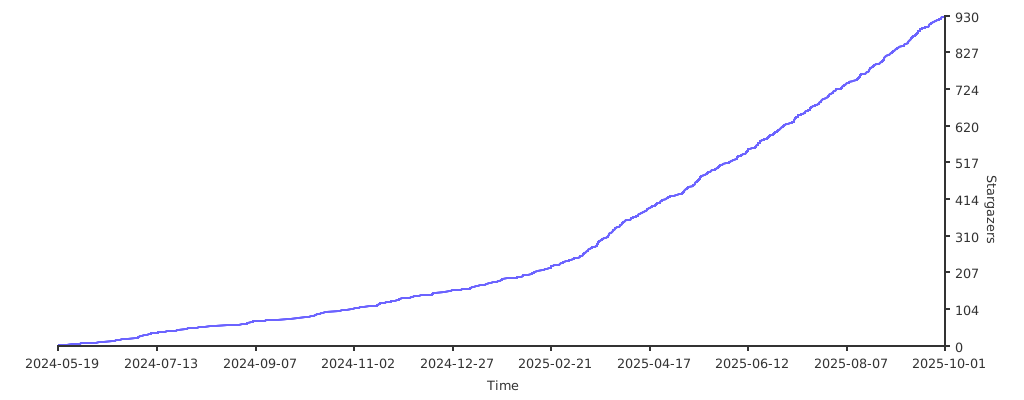
Star History
Getting Started
Welcome to LangGraph4j! This guide will help you understand the core concepts of LangGraph4j, install it, and build your first application.
Introduction
LangGraph4j is a Java library for building stateful, multi-agent applications with Large Language Models (LLMs). It is inspired by the Python library LangGraph and is designed to work seamlessly with popular Java LLM frameworks like Langchain4j and Spring AI.
At its core, LangGraph4j allows you to define cyclical graphs where different components (agents, tools, or custom logic) can interact in a stateful manner. This is crucial for building complex applications that require memory, context, and the ability for different "agents" to collaborate or hand off tasks.
Core Features & Benefits
LangGraph4j offers several features and benefits:
- Stateful Execution: Manage and update a shared state across graph nodes, enabling memory and context awareness.
- Cyclical Graphs: Unlike traditional DAGs, LangGraph4j supports cycles, essential for agent-based architectures where control flow can loop back (e.g., an agent retrying a task or asking for clarification).
- Explicit Control Flow: Clearly define the paths and conditions for transitions between nodes in your graph.
- Modularity: Build complex systems from smaller, reusable components (nodes).
- Flexibility: Integrate with various LLM providers and custom Java logic.
- Observability & Debugging:
- Checkpoints: Save the state of your graph at any point and replay or inspect it later. This is invaluable for debugging and understanding complex interactions.
- Graph Visualization: Generate visual representations of your graph using PlantUML or Mermaid to understand its structure.
- Asynchronous & Streaming Support: Build responsive applications with non-blocking operations and stream results from LLMs.
- Playground & Studio: A web UI to visually inspect, run, and debug your graphs.
Core Concepts Explained
Understanding these concepts is key to using LangGraph4j effectively:
StateGraph<S extends AgentState>
The StateGraph is the primary class you'll use to define the structure of your application. It's where you add nodes and edges to create your graph. It is parameterized by an AgentState.
AgentState
The AgentState (or a class extending it) represents the shared state of your graph. It's essentially a map (Map<String, Object>) that gets passed from node to node. Each node can read from this state and return updates to it.
- Schema: The structure of the state is defined by a "schema," which is a
Map<String, Channel.Reducer>. Each key in the map corresponds to an attribute in the state. Channel.Reducer: A reducer defines how updates to a state attribute are handled. For example, a new value might overwrite the old one, or it might be added to a list of existing values.Channel.Default<T>: Provides a default value for a state attribute if it's not already set.Channel.Appender<T>/MessageChannel.Appender<M>: A common type of reducer that appends the new value to a list associated with the state attribute. This is useful for accumulating messages, tool calls, or other sequences of data.MessageChannel.Appenderis specifically designed for chat messages and can also handle message deletion by ID.
Nodes
Nodes are the building blocks of your graph that perform actions. A node is typically a function (or a class implementing NodeAction<S> or AsyncNodeAction<S>) that:
- Receives the current
AgentStateas input. - Performs some computation (e.g., calls an LLM, executes a tool, runs custom business logic).
- Returns a
Map<String, Object>representing updates to the state. These updates are then applied to theAgentStateaccording to the schema's reducers.
Nodes can be synchronous or asynchronous (CompletableFuture).
Edges
Edges define the flow of control between nodes.
- Normal Edges: An unconditional transition from one node to another. After node A completes, control always passes to node B. You define these with
addEdge(sourceNodeName, destinationNodeName). - Conditional Edges: The next node is determined dynamically based on the current
AgentState. After a source node completes, anEdgeAction<S>(orAsyncEdgeAction<S>) function is executed. This function receives the current state and returns the name of the next node to execute. This allows for branching logic (e.g., if an agent decided to use a tool, go to the "execute_tool" node; otherwise, go to the "respond_to_user" node). Conditional edges are defined withaddConditionalEdges(...). - Entry Points: You can also define conditional entry points to your graph using
addConditionalEntryPoint(...).
Compilation
Once you've defined all your nodes and edges in a StateGraph, you compile() it into a CompiledGraph<S extends AgentState>. This compiled graph is an immutable, runnable representation of your logic. Compilation validates the graph structure (e.g., checks for orphaned nodes).
Checkpoints (Persistence)
LangGraph4j allows you to save (Checkpoint) the state of your graph at any step. This is extremely useful for:
- Debugging: Inspect the state at various points to understand what happened.
- Resuming: Restore a graph to a previous state and continue execution.
- Long-running processes: Persist the state of long-running agent interactions.
You'll typically use a
CheckpointSaverimplementation (e.g.,MemorySaverfor in-memory storage, or you can implement your own for persistent storage).
Project Structure
langgraph4j/
├── langgraph4j-bom/                     # LangGraph4j dependency management
├── langgraph4j-core/                    # LangGraph4j core components
├── langgraph4j-opentelemetry/           # LangGraph4j Hook & OpenTelemetry integration module
├── langgraph4j-mysql-saver              # LangGraph4j persistent checkpoint saver based on MySQL
├── langgraph4j-oracle-saver             # LangGraph4j persistent checkpoint saver based on OracleDB
├── langgraph4j-postgres-saver           # LangGraph4j persistent checkpoint saver based on PostgresSQL
├── langchain4j/                         # LangChain4j integration
│   ├── langchain4j-core/                # LangChain4j core components (integration required)
│   └── langchain4j-agent/               # LangChain4j agent executor
├── spring-ai/                           # Spring AI integration
│   └── spring-ai-core/                  # Spring AI core components (integration required)
│   └── spring-ai-agent/                 # Spring AI agent executor
├── studio/                              # LangGraph4j Studio (web UI)
│   └── base/                            # Base classes and interfaces
│   └── jetty/                           # Jetty server implementation
│   └── quarkus/                         # Quarkus server implementation
│   └── springboot/                      # Spring Boot implementation
├── how-tos/                             # How-tos and examples
├── javelit/                             # LangGraph4j & Javelit
Installation
To use LangGraph4j in your project, you need to add it as a dependency.
Maven:
Make sure you are using Java 17 or later.
Latest Stable Version (Recommended):
<properties>
    <langgraph4j.version>1.8.11</langgraph4j.version> <!-- Check for the actual latest version -->
</properties>

<!-- Optional: Add the Bill of Materials (BOM) to manage langgraph4j module versions -->
<dependencyManagement>
  <dependencies>
    <dependency>
      <groupId>org.bsc.langgraph4j</groupId>
      <artifactId>langgraph4j-bom</artifactId>
      <version>${langgraph4j.version}</version>
      <type>pom</type>
      <scope>import</scope>
    </dependency>
  </dependencies>
</dependencyManagement>

<dependencies>
    <dependency>
        <groupId>org.bsc.langgraph4j</groupId>
        <artifactId>langgraph4j-core</artifactId>
    </dependency>
    <!-- Add other langgraph4j modules if needed, e.g., langgraph4j-langchain4j -->
</dependencies>
(Note: Always check the Maven Central Repository for the latest version number.)
Development Snapshot Version: If you want to use the latest unreleased features, you can use a snapshot version.
<dependency>
    <groupId>org.bsc.langgraph4j</groupId>
    <artifactId>langgraph4j-core</artifactId>
    <version>1.8-SNAPSHOT</version> <!-- Or the current snapshot versi
