
Itiriri
A library built for ES6 iteration protocol.
Install / Use
/learn @labs42io/ItiririREADME
itiriri




A library built for ES6 iteration protocol.
function* numbers() {
  let n = 1;

  while (true) {
    yield n++;
  }
}

const s = itiriri(numbers()).map(n => 1 / (n * n)).take(1000).sum();
console.log(Math.sqrt(6 * s));
// 3.1406380562059946
itiriri provides similar functions as JavaScript arrays: filter, slice, map, reduce, every, some etc. and more. The functions are optimized for ES6 iterators and can be chained to perform simple but powerful manipulations over iterables.
Installation
Using npm
$ npm install 'itiriri' --save
Importing
import itiriri from 'itiriri';
Support
The itiriri library can be used with any ES6 compatible runtime.
Usage
itiriri can be used with a build-it type like array, Map, Set, a generator function or a custom iterable.
import itiriri from 'itiriri';

const values = [2, 0, 4, 8];

const s = itiriri(values).map(n => n / 2).reverse();
console.log(s.toString()); // prints: 4,2,0,1

// prints: 4 2 0 1
for (const n of s) {
  console.log(n)
}

console.log(s.sum()); // prints: 7
Deferred execution
JavaScript's array methods like filter, slice and others that return an array create a shallow copy for the result and are executed once called.
itiriri functions that return iterables are not executed unless chained with a function that reduces a value or transforms to a built-in type. The iterable source is iterated only once.
Let's see what happens in the below example.
import itiriri from 'itiriri';

function* fibonacci() {
  let [a, b] = [0, 1];

  while (true) {
    yield a;
    [a, b] = [b, a + b];
  }
}

// Finding first 3 Fibonacci numbers that contain 42
const result = itiriri(fibonacci())
  .filter(x => x.toString().indexOf('42') !== -1)
  .take(3);

for (const e of result) {
  console.log(e);
}

// outputs: 514229, 267914296, 7778742049
Step by step:
-
resultis assigned to a itiriri. At this pointnumbersarray is not iterated, the execution is deferred until the result is being iterated. -
filtermethod creates an iterator to pipe only numbers passing the predicate.filterdoes not buffer elements and only pipes them one-by-one totakeas it is iterated. -
takepipes only first three elements as it is iterated and breaks. -
for...ofinstruction starts iteration and requests elements one at a time.
Due to deferred execution, most of the functions that don't need entire sequence of elements to build an iterator (like filter, map, concat etc.) can be used with infinite iterables (like Fibonacci in the above example). These functions are also optimized to pass elements through and do not buffer them resulting in a more optimized memory usage.
Functions like sort, reverse, shuffle etc. that require entire sequence of elements in order to build an iterator expect to receive a finite iterable.
Benchmarks
Using itiriri is considerable faster than using array methods when processing large inputs.
In filter-map-slice example arrays of different size are used to filter and map a result of 100 elements:
|Array size (N) | array | itiriri |
|---------------|------------------------------------|-----------------------------------|
|1000 |111,611 ops/sec ±9.63% (86 runs) | 44,213 ops/sec ±1.92% (88 runs) |
|5000 |18,507 ops/sec ±0.67% (90 runs) | 42,103 ops/sec ±2.63% (84 runs) |
|10000 |8,655 ops/sec ±0.70% (91 runs) | 42,803 ops/sec ±2.20% (86 runs) |
|50000 |1,640 ops/sec ±0.79% (88 runs) | 43,446 ops/sec ±2.17% (88 runs) |
|100000 |848 ops/sec ±0.93% (87 runs) | 43,137 ops/sec ±2.15% (87 runs) |
|200000 |46.38 ops/sec ±0.74% (59 runs) | 42,445 ops/sec ±2.48% (90 runs) |
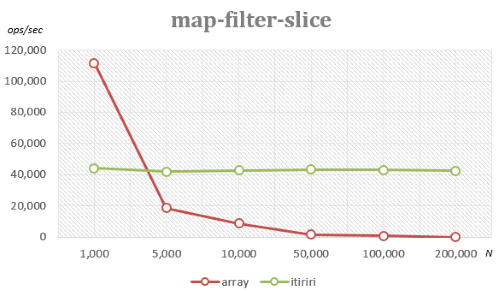
Using array methods performance drops significantly for large inputs due to creation of intermediary states for filter and map.
Using itiriri iteration always stops after 100 elements are found, therefore the size of the input doesn't affect the performance.
More benchmarks can be found in /benchmark.
Running Tests
$ npm install
$ npm test
Bundling
If you want to use itiriri in the browser, there is a gulp task that creates a minified file:
$ npm install
$ gulp bundle
// creates itiriri.min.js file in the root folder
Once you include the itiriri.min.js file on your page, you can use it as:
<script src="itiriri.min.js"></script>
<!-- ... -->
<script>
    // source can be an array or an Iterable
    const source = [1, 2, 3];
    console.log(itiriri(source).sum());
</script>
Complete list of methods
- average
- concat
- distinct
- entries
- every
- exclude
- fill
- filter
- find
- findIndex
- findLast
- findLastIndex
- first
- flat
- forEach
- groupBy
- groupJoin
- includes
- indexOf
- intersect
- join
- keys
- last
- lastIndexOf
- leftJoin
- length
- map
- max
- min
- nth
- prepend
- reduce
- reduceRight
- reverse
- rightJoin
- shuffle
- skip
- skipWhile
- slice
- some
- sort
- splice
- sum
- take
- takeWhile
- toArray
- toGroups
- toMap
- toSet
- toString
- union
- values
average
Returns the average value.
Syntax
average(): number;
average(selector: (element: T, index: number) => number): number;
Parameters
selector- (optional) a value transformer that accepts two arguments:element- the current elementindex- the index of the current element- returns a number that is used for average value calculation
For a sequence with no elements returns undefined.
Example
import itiriri from 'itiriri';

itiriri([41, 42, 43]).average()  // returns 42
itiriri([{value: 1}, {value: 2}]).average(elem => elem.value) // returns 1.5
itiriri([]).average() // returns undefined
concat
Concatenates a sequence with another one.
Syntax
concat(other: Iterable<T>): IterableQuery<T>;
concat(other: T): IterableQuery<T>;
Parameters
other- (required) a sequence or a value to be concatenated
Example
import itiriri from 'itiriri';

itiriri([1, 2, 3]).concat([4, 5]).toArray()  // returns [1, 2, 3, 4, 5]
concat is a deferred method and is executed only when the result sequence is iterated.
distinct
Returns a sequence of unique elements.
Syntax
distinct(): IterableQuery<T>;
distinct<S>(selector: (element: T) => S): IterableQuery<T>;
Parameters
selector- (optional) a function to get element's value for comparison. Accepts one argument:element- current element- returns a value to be used for comparison
Example
import itiriri from 'itiriri';

itiriri([1, 42, 3, 4, 1]).distinct().toArray();  // returns [1, 42, 3, 4]
itiriri([{value: 1}, {value: 2}, {value: 1}])
  .distinct(elem => elem.value)
  .toArray(); // returns [{value: 1}, {value: 2}]
distinct is a deferred method and is executed only when the result sequence is iterated.
entries
Returns a sequence of key/value pair for each element and its index.
Syntax
entries(): IterableQuery<[number, T]>;
Example
import itiriri from 'itiriri';

itiriri(['Alice', 'Bob', 'David']).entries().toArray();
// returns [[0, 'Alice'], [1, 'Bob'], [2, 'David']]
entries is a deferred method and is executed only when the result sequence is iterated.
every
Tests whether all the elements pass the predicate.
Syntax
every(predicate: (element: T, index: number) => boolean): boolean;
Parameters
predicate- (required) function to test for each elementelement- the current elementindex- the index of the current element- returns
trueorfalse
Example
import itiriri from 'itiriri';

itiriri([2, 4, 9]).every(elem => elem > 0); // returns true
itiriri([7, 23, 3]).every(elem => elem % 3 === 0); // returns false
exclude
Returns a sequence of elements not contained in a given sequence.
Syntax
exclude<S>(others: Iterable<T>): IterableQuery<T>;
exclude<S>(others: Iterable<T>, selector: (element: T) => S): IterableQuery<T>;
Parameters
others- (required) a sequence of elements to be excludedselector- (optional) a function to get element's value for comparison, accepts one argument:element- current element- returns a value to be used for comparison
Example
import itiriri from 'itiriri';

itiriri([2, 0,
Related Skills
node-connect
340.5kDiagnose OpenClaw node connection and pairing failures for Android, iOS, and macOS companion apps
frontend-design
84.2kCreate distinctive, production-grade frontend interfaces with high design quality. Use this skill when the user asks to build web components, pages, or applications. Generates creative, polished code that avoids generic AI aesthetics.
openai-whisper-api
340.5kTranscribe audio via OpenAI Audio Transcriptions API (Whisper).
commit-push-pr
84.2kCommit, push, and open a PR
