
RestaurantBot
Restaurant Bot using Zomato API using RASA Bot framework
Install / Use
/learn @kothiyayogesh/RestaurantBotREADME
Chatbot
The popularity of live chat applications has been growing over the past few years. And as the AI trend keeps rising, chatbots become more a must-have rather than a nice to have part of the business. The increasing demand for chats continues to grow so to keep the customer satisfaction rate high; companies must find ways to cope with the rising volumes of inquiries coming every day to all their communication channels.
Chatbots have no competition when it comes to turnout and motivation. They never get tired, bored or distracted.
Google 2018 I/O heated up the topic showing their Duplex AI-powered assistant that smoothly managed to book a table, and schedule appointments speaking with humans. The presentation blew everyone’s mind!
Chatbots are getting - smarter, more accessible and useful.
Various types of bots
Conversational AI: Your Guide to Five Levels of AI Assistants in Enterprise
Bot building platforms and frameworks
list is long and coming soon
The Architecture of chatbot
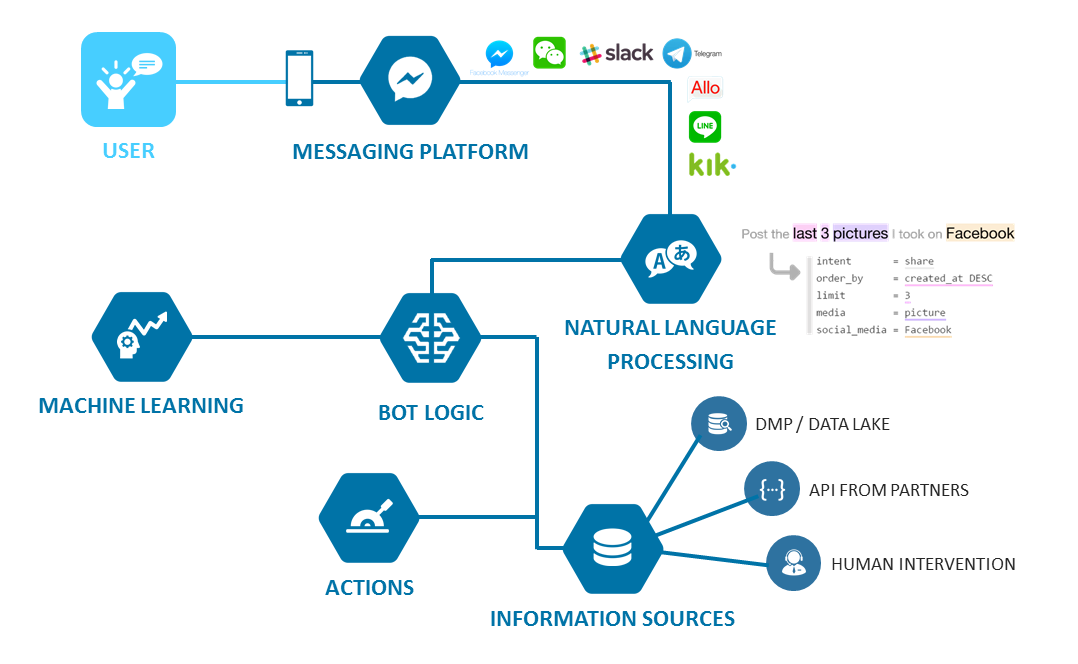
Read more about here
The awesomeness about Co-learning lounge is we explore everything in detail 😍 Here also we will go from project selection, design/documentation, development to deployment of the bot.
Project selection
This definition however often leads to two potential misconceptions. The biggest misconception that arises is that a chatbot is a bot that converses with a human in the way that another human would converse with a human. Software or even a robot (the digital part of the robot is of course software) that communicates with a human in natural language is not difficult to imagine. Science fiction is full of examples.
While this may be the end goal, this is simply not possible using the current technology. Not only is it not possible, it often leads to unrealistic expectations regarding the chatbot's capabilities and inevitable frustrations when those expectations are not met.
The second misconception is that a chatbot communicates using only text or voice. Actually, chatbots allow users to interact with them via graphical interfaces or graphical widgets, and the trend is in this direction. Many chat platforms including WeChat, Facebook Messenger and Kik allow web views on which developers can create completely customized graphical interfaces.
Chatbots can be used in many different ways, which is the reason why it’s difficult to define exactly what they are. It is actually possible to come up with a chatbot use case for every single business or industry, in the same way, that every business or industry can use a website or app. Literally any task you can do delegate to Chatbot. A couple of things you can definitely do is training chatbot to handle FAQs, Basic flow handling where it can help the user to view, purchase, or track something, feedback collection or notification.
All the above examples of chatbots could allow human agents to get involved in the conversation if necessary, perhaps as a premium service.
Documentation/Design
Detailed conversation design based on a defined scope is the first thing you should do before you head to development. If you are completely new to it and don’t know where to start then we recommend this article: How to design a robust chatbot interaction
Just like human chatbot needs to have personality, persona, and tone too(Aren't chatbot supposed to behave like a human 😜) Read more about chatbot personality here : Why AI And Chatbots Need Personality
There are a couple of online tools you can use to layout chatbot's conversation design.
moqups
draw.io
Read this thread to find out more apps/software: https://news.chatbotsmagazine.com/t/tool-method-to-design-conversation-diagram/915/20
In this tutorial, we will build a simple to complex restaurant bot step by step with the objective of exploring all awesome features of RASA and make a personal assistant for yourself or for your business. We assume you have gone through the chatbot introduction, various types of the chatbot, how to select chatbot as a project, It’s design practice, etc. If not then we highly recommend that you read the README of this section.
In this phase, we will be building a simple flow where users can search restaurants on bot through Zomato API based location and cuisine. As per the best design practice, the bot should welcome the user with the greeting and let the user know what bot can do. If user request matches with in-flow intents and if there are no or missing entities in the utterance then bot should ask required entities (cuisine and location in this phase) to complete the action (search restaurant from Zomato API). Here will train our model to extract cuisine and will use Bing map API to extract location as it’s impossible to train every damn location.
To hit Zomato API with location we need entity_id, entity_type, lat and long which will get from /location and for cuisine, we need cuisine_id which you will get from /cuisines Once we have all the details we can hit /search which is the main and final endpoint where you will get restaurant details. By default, you will get 20 top matched restaurants. We kept count as 5. Play around with Zomato API to get comfortable with it: https://developers.zomato.com/documentation
Zomato API
To start with, we will need an API key from Zomato, so navigate to Zomato and ‘request an API key’.
On being prompted, we may either sign up on Zomato or ‘Continue with Google’. After we have completed the sign up, we should receive the API key
Microsoft Bing Maps REST API
To use the Bing Maps REST API, we will need ‘Bing Maps Key’. Therefore, navigate here and then click on ‘Bing Maps Key’ hyperlink. After we have signed up (if we do not have an account on Microsoft) and provided our basic information, we can create a key. Bing Maps API provides a ‘basic’ key, by default (i.e. it can be specified directly in the request header, no need of OAuth complexity).
After the key has been created we can see/ copy it by clicking on ‘My Account’ -> ‘My Keys’.
Now, we have what we needed to start with. Let’s dive in to Postman and get the stuff working.
Look at the below self-explanatory state diagram which shows conversation flow with all required states.
What is Rasa?
Rasa is an open-source machine learning framework for building contextual AI assistants and chatbots.
To make complete AI-based chatbot it has to handle two things:
- Understanding the user’s message which is done through Rasa NLU.
- The bot should be able to carry dialogue with context which is done by Rasa Core.
Rasa’s document is very intuitive so in this tutorial, I will direct to appropriate section of the document.
Skeleton of Rasa
Since hype was to match chatbot with humans. We will take the human analogy to understand the components of the chatbot.
Bot configuration
Firstly we will understand the body parts of the human(mostly brain, Don’t worry it’s not biology class) which we call “Bot configuration” in the bot world.
Primary thing we humans do is communicate. And language is the primary means of communication. So for the bot as well we need to set language. We will use the English language for the bot. But you can build a multi-lingual bot with RASA.
For more information about languages supported by rasa refer: https://rasa.com/docs/rasa/nlu/language-support/
Now put on your apron and get ready with a scalpel to see what’s in the brain 😃. Seems like it’s way complex. Chuck it, but the point is whenever we hear something we process the information through millions of neurons to understand the meaning of the sentence with its context, etc. And our brain is smart enough to generate a proper response based on a question. So are we going to build that intelligent bot?. Hold on! We can but not right now. The best way to think and start building a chatbot is like a newborn baby. It learns with experience :) Now let’s understand how the brain of chatbot works. It’s called NLU(Natural language understanding) unit where it’s components do the job. Component includes as follows.
-
Tokenization: We read and understand the sentence word by word, right? Similarly, tokenizer will break the sentence into words(called word tokenizer).
For more information on RASA supported tokenizer refer: https://rasa.com/docs/rasa/nlu/components/#tokenizers -
Featurizer: We infer meaning by words and when all words are combined in a sentence then we infer the meaning of the sentence with context, right? Similarly, tokenized words are used as features to the post components of the pipeline. These features are has meaning of the word(ma
Related Skills
node-connect
346.4kDiagnose OpenClaw node connection and pairing failures for Android, iOS, and macOS companion apps
frontend-design
107.2kCreate distinctive, production-grade frontend interfaces with high design quality. Use this skill when the user asks to build web components, pages, or applications. Generates creative, polished code that avoids generic AI aesthetics.
openai-whisper-api
346.4kTranscribe audio via OpenAI Audio Transcriptions API (Whisper).
qqbot-media
346.4kQQBot 富媒体收发能力。使用 <qqmedia> 标签,系统根据文件扩展名自动识别类型(图片/语音/视频/文件)。
