
OMG
[ECCV 2024] OMG: Occlusion-friendly Personalized Multi-concept Generation In Diffusion Models
Install / Use
/learn @kongzhecn/OMGREADME
Zhe Kong · Yong Zhang* · Tianyu Yang · Tao Wang· Kaihao Zhang
Bizhu Wu · Guanying Chen · Wei Liu · Wenhan Luo*
<sup>*</sup>Corresponding Authors
OMG + LORA : <a href='https://huggingface.co/spaces/Fucius/OMG'><img src='https://img.shields.io/badge/%F0%9F%A4%97%20Hugging%20Face-Spaces-blue'></a>
OMG + InstantID: <a href='https://huggingface.co/spaces/Fucius/OMG-InstantID'><img src='https://img.shields.io/badge/%F0%9F%A4%97%20Hugging%20Face-Spaces-blue'></a>
<a href='https://kongzhecn.github.io/omg-project/'><img src='https://img.shields.io/badge/Project-Page-green'></a>
<a href='https://arxiv.org/abs/2403.10983'><img src='https://img.shields.io/badge/Technique-Report-red'></a>

<p align="center"> <img src="assets/teaser.png"> </p>TL; DR: OMG is a framework for multi-concept image generation, supporting character and style LoRAs on Civitai.com. It also can be combined with InstantID for multiple IDs with using a single image for each ID.
Introduction of OMG: A tool for high-quality multi-character image generation.

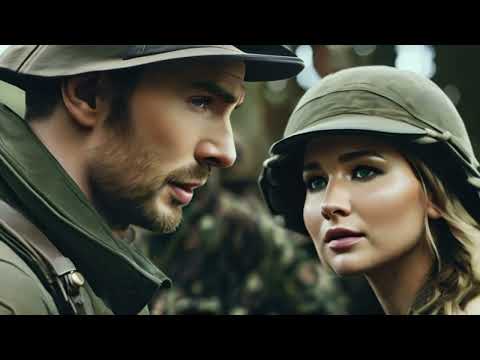
Trailor Demo: A short trailor "Home Defense" created by using OMG + SVD.
:label: Change Log
- [2023/3/22] 🔥 We release the Hugging space for OMG + InstantID. Support ID personalization with a single image.
- [2023/3/19] 🔥 We release the technical report and Hugging space for OMG-LoRAs
- [2023/3/18] 🔥 We release the source code and gradio demo of OMG.
🔆 Introduction
1. OMG + LoRA (ID with multiple images)
<p align="center"> <img src="assets/lora.png" height=390> </p>2. OMG + InstantID (ID with single image)
<p align="center"> <img src="assets/instantid.png" height=390> </p>3. OMG + ControlNet (Layout Control )
<p align="center"> <img src="assets/controlnet.png" height=1024> </p>4. OMG + style LoRAs (Style Control)
<p align="center"> <img src="assets/style.png" height=390> </p>:wrench: Dependencies and Installation
- The code requires
python==3.10.6, as well aspytorch==2.0.1andtorchvision==0.15.2. Please follow the instructions here to install both PyTorch and TorchVision dependencies. Installing both PyTorch and TorchVision with CUDA support is strongly recommended.
conda create -n OMG python=3.10.6
conda activate OMG
pip install torch==2.0.1 torchvision==0.15.2 torchaudio==2.0.2
pip install -r requirements.txt
pip install git+https://github.com/facebookresearch/segment-anything.git
- For Visual comprehension, you can choose
YoloWorld + EfficientViT SAMorGroundingDINO + SAM
-
- (Recommend) YoloWorld + EfficientViT SAM:
pip install inference[yolo-world]==0.9.13
pip install  onnxsim==0.4.35
-
- (Optional) If you can not install
inference[yolo-world]. You can installGroundingDINOfor visual comprehension.
- (Optional) If you can not install
GroundingDINO requires manual installation.
Run this so the environment variable will be set under current shell.
export CUDA_HOME=/path/to/cuda-11.3
In this example, /path/to/cuda-11.3 should be replaced with the path where your CUDA toolkit is installed.
git clone https://github.com/IDEA-Research/GroundingDINO.git

cd GroundingDINO/

pip install -e .
More installation details can be found in GroundingDINO
⏬ Pretrained Model Preparation
1) DownLoad Models
1. Required download:
Download stable-diffusion-xl-base-1.0, controlnet-openpose-sdxl-1.0.
For InstantID + OMG download:
wangqixun/YamerMIX_v8,
InstantID,
antelopev2,
2. For Visual comprehension, you can choose "YoloWorld + EfficientViT SAM" or "GroundingDINO + SAM".
For YoloWorld + EfficientViT SAM:
EfficientViT-SAM-XL1, yolo-world.
For GroundingDINO + SAM:
GroundingDINO, SAM.
3. For Character LoRAs, download at least one character for man and another character for woman.
For Character LoRAs for man:
Chris Evans,
Gleb Savchenko,
Harry Potter,
Jordan Torres.
For Character LoRAs for woman:
Taylor Swift,
Jennifer Lawrence,
Hermione Granger,
Keira Knightley.
4. (Optional) If using ControlNet, download:
ControlNet, controlnet-canny-sdxl-1.0, controlnet-depth-sdxl-1.0, dpt-hybrid-midas.
5. (Optional) If using Style LoRAs, download:
Anime Sketch Style, Oil Painting Style, Cinematic Photography Style.
2) Preparation
Put the models under checkpoint as follow:
OMG
├── assets
├── checkpoint
│   ├── antelopev2
│   │   └── models
│   │       └── antelopev2
│   │           ├── 1k3d68.onnx
│   │           ├── 2d106det.onnx
│   │           ├── genderage.onnx
│   │           ├── glintr100.onnx
│   │           └── scrfd_10g_bnkps.onnx
│   ├── ControlNet
│   ├── controlnet-canny-sdxl-1.0
│   ├── controlnet-depth-sdxl-1.0
│   ├── controlnet-openpose-sdxl-1.0
│   ├── dpt-hybrid-midas
│   ├── GroundingDINO
│   ├── InstantID
│   ├── lora
│   │   ├── chris-evans.safetensors
│   │   ├── Gleb-Savchenko_Liam-Hemsworth.safetensors
│   │   ├── Harry_Potter.safetensors
│   │   ├── Hermione_Granger.safetensors
│   │   ├── jordan_torres_v2_xl.safetensors
│   │   ├── keira_lora_sdxl_v1-000008.safetensors
│   │   ├── lawrence_dh128_v1-step00012000.safetensors
│   │   └── TaylorSwiftSDXL.safetensors
│   ├── sam
│   │   ├── sam_vit_h_4b8939.pth
│   │   └── xl1.pt
│   ├── stable-diffusion-xl-base-1.0
│   ├── style
│   │   ├── Anime_Sketch_SDXL.safetensors
│   │   ├── Cinematic Hollywood Film.safetensors
│   │   └── EldritchPaletteKnife.safetensors
│   └── YamerMIX_v8
├── example
├── gradio_demo
├── inference_instantid.py
├── inference_lora.py
├── README.md
├── requirements.txt
└── src
Put ViT-B-32.pt (download from openai) to ~/.cache/clip/ViT-B-32.pt.
If using YoloWorld, put yolo-world.pt to /tmp/cache/yolo_world/l/yolo-world.pt.
Or you can manually set the checkpoint path as follows:
python inference_lora.py  \
--pretrained_sdxl_model <path to stable-diffusion-xl-base-1.0> \
--controlnet_checkpoint <path to controlnet-openpose-sdxl-1.0> \
--efficientViT_checkpoint <path to efficientViT-SAM-XL1> \
--dino_checkpoint <path to GroundingDINO> \
--sam_checkpoint <path to sam> \
--lora_path <Lora path to character1|Lora path to character1> \
--style_lora <Path to style LoRA>
For OMG + InstantID:
python inference_instantid.py  \
--pretrained_model <path to stable-diffusion-xl-base-1.0> \
--controlnet_path <path to InstantID controlnet> \
--face_adapter_path <path to InstantID face adapter> \
--efficientViT_checkpoint <path to efficientViT-SAM-XL1> \
--dino_checkpoint <path to GroundingDINO> \
--sam_checkpoint <path to sam> \
--antelopev2_path <path to antelopev2> \
--style_lora <Path to style LoRA>
:computer: Usage
1: OMG + LoRA
The <TOK> for Harry_Potter.safetensors is Harry Potter and for Hermione_Granger.safetensors is Hermione Granger.
For visual comprehension, you can set --segment_type 'yoloworld' for YoloWorld + EfficientViT SAM, or --segment_type 'GroundingDINO' for GroundingDINO + SAM.
python inference_lora.py \
    --prompt <prompt for the two person> \
    --negativ
Related Skills
docs-writer
99.3k`docs-writer` skill instructions As an expert technical writer and editor for the Gemini CLI project, you produce accurate, clear, and consistent documentation. When asked to write, edit, or revie
model-usage
339.1kUse CodexBar CLI local cost usage to summarize per-model usage for Codex or Claude, including the current (most recent) model or a full model breakdown. Trigger when asked for model-level usage/cost data from codexbar, or when you need a scriptable per-model summary from codexbar cost JSON.
project-overview
FlightPHP Skeleton Project Instructions This document provides guidelines and best practices for structuring and developing a project using the FlightPHP framework. Instructions for AI Coding A
Design
Campus Second-Hand Trading Platform \- General Design Document (v5.0 \- React Architecture \- Complete Final Version)1\. System Overall Design 1.1. Project Overview This project aims t
