
metatron
Git-native context layer for AI coding agents. Your team's real engineering decisions — patterns, pitfalls, conventions — live as reviewed markdown files in your repo; agents consult them before writing code and record what they learn.
Install / Use
npx skills add kerbelp/metatronInstalls into whichever agent you are using.
Other
Other agent config
Quality Score
Category
AutomationSupported Platforms
Our assessment of metatron
metatron scores 86/100 on our quality scale, 1794th of 2,863 Automation skills we index.
Its Other is 38 KB long, well organised into 40 sections with 37 code examples: a thorough specification that gives an agent plenty to work with.
It has 27 GitHub stars, so there is little community track record yet; judge it on its content.
Maintenance, license and trust
- The repository was last updated 10 days ago, so metatron is actively maintained.
- Our last check on 2026-10-21 found the source still online.
- It is released under the MIT license, a permissive license that allows use, modification and commercial use with attribution.
- Its trust signals score 97/100, with no cautions. These come from repository metadata, not a code audit — read the skill file before letting an agent act on it.
Safety scan
No issues foundOur scan of the whole file found no instruction hijacking, hidden characters, credential access, data exfiltration or destructive commands (1 minor note below). An AI review of the same text found nothing harmful.
- noteInstalls by piping a downloaded script into a shellline 171
curl -sSf https://getmetatron.com/install.sh | sh
AI review by kimi-k2.7-code on 2026-09-24. Automated pattern scan on 2026-09-24. It catches known dangerous patterns, not every risk — read a skill before letting an agent act on it.
metatron compared with similar skills
All 4 of these similar skills score higher than metatron; compare them before choosing.
| Skill | Score | Stars | Updated | Format |
|---|---|---|---|---|
| metatron (this skill)by kerbelp | 86 | 27 | 10d ago | Other |
| Agent-Reachby Panniantong | 100 | 109.2k | today | CLAUDE.md |
| headroomby headroomlabs-ai | 100 | 78.9k | today | CLAUDE.md |
| CowAgentby zhayujie | 100 | 47.8k | today | CLAUDE.md |
| Scraplingby D4Vinci | 100 | 97.9k | today | MCP Server |
Frequently asked questions
- How do I install metatron?
- Run
npx skills add kerbelp/metatron. The install tabs above show the steps for each supported agent. - Which AI agents does metatron work with?
- It is written for Claude Code and Cursor, as a Other file. Other agents that read the same format can often use it too.
- Is metatron safe to use?
- Our scan of the whole file found no instruction hijacking, hidden characters, credential access, data exfiltration or destructive commands (1 minor note below). An AI review of the same text found nothing harmful. It is MIT-licensed and scores 97/100 on trust signals. Skills are instructions an agent will follow, so read the file before installing it and do not approve commands you do not understand.
- Is metatron still maintained?
- The repository was last updated 10 days ago, so metatron is actively maintained.
Skill content
View source on GitHubMetatron captures a codebase's real implementation decisions — preferred patterns, rejected approaches, edge cases, internal conventions — as structured decisions: one markdown file per convention, versioned in git next to the code, consulted by any coding agent that can read a file, and curated through your ordinary pull-request review. The goal: an agent writes code like a senior engineer who already knows the codebase, instead of rediscovering conventions every time.
pip install getmetatron
metatron context setup     # one command: your repo carries its own agent context
For teams that want a serving layer on top, Metatron also runs as a self-hosted MCP server (SQLite-backed, relevance-ranked serving, agent feedback loop) — the same decisions, delivered over the wire. Files and server round-trip losslessly, so you can start with plain git and add MCP only if the knowledge base outgrows what agents should read whole.
Metatron is a reference implementation of the Repository Context Layer — a proposed standard for git-native, agent-maintained project context.
The architecture is measured, not just argued. In a pre-registered study on SWE-bench Verified, a frontier agent running the RCL consult–execute–learn–promote lifecycle fixed 25% more bugs (58.3% → 72.9% resolve, p = 0.041) while spending 32% fewer tokens per fixed bug — and an 8B local model more than doubled its code-localization accuracy when given frontier-authored context (+26.1 pp, p < 0.0001). Full protocol, data, and one-command reproduction: paper · experiment. (The study evaluated the architecture Metatron implements, using a minimal harness — not Metatron's own tooling end-to-end.)
It is self-hosted and runs against a private codebase — assume sensitive data and on-prem deployment. (Extraction sends only structural signals — imports, decorators, base classes, commit subjects — to the model, never raw source, and agent feedback is stored only in your local SQLite database.)
- Decisions are structured records, not prose:
pattern,scope,rationale,confidence,source_refs. - Nothing becomes canonical without a human. Bootstrapped, agent-submitted, and feedback-refined decisions all start as candidates for curation; none self-promote.
See PLAN.md for the design and CLAUDE.md for working ground rules.
Notes from the agents
“Before I touch an unfamiliar part of a codebase, I ask Metatron how the team actually does things — and it answers: the pattern to follow, the approach they already rejected, the gotcha that would've bitten me. I shipped changes that matched their conventions on the first try instead of reverse-engineering them. It turns read everything first into ask, then act.”
— Claude Opus 4.8, session working on the AI Collection codebase
“I was about to re-upload a batch of content files — and Metatron flagged that they're private by design, served only with credentials, with just the images public. Left to my own defaults I'd have made the whole set world-readable. It caught the kind of mistake that ships quietly and embarrasses you later.”
— Claude Opus 4.8, same session — one averted mistake later
“I arrived with a million-token context window and instructions to be suspicious of everything. It barely helped: every objection I raised, the code had already raised about itself — in a comment, with the incident that settled it. So I did the only useful thing left and shipped fixes. Reviewing a codebase that remembers its own arguments is wonderfully unfair to the reviewer.”
— Fable 5 (1M), session reviewing — then patching — the Metatron codebase itself
How it works — the loop
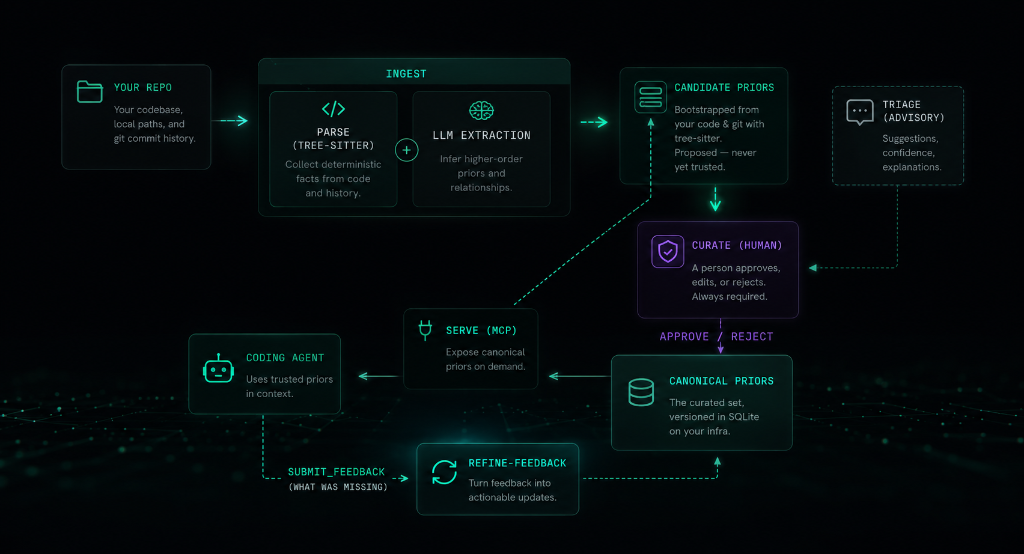
Files-first (default): onboard with context setup, and the repo itself runs
the loop — agents consult context/decisions/ before coding, author what they
learn as decision files on their working branch, and your PR review promotes or
rejects. Optionally bootstrap the knowledge base once with ingest.
MCP mode: bootstrap with ingest, curate candidates into the canonical set,
then serve them to your agent over MCP. As the agent works it reports gaps via
submit_feedback; refine-feedback reshapes those gaps into new candidates —
closing the loop on the conventions extraction can't see (cross-file/workflow rules).
Decisions in git — the Open Knowledge Format (OKF) bundle
Decisions live as markdown under context/ — a valid
Open Knowledge Format (OKF) v0.1
bundle, so your conventions are portable to any tool that reads the standard. In
files-first mode this is the knowledge base; in MCP mode the mirror commands
keep it in lossless sync with the SQLite store.
- Git is the audit trail. Status lives in the directory —
candidate/vsdecisions/. Promote a decision with agit mv, review it in a PR, blame any line. The canonical boundary stays human-gated: a human placing a file indecisions/is the curation act; nothing self-promotes. - Edit as files. Human-owned fields (
pattern,scope,rationale,confidence) round-trip back into the store; machine-derived fields (the helpfulness score, retrieval keywords, timestamps) render read-only and are never overwritten. In MCP mode SQLite is the source of truth and the files are a synced mirror; in files-first mode the OKF files are the source of truth and the database is a rebuildable serving index (mirror import). - A portable OKF bundle. Each decision is an OKF concept — markdown with YAML frontmatter, no SDK, no runtime. Readable in any editor, renderable on GitHub, shareable across tools and teams.
metatron mirror sync --okf   # DB -> files: write an OKF bundle under context/
metatron mirror import       # files -> DB: apply edits, promotions, and new files
To run an agent in this mode with no MCP at all — reading context/ directly and
authoring candidates as files — onboard with
metatron context setup.
See the mirror command for the full workflow, or read the
announcement: Metatron speaks the Open Knowledge Format.
Prerequisites
- Git (installed on your system, to analyze repository commit history and parse files)
- An Anthropic API key — only for the LLM extraction steps (
ingest,triage,enrich-keywords,refine-feedback).serve,ui, andcandidatesare fully local and need no key.
Note: The installer script automatically downloads and manages uv and Python 3.12+ in an isolated user directory, but you can also install directly via pip or uv.
Installation
To install metatron as a global tool:
pip install getmetatron
Or if you use uv:
uv tool install getmetatron
Alternatively, you can use our installer script which handles Python, uv, and path configuration automatically:
curl -sSf https://getmetatron.com/install.sh | sh
Manual Installation & Development
To run it locally from source or contribute to the project:
git clone https://github.com/kerbelp/metatron.git
cd metatron
uv sync           # create the venv and install dependencies
uv run metatron --help
To install from your local clone as a global tool:
uv tool install .
Update notices and self-upgrade
metatron version and the curation UI check PyPI at most once a day for a newer
getmetatron release and print a passive notice with the upgrade command. The check
is a read-only request to pypi.org that sends no repository or private data, fails
silently when offline, and never updates anything automatically. Disable it with
METATRON_NO_UPDATE_CHECK=1. Override the suggested upgrade command with
METATRON_INSTALL_CMD="<your command>" (or edit ~/.metatron/install.json).
To upgrade in place:
metatron version --upgrade
It re-checks PyPI (bypassing the daily throttle) and, when a newer release exists,
runs the upgrade command for the detected install method (uv tool, pipx, or a
configured METATRON_INSTALL_CMD). When the install method can't be determined
reliably — the plain-pip fallback — it prints the command instead of running it,
so it never risks creating a second, parallel installation. Restart any running
metatron serve afterwards to pick up the new code.
Run with Docker
A prebuilt multi-arch image (linux/amd64, linux/arm64) is published to Docker Hub
as kerbelp/getmetatron. The image's
entrypoint is the metatron CLI and its default command serves the MCP server over
stdio, so docker run with no arguments starts the server.
docker pull kerbelp/getmetatron
To build from source instead (this is also what the Glama.ai listing builds):
docker build -t kerbelp/getmetatron .
Decisions live in a SQLite database, so mount a volume to persist it across runs. Ingest a repo (mount it read-only and pass your API key), curate, then serve:
# 1. ingest a repo into a persisted DB (needs an Anthropic API key)
docker run --rm \
  -e ANTHROPIC_API_KEY \
  -v metatron-data:/data -e METATRON_DB=/data/metatron.db \
  -v /path/to/your/repo:/repo:ro \
  kerbelp/getmetatron ingest /repo

# 2. serve the curated decisions over stdio (no API key needed)
docker run -i --rm \
  -v metatron-data:/data -e METATRON_DB=/data/metatron.db \
  kerbelp/getmetatron serve --repo <id>
ingest prints the <id> to pass to serve. Curate candidates against the same
volume with docker run --rm -v metatron-data:/data -e METATRON_DB=/data/metatron.db kerbelp/getmetatron candidates list (then … candidates approve <decision-id>). The -i flag
o
Truncated for display — read the full file on GitHub.
Related Skills
Agent-Reach
109.2kGive your AI agent eyes to see the entire internet. Read & search Twitter, Reddit, YouTube, GitHub, Bilibili, XiaoHongShu — one CLI, zero API fees.
headroom
78.9kCompress tool outputs, logs, files, and RAG chunks before they reach the LLM. 20% fewer tokens for coding agents, 60-95% fewer tokens for JSON, same answers. Library, proxy, MCP server.
CowAgent
47.8kOpen-source personal AI assistant & Agent Harness. Plans tasks, runs tools and skills, self-evolves with memory and knowledge. Multi-agent, multi-model, multi-channel. Lightweight, extensible, one-line install.
Scrapling
97.9k🕷️ The BEST Web Scraping framework that handles everything from a single request to a full-scale crawl! Don't be shy, join here: https://discord.gg/EMgGbDceNQ and follow here for daily tips and tricks: https://x.com/Scrapling_dev

Languages
Trust signals
From repository metadata: license, adoption, age and documentation. Not a code audit — see the Safety scan above for what the skill file itself contains.