
Skeuocard
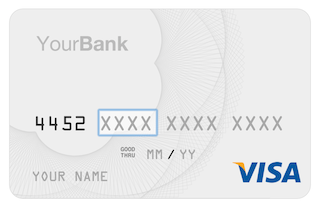
Skeuocard progressively enhances credit card inputs to provide a skeuomorphic interface.
Install / Use
/learn @kenkeiter/SkeuocardREADME
Looking for a new maintainer!
Unfortunately, I haven't been able to find the time that I would like to dedicate to this project. Although it is still widely stable on most browsers, the internet is an inherently unstable place, and the usability of Skeuocard will deteriorate over time if not maintained and improved. To further the use of Skeuocard, I'm looking for a new maintainer for the Skeuocard project.
To those of you that have submitted issues and pull requests: thank you so much for your time, attention to detail, and effort. I'm sorry that I haven't been able to return that. This was always meant to be at worst an experiment, and at best, a gift. I hope you enjoy Skeuocard, and I hope that we find a maintainer who can give this the attention your interest has demonstrated that it deserves.
If you believe yourself or someone you know to be qualified, please reach out to me via email: ken+skeuocard@kenkeiter.com.
Skeuocard (v1.0.3)
Skeuocard is a re-think of the way we handle credit card input on the web. It progressively enhances credit card input forms so that the card inputs become skeuomorphic, facilitating accurate and fast card entry, and removing barriers to purchase.
You can try it out at http://kenkeiter.com/skeuocard.
For more on the theory behind Skeuocard, check out the blog post that started it all: "Redesigning Credit Card Inputs" by me (Ken Keiter).
Usage
Skeuocard takes a standard credit card input form and partially transforms its DOM, removing non-essential elements, while leaving the underlying inputs alone. In order to use Skeuocard in your checkout page, you'll need to do one of two things.
Bower
If you have Bower then you can simply:
$ bower install skeuocard
Manually
Or you can link the necessary style sheets and scripts, and make sure any asset dependencies are at the right paths.
<head>
  <!-- ... your CSS includes ... -->
  <link rel="stylesheet" href="styles/skeuocard.reset.css" />
  <link rel="stylesheet" href="styles/skeuocard.css" />
  <link rel="stylesheet" href="styles/demo.css">
  <script src="javascripts/vendor/cssua.min.js"></script>
  <!-- ... -->
</head>
Make sure your credit card inputs are within their own containing element (most likely a <div>). In the example below, the name attribute of the inputs is significant because Skeuocard needs to determine which inputs should remain intact and be used to store the underlying card values.
Side note: If you'd like to use different input names or selectors, you can specify those at instantiation. See the "Changing Underlying Value Selectors" section, below.
<div class="credit-card-input no-js" id="skeuocard">
  <p class="no-support-warning">
    Either you have Javascript disabled, or you're using an unsupported browser, amigo! That's why you're seeing this old-school credit card input form instead of a fancy new Skeuocard. On the other hand, at least you know it gracefully degrades...
  </p>
  <label for="cc_type">Card Type</label>
  <select name="cc_type">
    <option value="">...</option>
    <option value="visa">Visa</option>
    <option value="discover">Discover</option>
    <option value="mastercard">MasterCard</option>
    <option value="maestro">Maestro</option>
    <option value="jcb">JCB</option>
    <option value="unionpay">China UnionPay</option>
    <option value="amex">American Express</option>
    <option value="dinersclubintl">Diners Club</option>
  </select>
  <label for="cc_number">Card Number</label>
  <input type="text" name="cc_number" id="cc_number" placeholder="XXXX XXXX XXXX XXXX" maxlength="19" size="19">
  <label for="cc_exp_month">Expiration Month</label>
  <input type="text" name="cc_exp_month" id="cc_exp_month" placeholder="00">
  <label for="cc_exp_year">Expiration Year</label>
  <input type="text" name="cc_exp_year" id="cc_exp_year" placeholder="00">
  <label for="cc_name">Cardholder's Name</label>
  <input type="text" name="cc_name" id="cc_name" placeholder="John Doe">
  <label for="cc_cvc">Card Validation Code</label>
  <input type="text" name="cc_cvc" id="cc_cvc" placeholder="123" maxlength="3" size="3">
</div>
When the Skeuocard is instantiated for the containing element above, all children of the containing element will be removed except for the underlying form fields.
Causing a Skeuocard to appear instead is as simple as:
$(document).ready(function(){
  card = new Skeuocard($("#skeuocard"));
});
That's it! You've got a skeuomorphic credit card input, instead of your normal, confusing form.
Beyond the Basics
Enabling Debugging Output
Skeuocard occasionally provides useful debugging output. By instantiating Skeuocard with the debug option set to true, those messages will be sent to console.log and prefixed with [skeuocard].
new Skeuocard($("#skeuocard"), {
  debug: true
});
Turn off Focusing the Input by Default
By default, when Skeuocard is initialized, the input field will be focused. If you don't want this to happen (for example, if the skeuocard element is positioned below the fold and you want to prevent the browser from scrolling there), then pass dontFocus: true as an initialization option.
new Skeuocard($("#skeuocard"), {
  dontFocus: true
});
Providing Initial Values
Sometimes you'll need to pre-fill credit card information when you load the page. To do so, you can simply provide a value attribute for your form fields (or <option selected ...>, in the case of a <select>), and Skeuocard will pick up your initial values when instantiated.
Alternately, you can instantiate your Skeuocard instance with an initialValues object, which will override any existing values provided in the form, like so:
new Skeuocard($("#skeuocard"), {
  initialValues: {
    number: "4111111111111111",
    expMonth: "1",
    expYear: "2016",
    name: "James Doe",
    cvc: "123"
  }
});
Changing Values on the Fly
You can also change Skeuocard values manually by changing the underlying form element's value, and triggering a change event.
$('[name="cc_number"]').val('4111111111111111').trigger('change')
Changing Placeholder Strings
You can change the character which Skeuocard uses as a placeholder for segmented card inputs, as well as the placeholder on the generic card view (visible when a card type has not been determined) by providing either of the following options at instantiation: cardNumberPlaceholderChar and genericPlaceholder.
cardNumberPlaceholderChar is used for filling only segmented inputs (i.e. "[XXXX] [XXXX] [XXXX] [XXXX]") and is by default set to X. The genericPlaceholder value is used when the card type has not yet been determined, and is by default set to XXXX XXXX XXXX XXXX.
new Skeuocard($("#skeuocard"), {
  cardNumberPlaceholderChar: '*',
  genericPlaceholder: '**** **** **** ****'
});
Changing Underlying Value Selectors
When a Skeuocard is instantiated, it attaches itself to a container element and removes any unneeded children, before adding its own; however, Skeuocard stores its values in pre-existing input fields, which aren't selected for removal.
By default, Skeuocard sets the following default selectors to match the underlying form fields within the container element, and use them to store values:
typeInputSelector: [name="cc_type"]numberInputSelector: [name="cc_number"]expMonthInputSelector: [name="cc_exp_month"]expYearInputSelector: [name="cc_exp_year"]nameInputSelector: [name="cc_name"]cvcInputSelector: [name="cc_cvc"]
Providing any of those options with different values at instantiation will cause Skeuocard to use your supplied selector, instead! For example, if our credit card number field had a name of credit_card_number (instead of the default cc_number), we could change it at instantiation like so:
new Skeuocard($("#skeuocard"), {
  numberInputSelector: '[name="credit_card_number"]'
});
Using the Server's Current Date
If you're smart, you probably won't want to use the client's local Date to validate against when checking expiration. You can specify a Date to check against at instantiation by setting currentDate on the Skeuocard class like so:
Skeuocard.currentDate = new Date(year, month, day);
Note that month is an integer from 0 - 11.
By default, Skeuocard will automatically use the client's local Date.
Specifying Accepted Card Products
Only accept Visa and AmEx? No worries. Skeuocard has you covered. You can specify accepted card types with an options argument, or in the underlying form itself.
To limit your accepted card products, simply add or remove <option>s from your type <select> where either the value attribute matches the shortname of the product (see the example below), or the data-sc-type attribute is set to the shortname of the product (if your value needs to be different for legacy purposes).
<select name="cc_type">
  <option value="">...</option>
  <option value="visa">Visa</option>
  <option value="mastercard">MasterCard</option>
  <option value="maestro">Maestro</option>
  <option value="amex">American Express</option>
  <option value="diners" data-sc-type="dinersclubintl">Diners Club</option>
</select>
You can also optionally override this list by providing an array of accepted card product shortnames at instantiation, like so:
new Skeuocard($("#skeuocard"), {
  acceptedCardProducts: ['visa', 'amex']
});
jQuery's noConflict Mode
If you are using jQuery's `n
