
ZenstruckFormBundle
Provides Twitter Bootstrap form theme, a help type extension, Ajax/Tunnel/Select2 entity form types and javascript helpers
Install / Use
/learn @kbond/ZenstruckFormBundleREADME
ZenstruckFormBundle
Provides Twitter Bootstrap form theme, useful FormType Extensions and javascript helpers.
Installation
-
Add to your
composer.json:composer require zenstruck/form-bundle:~1.4 -
Optional If using the
ajax_entity_controllerfeature, addzendframework/zend-cryptto yourcomposer.json:composer require zendframework/zend-crypt:~2.0,!=2.1.1Note: Version 2.1.1 of
zend-cryptdoes not have it's autoloader configured correctly. -
Optional If using the Grouped form feature, add cocur/slugify to your
composer.jsoncomposer require cocur/slugify:~0.8 -
Register the bundle with Symfony2:
// app/AppKernel.php public function registerBundles() { $bundles = array( // ... new Zenstruck\Bundle\FormBundle\ZenstruckFormBundle(), // enable if you want to use the grouped form // new Cocur\Slugify\Bridge\Symfony\CocurSlugifyBundle() ); // ... } -
If using 'Select2', be sure to download the required files from http://ivaynberg.github.io/select2/ and include the files in your template.
//base.html.twig Example

//...
{% block stylesheets %}
    <link href="{{ asset('path/to/select2.css') }}" type="text/css" rel="stylesheet" />

//...
{% block javascripts %}
    <script type="text/javascript" src="{{ asset('path/to/select2.js') }}"></script>
    <script type="text/javascript" src="{{ asset('path/to/zenstruckform/js/helper.js') }}"></script>
    <script type="text/javascript" src="{{ asset('path/to/zenstruckform/js/script.js') }}"></script>
Twitter Bootstrap form layout
To use, do one of the following:
-
Add for a single template:
{# for bootstrap 2.x #} {% form_theme form 'ZenstruckFormBundle:Twitter:form_bootstrap_layout.html.twig' %} {# for bootstrap 3.x #} {% form_theme form 'ZenstruckFormBundle:Twitter:form_bootstrap3_layout.html.twig' %} -
Add globally in your
config.yml:twig: form: resources: # for bootstrap 2.x - 'ZenstruckFormBundle:Twitter:form_bootstrap_layout.html.twig' # for bootstrap 3.x - 'ZenstruckFormBundle:Twitter:form_bootstrap3_layout.html.twig'
FormType Extensions
AjaxEntityType
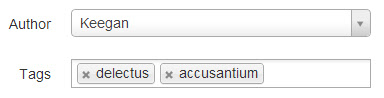
Creates a 1-m or m-m entity association field. This type simply creates a hidden field that takes
an either 1 or multiple comma separated entity ids. Note: Ensure the entity has __toString() defined.
Enable in your config.yml (disabled by default):
zenstruck_form:
    form_types:
        ajax_entity: true
There are several ways to use this type:
-
Default - creates a hidden field type. It is up to the user to add functionality.
use Symfony\Component\Form\AbstractType; use Symfony\Component\Form\FormBuilderInterface; class MyFormType extends AbstractType { public function buildForm(FormBuilderInterface $builder, array $options) { $builder ->add('name', 'zenstruck_ajax_entity', array( 'class' => 'AppBundle:MyEntity' // ensure MyEntity::__toString() is defined )) ; } // ... } -
Select2 with built in entity finder (
zendframework/zend-cryptrequired):Enable the controller in your
config.yml(disabled by default):zenstruck_form: form_types: ajax_entity_controller: trueAdd the route to your
routing.yml:zenstruck_form: resource: "@ZenstruckFormBundle/Resources/config/ajax_entity_routing.xml"Add to your form type:
use Symfony\Component\Form\AbstractType;
use Symfony\Component\Form\FormBuilderInterface;

class MyFormType extends AbstractType
{
    public function buildForm(FormBuilderInterface $builder, array $options)
    {
        $builder
            ->add('name', 'zenstruck_ajax_entity', array(
                'class'             => 'AppBundle:MyEntity', // ensure MyEntity::__toString() is defined
                'use_controller'    => true,
                'property'          => 'name', // the entity property to search by
                // 'repo_method'    => 'findActive' // for using a custom repository method
                // 'extra_data'     => array() // for adding extra data in the ajax request (only applicable when using repo_method)
            ))
        ;
    }

    // ...
}
Note: The URL is dynamically generated for each entity but is encrypted with the application's
secretfor security purposes. -
Select2 with custom URL. This will create a Select2 widget for this field.
use Symfony\Component\Form\AbstractType;
use Symfony\Component\Form\FormBuilderInterface;

class MyFormType extends AbstractType
{
    public function buildForm(FormBuilderInterface $builder, array $options)
    {
        $builder
            ->add('name', 'zenstruck_ajax_entity', array(
                'class' => 'AppBundle:MyEntity', // ensure MyEntity::__toString() is defined
                'url' => '/myentity/find'
            ))
        ;
    }

    // ...
}
The url endpoint receives the search string as a
qrequest parameter and must return a json encoded array. Here is an example:[ {"id":2004,"text":"dolorem"}, {"id":2008,"text":"inventore"} ]
FormType options
class: The entity the field represents. Required.url: The url that Select2 will send search queries toproperty: The entity property to search by (Overridesurl)method: The custom repository method to call for searches (Overridesproperty)placeholder: The Select2 placeholder text. Default: Choose an optionmultiple: Whether this is allows for multiple values. Default: falseuse_controller: Whether to use the bundled controller or not (``). Default: falserepo_method: For using a custom repository method. Default: nullextra_data: For adding extra data in the ajax request (only applicable when using repo_method). Default array()
Select2 Javascript Helper
Enables the Select2 widget for AjaxEntityType. Requires
Select2.
Enable with ZenstruckFormHelper.initSelect2Helper()
TunnelEntityType

Creates an entity association field with a select button. A javascript callback for the select button may be defined. Can be used for opening a dialog to choose an entity.
-
Enable in your
config.yml(disabled by default):zenstruck_form: form_types: tunnel_entity: true -
Add help option to your form fields
use Symfony\Component\Form\AbstractType;
use Symfony\Component\Form\FormBuilderInterface;

class MyFormType extends AbstractType
{
    public function buildForm(FormBuilderInterface $builder, array $options)
    {
        $builder
            ->add('name', 'zenstruck_tunnel_entity', array(
                'class' => 'AppBundle:MyEntity',
                'callback' => 'MyApp.selectMyEntity',
                'required' => false
            ))
        ;
    }

    // ...
}
The widget html generated by the above example is as follows:
<div class="input-append zenstruck-tunnel-widget">
    <input type="hidden" class="zenstruck-tunnel-id" />
    <span class="uneditable-input zenstruck-tunnel-title">{{ title }}</span>
    <a href="#" class="btn zenstruck-tunnel-clear"><b class="icon-remove"></b></a>
    <a href="#" class="btn zenstruck-tunnel-select" data-callback="MyApp.selectMyEntity">Select...</a>
</div>
Your javascript can hook into the clear button and select button. Here are the useful classes:
.zenstruck-tunnel-id: id of the selected entity.zenstruck-tunnel-title: title of the selected entity.zenstruck-tunnel-clear: button that clears the title/id (only available ifrequiredisfalse).zenstruck-tunnel-select: button that initiates the entity selection
FormType options
class: The entity the field represents. Required.callback: The javascript callbackbutton_text: The text for the select button. Default: Select...
Tunnel Javascript Helper
Adds events to the clear and select buttons. The select button calls the callback defined in the type options.
The callback receives the following parameters:
id: the id of the currently selected entity (if any)element: the hidden input element
Enable with ZenstruckFormHelper.initTunnelHelper()
HelpType
Allow you to add help messages to your form fields.
-
Enable in your
config.yml(disabled by default):zenstruck_form: form_types: help: true -
Add help option to your form fields
