
Kat.nvim
NeoVim specifc port of kat.vim, a warm blue theme, written in Fennel with Aniseed
Install / Use
/learn @katawful/Kat.nvimREADME
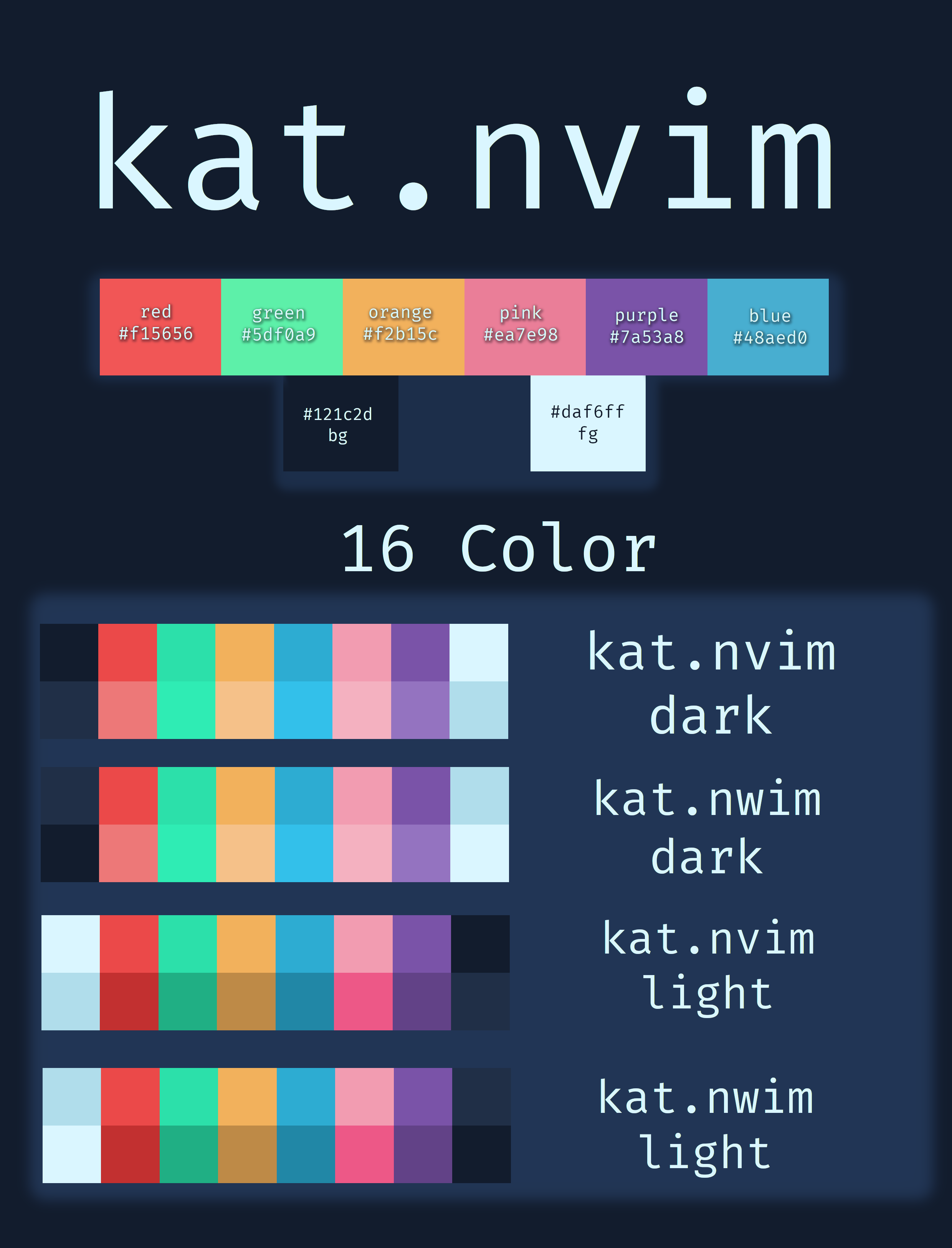
kat.nvim
A NeoVim theme with warm blue tones written in Fennel with Aniseed. Lua files are embedded, no external dependencies are required. Supports Neovim from version 0.7 and newer.
This theme is dynamic with only a few predefined colors. Almost everything is generated dynamically. Syntax is built off of groups, all statements inherent the colors of its parent color.
Installation:
Install with your plugin manager of choice. Example for vim-plug:
" kat.nvim
Plug 'katawful/kat.nvim', { 'tag': '3.1' }
Current release: 3.1 - 'Fallacious Burmese'
It is recommended to stick with the current tagged release.
main branch is mostly tested, but this is generally the latest release and breakages can occur outside of your tag.
dev branch is untested and not for end use.
Usage is and will always be considered broken.
Example:
Usage
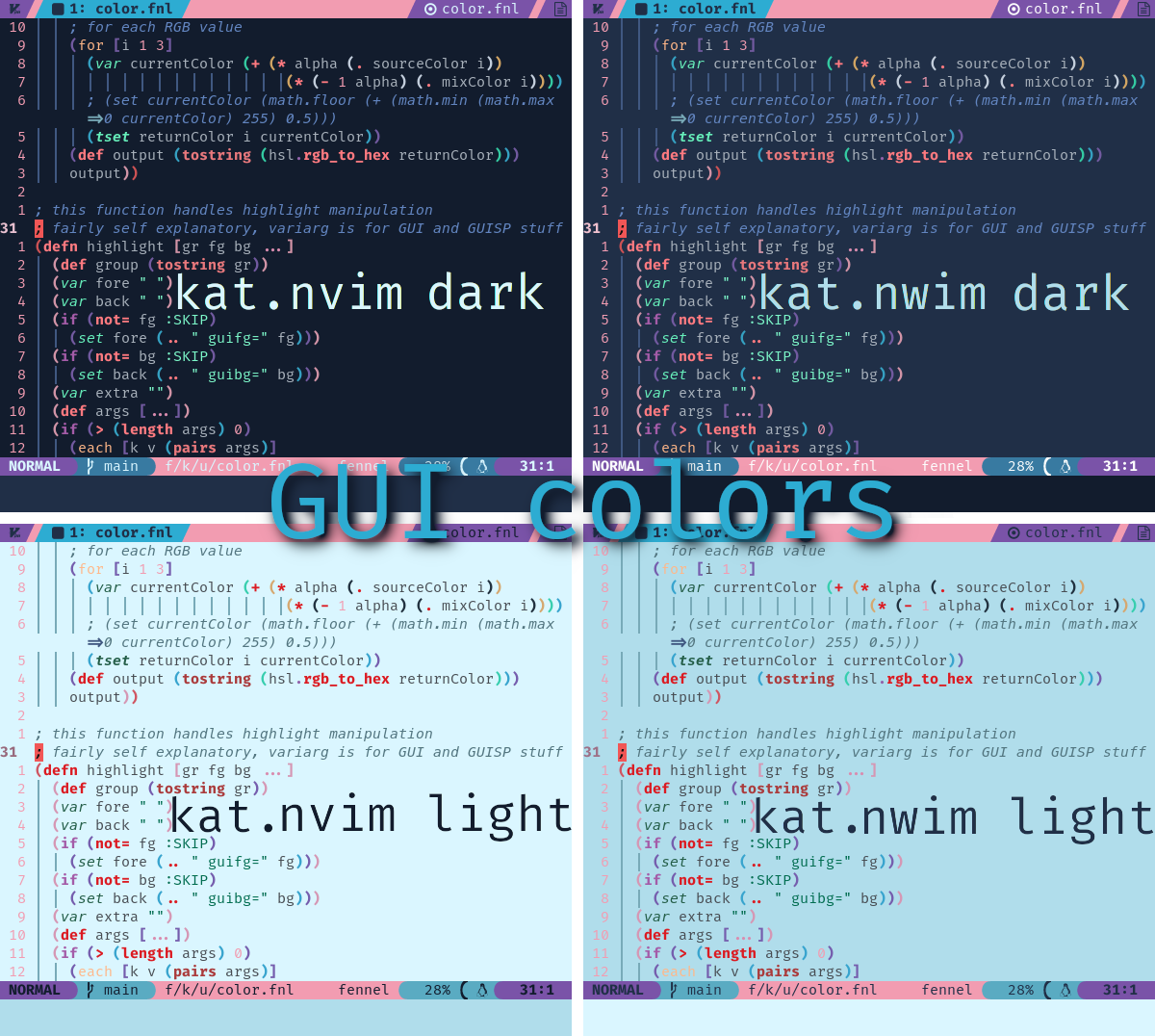
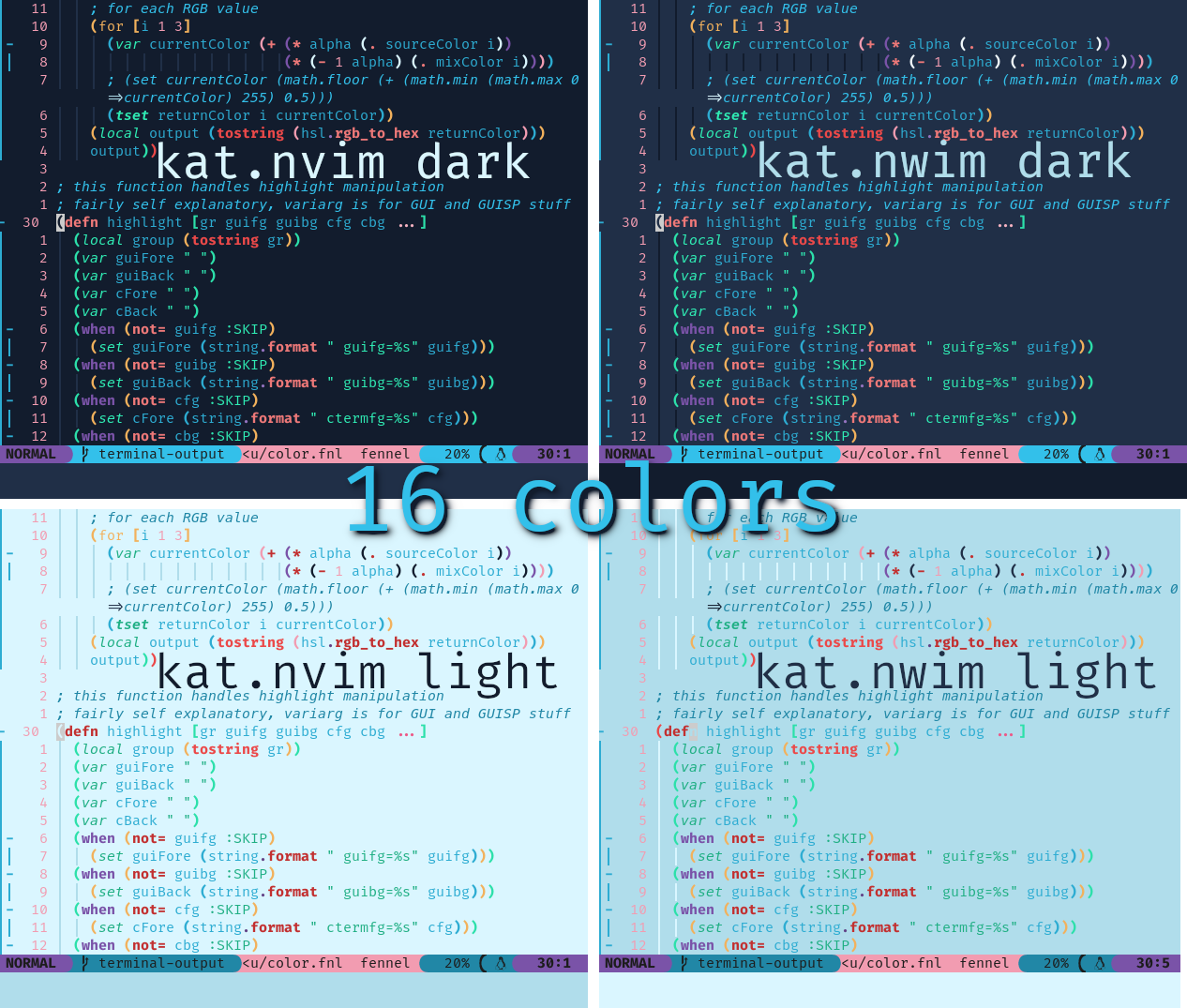
There are only 2 colorscheme provided: kat.nvim and kat.nwim.
The former is a harder contrast, the latter is a softer contrast (the name being shortened from kat.nvim-owo).
To set between dark and light schemes, the :set background method is used.
Simply set the contrast to whichever you prefer, and set your background in your NeoVim configs.
See the examples above for the differences.
Rendering
Colors for this colorscheme can be rendered to system-local JSON files for much faster startup time.
These will render to your Neovim stdpath('data').
For example on Linux:
/home/user/.local/share/nvim/kat/kat.nvim/json.
To render all of the base colorscheme files, use the user-command KatNvimRender.
This will render out all of the colors for both colorschemes and each background, synchronously, to said data path.
Overrides
local render = require('katdotnvim.utils.export.render')
local my_overrides = function ()
    render.override_all({
        source = "kat",
        {
            {group = "Normal", fg = "#ffffff", default = true},
            {group = "Visual", fg = "#ff0000", default = true}}})

    local color = function ()
        if vim.o.background == "light" then
            return "#000000"
        else
            return "#ffffff"
        end
    end

    render.override ({
        source = "kat",
        light_hard = {
            {group = "Normal", fg = color(), default = true},
            {group = "Visual", fg = "#ff0000", default = true}}})
    render.override ({
        source = "kat",
        light_soft = {
            {group = "Normal", fg = color(), default = true},
            {group = "Visual", fg = "#ff0000", default = true}}})
    render.override ({
        source = "kat",
        dark_hard = {
            {group = "Normal", fg = color(), default = true},
            {group = "Visual", fg = "#ff0000", default = true}}})
    render.override ({
        source = "kat",
        dark_soft = {
            {group = "Normal", fg = color(), default = true},
            {group = "Visual", fg = "#ff0000", default = true}}})
end
vim.api.nvim_create_user_command("MyOverrides", my_overrides, {})
Overrides can be defined, which will be loaded with the same method as system colors. There are 2 override functions:
override: Define an override for a single variation of kat.nvimoverride_all: Define an override for all variations of kat.nvim
override_all cannot change values for the group based upon values like vim.o.background or kat.nvim's current contrast.
override should be used for that instead.
Both functions take a table with 2 keys: both take a source key with a string value corresponding to a name of your desire (like computer username).
For override_all, the second key is a unnamed table of highlight groups.
For override, the second key must be one of the following:
- 'light_hard'
- 'light_soft'
- 'dark_hard'
- 'dark_soft'
It is recommended to define all 4, but it is not required.
kat.nvim will use all rendered files it finds.
However, for example if you only use 'light_hard' in override, if you set your background to dark or use the colorscheme kat.nwim, your overrides will not display.
Neovim version support also works with this feature, though remember to delete and regenerate if you update to a new version with a breaking change.
Highlight Table
This colorscheme uses a custom highlight table to consolidate everything.
It is mostly based on the opts table for nvim_set_hl, but with added keys:
{
    group = "hl-group-name, a string",
    fg = "gui-fg, any valid color",
    bg = "gui-bg, any valid color",
    ctermfg = "cterm-fg, a number 0-255",
    ctermbg = "cterm-bg, a number 0-255",
    sp = "gui hl for special highlights, any valid color",
    attr = "one of the possible attributes, true",
    default = "only overwrite values found in this table, true. different from the built in default key. 2nd priority",
    link = "hl group to link to, a string. highest priority",
}
While it isn't generally needed for overrides (as you have the 'default' key), all 4 color keys can take "SKIP" and "NONE" as additional values.
"SKIP" simply does not try to overwrite any value found, while "NONE" directly sets the value to empty.
See attr-list for the list of attribute keys possible.
-- Example highlight table
{
    group = "Normal",
    fg = "#000000",
    bg = "#ffffff",
    ctermfg = 7,
    ctermbg = 0,
    bold = true,
    italic = true,
    undercurl = true,
    sp = "#ff0000",
}

-- Just link a group
{
    group = "TSVariable",
    link = "Variable",
    -- the rest are ignored because of 'link' key
    fg = "#ffffff",
    -- ...
}

-- Only update a group
{
    group = "Visual",
    default = true,
    bold = true,
}
Terminal Colors Support
The following terminals can have a 16 color config file generated based on the current in use kat.nvim theme:
| Terminal | Setting | |---|---| | kitty | "kitty" | | alacritty | "alacritty" | | URxvt | "rxvt-unicode", "urxvt" | | konsole | "konsole" |
Generate the color file like so:
:KatGenTermTheme kitty
This will generate "kitty-kat.nvim-dark.conf" at the current working directory when kat.nvim with a dark background is used.
You can also generate all 4 variations at once at your cwd by passing all for the second argument:
:KatGenTermTheme kitty all
Options
| Variable | Function | Options | Default |
|---|---|---|---|
| g:kat_nvim_integrations| What plugins colors are loaded | a list of strings, see below for current integrations | all are enabled |
| g:kat_nvim_filetype | What filetype colors are loaded | a list of strings, see below for current filetypes | all are enabled |
| g:kat_nvim_stupidFeatures | Unstable. Features that work but probably shouldn't be used | boolean | v:false |
| g:kat_nvim_max_version | A string of the max supported nvim version | e.g. "0.7" | Sets to max version needed for plugin to work |
| g:kat_nvim_commentStyle | Deprecated. Use an override instead | any valid gui string | 'italic' |
| g:kat_nvim_dont_render | Deprecated. Remains unused | boolean | v:false |
| g:kat_nvim_compile_enable | Deprecated. Remains unused | boolean | v:false |
Integrations
| Plugin | Option Name | | --- | --- | | Native LSP | 'lsp' | | tree-sitter | 'treesitter' | | Startify | 'startify' | | TS Rainbow | 'ts_rainbow' | | indent-blankline | 'indent_blankline' | | coc.nvim | 'coc' | | nvim-cmp | 'cmp' | | bufferline | Note: not enabled by default 'bufferline' | | lightline | Use plugin settings: 'kat' | | Airline | Use plugin settings: 'kat' | | Lualine | Use plugin settings: 'kat' | | Fugitive | 'fugitive' | | gitsigns | 'gitsigns' |
Filetypes
|Filetypes| Option Name | |---| --- | |Vimscript| 'vim' | |Markdown| 'markdown' | |Vimwiki| 'vimwiki' |
Stupid Features
Note that this feature is subject to changes and is considered unstable. Please don't expect stability with version releases.
Due to the magic speed of Lua, in addition to the wonderful NeoVim API, I was given the ability to add in features unheard of for VimL based colorschemes.
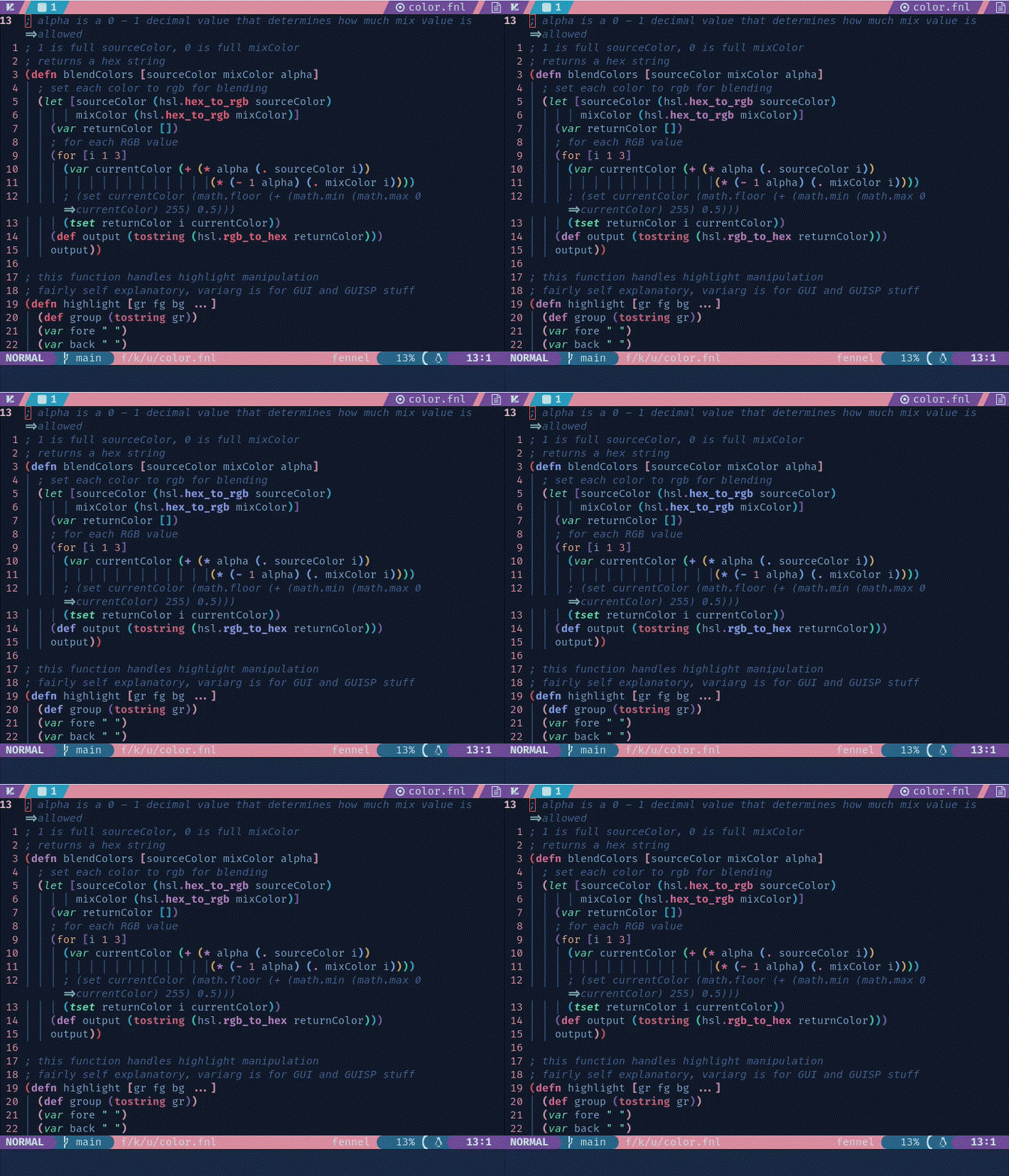
Currently the only feature is color fading for the Function highlight group. See the following image for an example. More features will be added in the future as I think of them.
Using in Other Plugins
To make integration with other plugins easier, the majority of colors used in this plugin are exported in katdotnvim.color in the table named kat:
local kat_colors = require('katdotnvim.color').kat
There are 10 tables contained in kat:
- pink
- red
- blue
- green
- purple
- orange
- teal
- plum
- fg
- bg
'fg' and 'bg' are the foreground and background colors. They are generally not mixed with other colors, but rather come from earlier definitions. The other color tables contain the various mixings used throughout this colorscheme.
Within each color table contains a table of the colors themselves, each with 2 keys:
- 'desc`
- 'color'
'desc' contains a descriptio
Related Skills
pestel-analysis
Analyze political, economic, social, technological, environmental, and legal forces
ai-cmo
Collection of my Agent Skills and books.
next
A beautifully designed, floating Pomodoro timer that respects your workspace.
product-manager-skills
38PM skill for Claude Code, Codex, Cursor, and Windsurf: diagnose SaaS metrics, critique PRDs, plan roadmaps, run discovery, and coach PM career transitions.
