Keras Unet
Helper package with multiple U-Net implementations in Keras as well as useful utility tools helpful when working with image semantic segmentation tasks. This library and underlying tools come from multiple projects I performed working on semantic segmentation tasks
Install / Use
npx skills add karolzak/keras-unetInstalls into whichever agent you are using.
README


Share:


About
Helper package with multiple U-Net implementations in Keras as well as useful utility tools helpful when working with image segmentation tasks
Features:
- [x] U-Net models implemented in Keras
- [x] Vanilla U-Net implementation based on the original paper
- [x] Customizable U-Net
- [x] U-Net optimized for satellite images based on DeepSense.AI Kaggle competition entry
- [x] Utility functions:
- [x] Plotting images and masks with overlay
- [x] Plotting images masks and predictions with overlay (prediction on top of original image)
- [x] Plotting training history for metrics and losses
- [x] Cropping smaller patches out of bigger image (e.g. satellite imagery) using sliding window technique (also with overlap if needed)
- [x] Plotting smaller patches to visualize the cropped big image
- [x] Reconstructing smaller patches back to a big image
- [x] Data augmentation helper function
- [x] Notebooks (examples):
- [x] Training custom U-Net for whale tails segmentation
- [ ] Semantic segmentation for satellite images
- [x] Semantic segmentation for medical images ISBI challenge 2015
Installation:
pip install git+https://github.com/karolzak/keras-unet
or
pip install keras-unet
Usage examples:
- U-Net implementations in Keras:
- Utils:
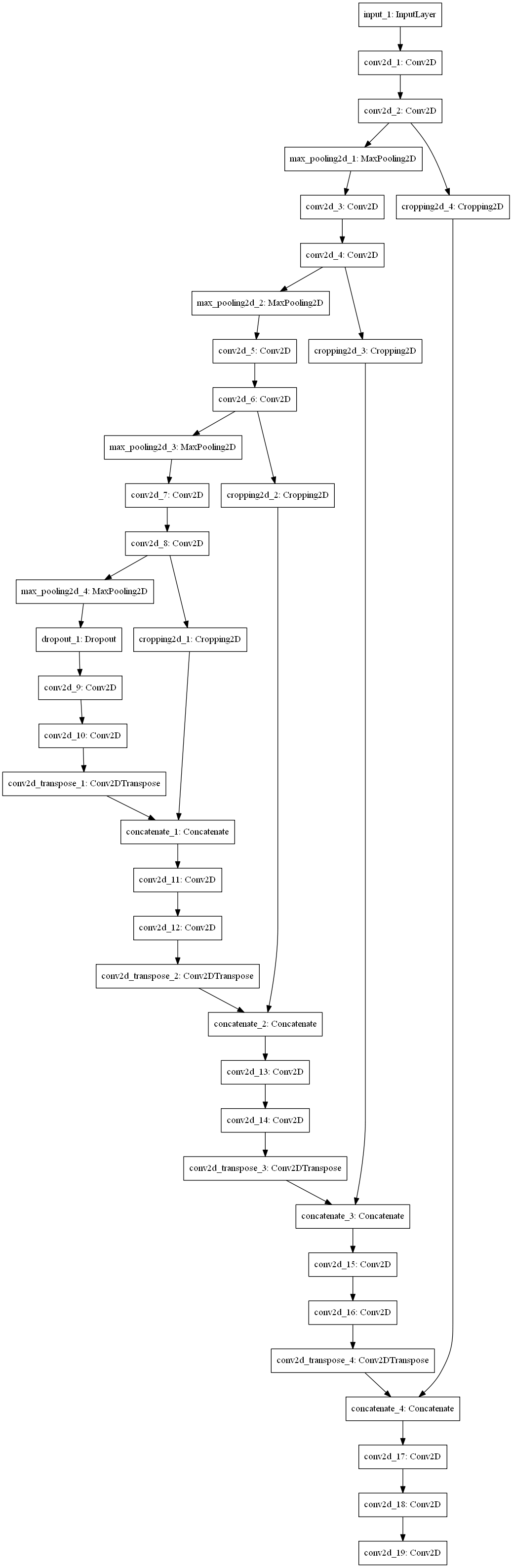
Vanilla U-Net
Model scheme can be viewed here
from keras_unet.models import vanilla_unet

model = vanilla_unet(input_shape=(512, 512, 3))
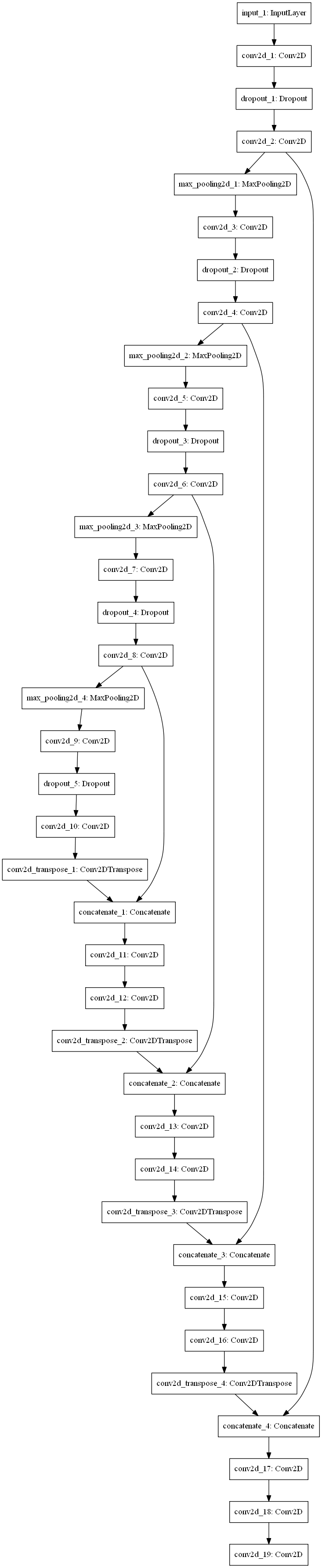
Customizable U-Net
Model scheme can be viewed here
from keras_unet.models import custom_unet

model = custom_unet(
    input_shape=(512, 512, 3),
    use_batch_norm=False,
    num_classes=1,
    filters=64,
    dropout=0.2,
    output_activation='sigmoid')
U-Net for satellite images
Model scheme can be viewed here
from keras_unet.models import satellite_unet

model = satellite_unet(input_shape=(512, 512, 3))
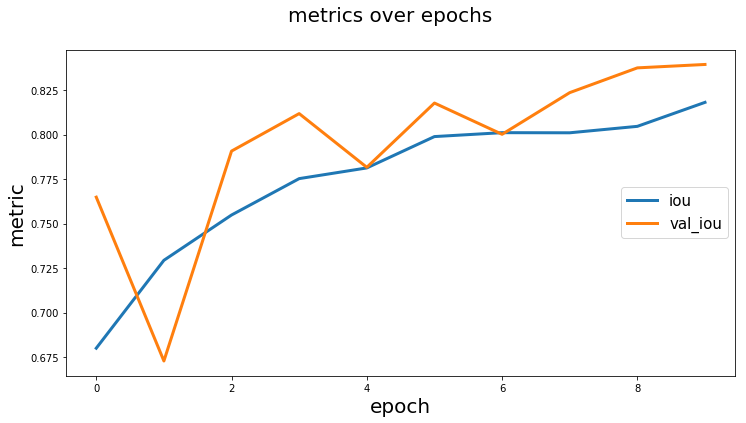
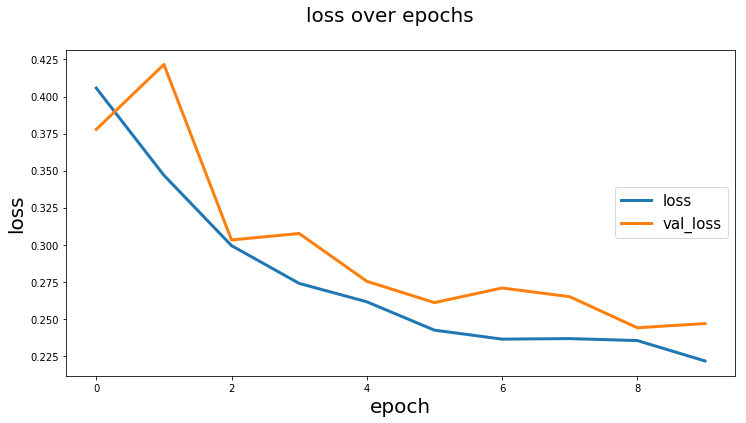
Plot training history
history = model.fit_generator(...)

from keras_unet.utils import plot_segm_history

plot_segm_history(
    history, # required - keras training history object
    metrics=['iou', 'val_iou'], # optional - metrics names to plot
    losses=['loss', 'val_loss']) # optional - loss names to plot
Output:
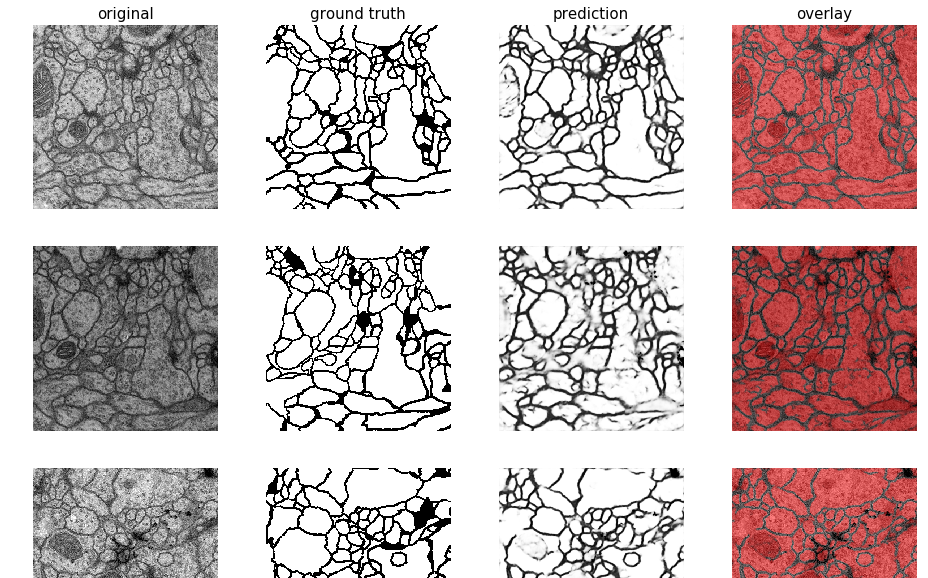
Plot images and segmentation masks
from keras_unet.utils import plot_imgs

plot_imgs(
    org_imgs=x_val, # required - original images
    mask_imgs=y_val, # required - ground truth masks
    pred_imgs=y_pred, # optional - predicted masks
    nm_img_to_plot=9) # optional - number of images to plot
Output:
Get smaller patches/crops from bigger image
from PIL import Image
import numpy as np
from keras_unet.utils import get_patches

x = np.array(Image.open("../docs/sat_image_1.jpg"))
print("x shape: ", str(x.shape))

x_crops = get_patches(
    img_arr=x, # required - array of images to be cropped
    size=100, # default is 256
    stride=100) # default is 256

print("x_crops shape: ", str(x_crops.shape))
Output:
x shape:  (1000, 1000, 3)
x_crops shape:  (100, 100, 100, 3)
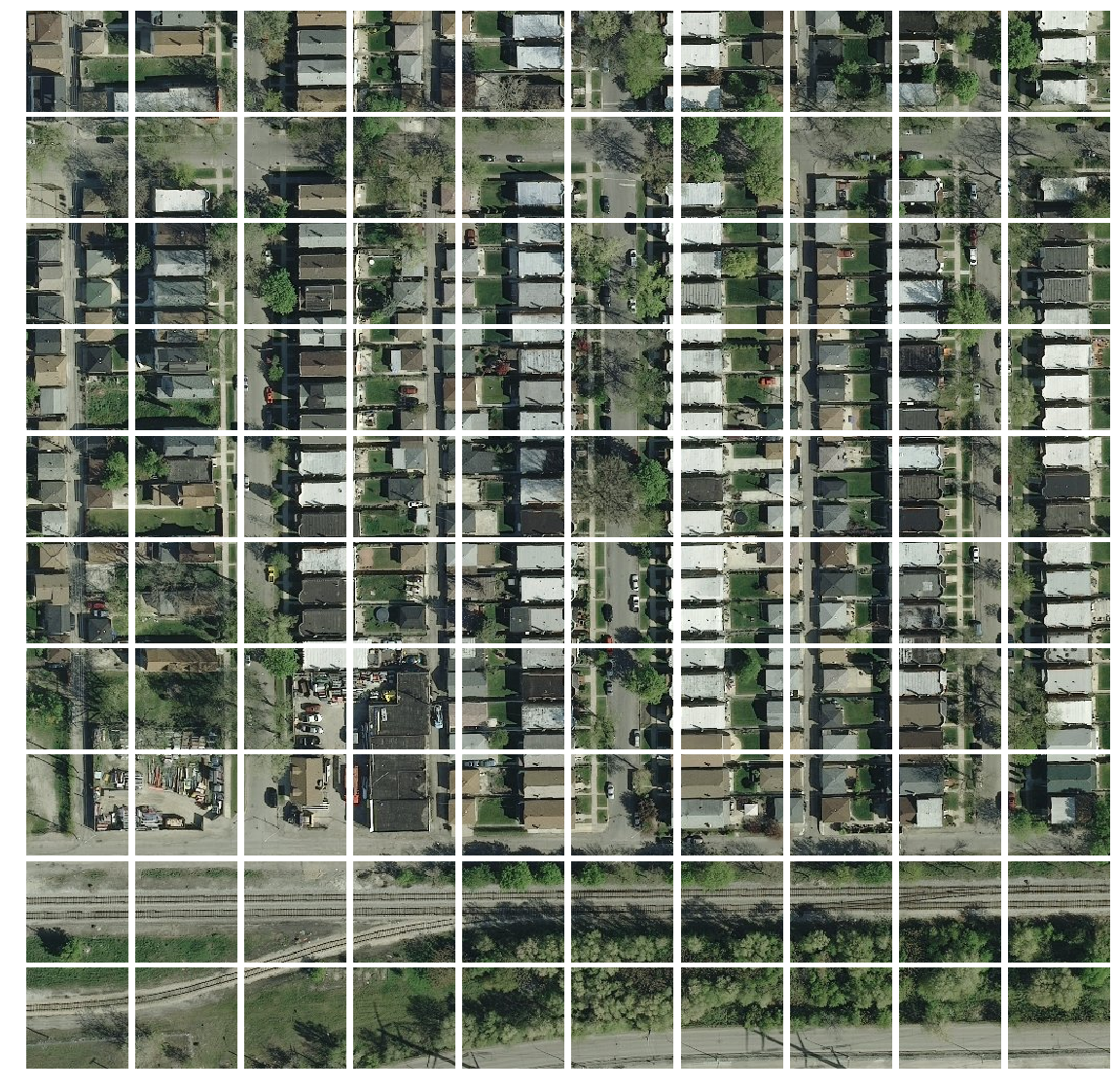
Plot small patches into single big image
from keras_unet.utils import plot_patches

print("x_crops shape: ", str(x_crops.shape))
plot_patches(
    img_arr=x_crops, # required - array of cropped out images
    org_img_size=(1000, 1000), # required - original size of the image
    stride=100) # use only if stride is different from patch size
Output:
x_crops shape: (100, 100, 100, 3)
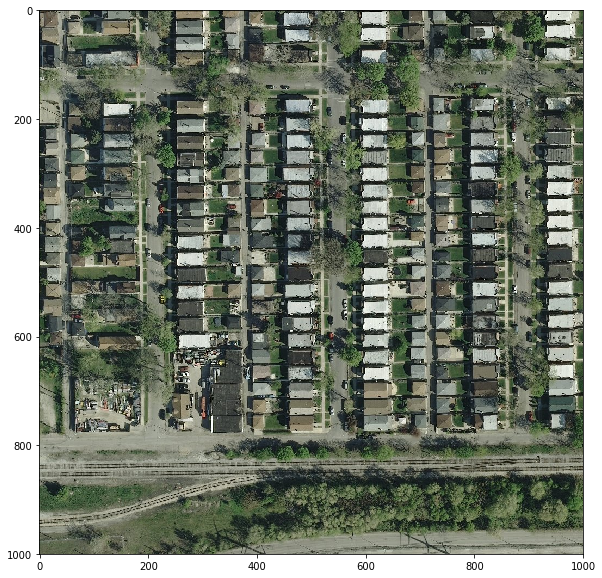
Reconstruct a bigger image from smaller patches/crops
import matplotlib.pyplot as plt
from keras_unet.utils import reconstruct_from_patches

print("x_crops shape: ", str(x_crops.shape))

x_reconstructed = reconstruct_from_patches(
    img_arr=x_crops, # required - array of cropped out images
    org_img_size=(1000, 1000), # required - original size of the image
    stride=100) # use only if stride is different from patch size

print("x_reconstructed shape: ", str(x_reconstructed.shape))

plt.figure(figsize=(10,10))
plt.imshow(x_reconstructed[0])
plt.show()
Output:
x_crops shape:  (100, 100, 100, 3)
x_reconstructed shape:  (1, 1000, 1000, 3)
Related Skills
mcp
Use the `mcp_perplexity-ask_perplexity_search` tools to answer questions. You should use this instead of the `web_search` tool because it is a lot more accurate.
practical-power-systems-synthesis
This skill enables synthesis in the domain of power-systems (engineering). It represents research-level-level expertise and is designed for production use in research, industry, and educational contexts. Use this skill when you need to perform synthesis operations related to power-systems.
semi-supervised-optogenetics-testing
This skill enables testing in the domain of optogenetics (neuroscience). It represents intermediate-level expertise and is designed for production use in research, industry, and educational contexts. Use this skill when you need to perform testing operations related to optogenetics.
data-mining-interpretation-fundamental
This skill enables interpretation in the domain of data-mining (data-science). It represents fundamental-level expertise and is designed for production use in research, industry, and educational contexts. Use this skill when you need to perform interpretation operations related to data-mining.