
ParallelWaveGAN
Unofficial Parallel WaveGAN (+ MelGAN & Multi-band MelGAN & HiFi-GAN & StyleMelGAN) with Pytorch
Install / Use
/learn @kan-bayashi/ParallelWaveGANREADME
Parallel WaveGAN implementation with Pytorch





This repository provides UNOFFICIAL pytorch implementations of the following models:
You can combine these state-of-the-art non-autoregressive models to build your own great vocoder!
Please check our samples in our demo HP.
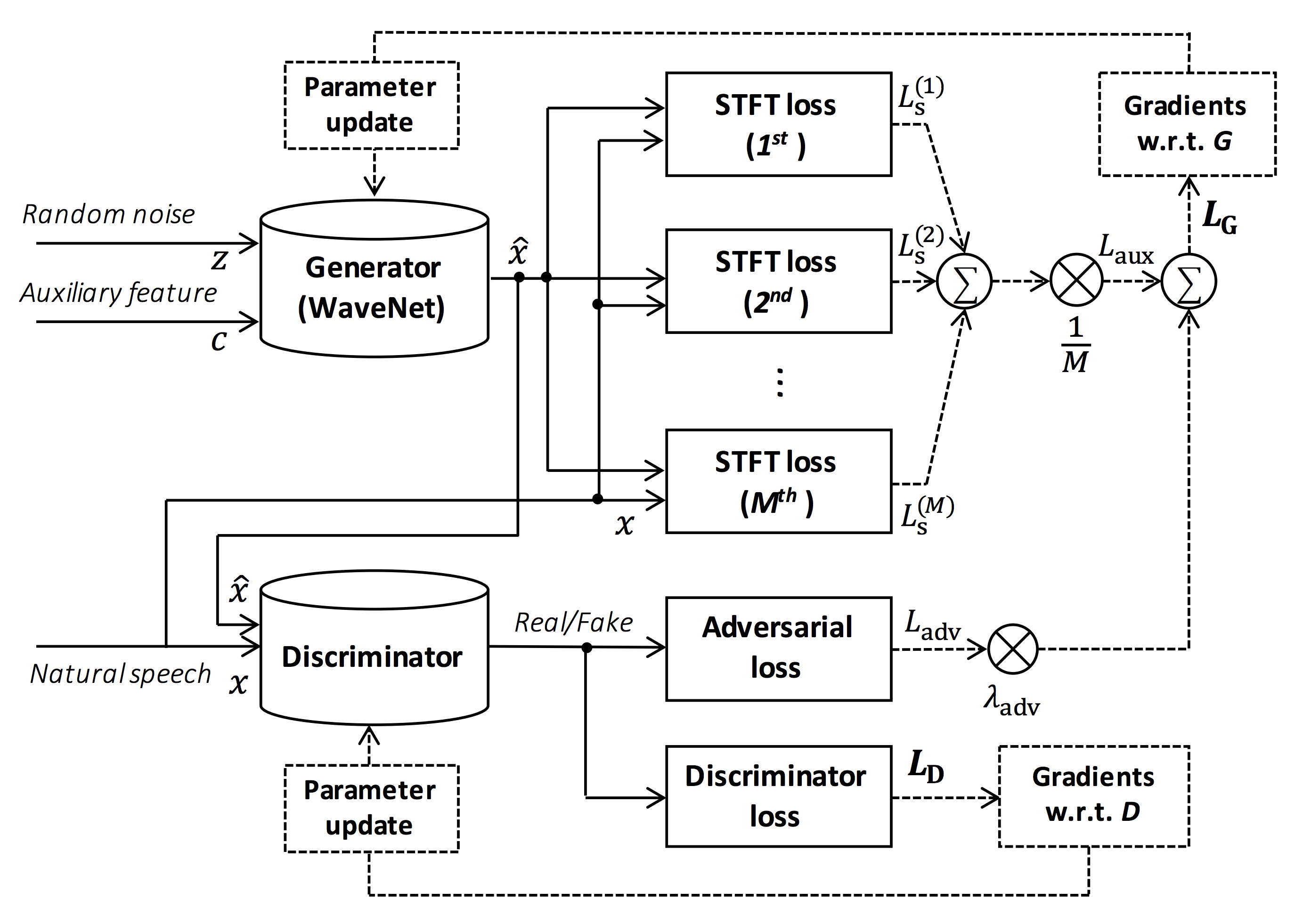
Source of the figure: https://arxiv.org/pdf/1910.11480.pdf
The goal of this repository is to provide real-time neural vocoder, which is compatible with ESPnet-TTS.
Also, this repository can be combined with NVIDIA/tacotron2-based implementation (See this comment).
You can try the real-time end-to-end text-to-speech and singing voice synthesis demonstration in Google Colab!
- Real-time demonstration with ESPnet2
- Real-time demonstration with ESPnet1
- Real-time demonstration with Muskits
What's new
- 2023/08/17 LibriTTS-R recipe is available!
- 2022/02/27 Support singing voice vocoder [egs/{kiritan, opencpop, oniku_kurumi_utagoe_db, ofuton_p_utagoe_db, csd, kising}/voc1]
- 2021/10/21 Single-speaker Korean recipe [egs/kss/voc1] is available.
- 2021/08/24 Add more pretrained models of StyleMelGAN and HiFi-GAN.
- 2021/08/07 Add initial pretrained models of StyleMelGAN and HiFi-GAN.
- 2021/08/03 Support StyleMelGAN generator and discriminator!
- 2021/08/02 Support HiFi-GAN generator and discriminator!
- 2020/10/07 JSSS recipe is available!
- 2020/08/19 Real-time demo with ESPnet2 is available!
- 2020/05/29 VCTK, JSUT, and CSMSC multi-band MelGAN pretrained model is available!
- 2020/05/27 New LJSpeech multi-band MelGAN pretrained model is available!
- 2020/05/24 LJSpeech full-band MelGAN pretrained model is available!
- 2020/05/22 LJSpeech multi-band MelGAN pretrained model is available!
- 2020/05/16 Multi-band MelGAN is available!
- 2020/03/25 LibriTTS pretrained models are available!
- 2020/03/17 Tensorflow conversion example notebook is available (Thanks, @dathudeptrai)!
- 2020/03/16 LibriTTS recipe is available!
- 2020/03/12 PWG G + MelGAN D + STFT-loss samples are available!
- 2020/03/12 Multi-speaker English recipe egs/vctk/voc1 is available!
- 2020/02/22 MelGAN G + MelGAN D + STFT-loss samples are available!
- 2020/02/12 Support MelGAN's discriminator!
- 2020/02/08 Support MelGAN's generator!
Requirements
This repository is tested on Ubuntu 20.04 with a GPU Titan V.
- Python 3.8+
- Cuda 11.0+
- CuDNN 8+
- NCCL 2+ (for distributed multi-gpu training)
- libsndfile (you can install via
sudo apt install libsndfile-devin ubuntu) - jq (you can install via
sudo apt install jqin ubuntu) - sox (you can install via
sudo apt install soxin ubuntu)
Different cuda version should be working but not explicitly tested.
All of the codes are tested on Pytorch 1.8.1, 1.9, 1.10.2, 1.11.0, 1.12.1, 1.13.1, 2.0.1 and 2.1.0.
Setup
You can select the installation method from two alternatives.
A. Use pip
$ git clone https://github.com/kan-bayashi/ParallelWaveGAN.git
$ cd ParallelWaveGAN
$ pip install -e .
# If you want to use distributed training, please install
# apex manually by following https://github.com/NVIDIA/apex
$ ...
Note that your cuda version must be exactly matched with the version used for the pytorch binary to install apex.
To install pytorch compiled with different cuda version, see tools/Makefile.
B. Make virtualenv
$ git clone https://github.com/kan-bayashi/ParallelWaveGAN.git
$ cd ParallelWaveGAN/tools
$ make
# If you want to use distributed training, please run following
# command to install apex.
$ make apex
Note that we specify cuda version used to compile pytorch wheel.
If you want to use different cuda version, please check tools/Makefile to change the pytorch wheel to be installed.
Recipe
This repository provides Kaldi-style recipes, as the same as ESPnet.
Currently, the following recipes are supported.
- LJSpeech: English female speaker
- JSUT: Japanese female speaker
- JSSS: Japanese female speaker
- CSMSC: Mandarin female speaker
- CMU Arctic: English speakers
- JNAS: Japanese multi-speaker
- VCTK: English multi-speaker
- LibriTTS: English multi-speaker
- LibriTTS-R: English multi-speaker enhanced by speech restoration.
- YesNo: English speaker (For debugging)
- KSS: Single Korean female speaker
- Oniku_kurumi_utagoe_db/: Single Japanese female singer (singing voice)
- Kiritan: Single Japanese male singer (singing voice)
- Ofuton_p_utagoe_db: Single Japanese female singer (singing voice)
- Opencpop: Single Mandarin female singer (singing voice)
- CSD: Single Korean/English female singer (singing voice)
- KiSing: Single Mandarin female singer (singing voice)
To run the recipe, please follow the below instruction.
# Let us move on the recipe directory
$ cd egs/ljspeech/voc1

# Run the recipe from scratch
$ ./run.sh

# You can change config via command line
$ ./run.sh --conf <your_customized_yaml_config>

# You can select the stage to start and stop
$ ./run.sh --stage 2 --stop_stage 2

# If you want to specify the gpu
$ CUDA_VISIBLE_DEVICES=1 ./run.sh --stage 2

# If you want to resume training from 10000 steps checkpoint
$ ./run.sh --stage 2 --resume <path>/<to>/checkpoint-10000steps.pkl
See more info about the recipes in this README.
Speed
The decoding speed is RTF = 0.016 with TITAN V, much faster than the real-time.
[decode]: 100%|██████████| 250/250 [00:30<00:00,  8.31it/s, RTF=0.0156]
2019-11-03 09:07:40,480 (decode:127) INFO: finished generation of 250 utterances (RTF = 0.016).
Even on the CPU (Intel(R) Xeon(R) Gold 6154 CPU @ 3.00GHz 16 threads), it can generate less than the real-time.
[decode]: 100%|██████████| 250/250 [22:16<00:00,  5.35s/it, RTF=0.841]
2019-11-06 09:04:56,697 (decode:129) INFO: finished generation of 250 utterances (RTF = 0.734).
If you use MelGAN's generator, the decoding speed will be further faster.
# On CPU (Intel(R) Xeon(R) Gold 6154 CPU @ 3.00GHz 16 threads)
[decode]: 100%|██████████| 250/250 [04:00<00:00,  1.04it/s, RTF=0.0882]
2020-02-08 10:45:14,111 (decode:142) INFO: Finished generation of 250 utterances (RTF = 0.137).

# On GPU (TITAN V)
[decode]: 100%|██████████| 250/250 [00:06<00:00, 36.38it/s, RTF=0.00189]
2020-02-08 05:44:42,231 (decode:142) INFO: Finished generation of 250 utterances (RTF = 0.002).
If you use Multi-band MelGAN's generator, the decoding speed will be much further faster.
# On CPU (Intel(R) Xeon(R) Gold 6154 CPU @ 3.00GHz 16 threads)
[decode]: 100%|██████████| 250/250 [01:47<00:00,  2.95it/s, RTF=0.048]
2020-05-22 15:37:19,771 (decode:151) INFO: Finished genera
