
Comicbubbles
CSS-only 8 bit-like comic balloons
Install / Use
/learn @kaisermann/ComicbubblesREADME
8 Bit-like Comic Bubbles
Simple CSS only, one element, 8 Bit-like comic bubble. Based on http://wigflip.com/ds/.
Classes
- .cbbl
- Obligatory. Defaults to left side balloon.
- .cbbl.-right
- Optional. Makes the bubble tail go to the right side.
- .cbbl.-up
- Optional. Makes the bubble tail come from the balloon's upper side. Works with .-right
- .cbbl.-hover
- Optional. Indicates that the bubble will change colors on mouse hover.
- .cbbl.-btn
- Optional. Indicates that the bubble will be used as a button (with click transform animation).
- .cbbl.-no-selection
- Optional. Makes the bubble unselectable by the user's cursor.
Installation
bower install --save comicbubblesnpm install comicbubblesyarn add comicbubbles
Examples & some usages
You can see some examples on codepen: http://codepen.io/chrispif/pen/xZWVrG
- Custom button;
- Section title;
- Input boxes (remove the input borders);
- And of course, actual speech bubbles.
Sample code
<div class="cbbl"> Hello </div>
<br>
<div class="cbbl -right"> How are you? </div>
Will produce:
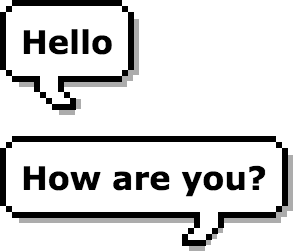
Compatibility
IE 9+, Chrome, Safari, Firefox, Opera...
Observations
- To rebuild the project, just run 'gulp' on your terminal.
- To change the hover colors you can simply rebuild the project with a different value on the variables or you can just search and replace the default colors values.
Related Skills
node-connect
347.2kDiagnose OpenClaw node connection and pairing failures for Android, iOS, and macOS companion apps
frontend-design
108.0kCreate distinctive, production-grade frontend interfaces with high design quality. Use this skill when the user asks to build web components, pages, or applications. Generates creative, polished code that avoids generic AI aesthetics.
openai-whisper-api
347.2kTranscribe audio via OpenAI Audio Transcriptions API (Whisper).
qqbot-media
347.2kQQBot 富媒体收发能力。使用 <qqmedia> 标签,系统根据文件扩展名自动识别类型(图片/语音/视频/文件)。
