<h3 align="center"><img src="https://s19.picofile.com/file/8439685950/favicon.png" alt="logo" height="250px"></h3>
<p align="center">
<b>ADB WEBKIT</b><br>
</p>
<hr>
<p align="center">
<b>Access ADB On Browser With Awesome UI</b>
</p>
<p align="center">
<a href="https://php.net">
<img src="https://img.shields.io/badge/php-8.0.7-green" alt="php">
</a>
<a href="#">
<img src="https://img.shields.io/badge/platform-Windows-red">
</a>
<img src="https://img.shields.io/badge/adb-1.0.35-blue"
alt="adb">
<a href="https://www.codefactor.io/repository/github/jxroot/adbwebkit"> <img src="https://www.codefactor.io/repository/github/jxroot/adbwebkit/badge" alt="CodeFactor" /> </a>
</p>
<p><img src="https://s19.picofile.com/file/8439686492/Screenshot_2021_08_22_025151.png" alt="enter image description here"></p>
<h2 id="table-of-contents">📜 Table of Contents</h2>
<ul>
<li><a href="#connection">Connection</a></li>
<li><a href="#dependency">Dependency </a></li>
<li><a href="#installation-and-usage">Installation And Usage</a></li>
<li><a href="#installation-termux">Install On Termux</a></li>
<li><a href="#operating-systems-tested">Operating Systems Tested</a></li>
<li><a href="#youtube-tutorials">YouTube Tutorials</a> Recommended For Tips</li>
<li><a href="#contact">Contact</a></li>
<li><a href="#next-update">Next Update</a></li>
<li><a href="#tabs">Tabs</a>
<ul>
<li><a href="#shell">Shell</a></li>
<li><a href="#application">Application</a></li>
<li><a href="#screen">Screen</a></li>
<li><a href="#phone">Phone</a></li>
<li><a href="#files">Files</a></li>
<li><a href="#network">Network</a></li>
<li><a href="#fun">Fun</a></li>
<li><a href="#keyboard">KeyBoard</a></li>
<li><a href="#payload">Payload</a></li>
<li><a href="#root">Root</a></li>
<li><a href="#info">Info</a></li>
<li><a href="#gallery">Gallery</a></li>
</ul>
</li>
</ul>
<h2>👊 Update Log</h2>
<ul>
<li>add live click option in screen tab </li>
<p>use with right mouse click</p>

<li>add get position item in screen </li>
<li>add click command in payload tab</li>
<p>use with left mouse click</p>

<p>use this items togther for testing and automation </p>
</ul>
<h2 id="connection">🔍 Connection</h2>
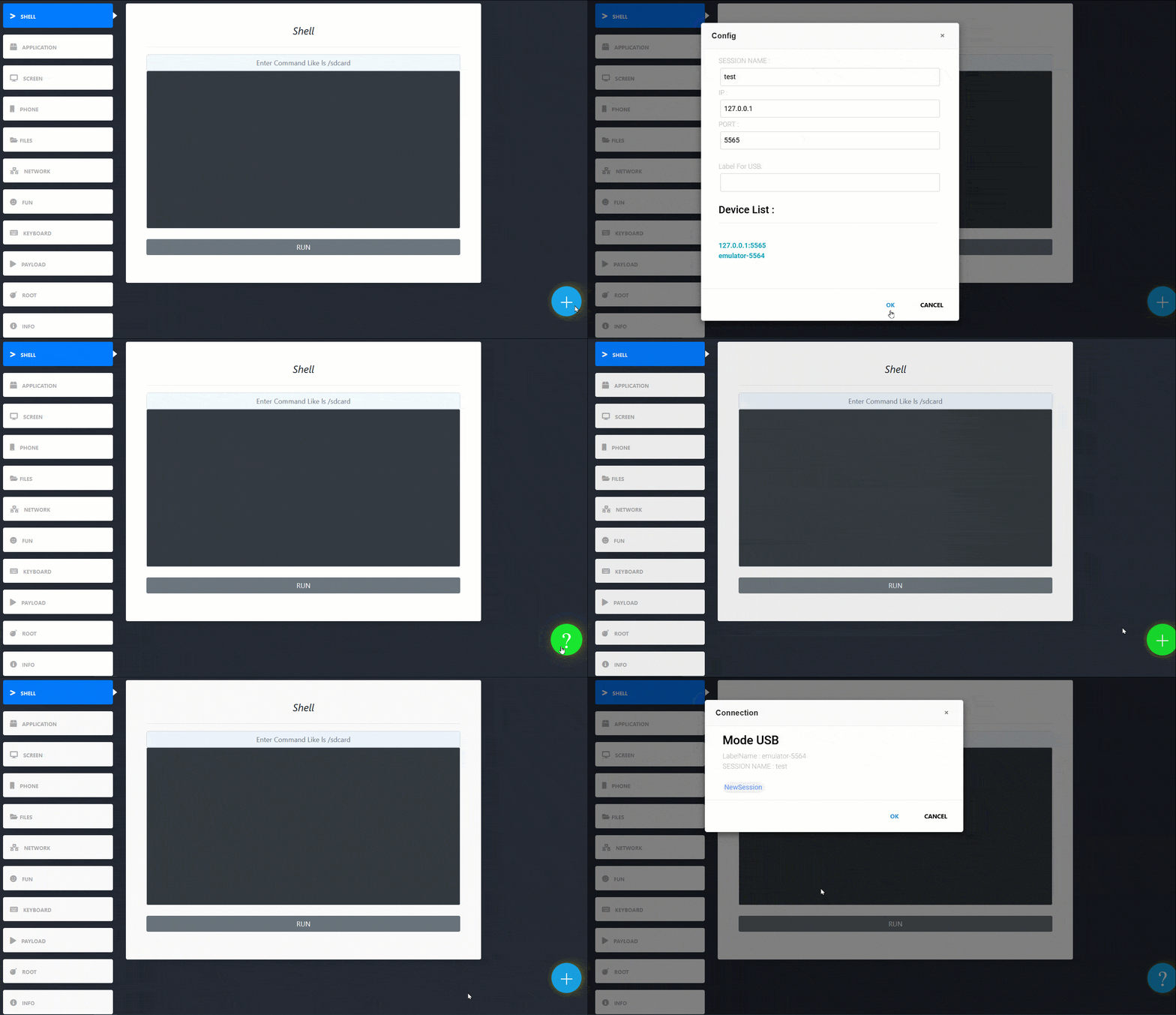
<p>You Can Connect With USB or IP Address But Just Use One if Use USB Dont Fill IP and Port And if Use IP Dont Fill USB if Fill Both input USB Mode in Priority<p>
<h2 id="shell">💎 Shell</h2>
<p><img src="https://s18.picofile.com/file/8439684268/ezgif_com_gif_maker_4_.gif" alt="shell tab demo"><br></p>
<ul>
<li>Shell Access</li>
</ul>
<h2 id="application">⚙️ Application</h2>
<p><img src="https://s18.picofile.com/file/8439684126/ezgif_com_gif_maker_2_.gif" alt="enter image description here"></p>
<p>Live Android Application Manager</p>
<ul>
<li>Install Apk With Some Options Like GrantPermission And …</li>
<li>Revoke And Grant Apk Permission</li>
<li>Uninstall Apk</li>
<li>Run Apk</li>
<li>Clear Cache</li>
<li>Save Apk</li>
<li>Stop Apk</li>
</ul>
<h2 id="screen">📟 Screen</h2>
<p><img src="https://s18.picofile.com/file/8439684034/ezgif_com_gif_maker_1_.gif" alt="enter image description here"></p>
<ul>
<li>Take Screen Shot</li>
<li>Record Screen</li>
</ul>
<h2 id="phone">📱 Phone</h2>
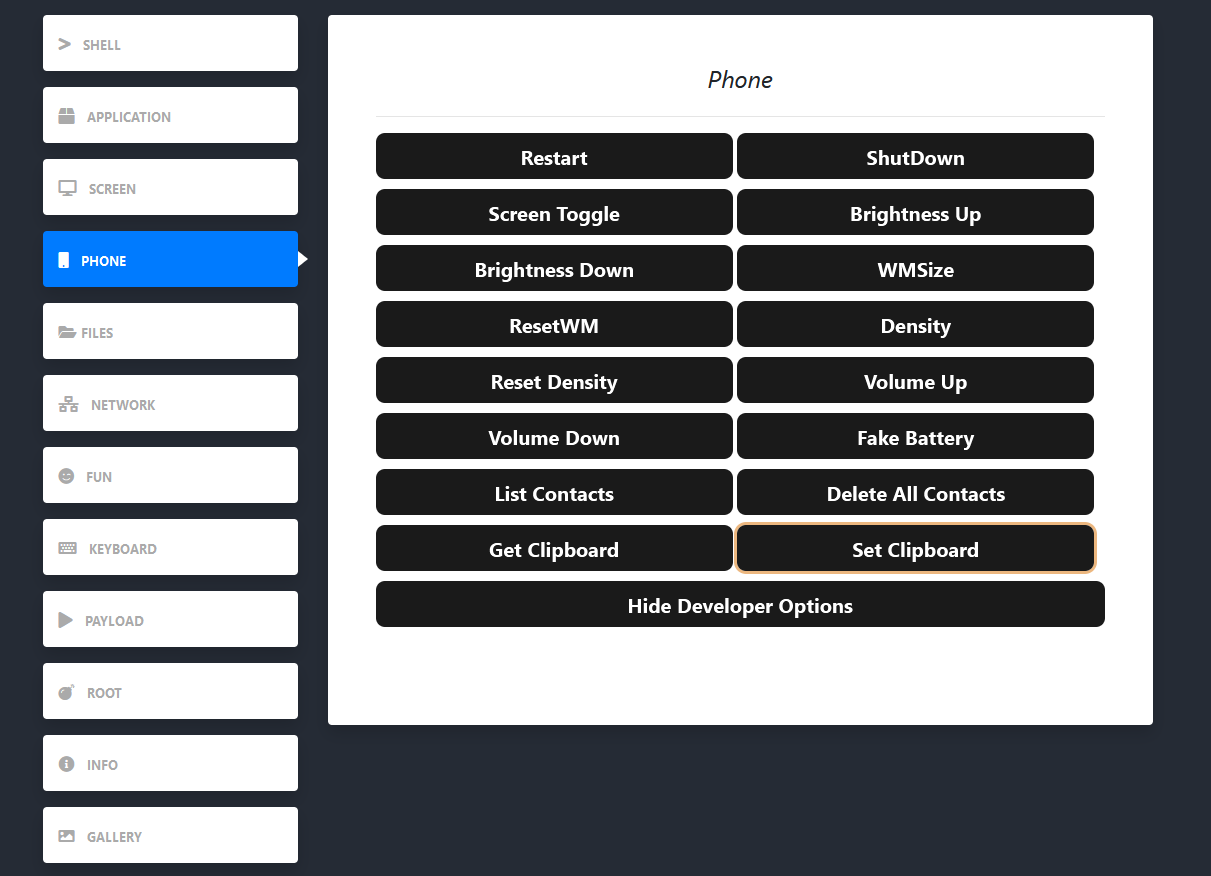
<li>Restart Device</li>
<li>ShutDown Device</li>
<li>Turn Screen On and Off</li>
<li>Brightness Up</li>
<li>Brightness Down</li>
<li>Chenge WMsize</li>
<li>Reset WMsize</li>
<li>Chenge Density</li>
<li>Reset Density</li>
<li>Volume Up</li>
<li>Volume Down</li>
<li>Chenge BatteryLevel</li>
<li>List Contacts Have issue</li>
<li>Delete All Contact</li>
<li>Add,Edit,Remove Contact Have issue</li>
<li>Get Clipboard Need clipper.apk</li>
<li>Set Clipboard Need clipper.apk</li>
<h2 id="files">📂 Files</h2>
<p><img src="https://s18.picofile.com/file/8439683234/ezgif_com_gif_maker.gif" alt="enter image description here"></p>
<p>Live Android File Manager With Live Search And Back Options</p>
<ul>
<li>CopyAll</li>
<li>MoveAll</li>
<li>DeleteAll</li>
<li>Information</li>
<li>Rename</li>
<li>Delete</li>
<li>Download</li>
<li>Create File Or Folder</li>
<li>Upload</li>
<li>SuperUplaod</li>
</ul>
<h2 id="network">📡 Newtork</h2>
<p><img src="https://s18.picofile.com/file/8439785300/net.png" alt="enter image description here"></p>
<ul>
<li>Netstat</li>
<li>DumpWifi</li>
<li>ifconfig</li>
<li>IP</li>
</ul>
<h2 id="fun">😀 FUN</h2>
<p><img src="https://s18.picofile.com/file/8439832684/FUN.png" alt="enter image description here"></p>
<ul>
<li>Send SMS Message</li>
<li>Open Link</li>
<li>Call</li>
<li>Play Music Taggle</li>
</ul>
<h2 id="keyboard">⌨️ Keyboard</h2>
<p><img src="https://s18.picofile.com/file/8439688650/ezgif_com_gif_maker_6_.gif" alt="enter image description here"></p><p>Live Android KeyInject With Your Keyboard </p><br>
<b>After Done Your Work Refresh Page</b>
<ul>
<li>a-z | 0-9 | Enter |@\/;#*-.=`+| ArrowKey | Backspace | Tab | Alt | Shift | PageUp | PageDown | Home | End | Escape | F12—>Space</li>
</ul>
<h2 id="payload">🧪 Payload</h2>
<p><img src="https://s18.picofile.com/file/8439688892/ezgif_com_gif_maker_7_.gif" alt="enter image description here"><br>
Make Android Payload For Automation This Section Like DuckyScript</p>
<ul>
<li>Allow Char : a-z | 0-9 | Enter |@/;#*-.=`+</li>
<li>ArrowKey : up | down | left | right</li>
<li>Scroll : scrollup | scrolldown</li>
<li>PhoneKey : back | home</li>
<li>KeyPad : enter | delete | tab | space</li>
<li>Input : text | menu</li>
<li>Device : resetwmsize | wmsize | densiysize | resetdensity | screen | shutdown | restart</li>
<li>Control : brightnessup | brightnessdown | volumeup | volumedown</li>
<li>App : run | launch | list | call | callpad | search | browsers</li>
<li>Music : play | pause | next | previous</li>
<li>Useful : sleep</li>
</ul>
<h2 id="root">☠️ Root</h2>
<p><img src="https://s19.picofile.com/file/8439689150/root.png" alt="enter image description here"><br>
<b>Temporarily disabled for some issues</b></p>
<ul>
<li>Install Root Kit Connect With Netcat</li>
<li>Disable Touch And Screen For Payload</li>
<li>Set Wallpaper</li>
<li>VirusBox</li>
<li>SpoofMAC</li>
<li>Dump WIFI Passwords</li>
<li>Dump SMS</li>
<li>Remove Password</li>
<li>etc …</li>
</ul>
<h2 id="info">💡 Info</h2>
<p><img src="https://s18.picofile.com/file/8439684200/ezgif_com_gif_maker_3_.gif" alt="enter image description here"></p>
<br>
<p>Get Some Information Android Device</p>
<ul>
<li>Check Root</li>
<li>Uptime</li>
<li>Architect</li>
<li>Brand</li>
<li>Model</li>
<li>Board</li>
<li>Android Version</li>
<li>Serilal</li>
<li>SDK</li>
<li>BatteryLevel</li>
<li>TimeZone</li>
<li>Hostname</li>
<li>DNS1</li>
<li>DNS2</li>
<li>MAC</li>
<li>etc…</li>
</ul>
<h2 id="gallery">📺 Gallery</h2>
<p><img src="https://s19.picofile.com/file/8439684842/ezgif_com_gif_maker_5_.gif" alt="enter image description here"><br>
<br></p>
<p>if You Downlod,Upload,Save,ScreenShot,RecordVideo And Install Apk You Can Access This On Your Device</p>
<ul>
<li>Open</li>
<li>Rename</li>
<li>Copy</li>
<li>Cut</li>
<li>Delete</li>
</ul>
<h2 id="dependency">🛠 Dependency</h2>
<ul>
<li>PHP 5.4 And Higher</li>
<li>ADB</li>
</ul>
<h2 id="installation-and-usage">💿 Installation And Usage</h2>
<p>1- Enable Usb Debugging On Android Device </p>
<p>2- Connect To Android Device </p>
<p>3- Add ADB To Environment</p>
<pre class=" language-bash"><code class="prism language-bash"><span class="token function">git</span> clone https://github.com/jxroot/adbwebkit.git
<span class="token function">cd</span> adbwebkit
php -S 127.0.0.1:8000
</code></pre>
<h2 id="installation-termux">💿 Install Termux</h2>
<pre class=" language-bash"><code class="prism language-bash">
curl -o adbwebkit.sh https://pastebin.pl/view/raw/f57a60c7 && chmod +x adbwebkit.sh && bash adbwebkit.sh
</code></pre>
<p align='center'>
<img src='https://s20.picofile.com/file/8441995942/Screenshot_20211009_150617_1.jpg'>
</p>
<h2 id="operating-systems-tested">💻 Operating Systems Tested</h2>
<ul>
<li>Kali Linux 2021.1</li>
<li>Windows 10</li>
</ul>
<h2 id="youtube-tutorials">📹 YouTube Tutorials</h2>
<p><a href="https://youtu.be/DrtnlH-hTz0">How Install And Usage ADBWEBKIT</a></p>
<h2 id="next-update">🔱 Next Update</h2>
<ul>
<li>Fix Root Tab</li>
<li>Fix Contact</li>
<li>Add Live Delete,Edit... in UI</li>
<li>Add Advanced Log Tab</li>
<li>Add Backup and Restore Tab</li>
</ul>
<h2 id="contact">📧 Contact</h2>
<p >
<a href="https://t.me/amajax"><img title="Telegram" src="https://img.shields.io/badge/Telegram-black?style=for-the-badge&logo=Telegram"></a>
<a href="https://www.youtube.com/channel/UC0-QcOXgzRgSfcE3zerwu9w/?sub_confirmation=1"><img title="Youtube" src="https://img.shields.io/badge/Youtube-red?style=for-the-badge&logo=Youtube"></a>
<a href="https://www.instagram.com/sectoolfa"><img title="Instagram" src="https://img.shields.io/badge/Instagram-white?style=for-the-badge&logo=Instagram"></a>
⚠️ Legal & Ethical Disclaimer
🚨 This tool is developed strictly for educational and authorized security testing purposes only.
🔬 It is intended to help cybersecurity professionals, researchers, and enthusiasts understand post-exploitation, red teaming, and detection techniques in lab or controlled environments.
❌ Do NOT use this tool on any system or network without explicit permission. Unauthorized use may be illegal and unethical.
🛡 The author takes no responsibility for any misuse or damage caused by this project.
Always hack responsibly. 💻🔐

