
JVFloatLabeledTextField
UITextField subclass with floating labels - inspired by Matt D. Smith's design: http://dribbble.com/shots/1254439--GIF-Mobile-Form-Interaction?list=users
Install / Use
/learn @jverdi/JVFloatLabeledTextFieldREADME
JVFloatLabeledTextField




JVFloatLabeledTextField is the first implementation of a UX pattern that has come to be known the "Float Label Pattern".
Due to space constraints on mobile devices, it is common to rely solely on placeholders as a means to label fields. This presents a UX problem, in that, once the user begins to fill out a form, no labels are present.
This UI component library, which includes both a UITextField and UITextView subclass, aims to improve the user experience by having placeholders transition into floating labels that hover above the fields after they are populated with text.
Credits for the concept to Matt D. Smith (@mds), and his original design:
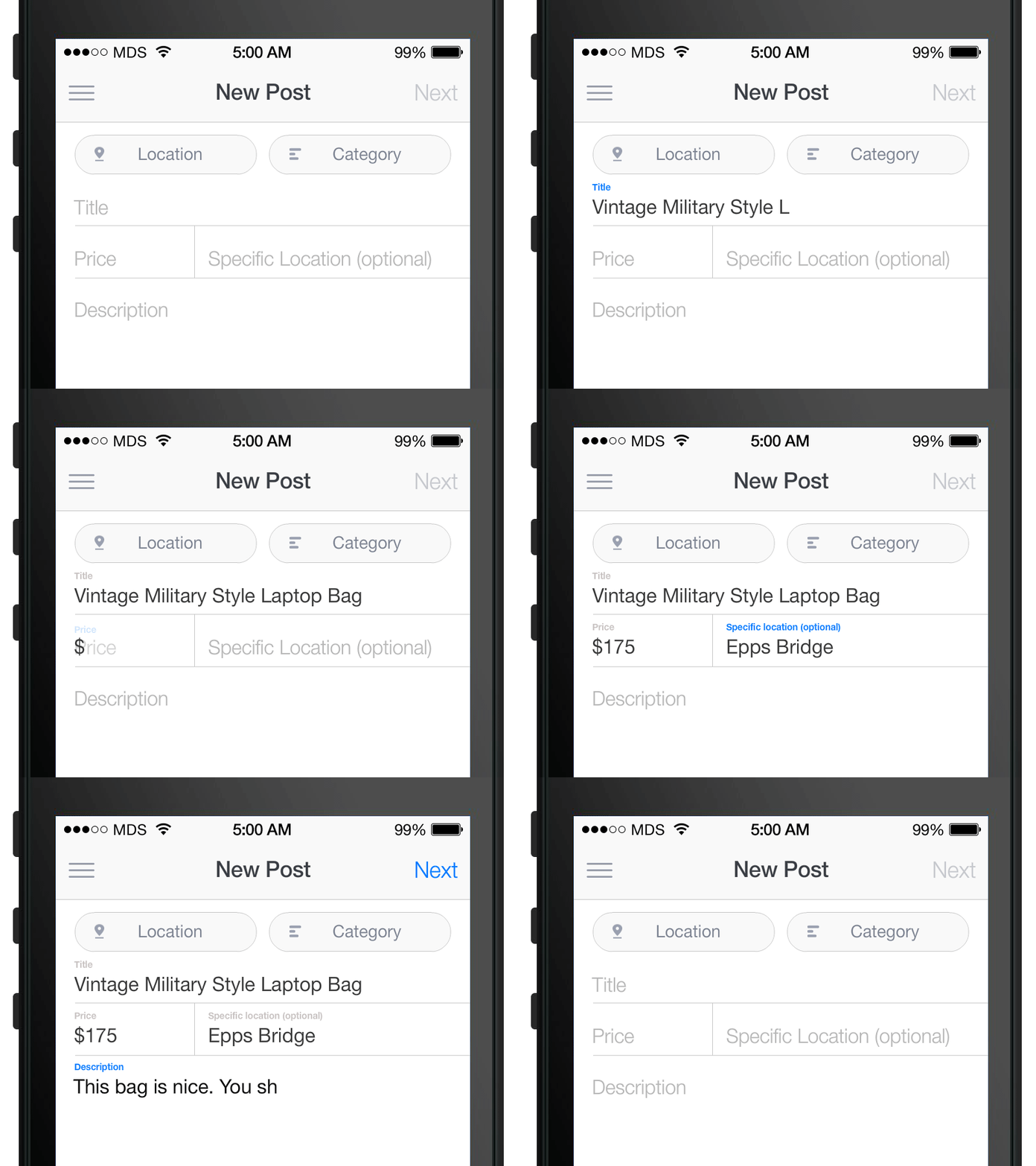
The component is officially supported for iOS 9 and greater.
Getting started via CocoaPods
sudo gem install cocoapods
Create a Podfile in your project directory:
pod init
Add the following to your Podfile project's target:
pod 'JVFloatLabeledTextField'
Then run CocoaPods with pod install.
Finally, include JVFloatLabeledTextField.h and JVFloatLabeledTextView.h in your project.
Getting started via Carthage
brew update
brew install carthage
Create a Cartfile in your project directory that contains:
github "jverdi/JVFloatLabeledTextField"
Then run carthage with carthage update and add JVFloatLabeledText.framework to your project from the Carthage/Build/iOS directory.
Finally, include JVFloatLabeledText.h in your project:
#import <JVFloatLabeledText/JVFloatLabeledText.h>
Getting started via SPM (Xcode 11+)
Click File -> Swift Packages -> Add Package Dependency, enter JVFloatLabeledText repo's URL.
After select the package, you can choose the dependency type (tagged version, branch or commit). Then Xcode will setup all the stuff for you.
If you're a framework author and use JVFloatLabeledTextField as a dependency, update your Package.swift file:
let package = Package(
    dependencies: [
        .package(url: "https://github.com/jverdi/JVFloatLabeledTextField", from: "1.2.2")
    ],
)
Additional References
How the Float Label Pattern Started - Matt D. Smith
Float Label Pattern - Brad Frost
Material Design - Floating Labels - Google
Ports and Alternate Implementations
Android - Henrik Sandström
Android - Kaushik Gopal
Android - Kevin Johnson
Xamarin.iOS - Greg Shackles
Xamarin.Android - Johan du Toit
CSS Jonathan Snook
JQuery / Zepto.js - Achmad Mahardi
JQuery - Mike Mitchell
AngularJS - Dave Ackerman
Bootstrap plugin - Matt Powell
JavaFX - Andy Till
Swift - Dirk Fabisch
Swift - Fahim Farook
Swift - Neeraj Kumar
Swift - Jimmy Jose
Swift - Skyscanner (Daniel Langh, Gergely Orosz, Raimon Lapuente)
ObjC - Arthur Ariel Sabintsev
ObjC - Rob Phillips
4D - Maurice Inzirillo
Appcelerator Titanium - The Smiths
B4i - Erel Uziel
Added a port? Let me know - @jverdi
Related Skills
diffs
343.3kUse the diffs tool to produce real, shareable diffs (viewer URL, file artifact, or both) instead of manual edit summaries.
clearshot
Structured screenshot analysis for UI implementation and critique. Analyzes every UI screenshot with a 5×5 spatial grid, full element inventory, and design system extraction — facts and taste together, every time. Escalates to full implementation blueprint when building. Trigger on any digital interface image file (png, jpg, gif, webp — websites, apps, dashboards, mockups, wireframes) or commands like 'analyse this screenshot,' 'rebuild this,' 'match this design,' 'clone this.' Skip for non-UI images (photos, memes, charts) unless the user explicitly wants to build a UI from them. Does NOT trigger on HTML source code, CSS, SVGs, or any code pasted as text.
openpencil
1.9kThe world's first open-source AI-native vector design tool and the first to feature concurrent Agent Teams. Design-as-Code. Turn prompts into UI directly on the live canvas. A modern alternative to Pencil.
HappyColorBlend
HappyColorBlendVibe Project Guidelines Project Overview HappyColorBlendVibe is a Figma plugin for color palette generation with advanced tint/shade blending capabilities. It allows designers to
