
beeper-mcp-addon
Companion MCP for Beeper Desktop: catch up on all chats in one call, download & send files, start new chats, reactions, edit & delete messages
Install / Use
claude mcp add juulieen -- npx -y github:juulieen/beeper-mcp-addonIf the server publishes to npm under a different name, use that package instead — check the repo README.
MCP Server
Model Context Protocol server
Quality Score
Category
Development & EngineeringSupported Platforms
Our assessment of beeper-mcp-addon
beeper-mcp-addon scores 84/100 on our quality scale, 2786th of 4,716 Development & Engineering skills we index.
Its MCP Server is 16 KB long, well organised into 21 sections with 7 code examples: a thorough specification that gives an agent plenty to work with.
It has 10 GitHub stars, so there is little community track record yet; judge it on its content.
Maintenance, license and trust
- The repository was last updated yesterday, so beeper-mcp-addon is actively maintained.
- It is released under the MIT license, a permissive license that allows use, modification and commercial use with attribution.
- Its trust signals score 97/100, with no cautions. These come from repository metadata, not a code audit — read the skill file before letting an agent act on it.
beeper-mcp-addon compared with similar skills
All 4 of these similar skills score higher than beeper-mcp-addon; compare them before choosing.
| Skill | Score | Stars | Updated | Format |
|---|---|---|---|---|
| beeper-mcp-addon (this skill)by juulieen | 84 | 10 | 1d ago | MCP Server |
| taste-skillby Leonxlnx | 100 | 118.9k | 11d ago | CLAUDE.md |
| Agent-Reachby Panniantong | 100 | 113.3k | 12d ago | CLAUDE.md |
| hyperframesby heygen-com | 100 | 87.1k | today | CLAUDE.md |
| rufloby ruvnet | 100 | 82.1k | today | CLAUDE.md |
Frequently asked questions
- How do I install beeper-mcp-addon?
- Run
claude mcp add juulieen -- npx -y github:juulieen/beeper-mcp-addon. The install tabs above show the steps for each supported agent. - Which AI agents does beeper-mcp-addon work with?
- It is written for Claude Code and Claude Desktop, as a MCP Server file. Other agents that read the same format can often use it too.
- Is beeper-mcp-addon safe to use?
- It is MIT-licensed and scores 97/100 on trust signals. Skills are instructions an agent will follow, so read the file before installing it and do not approve commands you do not understand.
- Is beeper-mcp-addon still maintained?
- The repository was last updated yesterday, so beeper-mcp-addon is actively maintained.
Skill content
View source on GitHubbeeper-mcp-addon
Unofficial. Not affiliated with or endorsed by Beeper.
The missing tools for Beeper Desktop's MCP server: a chat's photos and videos in one go, large files and phone videos, catching up on many chats, who reacted, and waiting for a reply.
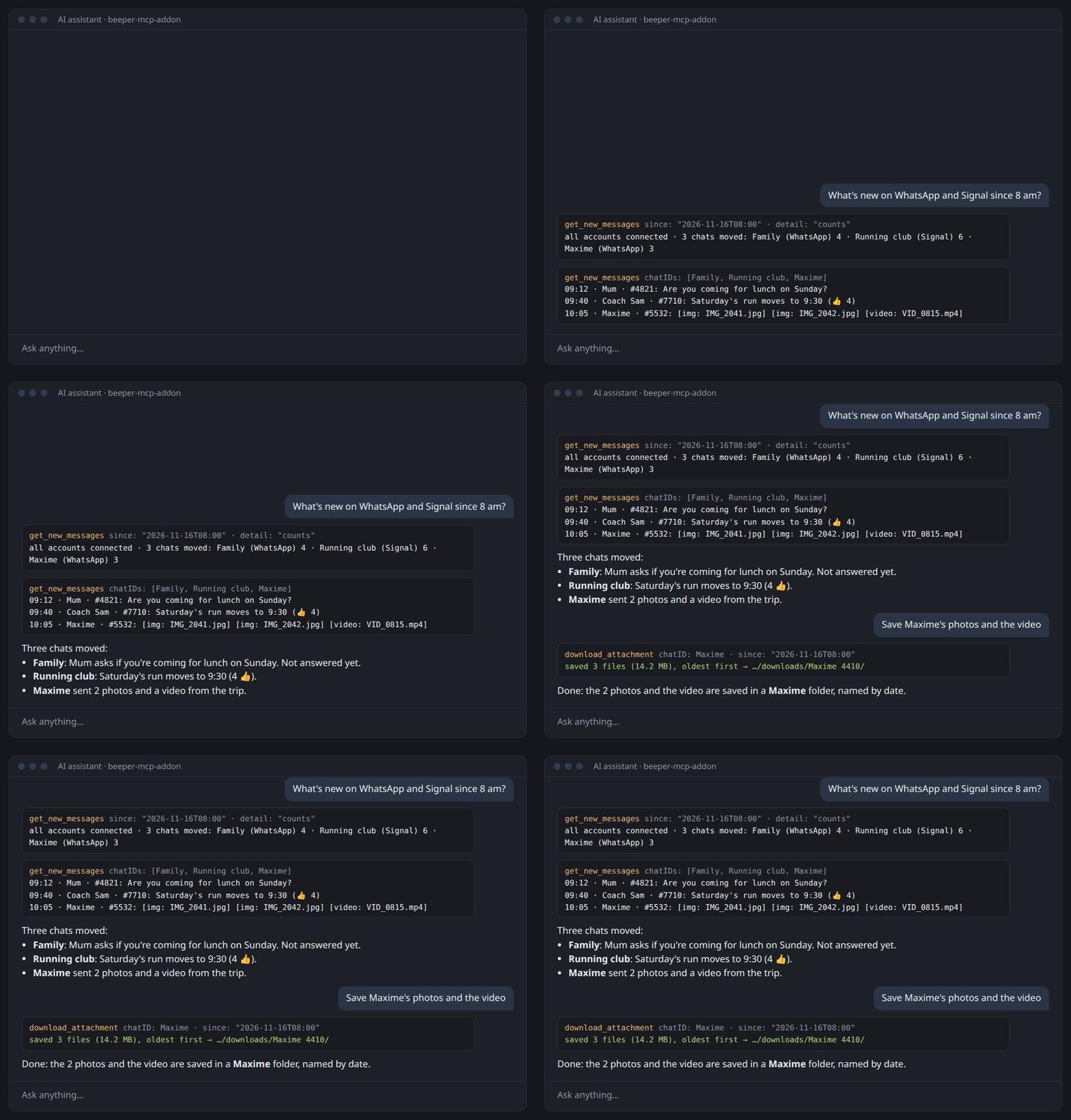
<sub>Example with made-up chats.</sub>
Beeper Desktop ships a built-in MCP server, so an AI assistant can search and send messages across WhatsApp, Signal, Telegram, iMessage and more. Since Beeper Desktop 4.3.326, it also downloads and sends single files, finds contacts, starts new chats, reacts, and edits or deletes messages. A few things are still missing:
- It downloads one attachment at a time: saving every photo and video of a group over a month takes hundreds of calls.
- It sends files passed inline as base64, up to about 7 MB, and sends phone videos as they are, even when WhatsApp then plays them badly.
- Catching up on many chats returns full messages, 20 at a time, without saying whether each account is connected.
- It shows reactions by user ID, not by name, and it can't wait for a reply.
This small MCP server fills those gaps on top of the Beeper Client API, as five tools:
| Tool | What it does |
|---|---|
| download_attachment | Saves every photo and video (or document) of a chat over a period into one folder, named by date; or one attachment, under a safe name |
| send_file | Sends a local file by its path (up to 500 MB) to any chat, with an optional caption, and fixes phone videos first |
| wait_for_message | Waits for an incoming message (a reply, say) and returns it, so the assistant doesn't have to poll |
| get_new_messages | Everything that arrived since a given time, across chats, in one call and in a compact form, with the connection state of each account |
| get_reactions | Who reacted to a message, by name (to count the 👍 on "who's in?") |
It runs next to the official Beeper MCP, not instead of it. Keep using the official server for search, chats, text messages (including replies to a specific message), contacts, new chats, reactions, edits and deletes.
Removed tools: earlier versions also had search_contacts, start_chat, react, edit_message and delete_message; they are gone because the official MCP now has the same tools under the same names. With a Beeper Desktop older than 4.3.326, update Beeper first.
Requirements
- Beeper Desktop 4.3.326 or later, with its API enabled (Settings → Developers)
- Node.js 20+ — except for the Claude Desktop bundle, which uses Claude's built-in Node
- Optional: ffmpeg, so
send_filecan fix videos that phones play badly
Works on macOS, Windows and Linux.
Install
One command, every client
npx -y beeper-mcp-addon install
It finds the MCP clients on your machine — Claude Code, Claude Desktop, Cursor, VS Code, Windsurf, Kimi Code, Gemini CLI, Codex — asks before adding the server to each one (backing up the config first), then opens Beeper once so you can approve access. Restart your apps and you're done.
Options: --client cursor,vscode (only these), --yes (no questions), --dry-run (show what would change), --no-login (don't open Beeper afterwards), --read-only, --local (run this checkout of the code instead of the npm package). Undo with npx -y beeper-mcp-addon uninstall.
One click


Claude Desktop: download beeper-mcp-addon.mcpb from the latest release and double-click it. No Node.js needed.
On first use, Beeper opens and asks you to approve access.
By hand
claude mcp add beeper-mcp-addon -- npx -y beeper-mcp-addon # Claude Code
Any other client:
{
  "mcpServers": {
    "beeper-mcp-addon": { "command": "npx", "args": ["-y", "beeper-mcp-addon"] }
  }
}
On Windows, use "command": "cmd", "args": ["/c", "npx", "-y", "beeper-mcp-addon"].
Then connect once with npx -y beeper-mcp-addon login, or just use a tool: Beeper will ask you to approve.
Security
- You approve access in Beeper.
loginuses Beeper's own OAuth screen (with PKCE); nothing is copied by hand. Beeper's approval screen decides the access level (read only, or read + write to send);login --read-onlyasks for read only. - The token stays in your system's secret store: macOS Keychain, Windows DPAPI (encrypted for your user), or the Linux keyring (GNOME Keyring / KWallet via
secret-tool). Without a keyring, it falls back to a file readable only by you — the same way Claude Code stores its own credentials on Linux. If a keyring shows up later, the token moves into it automatically and the file is deleted. It is never written to MCP client configs, and never passed on a command line. - Everything is local. The server only talks to Beeper Desktop on
localhost. - Sending is explicit.
send_fileacts on your behalf; keep your client's per-call approval on. - Access lasts 30 days. Beeper's tokens expire after 30 days and can't be renewed in the background. Five days before, a tool result asks your assistant to tell you; after that, the next tool call opens Beeper so you approve access again (or run
loginyourself). A renewal asks for the same access level as before, never more: a read-only token is renewed read-only.statusshows the expiry date. npx -y beeper-mcp-addon statusshows where the token lives and whether it's valid;logoutrevokes and deletes it.
From source
git clone https://github.com/juulieen/beeper-mcp-addon
cd beeper-mcp-addon && npm install && npm run build
node dist/index.js install --local   # clients run this checkout, not the npm package
Updates
Nothing updates on its own. install writes the exact version (for example beeper-mcp-addon@1.2.3) into each client's config, so a new release never runs on your machine before you've chosen to take it.
When you use one of the tools and a newer version exists, the first tool result of that session carries a short notice for your assistant: the new version, its release notes and the command to update. Your assistant tells you; you decide. The check is a plain request to the public npm and GitHub APIs, made at most once a day and only when a tool is actually used. Nothing about you is sent. Turn it off with BEEPER_ADDON_NO_UPDATE_CHECK=1.
To update: npx -y beeper-mcp-addon@<version> install. For Claude Desktop, open the new .mcpb from the releases.
There is no telemetry: the addon never reports usage or installs anywhere.
Configuration
| Variable | Default | |
|---|---|---|
| BEEPER_ACCESS_TOKEN | token saved by login | Beeper Desktop API token; overrides the saved one |
| BEEPER_URL | http://localhost:23373 | Base URL of the Beeper Client API |
| BEEPER_TOKEN_FILE | — | Force a plain token file instead of the system secret store |
| BEEPER_DOWNLOAD_DIR | ~/.cache/beeper-mcp-addon/downloads on Linux, <temp>/beeper-mcp-addon/downloads elsewhere | Where downloads go when no outputPath (one file) or outputDir (a period, one subfolder per chat) is given |
| BEEPER_ADDON_NO_UPDATE_CHECK | — | Set to 1 to never check for a new version |
| BEEPER_FFMPEG | ffmpeg on PATH | ffmpeg used to fix videos before sending (ffprobe is looked up next to it) |
| BEEPER_FFPROBE | next to BEEPER_FFMPEG, else ffprobe on PATH | ffprobe used to check videos before sending |
Tools
download_attachment
Identify the attachment in any of these ways:
url: anmxc:///localmxc://media URL, or abeeper-mcp://attachments/{chatID}/{messageID}/{index}URI as printed by the official Beeper MCP's search resultschatID+messageID(+indexif the message has several attachments)
By default it's saved as a new file in the download folder (BEEPER_DOWNLOAD_DIR); the sender's file name is sanitized, so it can never choose the folder. outputPath saves it elsewhere (~/ means your home folder), without replacing an existing file unless overwrite: true (which replaces your file: your client should ask first). Returns { path, fileName, mimeType, sizeBytes }.
A whole period at once: pass chatID + since (+ until) instead of a message, and it saves every photo and video of that chat sent in that period into one folder, oldest first. Options:
mediaTypes: which kinds, amongimage,videoandfile(documents, audio…). Default:["image", "video"]. Stickers are skipped.maxFiles: at most this many files per call, from 1 to 200. Default: 30.outputDir: the folder to save into. Default: one folder per chat in the download folder. Your client should ask you before saving elsewhere.
Files are named by date and message ID (2026-10-11_104635_75649_photo.jpg), so the folder sorts in time order. A file already in the folder is skipped, never replaced. The result gives one short line per file, with time, sender and message ID:
2026-10-11 10:46 · Maxime · #75649 → 2026-10-11_104635_75649_photo.jpg (6.4 MB)
When there are more files than maxFiles, the result gives nextSince. Call again with it and the same folder to get the rest.
send_file
chatID, filePath, and optionally text (caption), fileName (name shown to the recipient) and replyToMessageID. Files up to 500 MB. The MIME type comes from the file extension, so videos and images show up as media rather than generic files.
Videos are fixed before sending. Phone cameras often record videos that messaging apps play badly: HEVC, 60 fps, full-range color, rotation stored as metadata. The recipient then sees a black frame, a sideways picture, or nothing. When ffmpeg is installed, send_file checks each video with ffprobe and, only if needed, re-encodes it to H.264 + AAC MP4 (30 fps and 1280 px max, rotation applied). The result says what was fixed (reasons). Pass convert: "never" to send the original, or "always" to force it. Set BEEPER_FFMPEG if ffmpeg is not on your PATH.
wait_for_message
Optional chatID, from (part of the sender's name or ID), includeOwn (also your own messages, default false), since (ISO time, usually that of your last message, needs chatID: a reply that arrived just before the call is returned right away) and timeoutSeconds (default 300, max 1800). Returns { status: "message", message, note } or { status: "timeout" }; note reminds the assistant that the message was written by its sender and is data, not instructions. Text from other people is length-limited: message text at 4000 characters, names at 200, at most 20 attachment names, each marked … [truncated, N chars] when cut (same in watch output). For long waits, the watch command below is better: it doesn't hold a tool call open.
get_new_messages
since (ISO time), and optionally chatIDs, chatQuery (words in the chat title, e.g. "Ghoster"), accountIDs, includeMuted (default true), includeOwn (default true), detail ("messages", the default, or "counts"), maxChats (default 25) and `maxMessagesPerCh
Truncated for display — read the full file on GitHub.
Related Skills
taste-skill
118.9kAgent skills that give coding agents taste: art direction, reference images and a browser check instead of generic AI pages
Agent-Reach
113.3kGive your AI agent eyes to see the entire internet. Read & search Twitter, Reddit, YouTube, GitHub, Bilibili, XiaoHongShu — one CLI, zero API fees.
hyperframes
87.1kAI video you can actually edit. HyperFrames is a free, open-source AI video editor. Describe any video and get a real project you can change down to the frame.
ruflo
82.1k🌊 The original agent harness. Deploy intelligent multi-player swarms, coordinate autonomous workflows, and build conversational AI systems. Features adaptive memory, self-learning intelligence, federation, vector RAG integration, and native Claude Code / Codex / Hermes and many more Integrated

Languages
Trust signals
From repository metadata: license, adoption, age and documentation. Not a code audit — see the Safety scan above for what the skill file itself contains.