
Powerline Go
A beautiful and useful low-latency prompt for your shell, written in go
Install / Use
npx skills add justjanne/powerline-goInstalls into whichever agent you are using.
README
A Powerline style prompt for your shell
A Powerline like prompt for Bash, ZSH and Fish. Based on Powerline-Shell by @banga. Ported to golang by @justjanne.
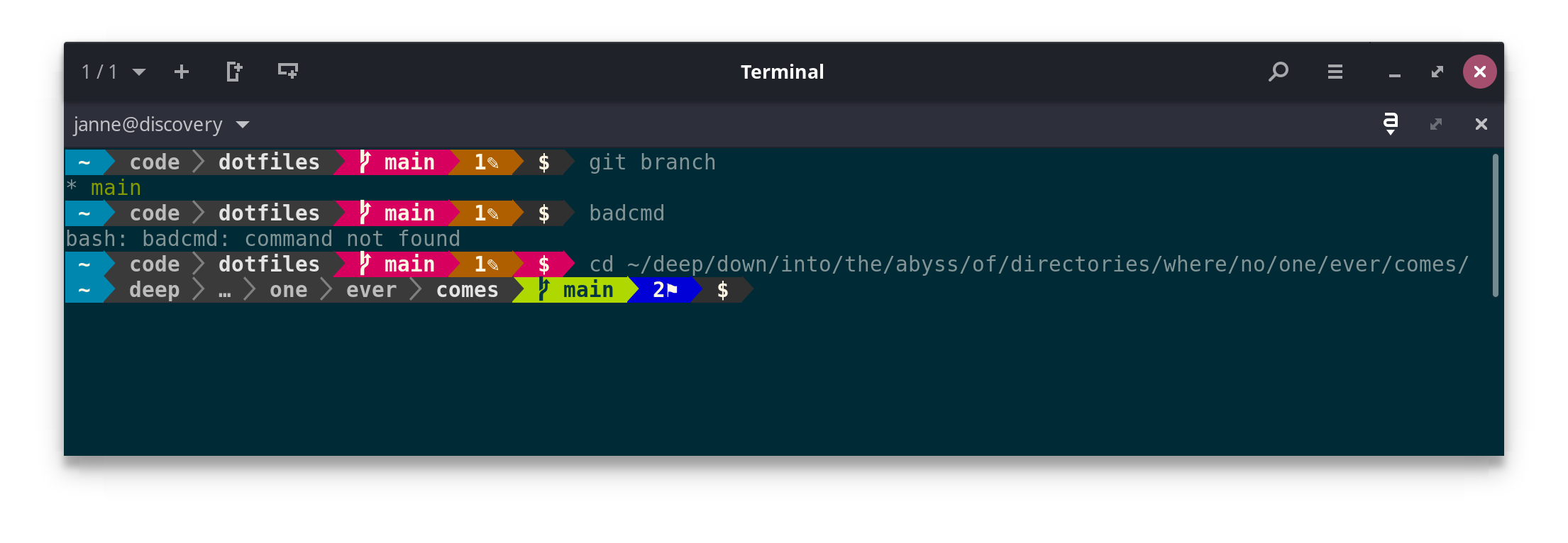
- Shows some important details about the git/hg branch (see below)
- Changes color if the last command exited with a failure code
- If you're too deep into a directory tree, shortens the displayed path with an ellipsis
- Shows the current Python virtualenv environment
- Shows the current Ruby version using rbenv or rvm
- Shows if you are in a nix shell
- It's easy to customize and extend. See below for details.
Table of Contents
Version Control
All of the version control systems supported by powerline shell give you a quick look into the state of your repo:
- The current branch is displayed and changes background color when the branch is dirty.
- When the local branch differs from the remote, the difference in number
of commits is shown along with
⇡or⇣indicating whether a git push or pull is pending
In addition, git has a few extra symbols:
✎-- a file has been modified, but not staged for commit✔-- a file is staged for commit✼-- a file has conflicts+-- untracked files are present⚑-- stash is present
Each of these will have a number next to it if more than one file matches.
Installation
Requires Go 1.15+
powerline-go uses ANSI color codes, these should nowadays work everywhere,
but you may have to set your $TERM to xterm-256color for it to work.
If you want to use the "patched" mode (which is the default, and provides improved UI), you'll need to install a powerline font, either as fallback, or by patching the font you use for your terminal: see powerline-fonts. Alternatively you can use "compatible" or "flat" mode.
Precompiled Binaries
I provide precompiled binaries for x64 Linux and macOS in the releases tab
Other Platforms
- Install (and update) the package with
go install github.com/justjanne/powerline-go@latest
- By default it will be in
$GOPATH/bin, if you want to change that, you can set your$GOPATHand/or$GOBIN, but will need to change the path in the following scripts, too.
Bash
Add the following to your .bashrc:
function _update_ps1() {
    PS1="$($GOPATH/bin/powerline-go -error $? -jobs $(jobs -p | wc -l))"

    # Uncomment the following line to automatically clear errors after showing
    # them once. This not only clears the error for powerline-go, but also for
    # everything else you run in that shell. Don't enable this if you're not
    # sure this is what you want.

    #set "?"
}

if [ "$TERM" != "linux" ] && [ -f "$GOPATH/bin/powerline-go" ]; then
    PROMPT_COMMAND="_update_ps1; $PROMPT_COMMAND"
fi
Currently, right prompt support is not available when using bash.
ZSH
Add the following to your .zshrc:
function powerline_precmd() {
    PS1="$($GOPATH/bin/powerline-go -error $? -jobs ${${(%):%j}:-0})"

    # Uncomment the following line to automatically clear errors after showing
    # them once. This not only clears the error for powerline-go, but also for
    # everything else you run in that shell. Don't enable this if you're not
    # sure this is what you want.

    #set "?"
}

function install_powerline_precmd() {
  for s in "${precmd_functions[@]}"; do
    if [ "$s" = "powerline_precmd" ]; then
      return
    fi
  done
  precmd_functions+=(powerline_precmd)
}

if [ "$TERM" != "linux" ] && [ -f "$GOPATH/bin/powerline-go" ]; then
    install_powerline_precmd
fi
Fish
Redefine fish_prompt in ~/.config/fish/config.fish:
function fish_prompt
    eval $GOPATH/bin/powerline-go -error $status -jobs (count (jobs -p))
end
Nix
When using nix-shell --pure, powerline-go will not be accessible, and
your prompt will disappear.
To work around this you can add this snippet to your .bashrc,
which should re-enable the prompt in most cases:
# Workaround for nix-shell --pure
if [ "$IN_NIX_SHELL" == "pure" ]; then
    if [ -x "$HOME/.nix-profile/bin/powerline-go" ]; then
        alias powerline-go="$HOME/.nix-profile/bin/powerline-go"
    elif [ -x "/run/current-system/sw/bin/powerline-go" ]; then
        alias powerline-go="/run/current-system/sw/bin/powerline-go"
    fi
fi
Powershell
Redefine prompt function on your profile:
# Load powerline-go prompt
function global:prompt {
    $pwd = $ExecutionContext.SessionState.Path.CurrentLocation
    $startInfo = New-Object System.Diagnostics.ProcessStartInfo
    $startInfo.FileName = "powerline-go"
    $startInfo.Arguments = "-shell bare"
    $startInfo.Environment["TERM"] = "xterm-256color"
    $startInfo.CreateNoWindow = $true
    $startInfo.StandardOutputEncoding = [System.Text.Encoding]::UTF8
    $startInfo.RedirectStandardOutput = $true
    $startInfo.UseShellExecute = $false
    $startInfo.WorkingDirectory = $pwd
    $process = New-Object System.Diagnostics.Process
    $process.StartInfo = $startInfo
    $process.Start() | Out-Null
    $standardOut = $process.StandardOutput.ReadToEnd()
    $process.WaitForExit()
    $standardOut
}
Use ProcessStartInfo is needed to allow fill the enviromnet variables required by powerline-go.
Customization
There are a few optional arguments which can be seen by running
powerline-go -help. These can be used by changing the command you have set
in your shell’s init file.
Usage of powerline-go:
  -alternate-ssh-icon
         Show the older, original icon for SSH connections
  -colorize-hostname
         Colorize the hostname based on a hash of itself, or use the PLGO_HOSTNAMEFG and PLGO_HOSTNAMEBG env vars (both need to be set).
  -fqdn-hostname
         Use the longer fully qualified domain name as the hostname
  -condensed
         Remove spacing between segments
  -cwd-max-depth int
         Maximum number of directories to show in path
         (default 5)
  -cwd-max-dir-size int
         Maximum number of letters displayed for each directory in the path
         (default -1)
  -cwd-mode string
         How to display the current directory
         (valid choices: fancy, semifancy, plain, dironly)
         (default "fancy")
  -duration string
         The elapsed clock-time of the previous command
  -duration-min string
         The minimal time a command has to take before the duration segment is shown (default "0")
  -east-asian-width
         Use East Asian Ambiguous Widths
  -error int
         Exit code of previously executed command
  -eval
         Output prompt in 'eval' format.
  -git-assume-unchanged-size int
         Disable checking for changed/edited files in git repositories where the index is larger than this size (in KB), improves performance (default 2048)
  -git-disable-stats string
         Comma-separated list to disable individual git statuses
         (valid choices: ahead, behind, staged, notStaged, untracked, conflicted, stashed)
  -git-mode string
         How to display git status
         (valid choices: fancy, compact, simple)
         (default "fancy")
  -hostname-only-if-ssh
         Show hostname only for SSH connections
  -ignore-repos string
         A list of git repos to ignore. Separate with ','.
         Repos are identified by their root directory.
  -ignore-warnings
         Ignores all warnings regarding unset or broken variables
  -jobs int
         Number of jobs currently running
  -max-width int
         Maximum width of the shell that the prompt may use, in percent. Setting this to 0 disables the shrinking subsystem.
  -mode string
         The characters used to make separators between segments.
         (valid choices: patched, compatible, flat)
         (default "patched")
  -modules string
         The list of modules to load, separated by ','
         (valid choices: aws, bzr, cwd, direnv, docker, docker-context, dotenv, duration, exit, fossil, gcp, git, gitlite, goenv, hg, host, jobs, kube, load, newline, nix-shell, node, perlbrew, perms, plenv, rbenv, root, rvm, shell-var, shenv, ssh, svn, termtitle, terraform-workspace, time, user, venv, vgo, vi-mode, wsl, azure)
         Unrecognized modules will be invoked as 'powerline-go-MODULE' executable plugins and should output a (possibly empty) list of JSON objects that unmarshal to powerline-go's Segment structs.
         (default "venv,user,host,ssh,cwd,perms,git,hg,jobs,exit,root")
  -modules-right string
         The list of modules to load anchored to the right, for shells that support it, separated by ','
         (valid choices: aws, bzr, cwd, direnv, docker, docker-context, dotenv, duration, exit, fossil, gcp, git, gitlite, goenv, hg, host, jobs, kube, load, newline, nix-shell, node, perlbrew, perms, plenv, rbenv, root, rvm, shell-var, shenv, ssh, svn, termtitle, terraform-workspace, time, user, venv, vgo, wsl, azure)
         Unrecognized modules will be invoked as 'powerline-go-MODULE' executable plugins and should output a (possibly empty) list of JSON objects that unmarshal to powerline-go's Segment structs.
  -newline
         Show the prompt on a new line
  -numeric-exit-codes
         Shows numeric exit codes for errors.
  -path-aliases string
         One or more aliases from a path to a short name. Separate with ','.
         An alias m
Related Skills
node-connect
385.5kDiagnose OpenClaw Android, iOS, or macOS node pairing, QR/setup code, route, auth, and connection failures.
blender-python-addon
40.5kBlender Python add-on rules for operators, panels, properties, registration, testing, and API-safe scripting
flutter-development-guidelines-cursorrules-prompt-file
40.5kCursor rules for Flutter development with MVVM architecture, Riverpod state management, Material widgets, and Dart style guidelines.
commit-push-pr
140.7kCommit, push, and open a PR
