
kitsune
MCP server that lets AI agents use your Firefox, Zen, or LibreWolf browser.
Install / Use
claude mcp add junyeong-nero -- npx -y github:junyeong-nero/kitsuneIf the server publishes to npm under a different name, use that package instead — check the repo README.
MCP Server
Model Context Protocol server
Quality Score
Category
AutomationSupported Platforms
Tags
Our assessment of kitsune
kitsune scores 74/100 on our quality scale, 2586th of 2,790 Automation skills we index.
Its MCP Server is 5.9 KB long, split into 5 sections and no code examples: a thorough specification that gives an agent plenty to work with.
It has 44 GitHub stars, so there is little community track record yet; judge it on its content.
Maintenance, license and trust
- The repository was last updated 3 days ago, so kitsune is actively maintained.
- It is released under the MIT license, a permissive license that allows use, modification and commercial use with attribution.
- Its trust signals score 92/100, with 1 caution from licensing, adoption, age or documentation. These come from repository metadata, not a code audit — read the skill file before letting an agent act on it.
kitsune compared with similar skills
All 4 of these similar skills score higher than kitsune; compare them before choosing.
| Skill | Score | Stars | Updated | Format |
|---|---|---|---|---|
| kitsune (this skill)by junyeong-nero | 74 | 44 | 3d ago | MCP Server |
| Agent-Reachby Panniantong | 100 | 112.3k | 8d ago | CLAUDE.md |
| rufloby ruvnet | 100 | 81.9k | today | CLAUDE.md |
| headroomby headroomlabs-ai | 100 | 79.8k | today | CLAUDE.md |
| CowAgentby zhayujie | 100 | 48.0k | today | CLAUDE.md |
Frequently asked questions
- How do I install kitsune?
- Run
claude mcp add junyeong-nero -- npx -y github:junyeong-nero/kitsune. The install tabs above show the steps for each supported agent. - Which AI agents does kitsune work with?
- It is written for Claude Code and Claude Desktop, as a MCP Server file. Other agents that read the same format can often use it too.
- Is kitsune safe to use?
- It is MIT-licensed and scores 92/100 on trust signals. Skills are instructions an agent will follow, so read the file before installing it and do not approve commands you do not understand.
- Is kitsune still maintained?
- The repository was last updated 3 days ago, so kitsune is actively maintained.
Skill content
View source on GitHubKitsune
<!-- mcp-name: io.github.junyeong-nero/kitsune -->





Delegate browser tasks. Keep your browser yours.
Kitsune connects Claude Code, Codex, Pi and other MCP clients to the Firefox, Zen or LibreWolf browser you already use. It's built for personal browser tasks—researching products, comparing pages, and drafting forms—rather than cross-browser testing. Your agent opens its own background tabs while you keep working in yours.
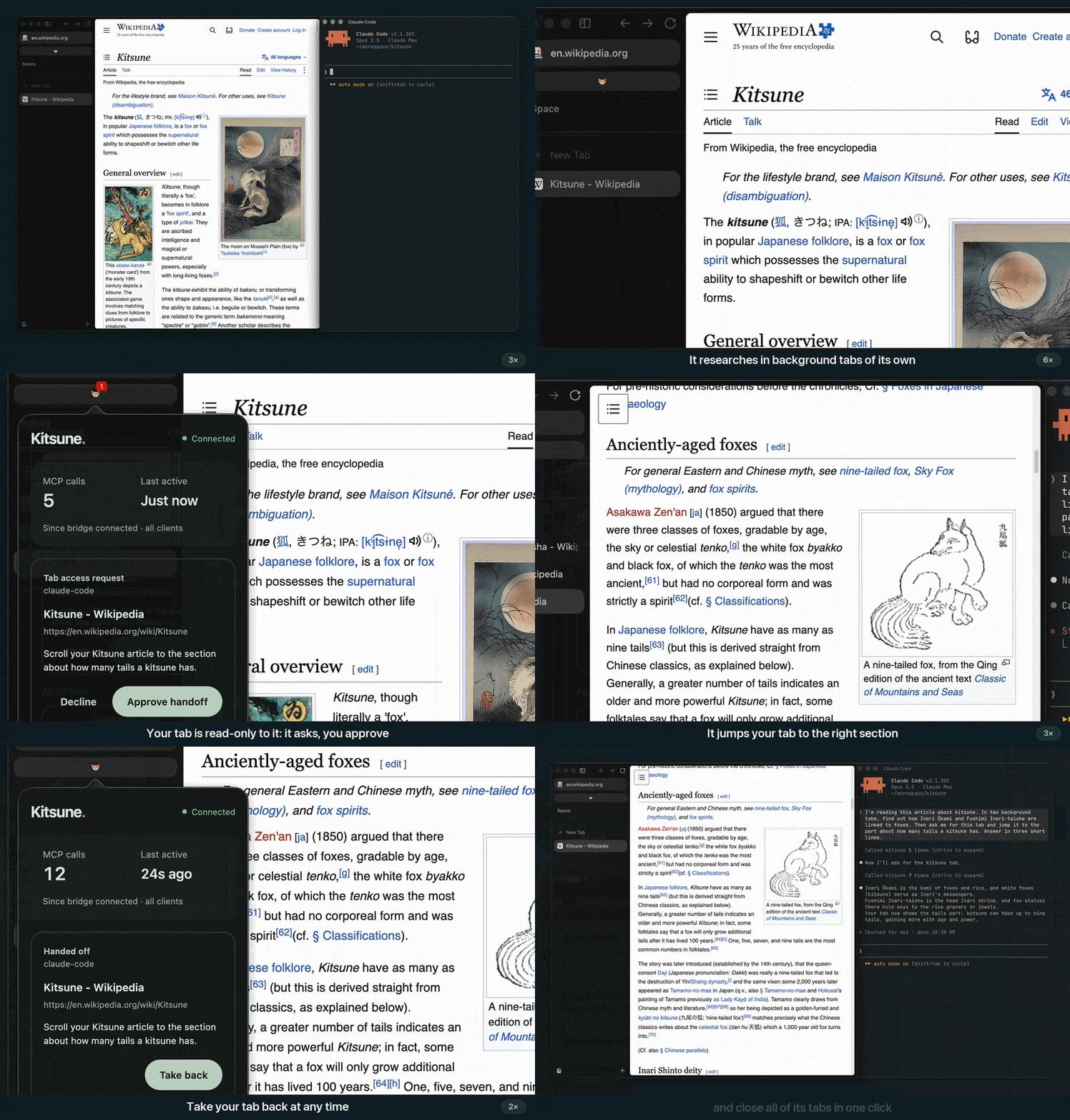
<sub>Your agent asks for a tab. You approve, then take it back. <a href="https://github.com/user-attachments/assets/532e8a65-2801-4a4c-89b4-2ec8cec7322b">Watch the 45-second demo →</a></sub>
Why Kitsune?
I built Kitsune after getting tired of switching back to my tab whenever my Playwright setup took focus, and opening Chrome for my agent when I already used a Firefox-based browser. I wanted browser automation that worked alongside me, not in my way.
- Keep working while the agent works. Agent-created tabs open in the background. Selecting a tab for the agent doesn't switch the tab you see.
- Your tabs stay yours. By default, the agent can read your tabs but cannot type, navigate, scroll or close them. It must request a handoff before changing one; you approve and can take it back.
- Stay in Firefox, Zen or LibreWolf. Reuse your existing sessions without opening a separate Chrome browser or installing WebDriver.
- A small tool surface. Six tools on
main, with Python for browser actions and direct controls for user help and recovery. The 0.8.0 release has 14.
Kitsune is designed to reduce interruptions, not eliminate them: site-opened popups and OS-level trusted input can still move focus. See the shared-browser limits.
Less input. Broader tasks.
The 6-tool Kitsune used the least total input in this four-way comparison. 23 personal and UI conditions, two repeats; all four configurations completed 46/46 attempts.
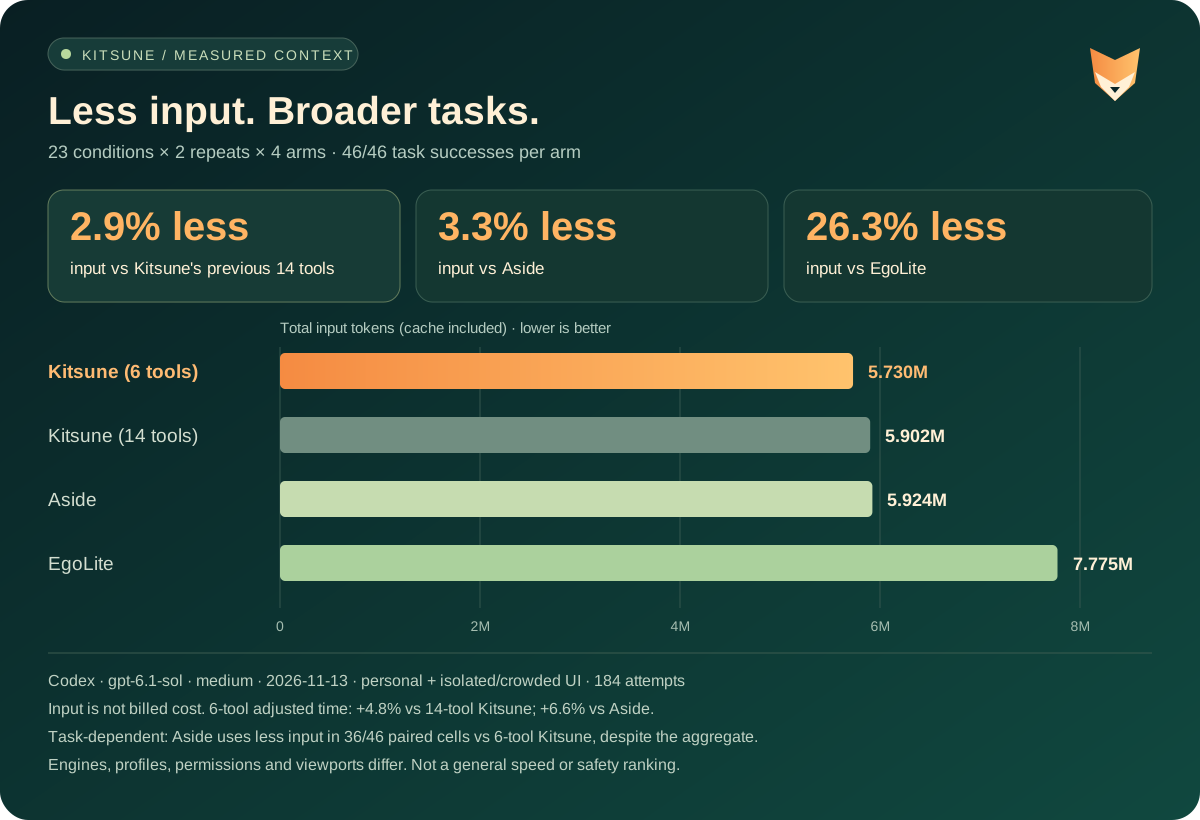
<sub>Codex gpt-6.1-sol, medium. Input includes cache, not billed cost. Browser environments and permissions differ. 6-tool adjusted time was 4.8% higher than 14-tool Kitsune and 6.6% higher than Aside; results vary by task. <a href="https://junyeong-nero.github.io/kitsune/benchmark/">Results, methodology and limitations →</a></sub>
Get started
-
Install uv.
-
Install the browser extension in Firefox, Zen or LibreWolf.
-
Add Kitsune to your agent. For Claude Code:
claude mcp add --scope user kitsune -- uvx --from kitsune-browser-mcp kitsuneCodex, Pi, OpenCode, Claude Desktop and Cursor are in Installation.
-
Keep the browser open and ask in plain language:
Research these three products in background tabs and compare them with links. Leave my current tab alone.
Fill in a draft of this form. Don't submit it.
Trust note: Python runs locally, not in a sandbox; set KITSUNE_SCRIPTING=0 to disable it.
Approvals do not prevent prompt injection. Use a separate profile for sensitive accounts and
read the security guide.
Documentation
The full documentation is at junyeong-nero.github.io/kitsune:
- Installation: every MCP client, version pinning, upgrades
- Your tabs and approvals: what limits the agent: protected tabs, per-tool approvals, ask-before-act
- Tools: the minimal and legacy tool lists, and the tool groups
- Python API: drive the browser from your own scripts with
pip install kitsune-browser - Troubleshooting · FAQ · Benchmarks · API reference
Related Skills
Agent-Reach
112.3kGive your AI agent eyes to see the entire internet. Read & search Twitter, Reddit, YouTube, GitHub, Bilibili, XiaoHongShu — one CLI, zero API fees.
ruflo
81.9k🌊 The original agent harness. Deploy intelligent multi-player swarms, coordinate autonomous workflows, and build conversational AI systems. Features adaptive memory, self-learning intelligence, federation, vector RAG integration, and native Claude Code / Codex / Hermes and many more Integrated
headroom
79.8kCompress tool outputs, logs, files, and RAG chunks before they reach the LLM. 20% fewer tokens for coding agents, 60-95% fewer tokens for JSON, same answers. Library, proxy, MCP server.
CowAgent
48.0kOpen-source personal AI assistant & Agent Harness. Plans tasks, runs tools and skills, self-evolves with memory and knowledge. Multi-agent, multi-model, multi-channel. Lightweight, extensible, one-line install.

Languages
Trust signals
From repository metadata: license, adoption, age and documentation. Not a code audit — see the Safety scan above for what the skill file itself contains.