
STIGMA
Simple Python program to parse OpenSCAP result files and give results
Install / Use
/learn @juliedavila/STIGMAREADME
STIGMA
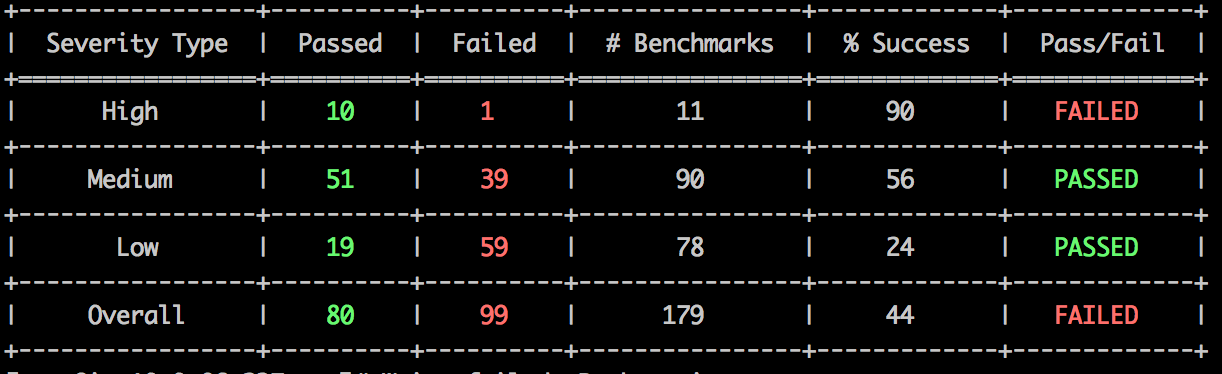
Easy Python program to parse OpenSCAP result files and give results. Like the following:
Instructions
-
Install OpenSCAP
yum install openscap-utils
-
Download SCAP DISA STIG zip file from here
-
Unzip DISA STIG content
-
Evaluate your favorite profile, for example MAC-1_Public, and write XCCDF results into a results.xml file.
    # Example
    oscap xccdf eval --profile MAC-1_Public --results results.xml --cpe U_RedHat_5_V1R2_STIG_Benchmark-cpe-dictionary.xml U_RedHat_5_V1R2_STIG_Benchmark-xccdf.xml
- Run STIGMA
python stigma.py -P /path/to/results.xml
- Optional Flags:
- -T Integer representing acceptable pass percentage of all benchmarks Combined
- -H Integer representing acceptable pass percentage of High Severity Benchmarks
- -M Integer representing acceptable pass percentage of Medium Severity Benchmarks
- -L Integer representing acceptable pass percentage of Low Severity Benchmarks
Related Skills
node-connect
343.1kDiagnose OpenClaw node connection and pairing failures for Android, iOS, and macOS companion apps
frontend-design
90.0kCreate distinctive, production-grade frontend interfaces with high design quality. Use this skill when the user asks to build web components, pages, or applications. Generates creative, polished code that avoids generic AI aesthetics.
openai-whisper-api
343.1kTranscribe audio via OpenAI Audio Transcriptions API (Whisper).
qqbot-media
343.1kQQBot 富媒体收发能力。使用 <qqmedia> 标签,系统根据文件扩展名自动识别类型(图片/语音/视频/文件)。
