
Paintless
A pointless VGA paint program for DOS
Install / Use
/learn @jtsiomb/PaintlessREADME
Paintless
A pointless VGA paint program for DOS.
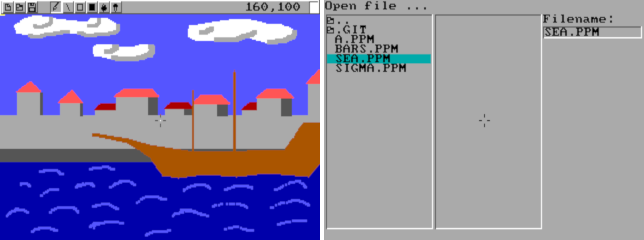
I didn't mean to write a paint program. I was just hacking aimlessly, one thing led to another, and a paint program appeared.
Download
You can always grab the latest source code from the git repository hosted on github: https://github.com/jtsiomb/paintless
Pre-compiled binaries for DOS, GNU/Linux (x86 64bit) and Windows (x86 32bit)
are available in the release archives. Both paintless-X.Y.tar.gz and
paintless-X.Y.zip archives contain source code and pre-compiled executables
for all platforms. pntlesXY.zip contains source code and only the DOS
pre-compiled executable, keeping filenames DOS-compatible (8.3).
Latest release (v0.2)
- http://nuclear.mutantstargoat.com/sw/paintless/release/pntles02.zip (source and DOS executable)
- http://nuclear.mutantstargoat.com/sw/paintless/release/paintless-0.2.tar.gz (source and binaries)
- http://nuclear.mutantstargoat.com/sw/paintless/release/paintless-0.2.zip (source and binaries)
The release archives are also mirrored on github, under the "releases" page.
License
Copyright (C) 2021-2023 John Tsiombikas nuclear@mutantstargoat.com
This program is free software. Feel free to use, modify, and/or redistribute it under the terms of the GNU General Public License v3, or at your option any later version published by the Free Software Foundation. See COPYING for details.
Usage
A mouse is required. Left mouse button uses the selected tool, right mouse button cycles between 16 preset colors.
Keyboard controls:
- 1: brush tool
- 2: line tool
- 3: rectangle tool
- 4: filled rectangle tool
- 5: flood fill tool
- 6: color picker tool
- [ / ]: increase/decrease brush size.
- Tab: toggle UI
- Backspace: clear canvas
- U: undo
- L: load image from file
- S: save image to file
- Esc: exit program
Build
DOS build
With a Watcom C environment set up, simply type wmake to build.
GNU/Linux build
Just type make.
Windows build
From a mingw32 shell type make. If you're cross-compiling from GNU/Linux with
the i686-w64-mingw32 cross-toolchain, type make crosswin.
