
Jsonquery
A lightweight, flexible, and expandable JSON query language
Install / Use
/learn @jsonquerylang/JsonqueryREADME
JSON Query

A small, flexible, and expandable JSON query language.
Try it out on the online playground: https://jsonquerylang.org
Features
- Small: just
4.2 kBwhen minified and gzipped! The JSON query engine without parse/stringify is only2.2 kB. - Feature rich (50+ powerful functions and operators)
- Easy to interoperate with thanks to the intermediate JSON format.
- Expressive
- Expandable
Documentation
On this page:
External pages:
Installation
Install the JavaScript library via npm:
npm install @jsonquerylang/jsonquery
A Python implementation can be found here: https://github.com/jsonquerylang/jsonquery-python
Usage
import { jsonquery } from '@jsonquerylang/jsonquery'

const data = {
  "friends": [
    { "name": "Chris", "age": 23, "city": "New York" },
    { "name": "Emily", "age": 19, "city": "Atlanta" },
    { "name": "Joe", "age": 32, "city": "New York" },
    { "name": "Kevin", "age": 19, "city": "Atlanta" },
    { "name": "Michelle", "age": 27, "city": "Los Angeles" },
    { "name": "Robert", "age": 45, "city": "Manhattan" },
    { "name": "Sarah", "age": 31, "city": "New York" }
  ]
}

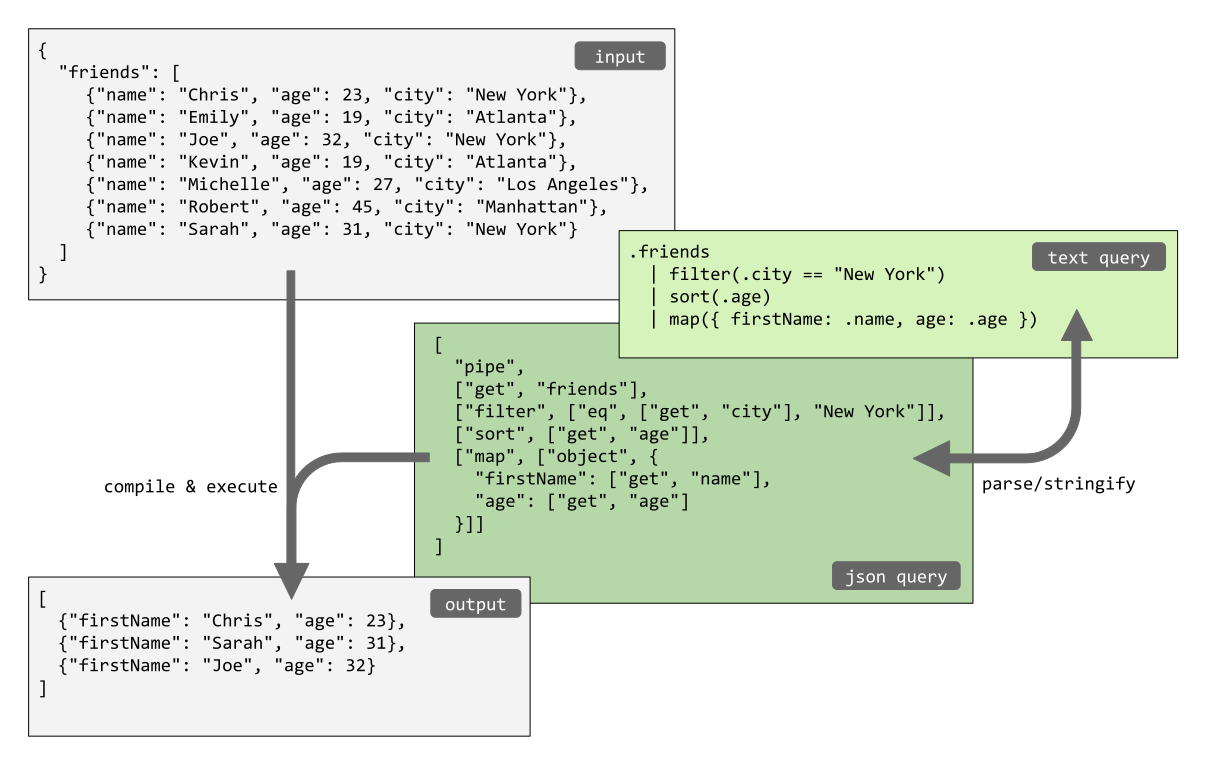
// Get the array containing the friends from the object, filter the friends that live in New York,
// sort them by age, and pick just the name and age out of the objects.
const output = jsonquery(data, `
  .friends
    | filter(.city == "New York")
    | sort(.age)
    | pick(.name, .age)
`)
// output = [
//   { "name": "Chris", "age": 23 },
//   { "name": "Sarah", "age": 31 },
//   { "name": "Joe", "age": 32 }
// ]

// The same query can be written in JSON format instead of the text format.
// Note that the functions `parse` and `stringify` can be used
// to convert from text format to JSON format and vice versa.
jsonquery(data, [
  "pipe",
  ["get", "friends"],
  ["filter", ["eq", ["get", "city"], "New York"]],
  ["sort", ["get", "age"]],
  ["pick", ["get", "name"], ["get", "age"]]
])
The build in functions can be extended with custom functions, like times in the following example:
import { jsonquery } from '@jsonquerylang/jsonquery'

const options = {
  functions: {
    times: (value) => (data) => data.map((item) => item * value)
  }
}

const data = [1, 2, 3]
const result = jsonquery(data, 'times(3)', options)
// [3, 6, 9]
Documentation on the syntax of JSON Query and all supported functions can be found on the website: https://jsonquerylang.org/docs/.
JavaScript API
The library exports the following functions:
jsonqueryis the core function of the library, which parses, compiles, and evaluates a query in one go.compileto compile and evaluate a query.parseto parse a query in text format into JSON.stringifyto convert a query in JSON into the text format.buildFunctiona helper function to create a custom function.
jsonquery
The function jsonquery allows to pass data and a query in one go and parse, compile and execute it:
jsonquery(data: JSON, query: string | JSONQuery, options: JSONQueryOptions) : JSON
Here:
datais the JSON document that will be queried, often an array with objects.queryis a JSON document containing a JSON query, either the text format or the parsed JSON format.optionsis an optional object that can contain the following properties:-
functionsis an optional map with custom function creators. A function creator has optional arguments as input and must return a function that can be used to process the query data. For example:const options = { functions: { // usage example: 'times(3)' times: (value) => (data) => data.map((item) => item * value) } }If the parameters are not a static value but can be a query themselves, the function
compilecan be used to compile them. For example, the actual implementation of the functionfilteris the following:const options = { functions: { // usage example: 'filter(.age > 20)' filter: (predicate) => { const _predicate = compile(predicate) return (data) => data.filter(_predicate) } } }You can have a look at the source code of the functions in
/src/functions.tsfor more examples. -
operatorsis an optional array definitions for custom operators. Each definition describes the new operator, the name of the function that it maps to, and the desired precedence of the operator: the same, before, or after one of the existing operators (at,before, orafter):type CustomOperator = | { name: string; op: string; at: string; vararg?: boolean, leftAssociative?: boolean } | { name: string; op: string; after: string; vararg?: boolean, leftAssociative?: boolean } | { name: string; op: string; before: string; vararg?: boolean, leftAssociative?: boolean }The defined operators can be used in a text query. Only operators with both a left and right hand side are supported, like
a == b. They can only be executed when there is a corresponding function. For example:import { buildFunction } from '@jsonquerylang/jsonquery' const options = { // Define a new function "notEqual". functions: { notEqual: buildFunction((a, b) => a !== b) }, // Define a new operator "<>" which maps to the function "notEqual" // and has the same precedence as operator "==". operators: [ { name: 'aboutEq', op: '~=', at: '==' } ] }To allow using a chain of multiple operators without parenthesis, like
a and b and c, the optionleftAssociativecan be settrue. Without this, an exception will be thrown, which can be solved by using parenthesis like(a and b) and c.When the function of the operator supports more than two arguments, like
and(a, b, c, ...), the optionvarargcan be settrue. In that case, a chain of operators likea and b and cwill be parsed into the JSON Format["and", a, b, c, ...]. Operators that do not support variable arguments, like1 + 2 + 3, will be parsed into a nested JSON Format like["add", ["add", 1, 2], 3].All build-in operators and their precedence are listed on the documentation page in the section Operators.
-
Here an example of using the function jsonquery:
import { jsonquery } from '@jsonquerylang/jsonquery'

const data = [
  { "name": "Chris", "age": 23 },
  { "name": "Emily", "age": 19 },
  { "name": "Joe", "age": 32 }
]

const result = jsonquery(data, ["filter", ["gt", ["get", "age"], 20]])
// result = [
//   { "name": "Chris", "age": 23 },
//   { "name": "Joe", "age": 32 }
// ]
compile
The compile function compiles and executes a query in JSON format. Function parse can be used to parse a text query into JSON before passing it to compile.
compile(query: JSONQuery, options: JSONQueryOptions) => (data: JSON) => JSON
Example:
import { compile } from '@jsonquerylang/jsonquery'

const queryIt = compile(["filter", ["gt", ["get", "age"], 20]])

const data = [
  { "name": "Chris", "age": 23 },
  { "name": "Emily", "age": 19 },
  { "name": "Joe", "age": 32 }
]

const result = queryIt(data)
// result = [
//   { "name": "Chris", "age": 23 },
//   { "name": "Joe", "age": 32 }
// ]
parse
Function parse parses a query in text format into JSON. Function stringify can be used to do the opposite.
parse(query: text, options: JSONQueryParseOptions) : JSONQuery
Example:
import { parse } from '@jsonquerylang/jsonquery'

const text = 'filter(.age > 20)'
const json = parse(text)
// json = ["filter", ["gt", ["get", "age"], 20]]
stringify
Function stringify turns a query in JSON format into the equivalent text format. Function parse can be used to parse the text into JSON again.
stringify(query: JSONQuery, options: JSONQueryStringifyOptions) : string
Example:
import { stringify } from '@jsonquerylang/jsonquery'

const json = ["filter", ["gt", ["get", "age"], 20]]
const text = stringify(json)
// text = 'filter(.age > 20)'
buildFunction
The function buildFunction is a helper function to create a custom function. It can only be used for functions (mostly operators), not for methods that need access the previous data as input.
The query engine passes the raw arguments to all functions, and the functions have to compile the arguments themselves when they are dynamic. For example:
const options = {
  functions: {
    notEqual: (a: JSONQuery, b: JSONQuery) => {
      const aCompiled = compile(a)
      const bCompiled = compile(b)

      return (data: unknown) => {
        const aEvaluated = aCompiled(data)
        const bEvaluated = bCompiled(data)

        return aEvaluated !== bEvaluated
      }
    }
  }
}

const data = { x: 2, y: 3}
const result = jsonquery(data, '(.x + .y) <> 6', options) // true
To automatically compile and evaluate the arguments of the function, the helper function buildFunction can be used:
import { jsonquery, buildFunction } from '@jsonquerylang/jsonquery'

const opt
