
BlazorWasmPreRendering.Build
When you publish your Blazor Wasm app, this package pre-renders and saves the app as static HTML files in your public folder.
Install / Use
/learn @jsakamoto/BlazorWasmPreRendering.BuildREADME
BlazorWasmPreRendering.Build


📝Summary
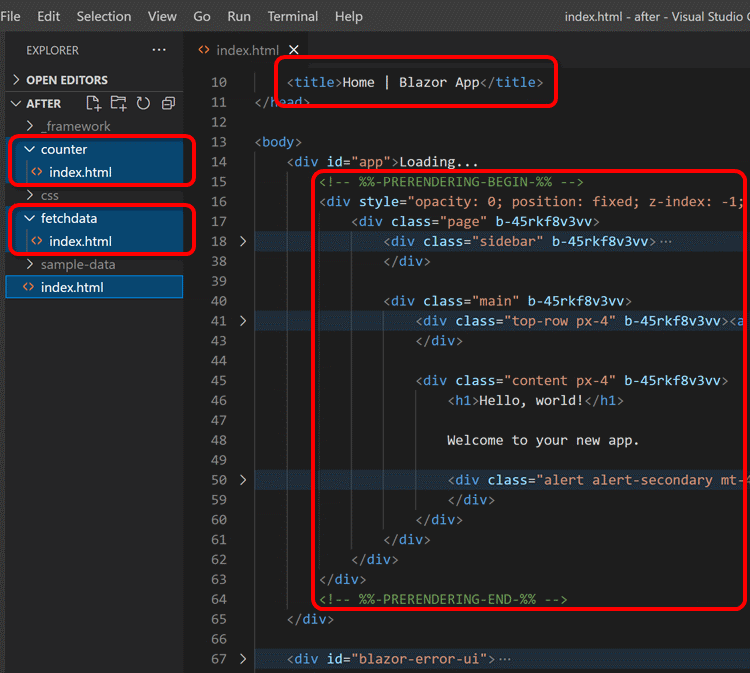
When you publish your Blazor WebAssembly app, this package pre-renders and saves the app as static HTML files in your public folder.
This will help make the contents of your Blazor WebAssembly static apps findable in internet search and be visible from the OGP client.
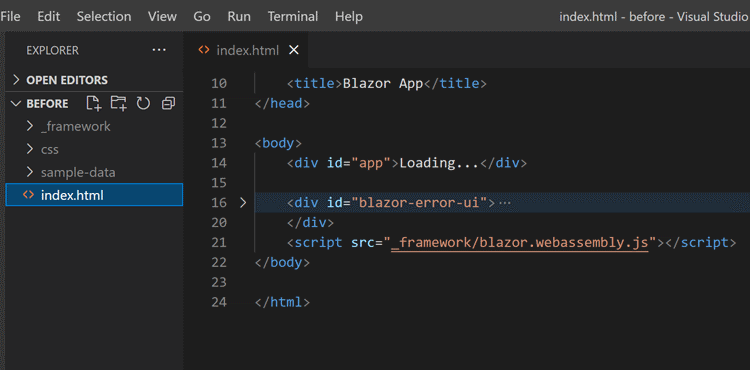
An output of "dotnet publish" before installing this package:
And after installing this package:
🚀Quick Start
Install this package to your Blazor WebAssembly project.
dotnet add package BlazorWasmPreRendering.Build
Basically, that's all.
Once installing this package is done, the output of the dotnet publish command will include pre-rendered contents! 🎉
⚙️Configurations
Services registration
In the Program.cs of your Blazor WebAssembly app, you must extract the service registration part into the static local function named static void ConfigureServices(IServiceCollection services, string baseAddress), like below.
// Program.cs

var builder = WebAssemblyHostBuilder.CreateDefault(args);
builder.RootComponents.Add<App>("#app");
builder.RootComponents.Add<HeadOutlet>("head::after");

ConfigureServices(builder.Services, builder.HostEnvironment.BaseAddress);

await builder.Build().RunAsync();

// 👇 extract the service-registration process to the static local function.
static void ConfigureServices(IServiceCollection services, string baseAddress)
{
  services.AddScoped(sp => new HttpClient { BaseAddress = new Uri(baseAddress) });
  services.AddScoped<IFoo, MyFoo>();
}
This package calls the ConfigureServices(...) static local function inside of your Blazor WebAssembly app when the pre-rendering process starts if that function exists.
This is important for your Blazor WebAssembly components to work fine in the pre-rendering process.
Note: other arguments of ConfigureServices() function
The ConfigureServices(...) static local function can also have an IConfiguration argument that reflects the contents of the wwwroot/appsetting.json JSON file.
The prerendering package supposes that the ConfigureServices method has no or only one string argument and that the string argument means the app's base address if there is one. The package doesn't suppose that the ConfigureServices method has two or more string parameters and can't determine those argument names. (The argument names of methods are usually minified at the publishing time.)
If you need to pass the environment name to the ConfigureServices, please pass the IWebAssemblyHostEnvironment to its argument like this.
// Program.cs
...
ConfigureServices(builder.Services, builder.HostEnvironment, builder.Configuration);
...
static void ConfigureServices(IServiceCollection services, IWebAssemblyHostEnvironment webHostEnv, IConfiguration configuration)
{
    // You can get the environment name via "webHostEnv.Environment".
    // You can also get the app base address via "webHostEnv.BaseAddress".
    ...
Root component type and selector
In some cases, suppose the type and selector of the root component of your Blazor WebAssembly app are not {RootNamespace}.App and #app or app.
In that case, you have to describe that information explicitly in the project file (.csproj) of your Blazor WebAssembly app, like this.
<!-- This is the .csproj file of your Blazor WebAssembly app -->
<Project Sdk="Microsoft.NET.Sdk.BlazorWebAssembly">
  ...
  <PropertyGroup>
    <BlazorWasmPrerenderingRootComponentType>My.Custom.RootComponentClass</BlazorWasmPrerenderingRootComponentType>
    <BlazorWasmPrerenderingRootComponentSelector>.selector-for-root</BlazorWasmPrerenderingRootComponentSelector>
  </PropertyGroup>
  ...
If the root component doesn't live in the application assembly, you can specify assembly name in the <BlazorWasmPrerenderingRootComponentType> peoperty value, like this.
<!-- This is the .csproj file of your Blazor WebAssembly app -->
<Project Sdk="Microsoft.NET.Sdk.BlazorWebAssembly">
  ...
  <PropertyGroup>
    <BlazorWasmPrerenderingRootComponentType>My.Custom.RootComponentClass, My.CustomAssembly</BlazorWasmPrerenderingRootComponentType>
    ...
(* See also: MSBuild properties reference for the "BlazorWasmPreRendering.Build")
Note: If the specified type was not found...
If the specified type was not found, as a fallback behavior, this package tries to find the root component type (which has the type name "App" and inherits ComponentBase type) from all assemblies that referenced from the application assembly.
Hosting Environment
The host environment returns the environment name "Prerendering" during the pre-rendering process.
@inject IWebAssemblyHostEnvironment HostEnv
<p>@HostEnv.Environment</p>
<!-- 👆 This will be pre-rendered as "<p>Prerendering</p>". -->
If you want to customize the host environment name during the pre-rendering process, please specify the "BlazorWasmPrerenderingEnvironment" MSBuild property inside your .csproj file or inside of the "dotnet publish" command-line argument.
<!-- This is the .csproj file of your Blazor WebAssembly app -->
<Project Sdk="Microsoft.NET.Sdk.BlazorWebAssembly">
  ...
  <PropertyGroup>
    <!-- 👇 If you want to make the environment name is "Production"
            even while pre-rendering, set the MSBuild property like this. -->
    <BlazorWasmPrerenderingEnvironment>Production</BlazorWasmPrerenderingEnvironment>
    ...
(* See also: MSBuild properties reference for the "BlazorWasmPreRendering.Build")
Output style
By default, all staticalized output HTML files are named "index.html" and are placed in subfolders in the same hierarchy as a request URL path.
But if you set the BlazorWasmPrerenderingOutputStyle MSBuild property to AppendHtmlExtension when you publish the project, the staticalized files are named with each request URL path appended ".html" file extension.
<!-- This is the .csproj file of your Blazor WebAssembly app -->
<Project Sdk="Microsoft.NET.Sdk.BlazorWebAssembly">
  ...
  <PropertyGroup>
    <!--
    👇 If you set this, then outut HTML files are named with
    each request URL path appended ".html" file extension.
    (ex. "http://host/foo/bar" ⇒ "./foo/bar.html")-->
    <BlazorWasmPrerenderingOutputStyle>AppendHtmlExtension</BlazorWasmPrerenderingOutputStyle>
    ...
(* See also: MSBuild properties reference for the "BlazorWasmPreRendering.Build")
Delete the "Loading..." contents
By default, this package keeps the "Loading..." contents in the original fallback page (such as an index.html) into prerendered output static HTML files.
And, prerendered contents are invisible on the browser screen.
(Only search engine crawlers can read them.)
That is by design because even if users can see the prerendered contents immediately after initial page loading, that page can not interact with users for a few seconds until the Blazor WebAssembly runtime has been warmed up.
However, in some cases, developers can control the user interactions completely until the Blazor WebAssembly runtime warmed up, and they would like to make the prerendered contents are visible immediately.
For that case, set the BlazorWasmPrerenderingDeleteLoadingContents MSBuild property to true.
<!-- This is the .csproj file of your Blazor WebAssembly app -->
<Project Sdk="Microsoft.NET.Sdk.BlazorWebAssembly">
  ...
  <PropertyGroup>
    <!--
    👇 If you set this MSBuild property to true,
       then outut HTML files do not contain the "Loading..." contents,
       and prerendered contents will be visible immediately. -->
    <BlazorWasmPrerenderingDeleteLoadingContents>true</BlazorWasmPrerenderingDeleteLoadingContents>
    ...
When that MSBuild property is set to true, this package deletes the "Loading..." contents from prerendered static HTML files and does not hide prerendered contents from users.
(* See also: MSBuild properties reference for the "BlazorWasmPreRendering.Build")
Url path to explicit fetch
By default, this package follows all of <a> links recursively inside the contents starting from the root index (/) page to save them statically.
However, in some cases, there are pages that are not linked from anywhere, such as an "Easter Egg" page.
To support that case, please set the URL path list that you want to fetch explicitly to the BlazorWasmPrerenderingUrlPathToExplicitFetch MSBuild property as a semicolon-separated string.
<Project Sdk="Microsoft.NET.Sdk.BlazorWebAssembly">
  ...
  <PropertyGroup>
    <!--
    👇 If you set this, each URL path will be fetched
       and saved as a static HTML file
       even if those URLs are not linked from anywhere.
    -->
    <BlazorWasmPrerenderingUrlPathToExplicitFetch>/unkinked/page1;/unlinked/page2</BlazorWasmPrerenderingUrlPathToExplicitFetch>
    ...
(* See also: [_MSBuild properties reference
