Rhandsontable
A htmlwidgets implementation of Handsontable.js
Install / Use
/learn @jrowen/RhandsontableREADME

See the project website for more details and live examples, and see below for important details on use in shiny apps.
An htmlwidgets implementation of Handsontable.js. Per the website:
Handsontable is a minimalist Excel-like data grid editor for HTML & JavaScript
This library was inspired by the shinyTable package. Most of the original functionality was preserved, and the htmlwidgets framework made it possible to leverage even more of the Handsontable.js functionality.
Note: With v7, handsontable went to a more restrictive license for commercial use. To avoid license violations for existing users, rhandsontable will not update handsontable beyond v6.2.2. This may change in the future if a way is found to manage multiple handsontable versions.
See the vignette for detailed examples and links to shiny apps.
To install from CRAN use
install.packages("rhandsontable")
For the latest development version use
devtools::install_github("jrowen/rhandsontable")
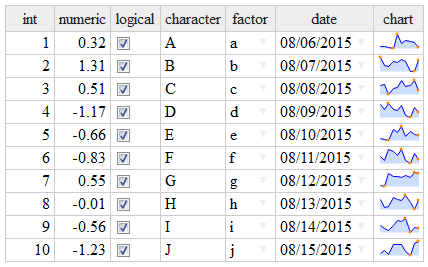
A simple example
library(rhandsontable)

DF = data.frame(int = 1:10,
                numeric = rnorm(10),
                logical = TRUE,
                character = LETTERS[1:10],
                fact = factor(letters[1:10]),
                date = seq(from = Sys.Date(), by = "days", length.out = 10),
                stringsAsFactors = FALSE)

# add a sparkline chart
DF$chart = sapply(1:10, function(x) jsonlite::toJSON(list(values=rnorm(10))))

rhandsontable(DF, rowHeaders = NULL) %>%
  hot_col("chart", renderer = htmlwidgets::JS("renderSparkline"))
A more involved shiny example
shiny::runGitHub("rhandsontable", "jrowen", subdir = "inst/examples/rhandsontable_corr")
Important note on shiny use: The htmlwidgets package creates widgets as shiny output bindings. The rhandsontable package also attempts to expose the table as a pseudo shiny input binding using handsontable change events (see here for the supported events). This means the table (e.g. hot) can be accessed in shiny using either input$hot or output$hot, but these values may not be in-sync. The timing of updates will depend on the particular reactive path followed by your shiny application.
Since the widget is not currently able to use the standard shiny input binding functionality, you will need to explicitly call the hot_to_r function to convert the handsontable data to an R object.
Two additional inputs are also enabled, input$hot_select and input$hot_comment, which will fire when a cell selection or a comment changes, respectively (if you would like to see more options, please post an issue or create a PR).
This functionality is still evolving, so please don't hesitate to share suggestions and PRs.
Related Skills
node-connect
346.8kDiagnose OpenClaw node connection and pairing failures for Android, iOS, and macOS companion apps
frontend-design
107.6kCreate distinctive, production-grade frontend interfaces with high design quality. Use this skill when the user asks to build web components, pages, or applications. Generates creative, polished code that avoids generic AI aesthetics.
openai-whisper-api
346.8kTranscribe audio via OpenAI Audio Transcriptions API (Whisper).
qqbot-media
346.8kQQBot 富媒体收发能力。使用 <qqmedia> 标签,系统根据文件扩展名自动识别类型(图片/语音/视频/文件)。