
Lswifi
a CLI-centric Wi-Fi scanning tool for Windows
Install / Use
/learn @joshschmelzle/LswifiREADME






lswifi is a CLI-centric Wi-Fi scanning tool for Windows that provides more information about nearby Wi-Fi networks than built-in tools (e.g. netsh wlan show networks). Examples include Received Signal Strength Indicator (RSSI), showing security AKMs and ciphers, decoding 802.11 IEs, revealing 6 GHz Reduced Neighbor Reports, and more. With capable Wi-Fi adapters, lswifi can detect and show networks in 2.4 GHz, 5 GHz, and 6 GHz bands.
Note: Recent versions of Windows add OFDM rates, RSSI, AKMs and ciphers, QBSS, and limited RNR information to netsh wlan output. lswifi still offers additional information, parsing, filtering, and output options.
Installation
Note: The Python Scripts directory must be added to the PATH environment variable.
> python -m pip install lswifi

Usage
Output nearby Wi-Fi networks:
> lswifi
Output nearby Wi-Fi networks that have a detected signal of -60 dBm or stronger:
> lswifi -t -60
Output only networks that match ENCOM (partial match support):
> lswifi -include ENCOM
Output verbose information (including Information Elements) for BSSID 00:00:00:00:00:00 (exact match):
> lswifi -ies 00:00:00:00:00:00
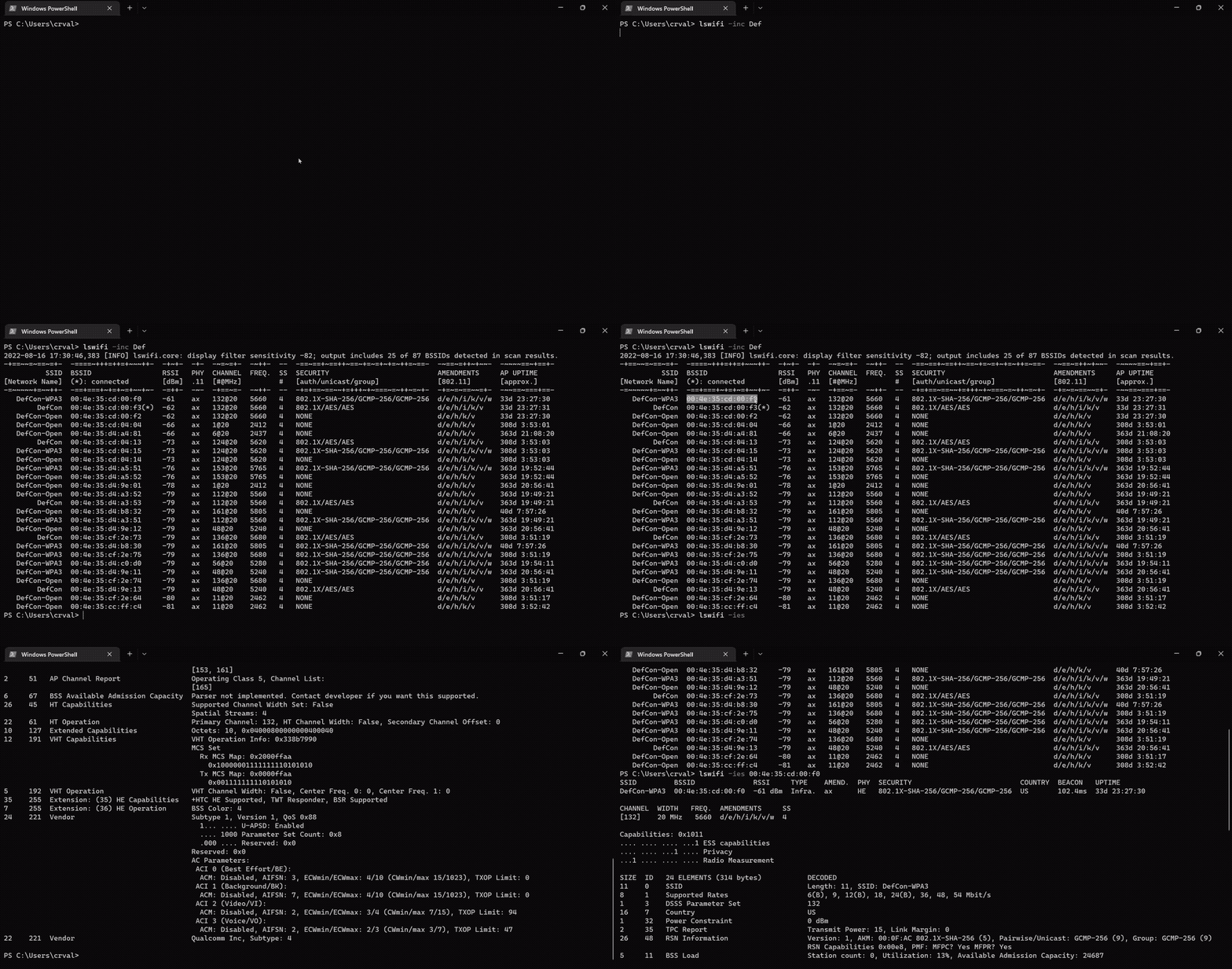
Print help information:
> lswifi -h
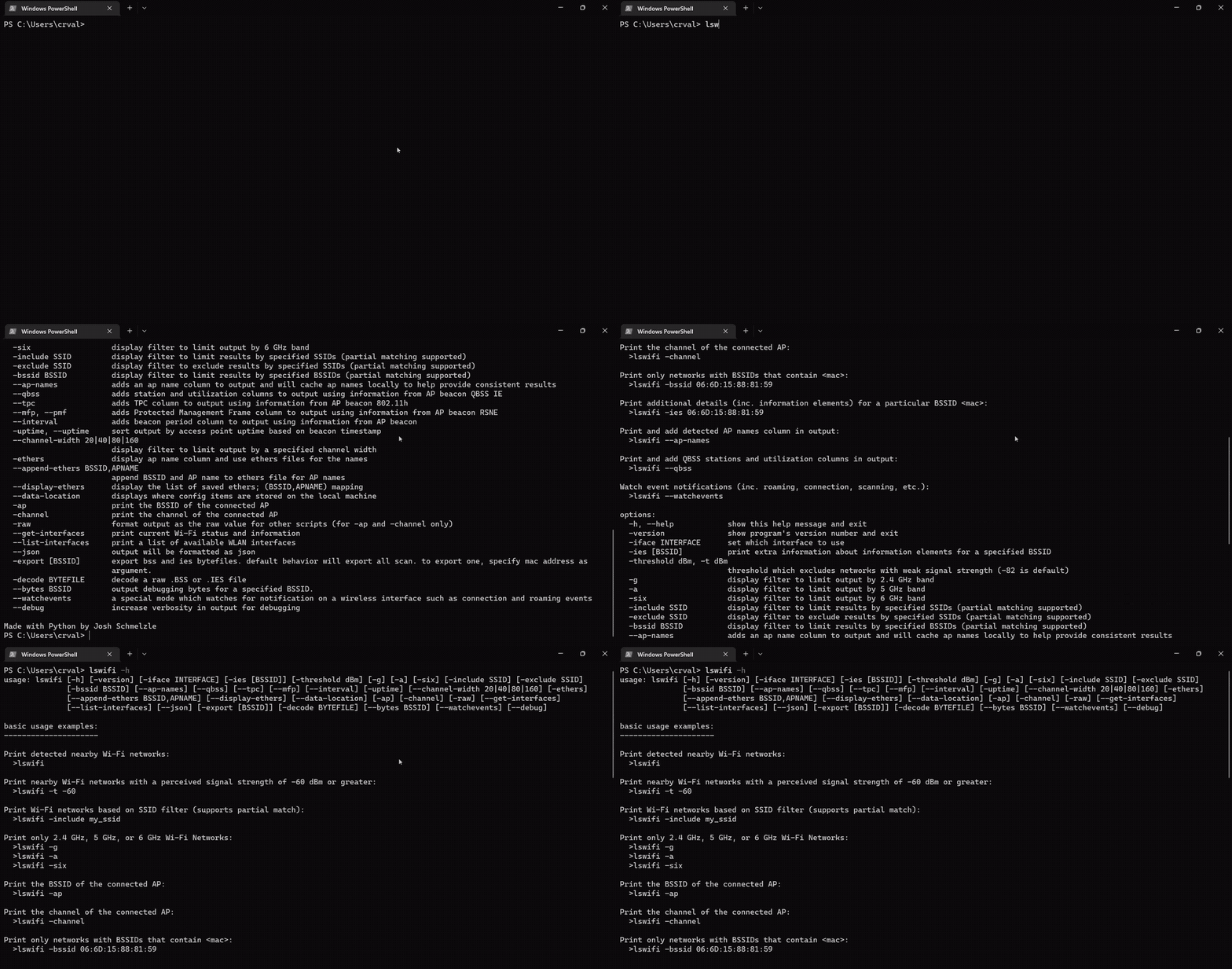
Print and add detected AP names column in output:
> lswifi --ap-names
Print and add detected AP names and QBSS column in output (try adding --mfp or --tpc too!):
> lswifi --ap-names --qbss
Print an alternative table for BSSes which may contain 6 GHz Reduced Neighbor Reports:
> lswifi -rnr
Watch event notifications (inc. roaming, connection, scanning, etc.):
> lswifi --watchevents
Export scan results to pcap:
> lswifi -export
PowerShell Tab Completion
To enable PowerShell tab completion for lswifi, run the following command in PowerShell:
lswifi completion powershell | Out-String | Invoke-Expression
To make this permanent, add the above command to your PowerShell profile. To find and edit your profile:
# View your profile location
$PROFILE

# Add the completion script to your profile
lswifi completion powershell | Out-String | Invoke-Expression >> $PROFILE

# Or edit manually
notepad $PROFILE
Then restart PowerShell or reload your profile:
. $PROFILE
CLI options
positional arguments:
  {completion}          commands
    completion          Generate shell completion script

options:
  -h, --help            show this help message and exit
  -version, --version, -V
                        show program's version number and exit
  -n, --scans #         set how many scans to do before exiting
  --time #              set test in seconds to perform scans for
  -i, --interval #      seconds between scans
  -ies [BSSID]          print extra information about information elements for a specified BSSID
  -threshold, -t -82    threshold which excludes networks with weak signal strength from results (-82 is default)
  -all                  remove threshold filtering which excludes results with weaker signal
  -g                    display filter to limit output by 2.4 GHz band
  -a                    display filter to limit output by 5 GHz band
  -six                  display filter to limit output by 6 GHz band
  -include, -inc SSID   display filter to limit results by specified SSIDs (partial matching supported)
  -exclude, -exc SSID   display filter to exclude results by specified SSIDs (partial matching supported)
  -bssid, -bss BSSID    display filter to limit results by specified BSSIDs (partial matching supported)
  --ap-names            adds an ap name column to output and will cache ap names locally to help provide consistent results
  --qbss                adds station and utilization columns to output using information from AP beacon QBSS IE
  --tpc                 adds TPC column to output using information from AP beacon 802.11h
  --period              adds beacon period column to output using information from AP beacon
  --uptime, -uptime     sort output by access point uptime based on beacon timestamp
  -rnr, --rnr           special mode to create an alternate table based on RNR results
  --channel-width 20|40|80|160|320
                        display filter to limit output by a specified channel width
  -ethers               adds an ap name column to output and use an ethers file for the ap names
  --append-ethers BSSID,APNAME
                        append BSSID and AP name to ethers file for AP names
  --display-ethers      display the list of saved ethers; (BSSID,APNAME) mapping
  --data-location       displays where config items are stored on the local machine
  -ap                   print the BSSID of the connected AP
  -channel              print the channel of the connected AP
  -raw                  format output as the raw value for other scripts (for -ap and -channel only)
  --get-interfaces      print current Wi-Fi status and information
  --list-interfaces     print a list of available WLAN interfaces
  --json [JSON]         output will be formatted as json
  --indent 4            JSON output will be formatted with pretty print with provided indent level
  --csv [CSV]           output will be formatted as csv
  -exportraw, -expraw [BSSID]
                        export raw bss and ies bytefiles. default behavior will export all from a scan. to export only one, provide full mac address of the BSSID as argument.
  -export, -exp [BSSID]
                        export scan results to pcapng file. default behavior will export all from a scan. to export only one, provide full mac address of the BSSID as argument.
  -path EXPORT_PATH     specify output path for pcapng export (defaults to app data directory)
  -decoderaw BYTE_FILE  decode a raw .BSS or .IES file
  -decode PCAP_FILE     parse scan results from pcap/pcapng file. by default shows all networks in the file, can be combined with filtering options.
  --bytes BSSID         output debugging bytes for a specified BSSID found in scan results.
  --watchevents         a special mode which watches for notification on a wireless interface such as connection and roaming events
  --syslog <server IP>  syslogs events from --watchevents to a remote syslog server
  --debug               increase verbosity for debugging
Upgrading
Here is how to upgrade lswifi using pip3 when there is a new version available.
First check where and if the executable exists:
> where.exe pip3
C:\Users\jsz\AppData\Local\Programs\Python\Python311\Scripts\pip3.exe
C:\Users\jsz\AppData\Local\Programs\Python\Python310\Scripts\pip3.exe

# OR

> where.exe python
C:\Users\jsz\AppData\Local\Programs\Python\Python311\python.exe
C:\Users\jsz\AppData\Local\Programs\Python\Python310\python.exe
C:\Users\jsz\AppData\Local\Microsoft\WindowsApps\python.exe
C:\msys64\mingw64\bin\python.exe
Let's install and upgrade lswifi to the latest version available:
> pip3 install --upgrade lswifi

# OR

> python -m pip install -U lswifi
Check the version installed:
> lswifi -v
Looking to install a specific version of lswifi?
python -m pip install lswifi==0.1.47.post1
FAQs
- What OSes and Python versions are required to run
lswifi?- Windows 10+ and Python 3.9 are the current minimum versions I'm willing to support (subject to change based on the official Python release cycle).
- Windows 11 and a capable interface is required for 6 GHz support. Don't have 6 GHz capable interface? Try
lswifi -rnrwith multi-band 6 GHz APs nearby.
- Can you get add information from radio tap headers?
- Currently there is not a way to get radio tap headers from Native Wifi wlanapi.h.
- Do I need to install
lswifiin a virtual environment (venv)?- Only if you want to. Installing in a venv is optional and not necessary.
lswificurrently has zero dependencies outside of the included standard library with Python.
- Only if you want to. Installing in a venv is optional and not necessary.
- When I try to run
lswififrom my Windows terminal I see an error that says'lswifi' is not recognized as an internal or external command operable program or batch file.?- Either
lswifiis not installed, or the Python Scripts directory is not in the PATH environment variable. - To fix ensure the Scripts directory is included in the [PATH environment variable](https://learn.microsoft.com
- Either
Related Skills
node-connect
353.1kDiagnose OpenClaw node connection and pairing failures for Android, iOS, and macOS companion apps
frontend-design
111.6kCreate distinctive, production-grade frontend interfaces with high design quality. Use this skill when the user asks to build web components, pages, or applications. Generates creative, polished code that avoids generic AI aesthetics.
openai-whisper-api
353.1kTranscribe audio via OpenAI Audio Transcriptions API (Whisper).
qqbot-media
353.1kQQBot 富媒体收发能力。使用 <qqmedia> 标签,系统根据文件扩展名自动识别类型(图片/语音/视频/文件)。
