
FeedBuilderBundle
A bundle that creates a feed (xml/json) based on the output channel plugin from Pimcore.
Install / Use
/learn @jorisros/FeedBuilderBundleREADME
FeedBuilderBundle
Feedbuilder bundle is export bundle that helps to export data of pimcore to other systems.
Installation
The installation can be installed though composer.
- Run
composer require jorisros/feed-builder-bundleto receive the bundle - Enable the bundle
bin/console pimcore:bundle:enable FeedBuilderBundleand then run./bin/console pimcore:bundle:enable OutputDataConfigToolkitBundlebecause you need to have both enabled. - Then reload the GUI of Pimcore, and there is a new menu item on the following location: Settings->Settings feedbuilder, this interface saves the in a configuration file on the following location
var/config/feedbuilder.php
How does it works?
The working is quite simple, you discibe your export method to the level you want, that's give you data you want. This is based on the output channel bundle
Events
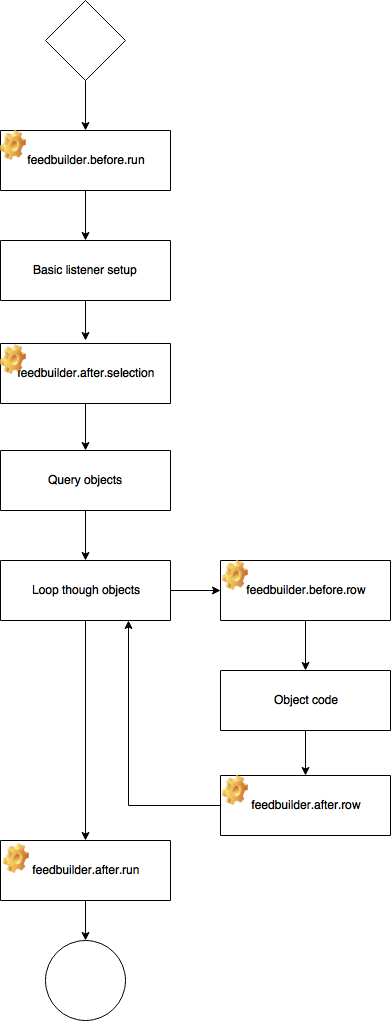
We can easily extend the feedbuilder to fit your own situation. The following event handlers are inside the builder to you can subscribe to events on different levels of the building of the feeds.
| Event | Description | | --------------------------- | ------------ | | feedbuilder.before.run | This event is triggered as first event, the input of this event is the configuration of the feeed. | | feedbuilder.after.selection | The event after the selection has been runned, this input for this event is the object listener. This is desgined for customize the query | | feedbuilder.before.row | This is the event before the object is converted to array, the input of this event is a object | | feedbuilder.after.row | The event after the object is converted from a object to a array. The input of this event is a array | | feedbuilder.after.run | Latest step of building the feed, this is triggered after looping through the objects. The input of the event is de result in a array. |
Ignore cache in your feed
It is possible to ignore the cache in your feed while developing or testing. You can give the run method in the composer a second boolean parameter, so it clears the cache before it runs the query code.
In the browser you can add the following get parameter to the feed: ...name-of-json.json?ignoreCache=true then the cache will be cleared before you run the feedbuilder.
Example of a export to JSON
Create a class and a method where the writer is been located.
<?php

namespace FeedBuilderBundle\EventListener;

use FeedBuilderBundle\Event\FeedBuilderEvent;

class ExportExample
{
    const FEED_TITLE = 'Testfeed';

    public function fileHandler(FeedBuilderEvent $event){

        if($event->getConfig()->get('title') === self::FEED_TITLE)
        {
            $arr['products'] = $event->getResult();

            $dir = PIMCORE_SYSTEM_TEMP_DIRECTORY.DIRECTORY_SEPARATOR.'export';

            $name = 'json_export_'.time().'.json';
            if(!file_exists($dir)){
                mkdir($dir);
            }
            file_put_contents($dir.DIRECTORY_SEPARATOR.$name,json_encode($arr, JSON_PRETTY_PRINT));
        }
    }
}
Now we have a writer that writes the json content to a file. Now we have to connect the listener after that the export has been runned.
We will do that in the service.yml
    FeedBuilderBundle\EventListener\ExportExample:
        tags:
            - { name: kernel.event_listener, event: feedbuilder.after.run, method: fileHandler }
Related Skills
node-connect
345.4kDiagnose OpenClaw node connection and pairing failures for Android, iOS, and macOS companion apps
frontend-design
104.6kCreate distinctive, production-grade frontend interfaces with high design quality. Use this skill when the user asks to build web components, pages, or applications. Generates creative, polished code that avoids generic AI aesthetics.
openai-whisper-api
345.4kTranscribe audio via OpenAI Audio Transcriptions API (Whisper).
qqbot-media
345.4kQQBot 富媒体收发能力。使用 <qqmedia> 标签,系统根据文件扩展名自动识别类型(图片/语音/视频/文件)。
