NebulaLogger
The most robust observability solution for Salesforce experts. Built 100% natively on the platform, and designed to work seamlessly with Apex, Lightning Components, Flow, OmniStudio, and integrations.
Install / Use
/learn @jongpie/NebulaLoggerREADME
Nebula Logger for Salesforce


The most robust observability solution for Salesforce experts. Built 100% natively on the platform, and designed to work seamlessly with Apex, Lightning Components, Flow, OmniStudio, and integrations.
Unlocked Package - v4.17.3


sf package install --wait 20 --security-type AdminsOnly --package 04tg70000001IMHAA2
Managed Package - v4.17.0


sf package install --wait 30 --security-type AdminsOnly --package 04tg70000000r5xAAA
[!NOTE] Starting in September 2024, Nebula Logger's documentation is being rewritten & consolidated into the wiki. Most of the content show below will eventually be migrated to the wiki instead.
Features
-
A unified logging tool that supports easily adding log entries across the Salesforce platform, using:
- Apex: classes, triggers, and anonymous Apex scripts
- Lightning Components: lightning web components (LWCs) & aura components
- Flow & Process Builder: any Flow type that supports invocable actions
- OmniStudio: omniscripts and omni integration procedures
-
Built with an event-driven pub/sub messaging architecture, using
LogEntryEvent__eplatform events. For more details on leveraging platform events, see the Platform Events Developer Guide site -
Actionable observability data about your Salesforce org, available directly in your Salesforce org via the 5 included custom objects
Log__cLogEntry__cLogEntryTag__cLoggerTag__cLoggerScenario__c
-
Customizable logging settings for different users & profiles, using the included
LoggerSettings__ccustom hierarchy settings object -
Easily scales in highly complex Salesforce orgs with large data volumes, using global feature flags in
LoggerParameter__mdt -
Automatic data masking of sensitive data, using rules configured in the
LogEntryDataMaskRule__mdtcustom metadata type object -
View related
LogEntry__crecords on any Lightning record page in App Builder by adding the 'Related Log Entries' component (relatedLogEntriesLWC) -
Dynamically assign tags to
Log__candLogEntry__crecords for tagging/labeling your logs -
Extendable with a built-in plugin framework: easily build or install plugins that enhance Nebula Logger, using Apex or Flow (not currently available in the managed package)
-
ISVs & package developers have several options for leveraging Nebula Logger in your own packages
- Optional Dependency: dynamically leverage Nebula Logger in your own packages - when it's available in a subscriber's org - using Apex's
Callableinterface and Nebula Logger's included implementationCallableLogger(requiresv4.14.10of Nebula Logger or newer) - Hard Dependency: add either Nebula Logger's unlocked (no namespace) package or its managed package (
Nebulanamespace) as a dependency for your package to ensure customers always have a version of Nebula Logger installed - No Dependency: Bundle Nebula Logger's metadata into your own project - all of Nebula Logger's metadata is fully open source & freely available. This approach provides with full control of what's included in your own app/project.
- Optional Dependency: dynamically leverage Nebula Logger in your own packages - when it's available in a subscriber's org - using Apex's
Learn more about the design and history of the project on Joys Of Apex blog post
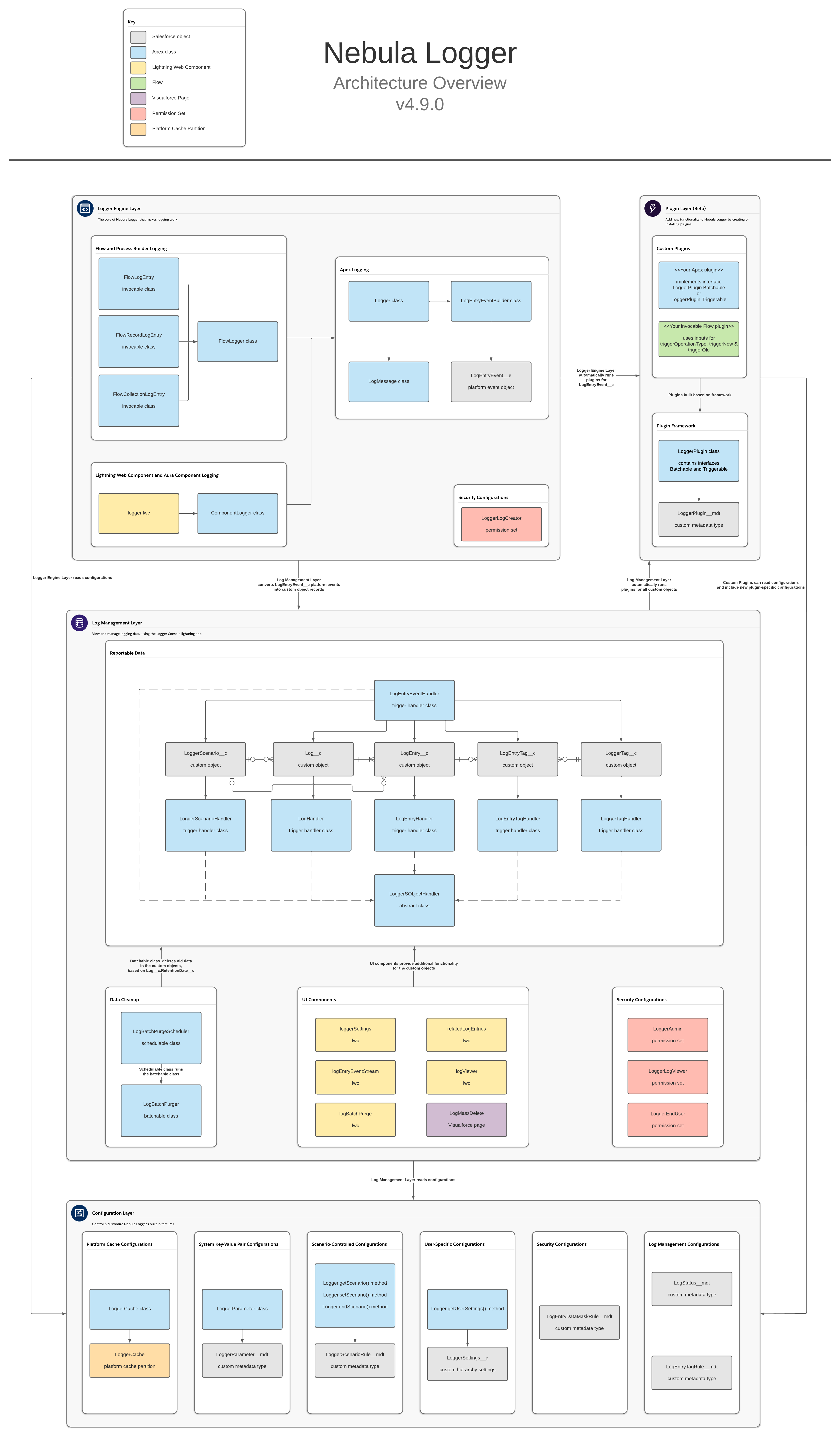
Architecture Overview
Nebula Logger is built natively on Salesforce, using Apex, lightning components and various types of objects. There are no required external dependencies. To learn more about the architecture, check out the architecture overview in the wiki.
<a href="https://github.com/jongpie/NebulaLogger/wiki/Architecture" target="_blank"> <img src="https://raw.githubusercontent.com/wiki/jongpie/NebulaLogger/images/nebula-logger-architecture-overview.png" width="300"> </a>Installing
Nebula Logger is available as both an unlocked package and a managed package. The metadata is the same in both packages, but there are some differences in the available functionality & features. All examples in README are for the unlocked package (no namespace) - simply add the Nebula namespace to the examples if you are using the managed package.
Getting Started
After installing Nebula Logger in your org, there are a few additional configuration changes needed...
- Assign permission set(s) to users
- See the wiki page Assigning Permission Sets for more details on each of the included permission sets
- Customize the default settings in
LoggerSettings__c- You can customize settings at the org, profile and user levels
Logger for Apex: Quick Start
For Apex developers, the Logger class has several methods that can be used to add entries with different logging levels. Each logging level's method has several overloads to support multiple parameters.
// This will generate a debug statement within developer console
System.debug('Debug statement using native Apex');

// This will create a new `Log__c` record with multiple related `LogEntry__c` records
Logger.error('Add log entry using Nebula Logger with logging level == ERROR');
Logger.warn('Add log entry using Nebula Logger with logging level == WARN');
Logger.info('Add log entry using Nebula Logger with logging level == INFO');
Logger.debug('Add log entry using Nebula Logger with logging level == DEBUG');
Logger.fine('Add log entry using Nebula Logger with logging level == FINE');
Logger.finer('Add log entry using Nebula Logger with logging level == FINER'