
Facer
Simple (🤞) face averaging (🙂) in Python (🐍)
Install / Use
/learn @johnwmillr/FacerREADME
Facer
Face detection, alignment, and averaging using OpenCV and dlib.
Facer draws heavily on this tutorial from Satya Mallick. I had to update the code pretty heavily to get the project to work, so I thought I'd share my modifications.
Example
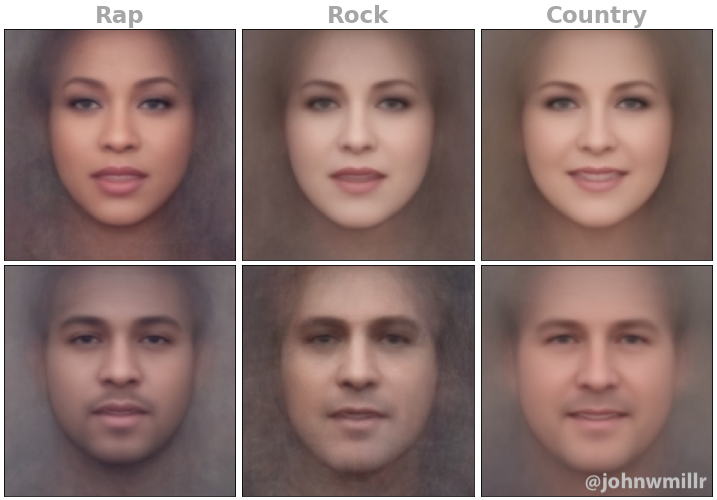
The image below is an example of Facer's output for one of my posts on r/dataisbeautiful.
Installation
You have my 100% money-back guarantee that the most difficult part of using this package is installing its requirements. Once you've got OpenCV installed, the rest ~~will~~ should be smooth sailing. I've had the best luck with the OpenCV using the opencv-python package from PyPI.
Install facer using pip:
pip install -U average-facer
Pre-trained detection model
The face landmark detection relies on a pre-trained model that must be downloaded separately from the dlib package itself.
wget http://dlib.net/files/shape_predictor_68_face_landmarks.dat.bz2
Unzip the compressed file after it finishes downloading and move it into a ./model directory.
If you store the downloaded file somewhere other than ./model (or if you use an entirely different model name), you can set a custom model path as an environment variable:
export FACER_PREDICTOR_PATH="./custom/path/to/your/model.dat"
Usage
from facer import facer
import matplotlib.pyplot as plt


# Load face images
path_to_images = "./face_images"  # Put your images here
images = facer.load_images(path_to_images)

# Detect landmarks for each face
landmarks, faces = facer.detect_face_landmarks(images)

# Use the detected landmarks to create an average face
average_face = facer.create_average_face(faces, landmarks, save_image=True)

# View the composite image
plt.imshow(average_face)
plt.show()
Facer also supports creating animated GIFs of the averaging process:
from facer import facer

path_to_images = "./face_images"
gif, average_face = facer.create_animated_gif(path_to_images)
