
TumblThree
A Tumblr Blog Backup Application
Install / Use
/learn @johanneszab/TumblThreeREADME
This repository is no longer maintained.
For the latest TumblThree updates, please visit our new home at TumblThreeApp.
TumblThree - A Tumblr Blog Backup Application




To facilitate TumblThrees development within a larger community, TumblThree is moving to its new home at a github organization. For new releases, issues and community/developer chat at gitter, check out its new home: TumblThreeApp
TumblThree is the code rewrite of TumblTwo, a free and open source Tumblr blog backup application, using C# with WPF and the MVVM pattern. It uses the Win Application Framework (WAF). It downloads photo, video, audio and text posts from a given tumblr blog.
Read this in other languages: 简体中文.
Features:
- Source code at github (Written in C# using WPF and MVVM).
- Multiple concurrent downloads of a single blog.
- Multiple concurrent downloads of different blogs.
- Internationalization support (currently available: zh, ru, de, fr, es).
- A download queue.
- Autosave of the queuelist.
- Save, clear and restore the queuelist.
- A clipboard monitor that detects blogname.tumblr.com urls in the clipboard (copy and paste) and automatically adds the blog to the bloglist.
- A settings panel (change download location, turn preview off/on, define number of concurrent downloads, set the imagesize of downloaded pictures, set download defaults, enable portable mode, etc.).
- Uses Windows proxy settings.
- A bandwidth throttler.
- An option to download an url list instead of the actual files.
- Set a start time for a automatic download (e.g. during nights).
- An option to skip the download of a file if it has already been downloaded before in any currently added blog.
- Uses SSL connections.
- Preview of photos & videos.
- Taskbar buttons and key bindings.
Blog backup/download:
- Download of photo, video (only tumblr.com hosted), text, audio, quote, conversation, link and question posts.
- Download meta information for photo, video and audio posts.
- Downloads inlined photos and videos (e.g. photos embedded in question&answer posts).
- ~~Download of _raw image files (original/higher resolution pictures)~~ (Tumblr raws are inaccessible as of August 10, 2018).
- Support for downloading Imgur, Gfycat, Webmshare, Mixtape, Lolisafe, Uguu, Catbox and SafeMoe linked files in tumblr posts.
- Download of safe mode/NSFW blogs.
- Allows to download only original content of the blog and skip reblogged posts.
- Can download only tagged posts.
- Can download only specific blog pages instead of the whole blog.
- Allows to download blog posts in a defined time span.
- Can download hidden blogs (login required / dash board blogs).
- Can download password protected blogs (of non-hidden blogs).
Liked/by backup/download:
- A downloader for downloading "liked by" photos and videos instead of a tumblr blog (e.g. https://www.tumblr.com/liked/by/wallpaperfx/) (login required).
- ~~Download of _raw image files (original/higher resolution pictures)~~ (Tumblr raws are inaccessible as of August 10, 2018).
- Allows to download posts in a defined time span.
Tumblr search backup/download:
- A downloader for downloading photos and videos from the tumblr search (e.g. http://www.tumblr.com/search/my+keywords).
- ~~Download of _raw image files (original/higher resolution pictures)~~ (Tumblr raws are inaccessible as of August 10, 2018).
- Can download only specific blog pages instead of the whole blog.
Tumblr tag search backup/download:
- A downloader for downloading photos and videos from the tumblr tag search (e.g. http://www.tumblr.com/tagged/my+keywords) (login required).
- ~~Download of _raw image files (original/higher resolution pictures)~~ (Tumblr raws are inaccessible as of August 10, 2018).
- Allows to download posts in a defined time span.
Download:
Latest releases can be found here.
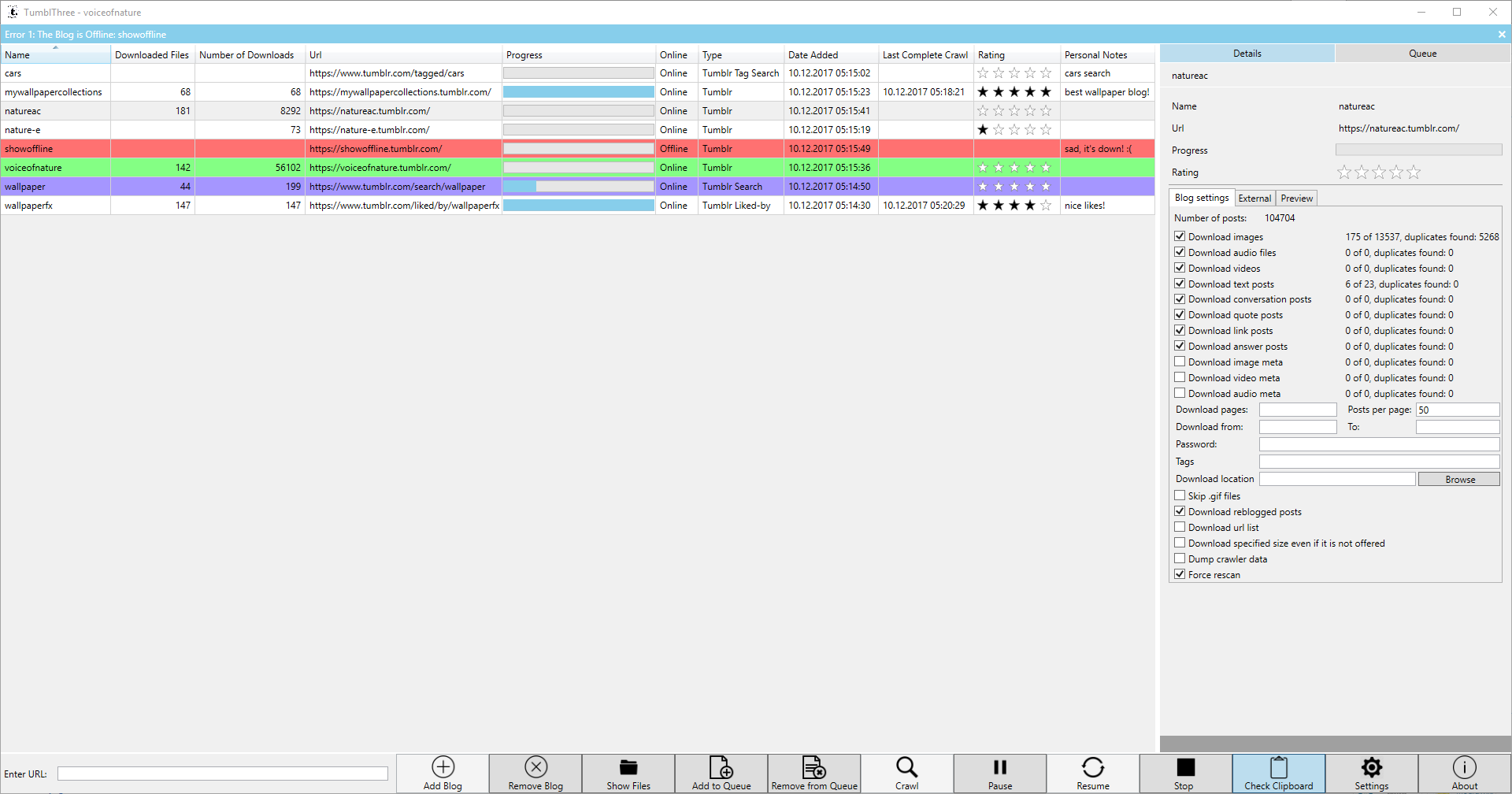
Screenshot:
Application Usage:
- extract the .zip file and run the application by double clicking TumblThree.exe.
- Copy the url of any tumblr.com blog you want to backup from into the textbox at the bottom left. Afterwards, click on 'Add Blog' on the right side of it.
- Alternatively, if you copy (ctrl-c) a tumblr.com blog url from the address bar/a text file, the clipboard monitor from TumblThree will detect it and automatically add the blog.
- To start the download process, click on 'Crawl'. The application will regularly check for (new) blogs in the queue and start processing them, until you stop the application by pressing 'Stop'. So, you can either add blogs to the queue via 'Add to Queue' or double click first and then click 'Crawl', or you start the download process first and add blogs to the queue afterwards.
- A light blue bar left to the blog in the queue indicates a actively downloading blog.
- The blog manager on the left side also indicates the state of each blog. A red background shows an offline blog, a green background an actively crawling blog and a purple background an enqueued blog.
- You change the download location, the number of concurrent connections, the default backup settings for each newly added blog and various other settings in the 'Settings'.
- In the Details window you can view statistics of your blog and set blog specific options. You can here what kind of post type (photo, video, audio, text, conversation, quote, link) to download.
- For downloading only tagged posts, you'll have to do some steps:
- Add the blog url.
- Open the blog in the details tab, enter the tags in the Tags textbox in a comma separated list without the leading hash (#) sign. E.g. great big car,bears would search for images that are tagged for either a great big car or bears or both.
- For downloading password protected blogs, you'll have to do some steps:
- Add the blog url.
- Open the blog in the details tab, enter the password in the Password textbox.
- For downloading hidden blogs (login required blogs), you have to do some steps:
- Go to Settings, click on the Connection tab and fill in your tumblr email address (login) and password, then click the Authenticate button. If the login was successfully, the label will change and display your email address. The email address and password are not stored locally on disk but cookies are generated and saved in %LOCALAPPDATA%\TumblThree in json format.
- Add the blog url.
- For downloading liked photos and videos, you'll have to do some steps:
- Go to Settings, click on the Connection tab and fill in your tumblr email address (login) and password, then click the Authenticate button. If the login was successfully, the label will change and display your email address. The email address and password are not stored locally on disk but cookies are generated and saved in %LOCALAPPDATA%\TumblThree in json format.
- Add the blog url including the liked/by string in the url (e.g. https://www.tumblr.com/liked/by/wallpaperfx/).
- For downloading your own likes, make sure you've (temporarily) enabled the following options in your blogs settings (i.e. https://www.tumblr.com/settings/blog/yourblogname):
- Likes -> Share posts you like (to enable the publicly visible liked/by page)
- Visibility -> blog is explicit (to see/download NSFW likes)
- For downloading photos and videos from the tumblr search, you'll have to do some steps:
- Add the search url including your key words separated by plus signs (+) in the url (e.g. https://www.tumblr.com/search/my+special+tags).
- For downloading photos and videos from the tumblr tag search, you'll have to do some steps:
- Go to Settings, click on the Connection tab and fill in your tumblr email address (login) and password, then click the Authenticate button. If the login was successfully, the label will change and display your email address. The email address and password are not stored locally on disk but cookies are generated and saved in %LOCALAPPDATA%\TumblThree in json format.
- Add the search url including your tags separated by plus signs (+) in the url (e.g. https://www.tumblr.com/tagged/my+special+tags).
- Key Mappings:
- double click on a blog adds it to the queue
- drag and drop of blogs from the manager (left side) to the queue.
- space -- start crawl
- ctrl-space -- pause crawl
- shift-space -- stop crawl
- del -- remove blog from queuelist
- shift-del -- remove blog from blogmanager.
- ctrl-shift-g -- manually trigger the garbage collection
Getting Started:
The default settings should cover most users. You should only have to change the download location and the kind of posts you want to download. For this, in the Settings (click on the Settings button in the lower panel of the main user interface) you might want to change:
- General -> Download location: Specifies where to download the files. The default is in a folder _
Related Skills
node-connect
353.3kDiagnose OpenClaw node connection and pairing failures for Android, iOS, and macOS companion apps
frontend-design
111.7kCreate distinctive, production-grade frontend interfaces with high design quality. Use this skill when the user asks to build web components, pages, or applications. Generates creative, polished code that avoids generic AI aesthetics.
openai-whisper-api
353.3kTranscribe audio via OpenAI Audio Transcriptions API (Whisper).
qqbot-media
353.3kQQBot 富媒体收发能力。使用 <qqmedia> 标签,系统根据文件扩展名自动识别类型(图片/语音/视频/文件)。
