
Risotto
A minimalist, responsive hugo theme inspired by terminal ricing aesthetics.
Install / Use
/learn @joeroe/RisottoREADME
🍚 risotto
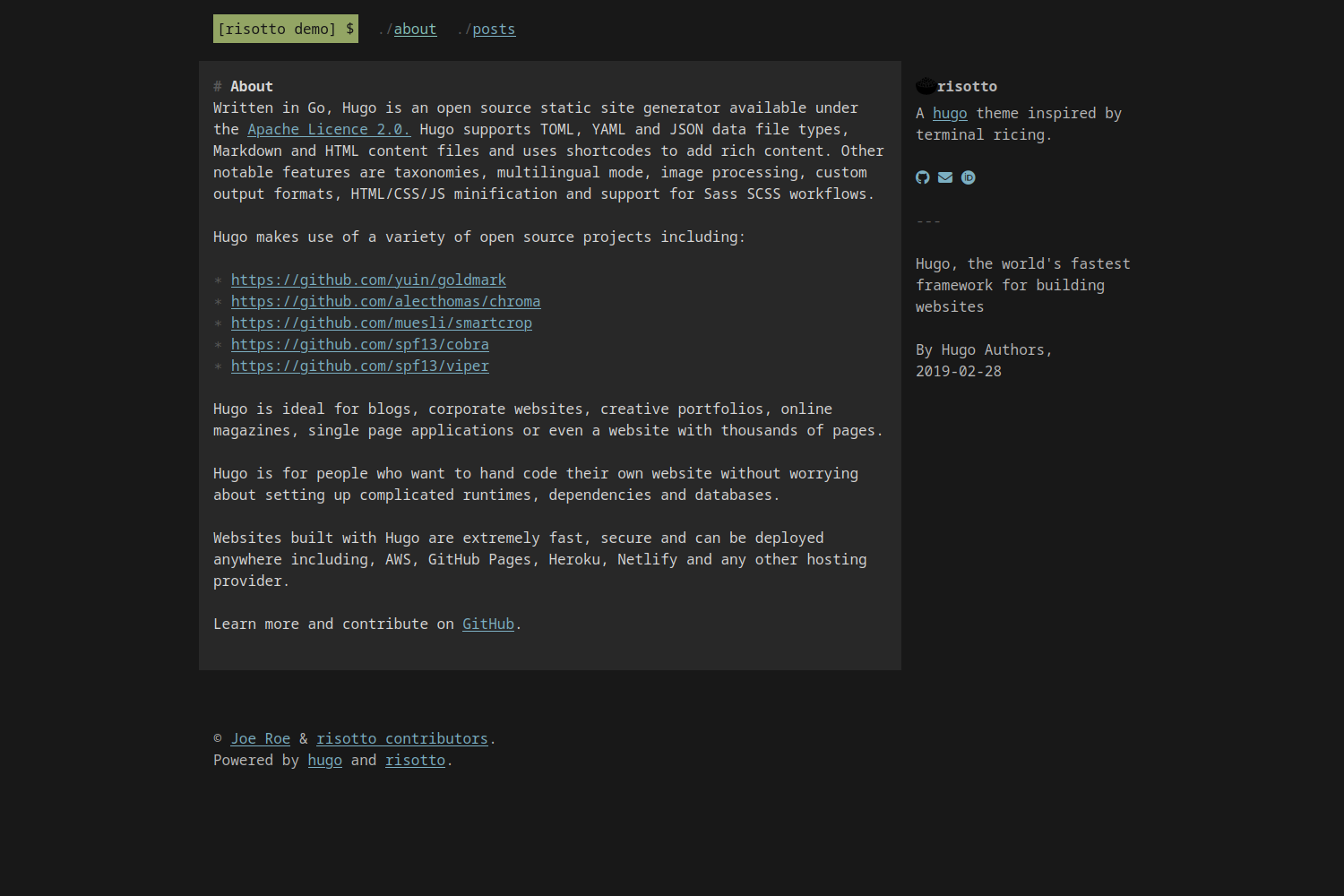
risotto is a minimalist, responsive hugo theme inspired by terminal ricing aesthetics.





Features
- Plain, semantic HTML with no Javascript
- Plain CSS – no frameworks, no preprocessors, just simple and easy-to-customise stylesheets
- Uses CSS Grid for native responsive behaviour without arbitrary breakpoints
- Comes with 16 built-in colour schemes based on popular terminal themes plus the ability to use custom themes using the base16 system
Install
The easiest way to install the theme is to download the latest release and extract it to your project's themes/ directory.
You can also clone this repository into your site's themes directory and checkout the latest release:
git clone https://github.com/joeroe/risotto themes/risotto && cd themes/risotto
git checkout $(git tag -l | grep '^v[0-9.]*$' | sort -V | tail -n 1)
Note that this will not work if your site is itself a git repository. In that case, you can add the theme as a git submodule, but this is not recommended due to the difficulty of tracking a specific release.
Update
If you installed the theme using git clone, pull the repository to get the latest version:
cd themes/risotto
git pull
Otherwise, simply download the latest release and extract it to your project's themes/ directory, replacing the old version.
Configure
To use the theme, add theme = 'risotto' to your site's hugo.toml, or theme: risotto to your hugo.yaml.
See exampleSite/config.toml for the theme-specific parameters you need to add to your site's hugo.toml or hugo.yaml to configure the theme.
Colour schemes
risotto uses the base16 framework to define colour schemes that can be used with the theme.palette parameter.
A selection of 16 palettes (10 dark, 6 light) are bundled with the theme: apprentice, base16-dark, base16-light, dracula, gruvbox-dark, gruvbox-light, material, papercolor-dark, papercolor-light, solarized-dark, solarized-light, tender, tokyo-night-dark, tokyo-night-light, windows-95 and windows-95-light.
The default is base16-dark.
| Palette | Preview | | ----------------- | ------------------------------------------------------------------------------------------------------------------------------ | | apprentice | <img align="center" width="250" src="images/palette/apprentice.png" alt="risotto theme with apprentice palette"> | | base16-dark | <img align="center" width="250" src="images/palette/base16-dark.png" alt="risotto theme with base16-dark palette"> | | base16-light | <img align="center" width="250" src="images/palette/base16-light.png" alt="risotto theme with base16-light palette"> | | dracula | <img align="center" width="250" src="images/palette/dracula.png" alt="risotto theme with dracula palette"> | | gruvbox-dark | <img align="center" width="250" src="images/palette/gruvbox-dark.png" alt="risotto theme with gruvbox-dark palette"> | | gruvbox-light | <img align="center" width="250" src="images/palette/gruvbox-light.png" alt="risotto theme with gruvbox-light palette"> | | material | <img align="center" width="250" src="images/palette/material.png" alt="risotto theme with material palette"> | | papercolor-dark | <img align="center" width="250" src="images/palette/papercolor-dark.png" alt="risotto theme with papercolor-dark palette"> | | papercolor-light | <img align="center" width="250" src="images/palette/papercolor-light.png" alt="risotto theme with papercolor-light palette"> | | solarized-dark | <img align="center" width="250" src="images/palette/solarized-dark.png" alt="risotto theme with solarized-dark palette"> | | solarized-light | <img align="center" width="250" src="images/palette/solarized-light.png" alt="risotto theme with solarized-light palette"> | | tender | <img align="center" width="250" src="images/palette/tender.png" alt="risotto theme with tender palette"> | | tokyo-night-dark | <img align="center" width="250" src="images/palette/tokyo-night-dark.png" alt="risotto theme with tokyo-night-dark palette"> | | tokyo-night-light | <img align="center" width="250" src="images/palette/tokyo-night-light.png" alt="risotto theme with tokyo-night-light palette"> | | windows-95 | <img align="center" width="250" src="images/palette/windows-95.png" alt="risotto theme with windows-95 palette"> | | windows-95-light | <img align="center" width="250" src="images/palette/windows-95-light.png" alt="risotto theme with windows-95-light palette"> |
The easiest way to use other base16 styles is to place .css file from https://github.com/monicfenga/base16-styles/tree/master/css-variables and place it in your static/css/palettes directory.
Or to define a wholly custom theme, you will need to define the following CSS variables for the following base16 colours (see base16-dark.css for an example):
| Base | Default colour | Used for | Examples |
| ---- | ------------------------------------------ | ------------------- | ------------------------------------ |
| 00 | <span class="base00">Dark</span> | Background | Page background |
| 01 | <span class="base01">│</span> | Alt. background | Content background |
| 02 | <span class="base02">│</span> | In-text backgrounds | <pre>, <code>, <kbd>, <samp> |
| 03 | <span class="base03">│</span> | Muted text | :before & :marker symbols |
| 04 | <span class="base04">│</span> | Alt. foreground | Aside text |
| 05 | <span class="base05">│</span> | Foreground | Content text |
| 06 | <span class="base06">│</span> | | |
| 07 | <span class="base07">Light</span> | | |
| 08 | <span class="base08">Red</span> | | |
| 09 | <span class="base09">Orange</span> | | |
| 0A | <span class="base0A">Yellow</span> | Highlights | Selected text, <mark> |
| 0B | <span class="base0B">Green</span> | Primary accent | Logo |
| 0C | <span class="base0C">Cyan</span> | Active links | a:active, a:hover |
| 0D | <span class="base0D">Blue</span> | Links | a:link, a:visited |
| 0E | <span class="base0E">Magenta</span> | | |
| 0F | <span class="base0F">Brown</span> | | |
For light mode palettes, the sequence of 00–07 should be reversed (light to dark, not dark to light). Note that not all colours are currently used in the theme.
You you use these colours directly in content using the convenience classes .baseXX and .bg-baseXX.
For example:
<span class="base0A">Yellow text</span>
<mark class="bg-base0D">Text highlighted in green</mark>
Favicon
risotto will automatically use favicons placed in the static/ directory.
The following files will be detected and included in your site's <head> section:
favicon.icofavicon-16x16.pngfavicon-32x32.pngapple-touch-icon.pngsite.webmanifest
You can generate these from an image or emoji using favicon.io or a similar service.
They must be placed directly under your site's static/ directory, i.e. not in in a subdirectory or themes/risotto/static/.
Acknowledgements
The 'cooked rice' emoji used as a favicon for the example site was created by the Twemoji project and is licensed under CC-BY 4.0.
Related Skills
node-connect
347.9kDiagnose OpenClaw node connection and pairing failures for Android, iOS, and macOS companion apps
frontend-design
108.7kCreate distinctive, production-grade frontend interfaces with high design quality. Use this skill when the user asks to build web components, pages, or applications. Generates creative, polished code that avoids generic AI aesthetics.
openai-whisper-api
347.9kTranscribe audio via OpenAI Audio Transcriptions API (Whisper).
qqbot-media
347.9kQQBot 富媒体收发能力。使用 <qqmedia> 标签,系统根据文件扩展名自动识别类型(图片/语音/视频/文件)。
