
Jupyterquiz
An interactive Quiz generator for Jupyter notebooks and Jupyter Book
Install / Use
/learn @jmshea/JupyterquizREADME
JupyterQuiz
JupyterQuiz is a tool for displaying interactive self-assessment quizzes in Jupyter notebooks and Jupyter Book. JupyterQuiz was created to enable interactive quizzes for readers of my book Foundations of Data Science with Python [Affiliate Link]
Important Note for JupyterLab 4 Users: TLDR: Make sure you are using Jupyter Quiz version 2.8.0 or later.
There have been two significant changes to Jupyter Lab recently:
-
Changes to the math rendering system in JupyterLab 4 have broken the LaTeX rendering in JupyterQuiz. There is not currently a simple solution, but I have opened an issue requesting that the necessary methods be made available. Math should still work in Jupyter Book. A very hacky solution for Jupyter Lab has now been moved to the main branch staring with 2.8.0. This loads MathJax 3 on top of the JupyterLab MathJax version. Although this is not the ideal solution, the upstream problem has not been fixed after many months, and so I felt I had to take this step. If it breaks anything for you, please let me know.
-
Starting with Jupyter 4.2.5, when Markdown cells are rendered, the id tags will be stripped from any HTML elements. These id tags were needed by JupyterQuiz users who use hidden spans to embed quizzes in Jupyter notebooks. This probably affects a small number of JupyterQuiz users. If you are affected, update to JupyterQuiz 2.8.0 or later and change your
idtags toclass, and everything should work again.
Change to precision parameter: Starting with 2.7.0a3 and 2.8.0, I changed how the precision parameter effects numerical answers. Prior to these versions, precision specified a decimal place; from these versions on, it specifies a number of significant digits. )
JupyterQuiz is part of my effort to make open source tools for developing modern, interactive textbooks.
- The other part of this effort is my interactive flashcards tool, JupyterCards.
- You can see both tools in action in the online resources for my textbook Foundations of Data Science with Python.
If you would like to see a video that introduces these tools and discusses why I made them, check out my JupyterCon 2023 talk on Tools for Interactive Education Experiences in Jupyter Notebooks and Jupyter Books.
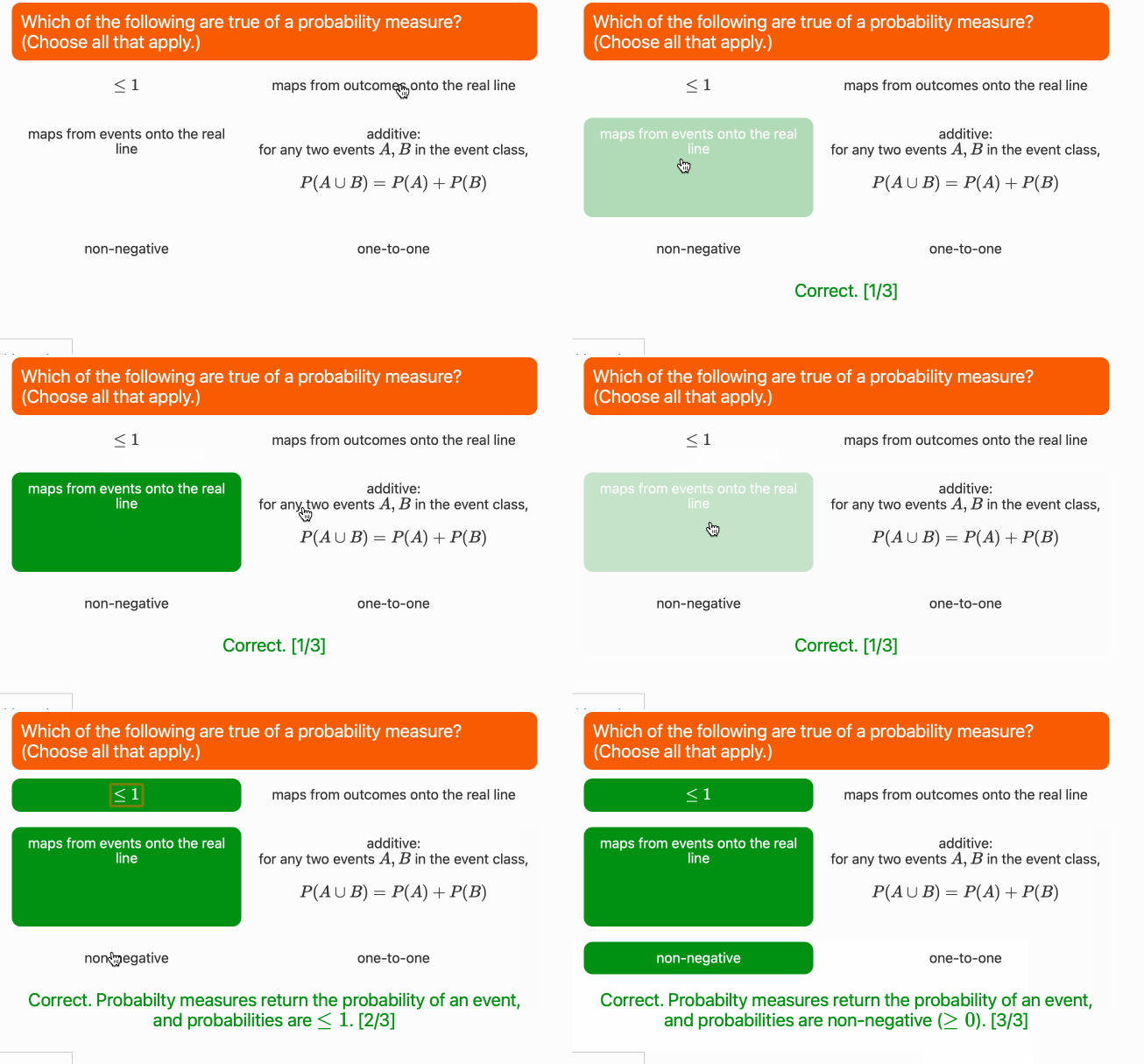
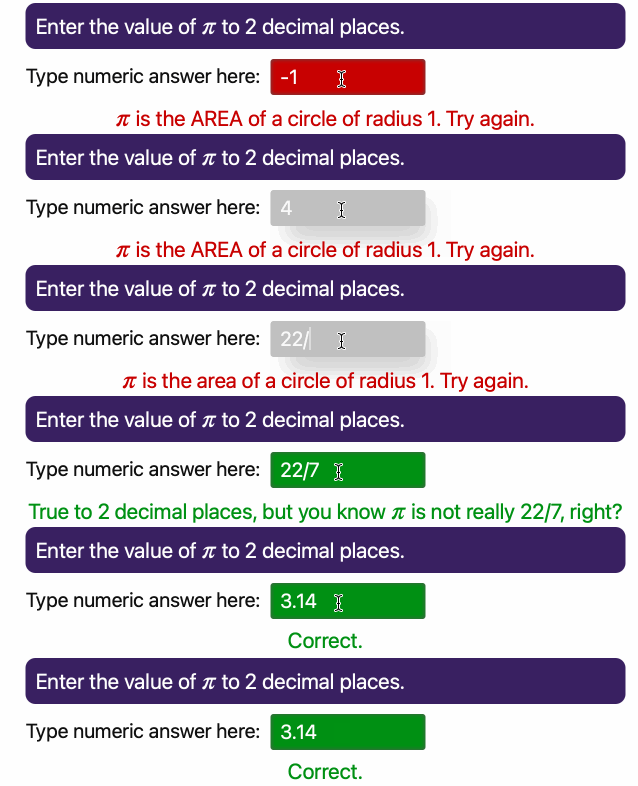
These animated GIFs illustrate two of the basic question types in JupyterQuiz (a third String type of question was added in April 2025, and I have not created an animated GIF for it yet):
Many Choice Question
Numerical Answer Question
String Questions

Examples using JupyterQuiz
This library was built to create interactive questions for the Foundations of Data Science with Python book by John M. Shea. Example: Chapter 3 Self-Assessment Questions
Some other examples I have seen around the web include:
- Introduction to Python for Humanists book by W.J.B. Mattingly. Example: Section 2.2 Introduction to Data Structures,
- Groundwater I by P. K. Yadav, T. Reimann, and others. Example: Lecture 1: Course Introduction/Water Cycle of
- Sizing and optimization of mechatronic systems course by Marc Budinger, Scott Delbecq and Félix Pollet. Example: Lecture 1 Quiz
- Linux en Bioinformatique by Thomas Denecker & Claire Toffano-Nioche. Example: Quizz 1
- Programmering i Kjemi (Programming in Chemistry?) by Andreas Haraldsrud. Example: Quiz 1: Variabler og aritmetikk
- AnIML: Another Introduction to Machine Learning by Hunter Schafer. Example: Chapter 2: Assessing Performance
If you using JupyterQuiz in a Jupyter Book or other way that is useable on the web, please clone this repository, add your information to the bulleted list in the README.md, and make a pull request for me to include a link to your use of this library.
The notebook test.ipynb shows more features but must be run on your own local Jupyter or in nbviewer -- GitHub only renders the static HTML that does not include the interactive quizzes. (If viewing on GitHub, there should be a little circle with a minus sign at the top of the file that offers you the ability to launch the notebook in nbviewer.)
It currently supports three types of quiz questions:
- Multiple/ Many Choice Questions: Users are given a predefined set of choices and click on answer(s) they believe are correct.
- Numerical: Users are given a text box in which they can submit answers in decimal or fraction form.
- String: Users are given a text box in which they can submit answers in string form.
Each type of question offers different ways to provide feedback to help users understand what they did wrong (or right).
Quesitons can be loaded from:
- a Python list of dicts,
- a JSON local file,
- via a URL to a JSON file.
New as of version 1.6 (9/26/2021): You can now embed the question source (most importantly, the answers) in Jupyter Notebook so that they will not be directly visibile to users!
Question source data can be stored in any Markdown cell in a hidden HTML element (such as a span with the display style set to "none"). Questions can be stored as either JSON or base64-encoded JSON (to make them non-human readable). Please see the notebook HideQuiz.ipynb for examples of how to use this.
Quiz options
JupyterQuiz supports a few options:
- num = Number of questions to present. If this option is chosen, the set of questions will be selected at random.
- shuffle_questions = boolean, whether to shuffle order of questions (default False)
- shuffle_answers = boolean, whether to shuffle answers for multiple-choice questions (default True)
- preserve_responses = boolean, whether to output the user responses in a way that is preserved upon reload of the notebook (default False) -- see below
Quiz Formatting
In addtion, it supports additional options for controlling the formatting of the quiz options.
border_radius= boolean, border radius of question boxesquestion_alignment= string, alignment of question text (e.g., "left", "right)max_width= int, max width of question boxes
For more fine-grained formatting control of the question text, leaving the
question field the empty string ("") will result in only the answers being
displayed. This allows for custom question formatting such as including images,
tables, more complex code examples, etc. Note that this feature works better for
a single question quiz and may not work as well with shuffled quizzes or quiz
questions selected at random.
Colors can be changed by passing the colors keyword argument. Pass in a dictionary of colors that you would like to change. Here is the default dictionary for reference:
color_dict = {
        '--jq-multiple-choice-bg': '#6f78ffff',   # Background for the question part of multiple-choice questions
        '--jq-mc-button-bg': '#fafafa',           # Background for the buttons when not pressed
        '--jq-mc-button-border': '#e0e0e0e0',     # Border of the buttons
        '--jq-mc-button-inset-shadow': '#555555', # Color of inset shadow for pressed buttons
        '--jq-many-choice-bg': '#f75c03ff',       # Background for question part of many-choice questions
        '--jq-numeric-bg': '#392061ff',           # Background for question part of numeric questions
        '--jq-numeric-input-bg': '#c0c0c0',       # Background for input area of numeric questions
        '--jq-numeric-input-label': '#101010',    # Color for input of numeric questions
        '--jq-numeric-input-shadow': '#999999',   # Color for shadow of input area of numeric questions when selected
        '--jq-incorrect-color': '#c80202',        # Color for incorrect answers
        '--jq-correct-color': '#009113',          # Color for correct answers
        '--jq-text-color': '#fafafa'              # Color for question text
    }
There is one included alternative set of colors to the default colors, which be selected by passing colors='fdsp'.
Preserving student responses
New as of version 2.0 (7/26/2022): There is now code to enable preserving student responses (for instance, for checking/grading their quizzes). If you want to use this functionality, please read this carefully!
To enable this behavior, set preserve_responses=True in display_quiz()
This option produces a text ouptut that consists of a question number (based on the question order) along with the chosen answer. Instructions are given at the end of the quiz on how to copy the text output and paste it into a pre-prepared Markdown cell. See preserve-responses.ipynb for an example.
*The requirement that the student copy and paste the text output to preserve it is because of limitations in the exchange of information from the JavaScript side to the Python side. As far as I know, the only way around this requires a
Related Skills
node-connect
340.2kDiagnose OpenClaw node connection and pairing failures for Android, iOS, and macOS companion apps
frontend-design
84.1kCreate distinctive, production-grade frontend interfaces with high design quality. Use this skill when the user asks to build web components, pages, or applications. Generates creative, polished code that avoids generic AI aesthetics.
openai-whisper-api
340.2kTranscribe audio via OpenAI Audio Transcriptions API (Whisper).
commit-push-pr
84.1kCommit, push, and open a PR
