
Megahash
A super-fast C++ hash table with Node.js wrapper, tested up to 1 billion keys.
Install / Use
/learn @jhuckaby/MegahashREADME
Overview
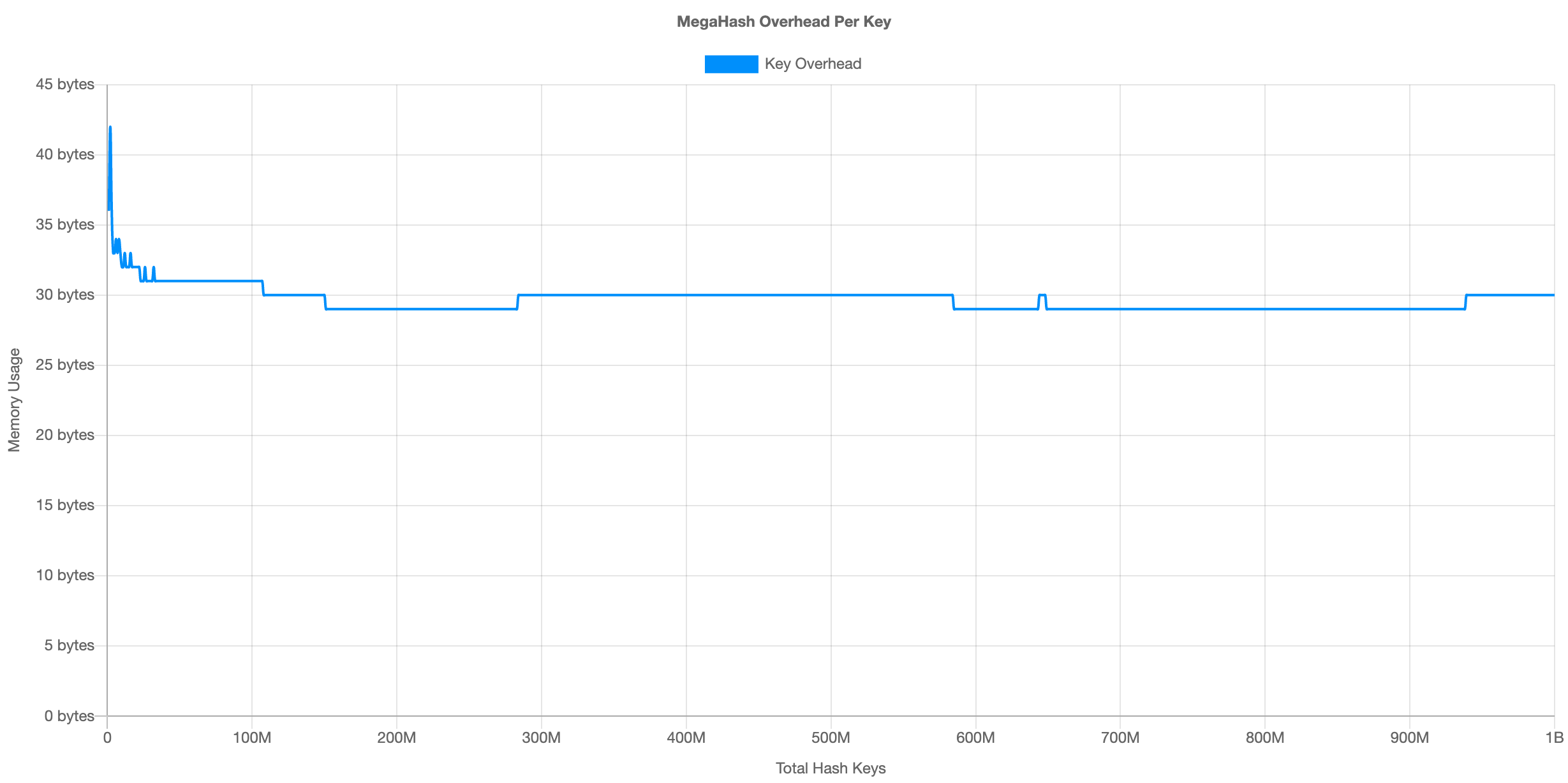
MegaHash is a super-fast C++ hash table with a Node.js wrapper, capable of storing over 1 billion keys, has read/write speeds above 500,000 keys per second (depending on CPU speed, key/value size, and total keys in hash), and low memory overhead (~30 bytes per key). However, please note that there are some caveats.
I do know of the hashtable module on NPM, and have used it in the past. The problem is, that implementation stores everything on the V8 heap, so it runs into serious performance dips with tens of millions of keys. Also, it seems like the author may have abandoned it (open issues are going unanswered), and it doesn't compile on Node v12+.
MegaHash Features
- Very fast reads, writes, deletes and key iteration.
- Stable, predictable performance.
- Low memory overhead.
- All data is stored off the V8 heap.
- Buffers, strings, numbers, booleans and objects are supported.
- Tested up to 1 billion keys.
- Mostly compatible with the basic ES6 Map API.
Performance
See the chart below, which fills up a hash with 1 billion keys while measuring both read and write performance. This is an "ideal" case, with very small keys and values, simply to illustrate the maximum possible speed and hash overhead:

The average writes/sec was 535,261, and reads/sec was 961,852. This was on an AWS EC2 c5a.16xlarge VM. The performance is fairly consistent regardless of the total number of keys. As for memory usage, here is the chart:
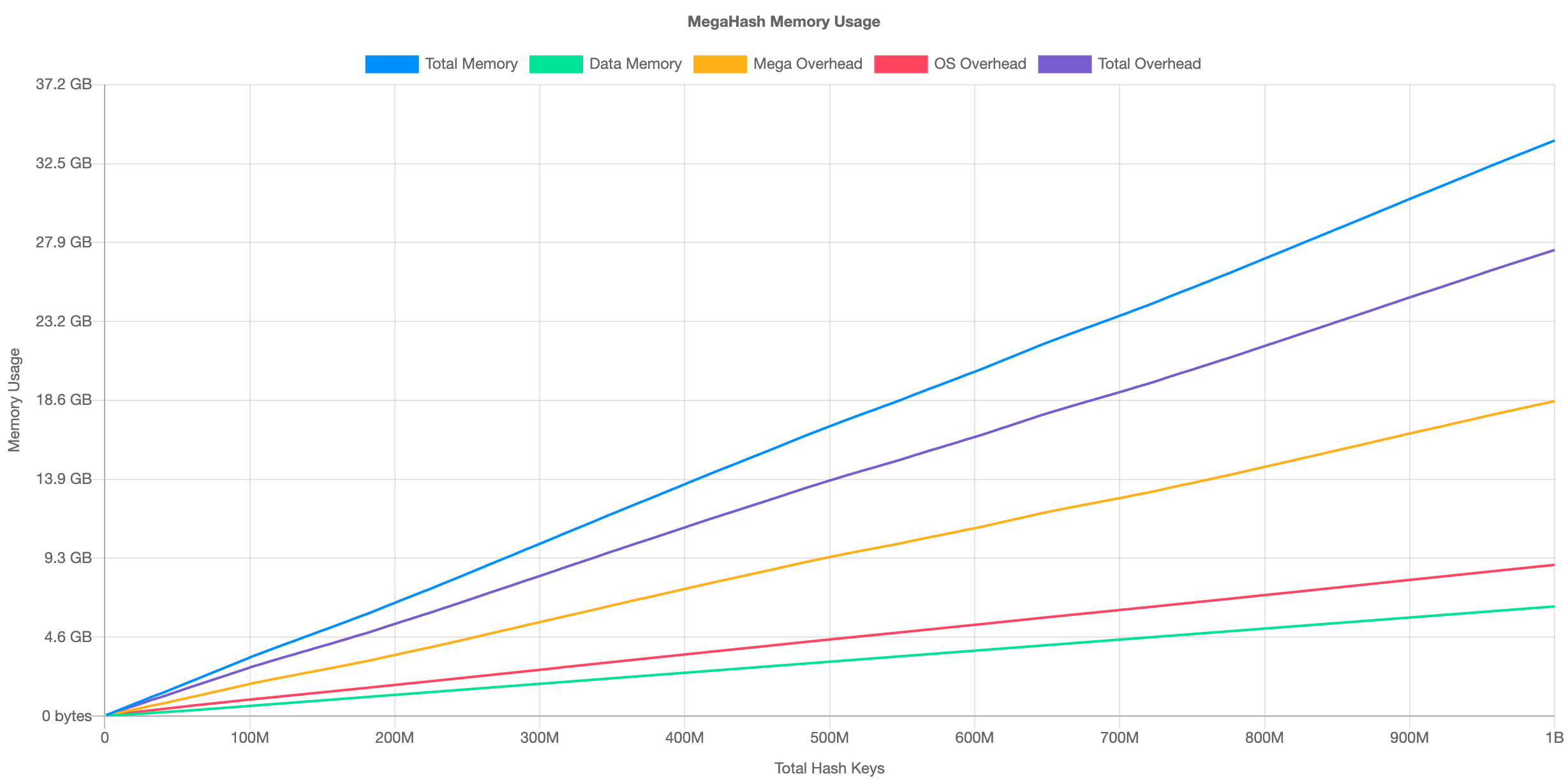
At 1 billion keys, MegaHash requires about 27.4 GB memory overhead. This divides out to approximately 30 bytes per key. Here is the overhead per key illustrated:
For more benchmark results, see the table below:
| Test Description | Record Size | Hardware | OS | Link | |------------------|-------------|----------|----|------| | Mac Standard 100M Keys | 96 - 128 chars | 2020 MacBook Pro 16" | macOS 10.15.7 | View Results | | Mac Ideal 100M Keys | 1 char | 2020 MacBook Pro 16" | macOS 10.15.7 | View Results | | Linux Standard 100M Keys | 96 - 128 chars | AWS EC2 c5a.16xlarge | AWS Linux 2021 | View Results | | Linux Standard 100M Keys | 96 - 128 chars | AWS EC2 c5.metal | AWS Linux 2021 | View Results | | Linux Ideal 1B Keys | 1 char | AWS EC2 c5a.16xlarge | AWS Linux 2021 | View Results |
All results were produced using the included Benchmark Script.
Installation
Use npm to install the module locally:
npm install megahash
You will need a C++ compiler toolchain to build the source into a shared library:
| Platform | Instructions |
|----------|--------------|
| Linux | Download and install GCC. On RedHat/CentOS, run sudo yum install gcc gcc-c++ libstdc++-devel pkgconfig make. On Debian/Ubuntu, run sudo apt-get install build-essential. |
| macOS | Download and install Xcode. You also need to install the XCode Command Line Tools by running xcode-select --install. Alternatively, if you already have the full Xcode installed, you can find them under the menu Xcode -> Open Developer Tool -> More Developer Tools.... This step will install clang, clang++, and make. |
| Windows | Install all the required tools and configurations using Microsoft's windows-build-tools using npm install --global --production windows-build-tools from an elevated PowerShell or CMD.exe (run as Administrator). |
Once you have that all setup, use require() to load MegaHash in your Node.js code:
const MegaHash = require('megahash');
Usage
Here is a simple example:
let hash = new MegaHash();

hash.set( "hello", "there" );
console.log( hash.get("hello") );
hash.delete("hello");
hash.clear();
Setting and Getting
To add or replace a key in a hash, use the set() method. This accepts two arguments, a key and a value:
hash.set( "hello", "there" );
hash.set( "hello", "REPLACED!" );
To fetch an existing value given a key, use the get() method. This accepts a single argument, the key:
let value = hash.get("hello");
The following data types are supported for values:
Buffers
Buffers are the internal type used by the hash, and will give you the best performance. This is true for both keys and values, so if you can pass them in as Buffers, all the better. All other data types besides buffers are auto-converted. Example use:
let buf = Buffer.allocSafe(32);
buf.write("Hi");
hash.set( "mybuf", buf );

let bufCopy = hash.get("mybuf");
It should be noted here that memory is copied when it enters and exits MegaHash from Node.js land. So if you insert a buffer and then retrieve it, you'll get a brand new buffer with a fresh copy of the data.
Strings
Strings are converted to buffers using UTF-8 encoding. This includes both keys and values. However, for values MegaHash remembers the original data type, and will reverse the conversion when getting keys, and return a proper string value to you. Example:
hash.set( "hello", "there" );
console.log( hash.get("hello") );
Keys are returned as strings when iterating using nextKey().
Objects
Object values are automatically serialized to JSON, then converted to buffers using UTF-8 encoding. The reverse procedure occurs when fetching keys, and your values will be returned as proper objects. Example:
hash.set( "user1", { name: "Joe", age: 43 } );

let user = hash.get("user1");
console.log( user.name, user.age );
Numbers
Number values are auto-converted to double-precision floating point decimals, and stored as 64-bit buffers internally. Number keys are converted to strings, then to UTF-8 buffers which are used internally. Example:
hash.set( 1, 9.99999999 );
let value = hash.get(1);
BigInts
MegaHash has support for BigInt numbers, which are automatically detected and converted to/from 64-bit signed integers. Example:
hash.set( "big", 9007199254740993n );
let value = hash.get("big");
Note that BigInts are only supported in Node 10.4.0 and up.
Booleans
Booleans are internally stored as a 1-byte buffer containing 0 or 1. These are auto-converted back to Booleans when you fetch keys. Example:
hash.set("bool1", true);
let test = hash.get("bool1");
Null
You can specify null as a hash value, and it will be preserved as such. Example:
hash.set("nope", null);
You cannot, however, use undefined as a value. Doing so will result in undefined behavior (get it?).
Deleting and Clearing
To delete individual keys, use the delete() method. Example:
hash.delete("key1");
hash.delete("key2");
To delete all keys, call clear() (or just delete the hash object -- it'll be garbage collected like any normal Node.js object). Example:
hash.clear();
Iterating over Keys
To iterate over keys in the hash, you can use the nextKey() method. Without an argument, this will give you the "first" key in undefined order. If you pass it the previous key, it will give you the next one, until finally undefined is returned. Example:
let key = hash.nextKey();
while (key) {
	// do something with key
	key = hash.nextKey(key);
}
Please note that if new keys are added to the hash while an iteration is in progress, it may miss some keys, due to indexing (i.e. reshuffling the position of keys).
Error Handling
If a hash operation fails (i.e. out of memory), then set() will return 0. You can check for this and bubble up your own error. Example:
let result = hash.set( "hello", "there" );
if (!result) {
	throw new Error("Failed to write to MegaHash: Out of memory");
}
Hash Stats
To get current statistics about the hash, including the number of keys, raw data size, and other internals, call stats(). Example:
let stats = hash.stats();
console.log(stats);
Example stats:
{
Related Skills
node-connect
346.4kDiagnose OpenClaw node connection and pairing failures for Android, iOS, and macOS companion apps
frontend-design
107.2kCreate distinctive, production-grade frontend interfaces with high design quality. Use this skill when the user asks to build web components, pages, or applications. Generates creative, polished code that avoids generic AI aesthetics.
openai-whisper-api
346.4kTranscribe audio via OpenAI Audio Transcriptions API (Whisper).
qqbot-media
346.4kQQBot 富媒体收发能力。使用 <qqmedia> 标签,系统根据文件扩展名自动识别类型(图片/语音/视频/文件)。
